USB Splitter vs. USB Hub - Which is Better[ A Thorough Guide]
PAGE CONTENT:
What is USB Splitter
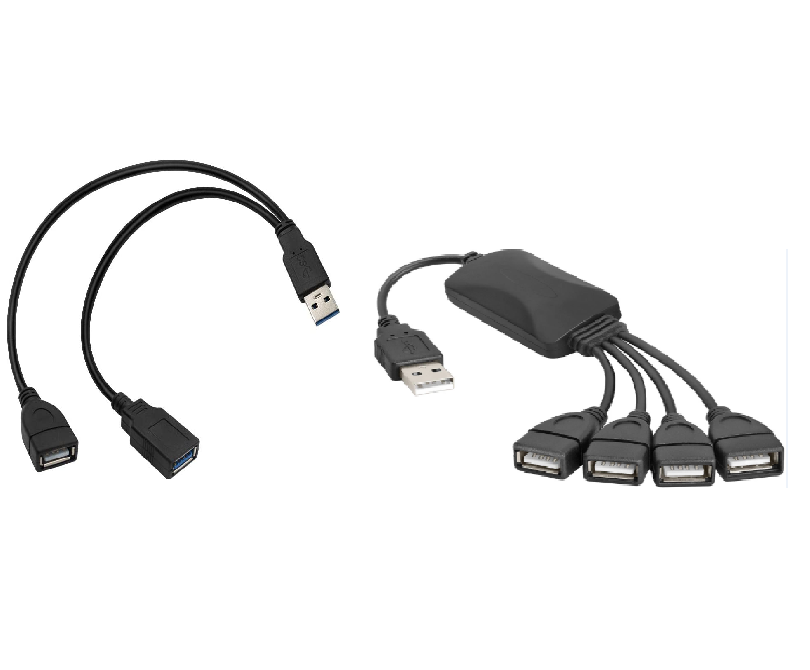
USB splitter A USB splitter is a hardware device that takes one USB port and turns it into two or more USB ports, allowing multiple devices to be connected and used at the same time.
A USB splitter allows you to connect multiple peripheral devices, such as mice, keyboards, printers, and scanners, to your computer by attaching the USB end to your computer's USB interface and then connecting the other ports to the respective external devices.
A USB splitter's key feature is to prevent your PC's overload, ensuring a smooth performance by distributing the load evenly across multiple ports.
What is USB Hub
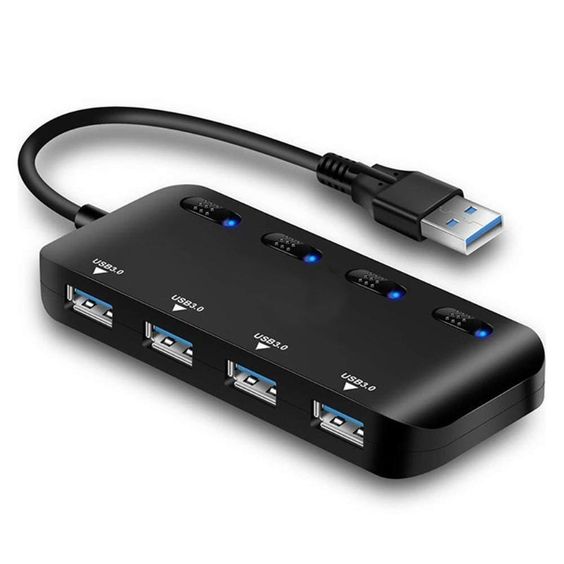
USB hub, A USB hub is a device that allows multiple USB devices to be connected to a single computer port, expanding the number of available ports. It looks like a mini power strip and has multiple ports that share the same bandwidth, enabling simultaneous interaction with devices like mice, keyboards, and printers. Some USB hubs also feature additional ports for other connections, such as HDMI, Ethernet, or mini USB, for improved functionality and screen display.
There are three main types of USB hubs available: USB 2.0, USB 3.0, and USB 3.1 (type-c), each with a different interface.
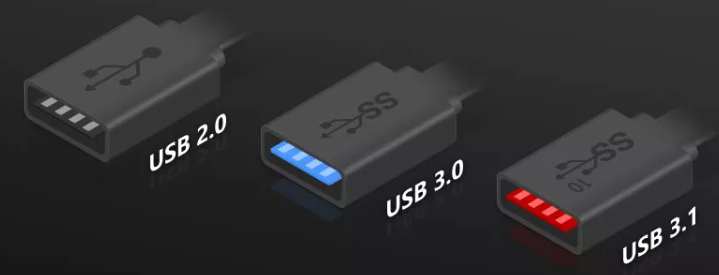
(image source: https://www.google.com/imghp)
USB ports have undergone significant form factor changes and version updates, making it sometimes challenging to distinguish between them. If you're unsure about the different types, consider reading this article, which provides an overview of various USB types, their generations, and offers tips on how to add more USB ports to your PC.
A Thorough Comparison Between USB Splitter & USB Hub
Choosing between a USB splitter and a USB hub can be confusing, but understanding their key differences can help. A USB splitter is a simple device that allows you to share a single USB port with multiple devices, essentially splitting the connection. On the other hand, a USB hub is a more advanced device that not only splits the connection but also provides additional USB ports, allowing you to connect multiple devices at once. When deciding which one to buy or use, consider whether you need to share a single port or add more ports to your system. This comparison should help you make an informed decision.
| Comparison | USB Splitter | USB Hub |
|---|---|---|
| Suitable users |
|
|
| USB Splitter | USB Hub | ||
|---|---|---|---|
| Similarity | Purpose & Function | Both USB hubs and USB extenders are used to connect external devices to a computer, expanding the number of USB slots available. They allow you to connect devices such as mice, keyboards, printers, and scanners to your PC. | |
| Difference | Outlook | One USB port is divided into multiple USB lines | A hub is expanded into multiple ports |
| USB Interface | Only USB ports are available | Besides having a USB port, it also supports Ethernet, HDMI, or USB-C ports. | |
| Transferring Speed | No transferring function | Transferring data at a speed of 480 MPs | |
| Power supply | USB splitter has no power supply | USB hub provides extra power supply for each port | |
If your laptop only has one USB port and it's already occupied, you'll need a USB hub to connect another device and watch PC content on a display using a USB to HDMI adapter.
A USB splitter is a device that allows you to connect multiple devices to a single USB port on your computer, such as a phone, tablet, or external hard drive. It's a convenient solution for situations where you need to charge or transfer data between multiple devices and only have one available USB port.
The Bottom Line
The post provides a comprehensive guide to USB splitters and USB hubs, highlighting their similarities and differences. By reading this article, you will gain a thorough understanding of these two devices and be able to make an informed decision on which one to use and purchase.
Related Articles
- What Is Winver and How to Run Winver to Check Your Windows Version?
- TOP 10 FREE PHOTO EDITORS LIKE PHOTOSHOP
- 2020 Top 5 Free Online PDF Service
- All Inforamtion About Recovery Media Creator [Update 2022]
- HP Recovery Manager in Windows 10 [Free Download]
What Is and How to Use HP Recovery Manager? This guide gives a full understanding of HP Recovery Manager and covers a complete guide that you can follow to use HP Recovery Manager to Backup & Restore. - What Is Hyper-V Monitoring [All You Need to Know]
Hyper-V monitoring is the process of tracking and analyzing the performance and health of a Hyper-V virtualization environment. Learn how to optimize resource utilization, detect issues, and improve system reliability.
Products
Articles & Tutorials
- Data Recovery
- Data Backup
- File Recovery
- File Backup
- System Backup and Restore
- Disk and Partition Clone
- Technical articles
- Mobile articles
- Disk Master Help
- Windows Data Recovery Tutorials
- Windows Secure Delete Tutorials
- Windows Partition Management Tutorials
- Windows File Backup and Restore Tutorials
- Windows System Backup and Restore Tutorials
- Windows Disk Backup and Restore Tutorials
- Windows Clone Tutorials