What Is Microsoft Defender Advanced Threat Protection and How to Use It
Microsoft Defender Advanced Threat Protection (ATP) provides a unified security platform for enterprise environments, featuring endpoint behavioral sensors, cloud security analytics, and threat intelligence. Its primary goals are to detect potential breaches before they occur and respond quickly to incidents as they happen, using automated investigation and remediation capabilities. With multiple layers of protection, Microsoft Defender ATP helps defend against various types of attacks, including malware, fileless threats, and unauthorized application activity, all powered by Microsoft's advanced security technology.
What is Microsoft Defender Advanced Threat Protection
Microsoft Defender Advanced Threat Protection (ATP) helps prevent, detect, investigate, and respond to sophisticated attacks in enterprise networks by combining technology from Windows 10 and Microsoft's cloud service. It uses threat intelligence, cloud security analytics, and endpoint behavioral sensors to monitor device behavior, identify potential threats, and alert the company's Microsoft Defender cloud instance, which can then take action to protect the network.
How to Set up Microsoft Defender Advanced Threat Protection
Microsoft Defender Advanced Threat Protection uses cloud power to defend against sophisticated and prevalent threats, allowing you to identify and investigate security occurrences within your company. This cloud security system can handle demanding analytical workloads, providing the necessary information to set it up.
Step 1. Navigate to Microsoft Endpoint Manager at https://endpoint.microsoft.com.
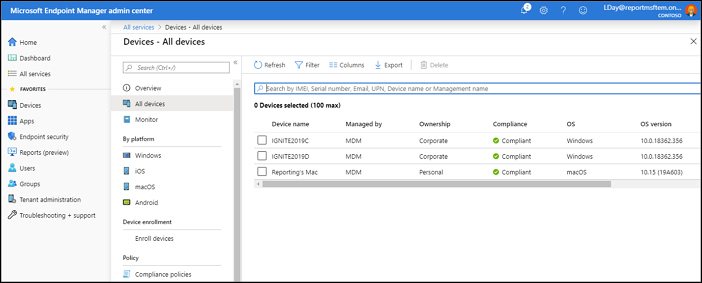
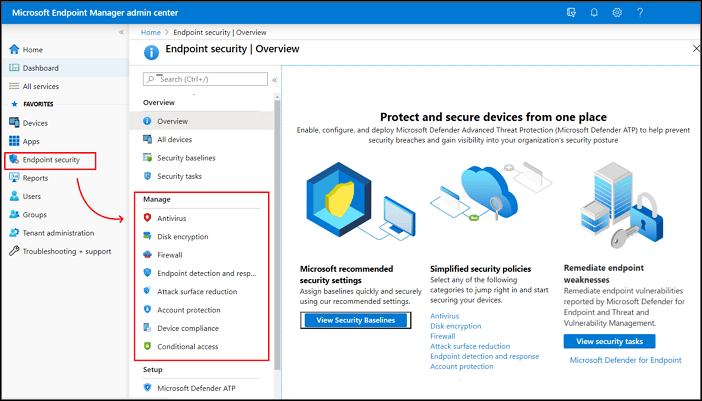
Step 2. To configure Microsoft Defender Antivirus, go to Endpoint security > Antivirus, and select either an existing policy or create a new one using the Microsoft Defender Antivirus profile type.
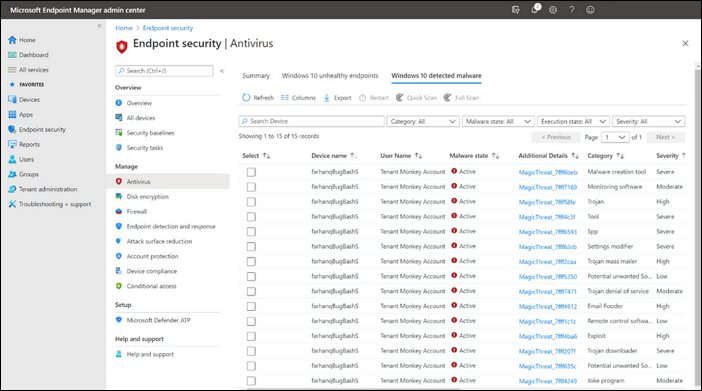
Step 3. For Threat History, click "Report file." You can eliminate any threat if you locate it.
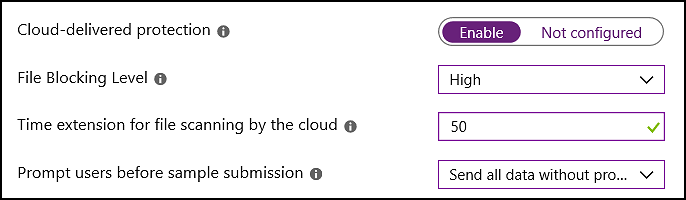
Step 4. To confirm, the configurations should be set to: Set Microsoft Defender Antivirus Extended Timeout in Seconds to "50", Cloud-delivered Protection Level to "High", and Turn on Cloud-delivered Protection to "Yes".
Conclusion
Microsoft Defender ATP is a cloud-based threat management and protection solution for Windows 10 that provides enterprise-grade security through endpoint detection and response, automated investigation, and integration with other Microsoft security products.
While Microsoft markets ATP primarily to businesses, its integration with the broader Microsoft ecosystem makes it a comprehensive security solution suitable for organizations of various sizes.
Related Articles
- Windows File and Folder Permissions Guarantee Your File and Folder Security [You Must Know]
- What Is Winver and How to Run Winver to Check Your Windows Version?
- What Is Disk Utility on Mac? Introduction to the Storage Device Manager on macOS
- What Are Fsck Commands and How to Use It in Linux? [2022 Guide]
- What Is SMTP? Everything You Need to Know about Simple Mail Transfer Protocol
SMTP is one of the key protocols in emailing systems today. So, what exactly is it and how does it work? This article will help you answer these questions and explore the key traits of SMTP. - What Is The Root Directory and What Are The Folders in The Root Directory Used for
The root directory is the top-level folder on a drive, containing all other files and folders. In Windows, it is typically C:\, holding Program Files, Windows, and Users.
Products
Articles & Tutorials
- Data Recovery
- Data Backup
- File Recovery
- File Backup
- System Backup and Restore
- Disk and Partition Clone
- Technical articles
- Mobile articles
- Disk Master Help
- Windows Data Recovery Tutorials
- Windows Secure Delete Tutorials
- Windows Partition Management Tutorials
- Windows File Backup and Restore Tutorials
- Windows System Backup and Restore Tutorials
- Windows Disk Backup and Restore Tutorials
- Windows Clone Tutorials