What Is WSUS? Windows Server Update Services Explained
Windows Update plays a crucial role for many computers, delivering timely security fixes and bug patches. However, for server computers, Microsoft Update follows a distinct procedure, differing from the typical Windows Update process.
WSUS, or Windows Server Update Services, is a tool that secures updates for server computers, ensuring they receive the latest security patches and updates. It works by connecting to Microsoft's update servers, which provide the latest updates, and then distributes them to the servers on the network, allowing IT administrators to manage and control the update process. This helps prevent security vulnerabilities and ensures that server computers are running with the latest security patches, making it an essential tool for maintaining the security and integrity of a network.
WSUS (Windows Server Update Services) is a widely used updating method for both server and client-level systems, but many organizations overlook its importance. Despite this, WSUS plays a crucial role in keeping systems up-to-date, and its benefits should not be ignored. In this article, we aim to explain how WSUS works and why it's essential for maintaining the security and stability of IT infrastructure.
Server computers often come equipped with a feature that can greatly benefit many organizations, making life easier for them. Let's dive in and explore this feature further.
What Is WSUS?
WSUS, short for Windows Server Update Service, is a distribution program that enables the timely delivery of updates, fixes, and features from Microsoft's Windows Update service to Windows Servers. It allows for the execution of updates, drive updates, feature updates, and other releases, ensuring that Windows Servers stay up-to-date and secure.
WSUS allows for the controlled execution and management of updates on various computers and profiles, unlike Microsoft Updates in Windows, which can be executed and managed by the server computer to distribute updates on client computers.
WSUS (Windows Server Update Services) allows organizations to manage and distribute Microsoft updates to their computers, conserving bandwidth and maintaining control over their IT network. By using WSUS, administrators can centrally manage updates, ensuring that all computers receive the necessary patches and updates without overloading the network with unnecessary traffic. This centralized approach enables organizations to streamline their update process, reduce the risk of security vulnerabilities, and minimize downtime.
- Windows Defender
- Windows 10 or 11
- Microsoft Office (and its attributing software/extensions)
- Security patches and fixes
Therefore, it's an ideal system for any organization or company that relies on an array of computers.
How Does WSUS Work?
WSUS is pre-installed in Windows Server and can be accessed through the Windows Server Manager. It allows a computer to take on an administrator role, enabling it to manage updates for other devices.
After the client role is taken by the other section, which is usually other organizational computers, it comes down to the size of the IT network and computers used within that web.
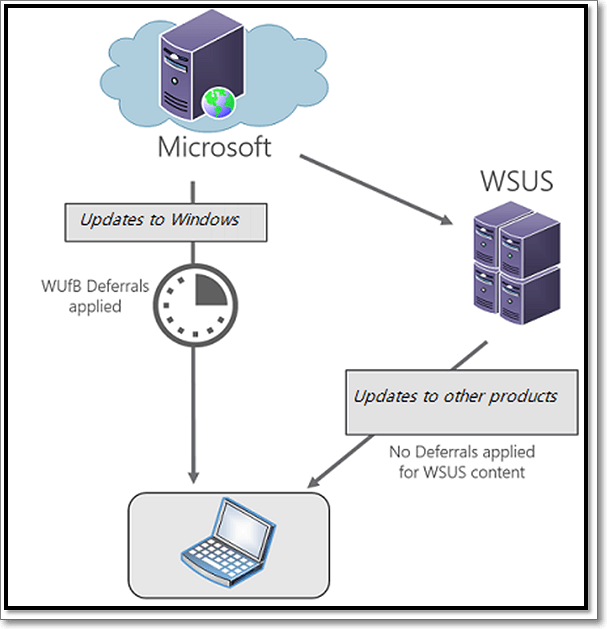
The WSUS can be more than just an open server working together, as long as they're granted the admin role. However, some prerequisites of the WSUS include.
- Services like NET
- Microsoft Report Viewer
- Internet Information Services or IIS
- Windows Internal Database (WID) or SQL
Most Windows Server editions come pre-loaded with WSUS and other necessary tools, but the admin must configure Group Policy to set it up on client systems after deploying the WSUS server to a network.
The admin can provide updates to computers, and even without an active internet connection, client computers can receive updates from the server as long as they're on the same network.
Defining WSUS Server Modes
WSUS Servers come in two different modes, which allow users or admins to distribute updates according to their requirements. The two modes differ in how updates are deployed, but they're practically the same in functionality.
Autonomous:
Autonomous mode is the default installation mode for WSUS-based computers, where updates are applied directly to client computers as they are received from Microsoft Servers. The server first receives the update from the upstream server, which is the main Microsoft update source, and then applies it to the client computers. This is the primary method of updating client computers and is the default mode for WSUS installations.
The administrator reviews, approves, discards or changes the updates before passing them along to the client machines connected to their server.
Replica:
The replica mode enables automatic deployment of updates to client computers, allowing the server to receive and review updates from an upstream server without needing to individually manage each update.
Conclusion
WSUS, or Windows Server Update Services, is a key feature that provides a convenient utility for organizations and server-based computer networks, offering a range of benefits for managing updates and maintaining a secure and up-to-date IT infrastructure.
Related Articles
- What Is Dynamic Routing and What are the Dynamic Routing Protocols
- What Is RTOS? Real-Time Operating System Explained
- What Is FTP? File Transfer Protocol Explained
- Complete Guide to Windows Internet Name Service (WINS)
- How to Factory Reset Microsoft Surface with Every Possible Way
Learn how to factory reset Microsoft Surface safely. Use Windows settings, recovery options, or reset methods while protecting data. - [Full Guide] How to Factory Reset PC Without Turning It On
Make your PC brand new and super fast with the help of factory reset settings. Learn different methods and techniques for how to factory reset pc without turning it on. Also, find out details of EasyUS software to create a backup in your window before the factory reset.
Products
Articles & Tutorials
- Data Recovery
- Data Backup
- File Recovery
- File Backup
- System Backup and Restore
- Disk and Partition Clone
- Technical articles
- Mobile articles
- Disk Master Help
- Windows Data Recovery Tutorials
- Windows Secure Delete Tutorials
- Windows Partition Management Tutorials
- Windows File Backup and Restore Tutorials
- Windows System Backup and Restore Tutorials
- Windows Disk Backup and Restore Tutorials
- Windows Clone Tutorials