Complete Guide to Windows Internet Name Service (WINS)
You've likely encountered WiFi connection issues in Windows, network slowdowns after updates, and wondered about WINS, which is a Microsoft service that registers NetBIOS names on a local area network.
NetBIOS is a communication service that allows different computers to interact with each other across a LAN, and WINS works by registering the NetBIOS name to IP address mapping on the WINS server after a name registration process. It consists of a WINS server and TCP/IP client software, with the server handling the database, replication, and client registration, and the client software managing name queries.
You may experience WiFi connection issues on your Windows due to a problem with NetBIOS name resolution in your router connection. In routed networks that use NetBIOS, WINS is a viable solution to such problems.
What's The Difference Between WINS Server And DNS Server?
The difference between a WINS server and a DNS server can be subtle, but they serve distinct purposes. While both are essential for network communication, they operate in different ways, making it crucial to understand their roles. By knowing the difference, users can better manage their network and troubleshoot issues more effectively.
| WINS Server | DNS server |
|---|---|
| 1. WINS (Windows Internet Name Server) is a Microsoft Windows Service that registers NetBIOS names on a Local Area Network (LAN). | 1. The Domain Name System (DNS) is a system that converts domain names into IP addresses, allowing users to access websites and online resources using easy-to-remember names instead of complex IP addresses. |
| 2. In older versions of Windows, NetBIOS only worked with the NetBEUI protocol, and WINS was crucial for resolving name resolution issues that arose from this limitation. | 2. Microsoft replaced NetBEUI with TCP/IP in NetBIOS, allowing DNS servers to handle NetBIOS name requests. This change has made DNS a replacement for WINS in current Windows servers. |
| 3. When using the "Net use" command, such as "Net use * \tree mainshare", WINS is utilized to register the NetBIOS name "tree" to a LAN, effectively mapping the name to an IP address. This allows for the use of NetBIOS names to access resources on the network. | 3. The command "Ping Tree.space.net" uses DNA to register Tree.space.net to an IP address, effectively registering TCP/IP host names to IP addresses. |
How To Find Your WINS Server?
Finding a WINS server can be a hectic task, but it requires giving your utmost attention to the process.
You can find your IP address in Windows by following these steps:
Step 1. Select "Start" > Settings > Network & sharing center, and then click on your wifi connection.
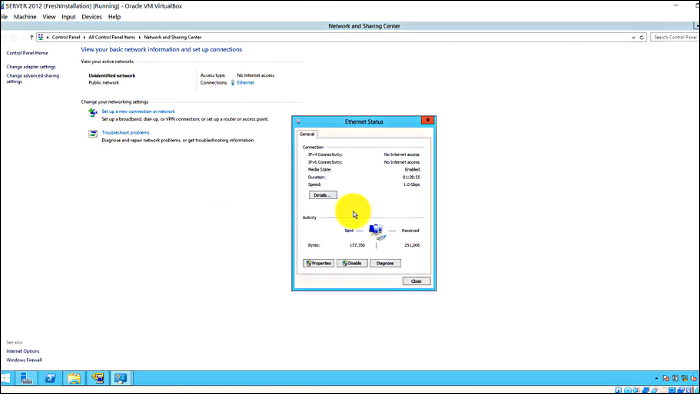
Step 2. Under Properties, click on Internet Protocol version 4 (TCP/IPv4). Your IP address will be visible on the screen.
After clicking on the above options, the WINS configuration will be applied.
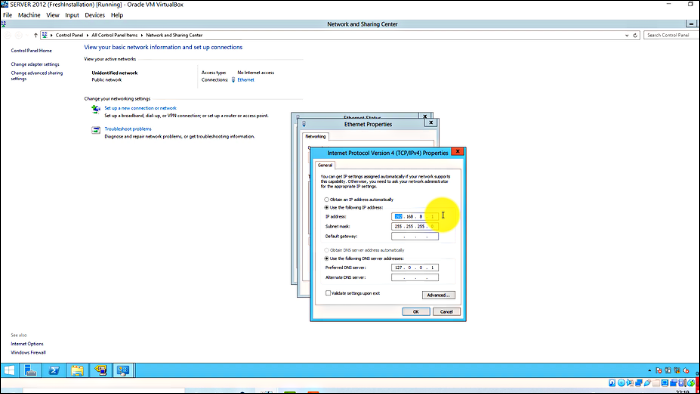
Now, to find your WINS server follow these steps:
Step 1: Select "Server Manager" > Add Roles and Feature Wizard > Features > WINS server
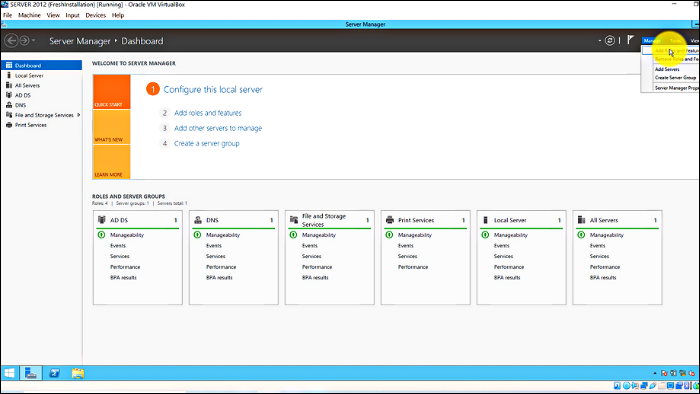
Step 2: Select "WINS server" > Add Features > Next > Install
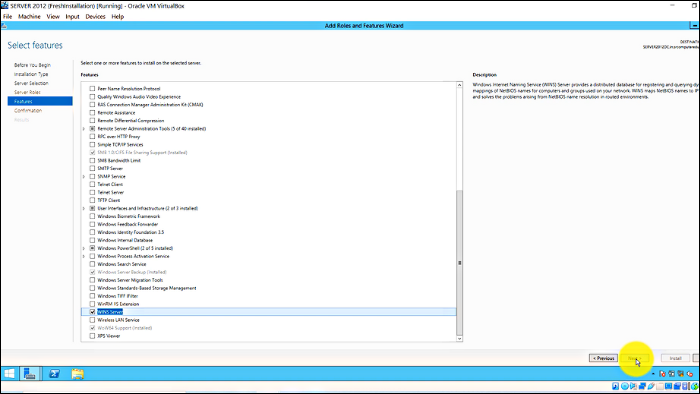
Step 3: After installing, follow the same process of finding your IP address and click advanced
Step 4: Select "WINS" > Add > Type your IP address > Add > Ok
Step 5: To activate the WINS server on your Windows, follow these steps: Run the Command Prompt as Administrator, type the command "nbtstat -RR", and then restart your system. This will initiate the WINS server, making it functional on your Windows.
Do You Still Need A WINS Server?
The WINS server has been a core component of the Windows system since its inception, with every Windows server from Windows NT 4.0 onwards having it installed, underscoring its importance.
If you're using Windows NT 4.0 or earlier Windows servers, you need WINS. However, if you're using Windows servers launched after Windows NT 4.0, you can stop using WINS by decommissioning all WINS servers after identifying and removing them from your network.
However, it will be a large-The best option is to keep the WINS server running on your Windows.
Final Words
WINS (Windows Internet Name Service) has been a crucial component of Windows servers since its inception. Having a WINS server can significantly speed up name resolution on your network, and its low resource requirements make it a desirable option. Although the importance of WINS servers has diminished with the rise of DNS (Domain Name System) servers, it still has its place in modern networks and can be a valuable asset if utilized effectively.
Related Articles
- Windows 11 22H2 Slows Down Copying of Files
- Windows 11 Download: How to Download and Install Windows 11 [3 Ways]
- How Many Megabytes Are There in a Gigabyte
- What Is Boot Disk? Get A Boot Disk for Abnormal System Startup
- [FIXED] How to Fix Hogwarts Legacy AutoSave Not Working
If you're experiencing issues with the Hogwarts Legacy autosave not working, you can try resolving the problem and recovering any disappeared game data. To fix the issue, you can refer to the article for guidance. - Hogwarts Legacy Cloud Save on Steam/Xbox/PS5
Learn how Hogwarts Legacy cloud saves work on Steam, Xbox, and PS5, including how to access, sync, download, and protect saves.
Products
Articles & Tutorials
- Data Recovery
- Data Backup
- File Recovery
- File Backup
- System Backup and Restore
- Disk and Partition Clone
- Technical articles
- Mobile articles
- Disk Master Help
- Windows Data Recovery Tutorials
- Windows Secure Delete Tutorials
- Windows Partition Management Tutorials
- Windows File Backup and Restore Tutorials
- Windows System Backup and Restore Tutorials
- Windows Disk Backup and Restore Tutorials
- Windows Clone Tutorials