Backup Image Not Listed After an External Drive Letter Changed
An external backup disk can receive a different drive letter after being reconnected. A saved backup task may then point to the old path even though the image files still exist. Do not delete or recreate the image until you have located the physical disk and checked the files.
Find the backup disk safely
Step 1. In Disk Management, identify the external drive by model, capacity, and label. Write down its current drive letter. Avoid selecting the Windows system drive merely because it has the old letter.
Step 2. Open the disk in File Explorer and locate the backup folder by task name and timestamp. Confirm the folder contains files of plausible size; do not rename or reorganize a backup chain.
Step 3. Check whether the destination has read errors, is locked with BitLocker, or needs a NAS credential. A letter change cannot explain missing files on an unreadable device.
Browse an existing image in Qiling Disk Master Pro
Qiling Disk Master Pro's Browse for recovery option helps locate an image whose task is no longer displayed under the old destination path. Use the image-browsing flow to inspect contents before deciding to restore anything.
Step 1. Open Backup and Recovery > Browse for recovery. Browse to the current drive letter and select the appropriate backup image file from the original folder.
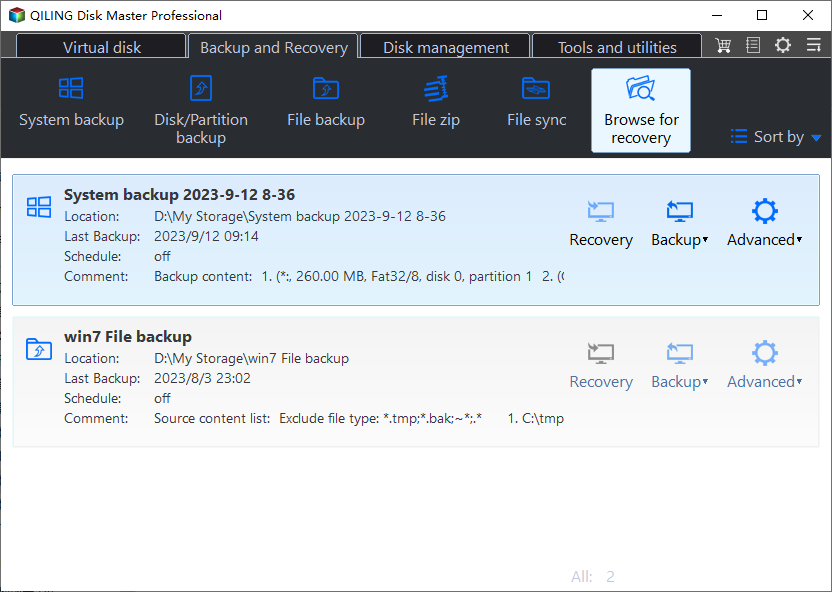
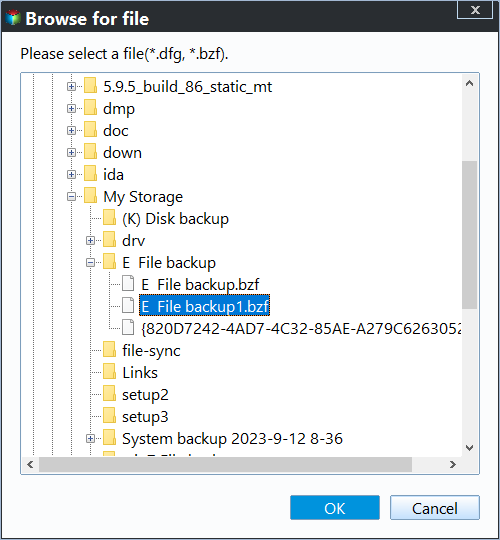
Step 2. Compare the image date, task type, and source contents with your expectations. A file-backup image can be browsed for selected folders; a system or disk image follows a different restore route.
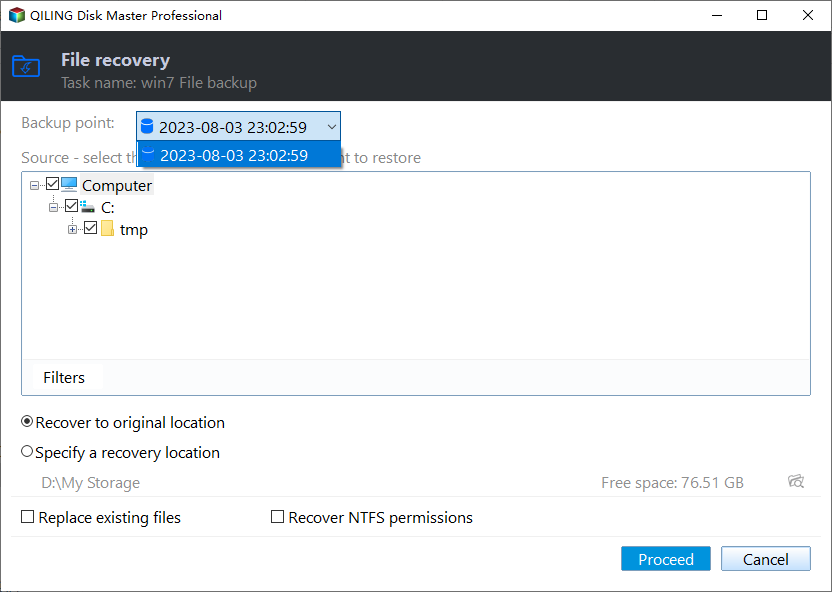
Step 3. If you need a file, choose a backup point and restore a small sample to a new folder. Leave replacement off and verify that the file opens. Do not start a full-disk restore merely to test visibility.
Prevent the path changing again
After the image is verified, you may assign a stable unused letter to a non-system external data drive in Disk Management. Microsoft warns against changing the letter of a drive containing Windows or installed applications. Update the saved backup task's destination path if needed, then run and verify a new backup. Keep the old image untouched until the new point is usable.
For NAS locations, prefer the stable share path and check credentials rather than relying on a transient mapped letter. A path fix does not repair an incomplete or damaged image.
Related Articles
- Restore a Single Folder
Test an image without replacing live files. - Interrupted Backup Drive
Separate path changes from incomplete images.
Products
Articles & Tutorials
- Data Recovery
- Data Backup
- File Recovery
- File Backup
- System Backup and Restore
- Disk and Partition Clone
- Technical articles
- Mobile articles
- Disk Master Help
- Windows Data Recovery Tutorials
- Windows Secure Delete Tutorials
- Windows Partition Management Tutorials
- Windows File Backup and Restore Tutorials
- Windows System Backup and Restore Tutorials
- Windows Disk Backup and Restore Tutorials
- Windows Clone Tutorials