NAS Backup Interrupted When Wi-Fi Disconnects in Windows
A NAS backup can stop halfway through if Wi-Fi briefly drops, Windows sleeps, or the share credentials expire. A folder left on the NAS after the interruption is not proof that the backup image is complete. Check the failed task and the connection separately before relying on that copy.
Find the network failure
Step 1. Record the task's failure time and exact NAS path. In File Explorer, open that share and create a harmless test file with the same Windows account. If this fails, resolve the network or credentials before retrying Qiling.
Step 2. Compare the failure time with Windows Wi-Fi disconnection or sleep events. Try an Ethernet cable or a stable Wi-Fi location for one test run. Do not disable network security or repeatedly enter passwords into an unknown share.
Step 3. Check free space and any NAS quota. Copying a small file successfully does not prove the share can hold a full system image.
Retry a verified Qiling backup
Step 1. Open Backup and Recovery > File backup and select the folders you need directly in the source tree. If the old task is incomplete, keep its files until a replacement backup is verified.
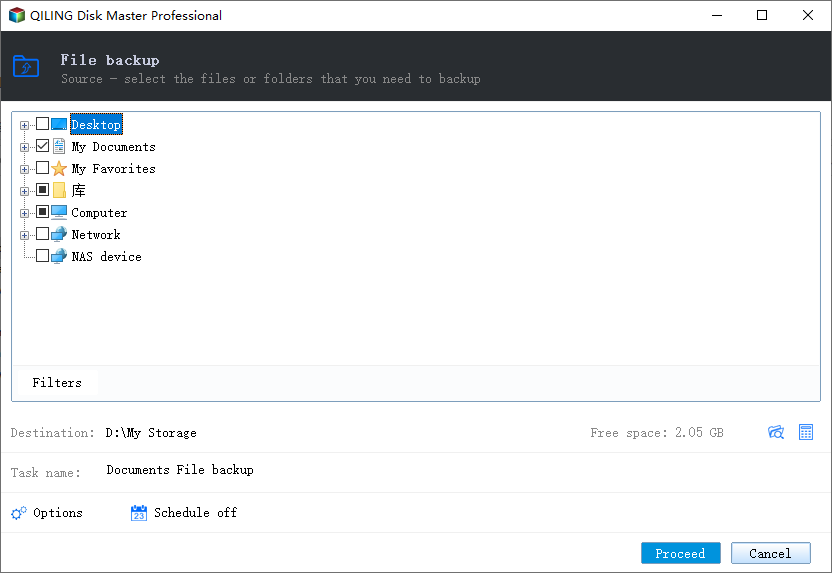
Step 2. Open the destination browser, choose Add NAS device if the share is not saved, enter the share path and authorized credentials, and select a dedicated backup folder. Check that the destination shown in the task is the NAS share, not a local folder with a similar name.
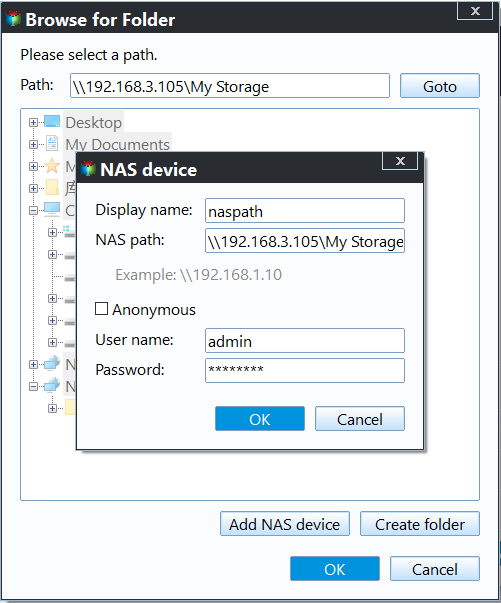
Step 3. Start a small test backup with Proceed. Keep the computer awake and connected. After Success, browse or restore a test file from the new backup point to a different folder.
Make the next run reliable
Schedule large backups for a time when the PC is powered and the NAS is reachable. If Wi-Fi continues to drop, use a wired connection or first create a local backup on a separate drive, then copy the verified image to the NAS. A network copy is additional protection only after it opens correctly.
Related Articles
- NAS Backup Credentials
Check a share that repeatedly asks for login details. - Windows 11 Backup to NAS
Choose a NAS location for file or system backups.
Products
Articles & Tutorials
- Data Recovery
- Data Backup
- File Recovery
- File Backup
- System Backup and Restore
- Disk and Partition Clone
- Technical articles
- Mobile articles
- Disk Master Help
- Windows Data Recovery Tutorials
- Windows Secure Delete Tutorials
- Windows Partition Management Tutorials
- Windows File Backup and Restore Tutorials
- Windows System Backup and Restore Tutorials
- Windows Disk Backup and Restore Tutorials
- Windows Clone Tutorials