Upgrade Windows to a Samsung 990 EVO SSD
The Samsung 990 EVO is an M.2 2280 SSD designed for PCIe 4.0 x4 or PCIe 5.0 x2 operation. A compatible slot is essential; a faster interface label does not mean every laptop supports the physical drive. Check the exact PC service manual for slot type, length, cooling, and whether the SSD is user-replaceable.
Prepare the SSD and a fallback
Step 1. Confirm the exact model and capacity of the current Windows disk. Check the amount of used space against the target SSD's usable capacity.
Step 2. Back up important files to an independent device and test opening several files. Save the BitLocker recovery key and suspend protection before changing the boot drive.
Step 3. If the PC has one M.2 slot, use a compatible enclosure to connect the new SSD temporarily. Verify Windows detects it by model and capacity. Avoid assigning a disk number from memory.
Step 4. Connect AC power. If the old drive has errors, prioritize a full backup and consider clean installation over repeated cloning attempts.
Warning: Cloning overwrites the selected destination SSD. Never choose the only disk containing your backup as the target.
Clone Windows with Qiling Disk Master
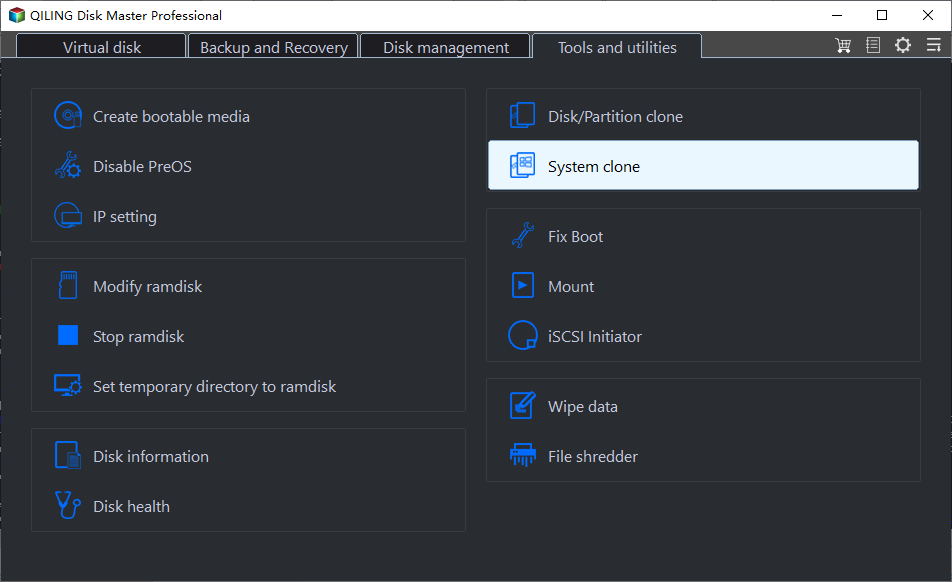
Step 1. Open Tools and utilities > System clone. This mode includes Windows boot components; copying only C: may not produce a bootable drive.
Step 2. Confirm the source Windows disk and associated boot partitions shown by the tool.
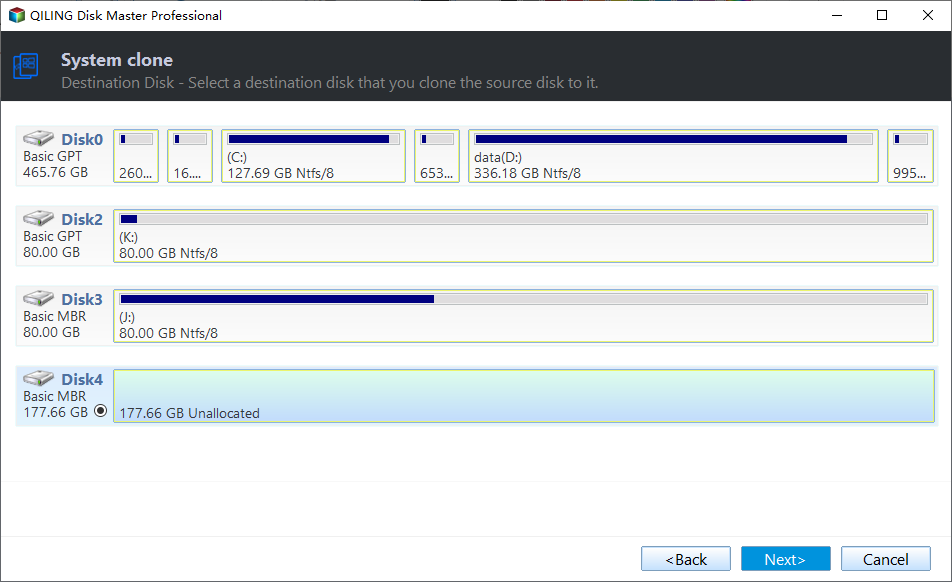
Step 3. Select the Samsung 990 EVO as destination, comparing its model and capacity with the connected hardware.
Step 4. Review the source-to-target preview and proposed layout. If the target is larger, decide how to allocate unused space. Recheck the destination before proceeding.
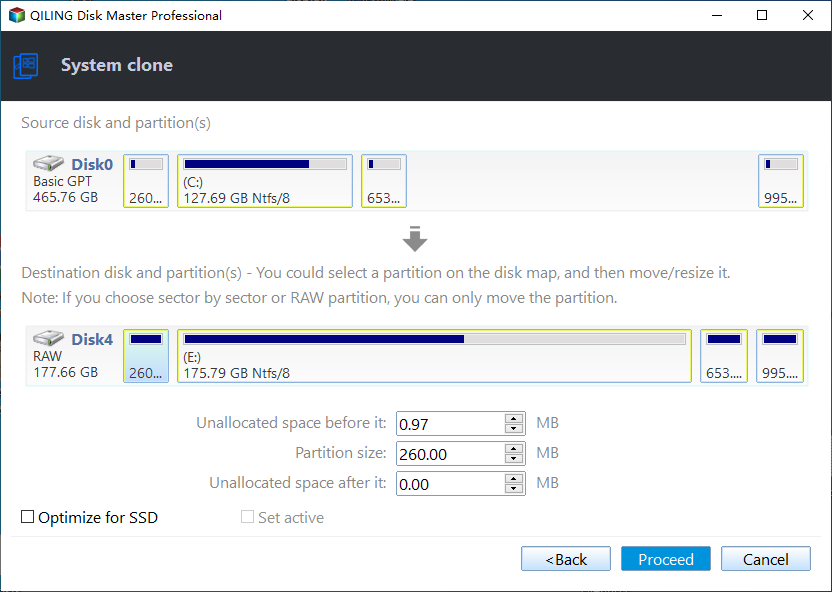
Step 5. Click Proceed, acknowledge the target-overwrite warning, and wait for the operation to finish without unplugging either drive.
Install and test the new drive
Shut down and follow the PC manufacturer's service instructions to exchange drives. Disconnect power and follow static-electricity precautions. Set the new SSD as the boot device if necessary. With the old disk disconnected, boot Windows, sign in, check important files and apps, and inspect Disk Management for unallocated space. Resume BitLocker only after the new boot path is stable. Keep the old drive untouched until multiple boot tests and a backup verification succeed.
For model specifications, see Samsung's 990 EVO announcement.
Related Articles
- OS Migration Alternative
Compare the system-clone route. - Use Full SSD Capacity
Find unused capacity after cloning.
Products
Articles & Tutorials
- Data Recovery
- Data Backup
- File Recovery
- File Backup
- System Backup and Restore
- Disk and Partition Clone
- Technical articles
- Mobile articles
- Disk Master Help
- Windows Data Recovery Tutorials
- Windows Secure Delete Tutorials
- Windows Partition Management Tutorials
- Windows File Backup and Restore Tutorials
- Windows System Backup and Restore Tutorials
- Windows Disk Backup and Restore Tutorials
- Windows Clone Tutorials