Windows Defender vs Norton: Security and Backup Notes
Windows Defender is built into Windows and covers basic antivirus protection. Norton adds broader security features depending on the plan. Neither replaces a backup when files are deleted, encrypted, or damaged.
How to Think About PC Protection
- Use antivirus to reduce malware risk.
- Use Windows updates to patch known security issues.
- Use backups to recover files or the system after damage.
- Keep backup drives disconnected when not in use to reduce ransomware exposure.
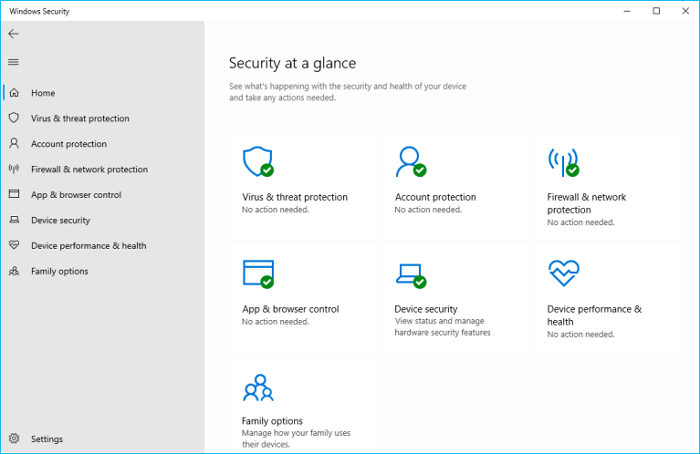
Check Your Current Protection
- Open Windows Security and confirm that virus protection, firewall, and app protection are enabled.
- Run Windows Update so Defender definitions and system patches are current.
- If Norton or another antivirus is installed, check whether Defender real-time protection has been turned off automatically.
- Review browser extensions and startup apps if pop-ups, redirects, or slow startup continue after scanning.
Add Recovery Protection with Qiling Backup
Step 1. Open Qiling Backup and choose a file or system backup plan.
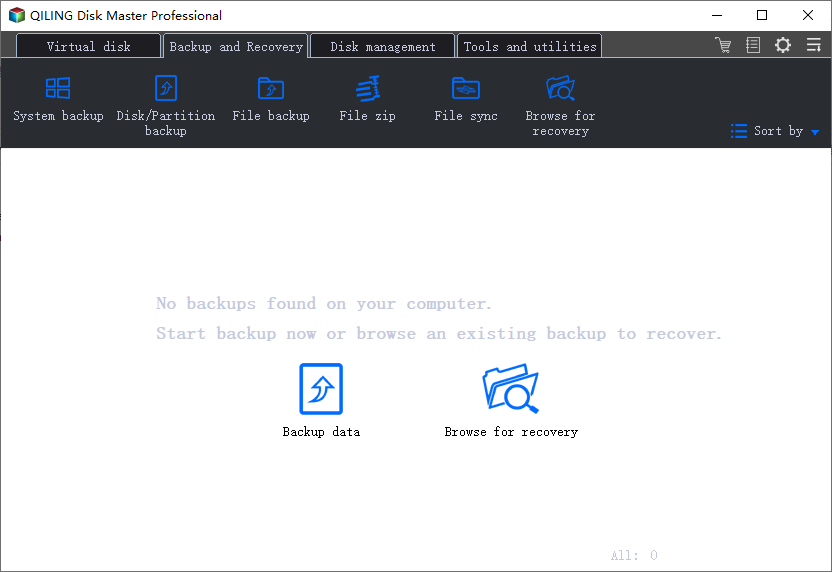
Step 2. Choose an external or network destination.
Step 3. Set a schedule if needed and click Proceed.
Which One Should You Use?
| Need | Windows Defender | Norton | Backup still needed? |
|---|---|---|---|
| Basic malware protection | Good starting point | Also available | Yes |
| Extra identity, VPN, or bundled security tools | Limited | Depends on plan | Yes |
| Recover deleted or encrypted files | No | No | Yes |
| Restore Windows after a failed cleanup | No | No | Yes |
Safe Setup Tips
- Do not run two real-time antivirus tools at the same time unless one is disabled.
- Keep Windows Update enabled so Defender and system security patches stay current.
- Back up files before removing serious malware because cleanup can delete infected or damaged files.
- Store backups on an external or network location that is not always writable.
- Create a system image before changing security suites, especially on business PCs or older Windows installations.
Conclusion
Windows Defender and Norton help prevent threats, but backup is the recovery layer. Use both security software and a reliable backup plan for Windows protection.
Related Articles
Products
Articles & Tutorials
- Data Recovery
- Data Backup
- File Recovery
- File Backup
- System Backup and Restore
- Disk and Partition Clone
- Technical articles
- Mobile articles
- Disk Master Help
- Windows Data Recovery Tutorials
- Windows Secure Delete Tutorials
- Windows Partition Management Tutorials
- Windows File Backup and Restore Tutorials
- Windows System Backup and Restore Tutorials
- Windows Disk Backup and Restore Tutorials
- Windows Clone Tutorials