Best Commercial Backup Software for Windows (2022 Thorough Review)
Businesses rely heavily on data as a key tool for success in their industry. To prevent data loss in various situations, it's essential to have a dedicated backup system for both personal and professional data storage. There are various commercial backup software options available in the market, with some being particularly powerful. These software solutions enable businesses to copy data from different devices, such as desktops, laptops, servers, and databases, providing a safeguard against data loss due to various issues.
The best business backup software can effectively handle physical disasters, corrupted files, or errors in storage, providing a reliable solution for data protection. Our selection of top commercial backup software programs can help you safeguard your business, and we'll also explore the different versions of Qiling Backup, a popular option in this category.
Best Commercial Backup Software-What We Choose?
The best commercial backup software can be identified based on two primary functions: data protection and recovery. These software solutions provide a robust and reliable way to safeguard important business data, ensuring it is safely stored and can be quickly restored in case of a disaster or system failure. By leveraging advanced features such as automated backups, data compression, and encryption, commercial backup software helps businesses protect their critical information and minimize downtime, making them an essential tool for any organization looking to ensure business continuity.
- It can create business data copies and keep them safe.
- It can restore backup data onto devices as and when needed.
Choosing the best business backup software requires a detailed guide, but having a clear understanding of your immediate backup needs can help narrow down the options. To make a suitable selection, consider the following criteria:
- Ease of use: A user-friendly data backup software should cater to both beginners and professionals, making data restore a simple, quick, and hassle-free process in case of any issues.
- High-flexibility: Commercial backup software should have flexible data backup capabilities, allowing for customizable scheduling to meet the continuous backup needs of top companies.
- Scalability: The next in line after flexibility is the scalability of commercial backup solutions.
- Compatibility: Businesses should have data backup software that can handle various data types to ensure seamless data recovery.
- Security: Any data backup software should be compliant with the latest data security and compliance standards, including GDPR (General Data Protection Regulation) and third-party vendor guidelines.
- Availability: The storage volume and associated charges should be clearly communicated to users in a timely manner.
- Cost: The monthly cost of the subscription-based data backup software is the last but not least factor to consider.
Qiling Backup is an effective commercial backup software that offers one-click backup and instant recovery with highly effective results. It can perform disk imaging and save backups in safe mode, making it a reliable tool for users. With over 20 million users globally, it has proven to be a trusted solution for many.

Features of Qiling Backup:
Qiling Backup offers several key features, including the ability to backup and restore data, as well as create and manage backup sets. The tool also allows for scheduling of backups, ensuring that data is protected at regular intervals.
- This software has a user-friendly interface that allows users to create operating system, partition, or disk backups, which can be saved to the cloud, network, or local drives.
- It allows backup restoration, including data path and data, to replace existing files or the original location.
- It can quickly perform various types of recovery, including disaster recovery, bootable recovery, right-click recovery, and system image recovery, among others.
- 250GB of free cloud storage is provided for users to save their data backup without worrying about time and space constraints.
- The platform offers free access to users and also provides different pricing plans based on the advanced features offered by them.
Compatibility of Qiling Backup:
The top compatibility features of Qiling Backup include support for various file systems, such as NTFS, HFS+, and APFS, allowing users to back up files from different operating systems. It also supports cloud storage services like Google Drive, Dropbox, and OneDrive, enabling users to access their backups from anywhere. Additionally, Qiling Backup supports various backup destinations, including external hard drives, USB drives, and network-attached storage (NAS) devices, providing users with flexibility in choosing where to store their backups.
- Operating system: This software is compatible with various Windows versions, including Windows XP, Vista, 7, 8, 8.1, 10, and 11.
- File system: The device is compatible with various file systems, including FAT12, FAT16, FAT32, and NTFS.
- Disk space requirements: The software requires a minimum of 1GB of free space on the hard disk.
- CPU: It works with full efficiency on CPUs with a minimum of 500 MHz processor.
- RAM: It requires a minimum RAM of 1GB.
Qiling Backup is the top commercial backup software that meets the perfect backup software criteria. It boasts high compatibility, scalability, and ease of use, making it a robust tool for various professional uses. Its detailed features make it easy to understand the best use of this tool for different applications.
A Thorough Review of Various Versions of Qiling Backup
Qiling Backup is a powerful commercial backup software that stands out for its impressive features, compatibility, and affordability. It offers free cloud space of up to 250GB, making it an attractive choice for businesses. The software comes in different versions, each catering to the specific needs of various businesses, providing a tailored solution for their backup and storage requirements.
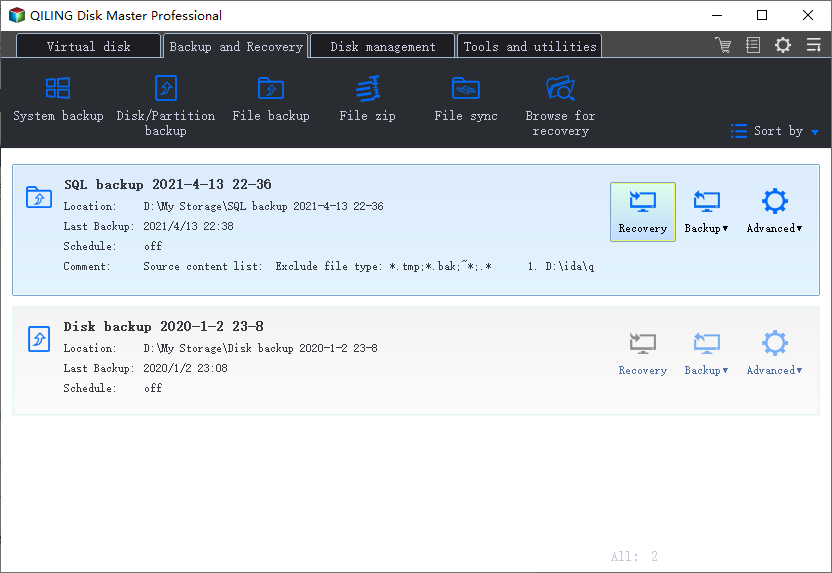
A reliable backup solution is essential for businesses and servers, protecting all system sizes and types. It's particularly effective for SQL databases, Microsoft Exchange email, servers, and PCs, and can quickly back up physical or virtual server files to a compressed image file for fast data recovery. With multiple budget-friendly versions available at competitive pricing, this solution offers affordable data backup options for small, medium, or large enterprises.
Qiling Backup offers four versions to cater to different needs: Basic, Pro, Enterprise, and Cloud. The Basic version provides core functionality for small businesses or individuals, while the Pro version adds advanced features like data compression, encryption, and scheduling.
1. The Workstation version is a popular offering that provides around-the-clock backup solutions, covering cloud, HDD, and DD backup solutions. Its top features include.
- It is centrally managed by Qiling Backup Center.
- It offers quick backup to dropbox, Google drive, etc.
- The tool can perform disk cloning, operating system migration to solid state drive (SSD) or hard disk drive (HDD), and other tasks.
- The tool can perform various backup and restore operations, including email, disk partition, system, and file backups, allowing users to safeguard their important data across different types of storage.
- It can be used with one license for one system.
2. The Qiling Backup Server is the powerful version of Qiling Backup, offering PXE network tools and covering Windows Server backup, with top features including PXE network boot, Windows Server backup, and remote management.
- It supports Windows servers and is centrally managed by Qiling Backup Center.
- It creates data backup on Google drive, dropbox, etc.
- It is a popular option for migrating an operating system to an SSD/HDD, disk clone, etc.
- The system can perform various backup and restore operations, including file, system, partition, email, and disk backups, among others.
- It can be used with one license for one server.
3. The Advanced Server version of Qiling Backup offers a range of features for SQL server and exchange backup and recovery solutions, catering to different business needs. It provides advanced backup and recovery solutions for SQL server and exchange, including features such as SQL server and exchange backup, backup and recovery of databases, and disaster recovery. It also supports various business needs, including data protection, business continuity, and disaster recovery.
- The system is centrally managed by Qiling Backup Center and supports the Windows server.
- It can back up to popular cloud options like Dropbox, Google Drive, etc.
- It is capable of operating system migration, disk cloning, and other advanced features.
- The service provides comprehensive data backup and recovery solutions for various business data types, including SQL, Exchange, files, systems, disks, partitions, and email, ensuring all possible data is protected.
- It can be used with one license for one server.
4. The Technician version of Qiling Backup is a preferred choice for businesses looking to offer technical assistance to clients, allowing seamless use on multiple systems, and offering top features such as
- Qiling Backup Center manages Windows servers centrally and provides support for them.
- Quickly back up your files to widely used cloud options like Dropbox, Google Drive, and more, ensuring your important documents and media are safely stored and accessible from anywhere.
- It performs operating system migration, disk cloning, etc.
- The article discusses various business data backup and recovery options, including email, disk, partition, file, system, SQL, and exchange backups.
- This software can be used with a single license for multiple servers or systems, making it a cost-effective solution for organizations with multiple machines.
Comparison between Workstation, Server, Advanced Server, and Technician versions:
Comparing the four versions of Qiling Backup can help businesses choose the right one based on their immediate data backup and recovery needs. Each version offers different features and benefits, so it's worth taking a closer look at their differences to select the one that best meets their requirements.
| Sr. No. | Feature | Workstation | Server | Advanced Server | Technician |
|---|---|---|---|---|---|
| 1 | Exchange Backup | No | No | Yes | Yes |
| 2 | SQL Backup | No | No | Yes | Yes |
| 3 | PXE | No | Yes | Yes | Yes |
| 4 | License type | One license per one system | One license per one system | One license per one server | One license per multiple systems or servers |
| 5 | Technical support | Yes | Yes | Priority | Priority |
| 6 | Backup speed | Good | Good | Excellent | Excellent |
| 7 | Pricing | 49 USD yearly | 199 USD yearly | 299 USD yearly | 999 USD yearly |
Final Verdict
Qiling Backup stands out from other competitors by offering seamless data backup, recovery, and backup management solutions. For commercial uses, the software is easy to understand, and users can start by reading a quick definition before diving into a detailed guide to selecting the best commercial backup software.
The various versions of Qiling Backup, including Workstation, Server, Advanced Server, and Technician, cater to different business needs, allowing companies to choose the one that best suits their requirements. A comparison of the features of these four versions helps businesses select the most suitable commercial backup software to prevent data backup issues and ensure data security.
FAQs on Best Commercial Backup Software
After reviewing the best commercial backup software, you may have questions. Let's address the top queries with our list of frequently asked software questions, providing a detailed solution to each one.
1. What is the best backup solution for a small business?
Qiling Backup is the best backup solution for small businesses, offering essential functionalities such as disk/partition backup, system backup, file backup, cloud backup, system image recovery, disaster recovery, and bootable recovery. The added benefit of free cloud space up to 250GB makes it perfect for small businesses.
2. What storage and backup solutions are the most popular?
Cloud technology offers an effective solution for businesses in terms of storage and backup. A dedicated tool like Qiling Backup stands out with its benefits of usability, functionality, and affordability, making it an ideal choice for various businesses.
3. Where can I back up my business data?
Cloud backup solutions, data backup software, external hard drives, hardware appliances, and removable media are all viable options for businesses to trust for data backup. However, cloud backup solutions like Qiling Backup stand out from the rest due to their numerous advantages.
Related Articles
- Backup SQL Server Database in 3 Ways [Quickstart]
- Best Software to Automatically Clone Hard Drive[2022 Roundup Review]
- Open Source Backup Software for Windows Server 2003(2022 New List)
- Best HDD for Backup in 2022 [Most Comprehensive Guide]
This guide will recommend the best HDD for backup and list their pros and cons. So, you can choose one of them to protect your data. And you will also know how to back up your computer to HDD. - Best PC Transfer Software Free Download with How-to Guide [Video Tutorial]
PC transfer software makes it easy to move files from one computer to another, and with the help of such software, the process is simple and straightforward.
Products
Articles & Tutorials
- Data Recovery
- Data Backup
- File Recovery
- File Backup
- System Backup and Restore
- Disk and Partition Clone
- Technical articles
- Mobile articles
- Disk Master Help
- Windows Data Recovery Tutorials
- Windows Secure Delete Tutorials
- Windows Partition Management Tutorials
- Windows File Backup and Restore Tutorials
- Windows System Backup and Restore Tutorials
- Windows Disk Backup and Restore Tutorials
- Windows Clone Tutorials