Destination Disk Sector Size Is Not Identical: What to Check
A sector-size warning is not the same as a capacity warning. Drives may expose 512-byte logical sectors, 4K logical sectors, or 4K physical sectors with 512-byte emulation. The clone tool and Windows must support the actual source and destination combination.
Confirm which sector sizes differ
In an elevated PowerShell window, run Get-PhysicalDisk | Select FriendlyName,LogicalSectorSize,PhysicalSectorSize,Size and identify both disks by model. Some USB bridges report geometry differently from a direct SATA or NVMe connection; check the manufacturer's specifications as well.
512e normally exposes 512-byte logical sectors on 4K physical media. Native 4Kn exposes 4096-byte logical sectors. A tool that copies raw sectors without translating the layout may reject a mismatch or create a destination Windows cannot boot. Do not assume any general clone product automatically converts between the two.
Choose a supported migration route
Save a separate backup of important files. Check whether the current Qiling version explicitly supports the detected pair. If its wizard rejects the combination, stop rather than forcing sector-by-sector mode. A file backup followed by a clean Windows installation, or an image-and-restore method verified for that sector pair, can be safer.
Also check target capacity, firmware boot mode, and partition style. A smaller SSD can fail for lack of space independently of sector-size compatibility. Do not initialize or format the only copy of the source while diagnosing.
Test the result before discarding the source
If the tool accepts the job, inspect the proposed layout before clicking Proceed. After completion, place the target in its intended internal port and boot without the old disk connected when practical. Verify files, applications, and recovery access.
If the target is not bootable, record the exact error and reported logical sector sizes. Repeating the same unsupported clone does not fix an incompatibility; restore from a verified backup or use a supported deployment path.
Check Compatibility in Qiling Disk Master
Follow these steps only after confirming that the installed Qiling version supports your source and destination logical sector sizes. This is not a promise of automatic 512e-to-4Kn conversion.
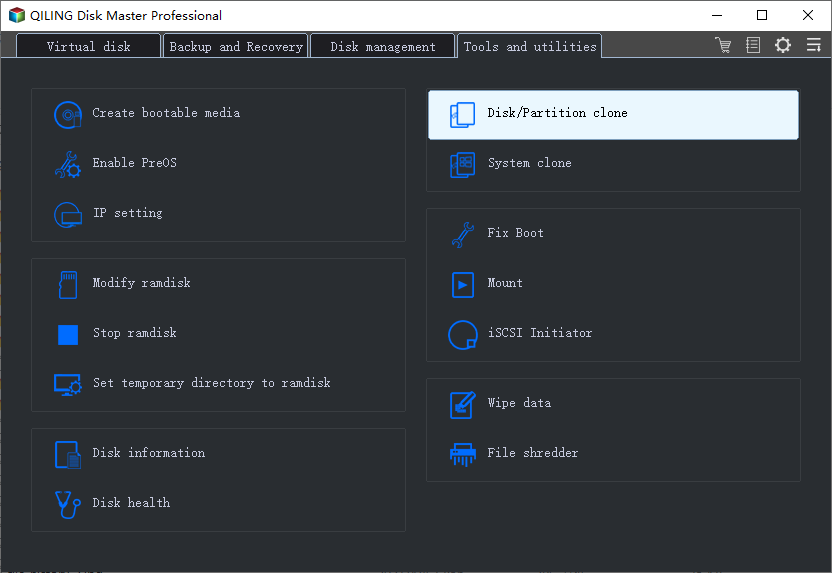
Step 1. Connect the target through a compatible SATA or NVMe port or enclosure. In Qiling Disk Master, choose Tools and utilities > Disk/Partition clone. Attach the target through a reliable interface and record both logical sector sizes.
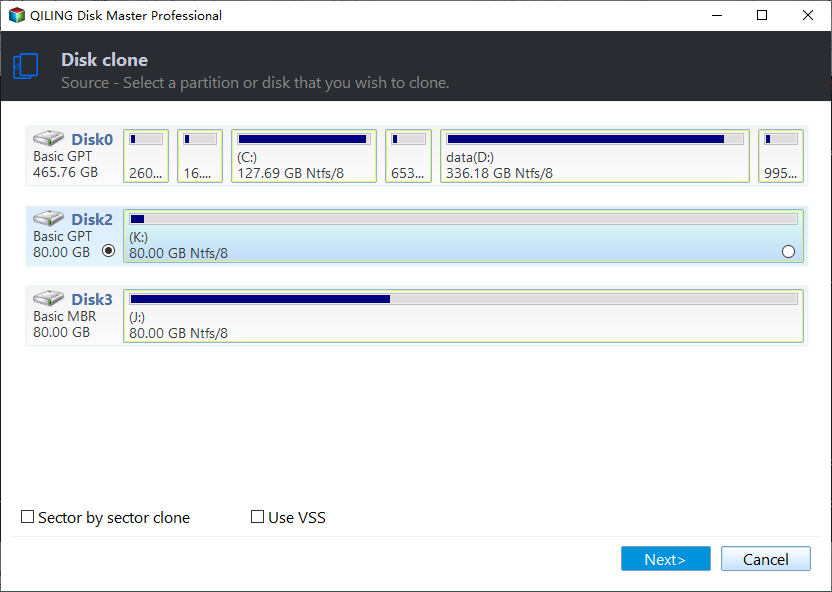
Step 2. Select the whole source disk row by model and capacity, rather than only C:, and click Next. Select the whole source disk and do not enable sector-by-sector mode to bypass a warning.
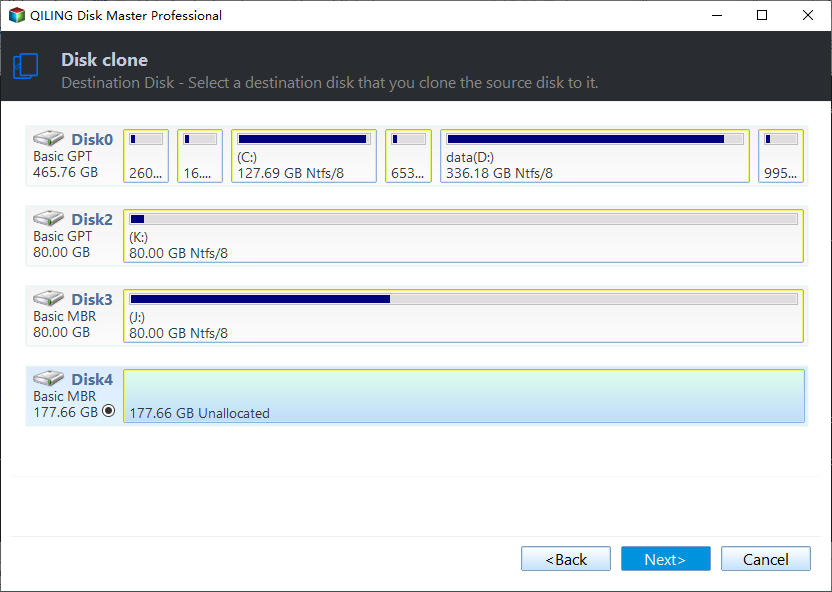
Step 3. Select the intended target disk by model and capacity and click Next. The target will be overwritten. Select the intended target and stop if the wizard reports an unsupported mismatch.
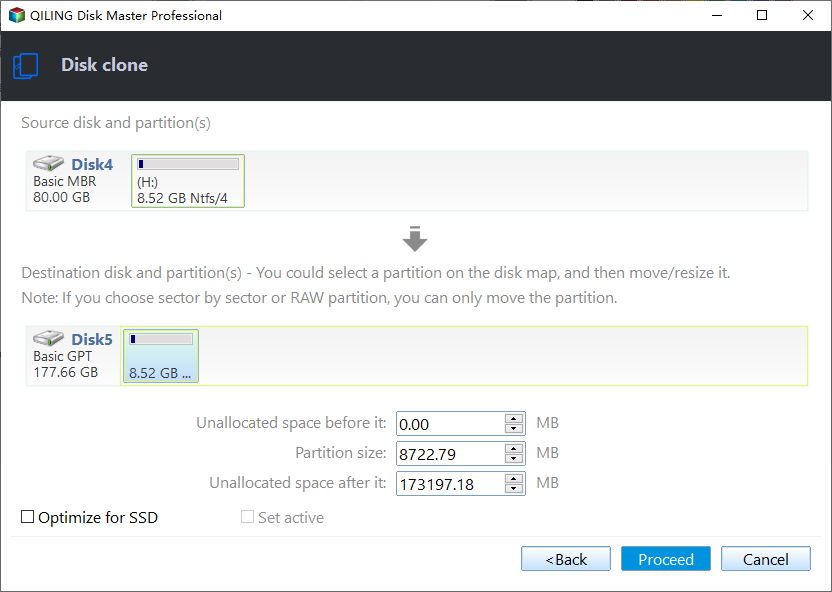
Step 4. Review source, target, and the proposed partition layout. Click Proceed, confirm the erase warning, and keep both drives connected. Confirm the layout and boot partitions only if the wizard accepts the pair.
Step 5. Install the target in its intended position and check it independently before erasing the source. Test the target independently; keep the source intact until a verified boot and file check.
Frequently Asked Questions
Can I change physical sector size by formatting?
No. Formatting can change the file-system cluster size, not the hardware-reported physical sector size.
Is 512e the same as 4Kn?
No. Both may use 4K physical sectors, but they expose different logical sector sizes.
Conclusion
Identify the actual logical sizes and use only a migration path that explicitly supports them; retain the original until independent testing passes.
Related Articles
- Sector-by-Sector SSD Clone
Understand exact-sector mode and its limits. - Image a Hard Drive
Consider a verified backup-and-restore route.
Products
Articles & Tutorials
- Data Recovery
- Data Backup
- File Recovery
- File Backup
- System Backup and Restore
- Disk and Partition Clone
- Technical articles
- Mobile articles
- Disk Master Help
- Windows Data Recovery Tutorials
- Windows Secure Delete Tutorials
- Windows Partition Management Tutorials
- Windows File Backup and Restore Tutorials
- Windows System Backup and Restore Tutorials
- Windows Disk Backup and Restore Tutorials
- Windows Clone Tutorials