How to Open .DAT Files in Windows 10/11
A .DAT file is a generic data file that can store various types of information, such as audio, video, PDFs, and more, often used by desktop programs.
DAT files are produced or used independently by different programs, serving as references for specific activities in each software. They can also contain attachments of corrupted emails. Despite their various uses, opening a file with the .dat extension can be a challenge, but it can be done, as explained in this article.
How to Open A .DAT File in Windows 10/11
To open a DAT file, first determine if it's text-based or video-based. Since the file format isn't immediately clear, it can be challenging. If it's a video or audio file, a media player is needed, while an image file can be accessed through a photo app.
Most DAT files are text-Text files can be opened with various text editors, such as Notepad, Notepad++, VS Code, and other similar applications. This allows users to view and edit the contents of the file.
Given below are the common programs used to open .dat files.
- Text editors (e.g., Notepad, TextEdit)
- Media players/Video editors (e.g., VLC, Qiling Video Editor)
- Image viewers (e.g., Microsoft Photos, IrfanView)
Text editors
You can view DAT files using a code-editing computer application like Windows Notepad, which is already present on your PC, as they are text-based.
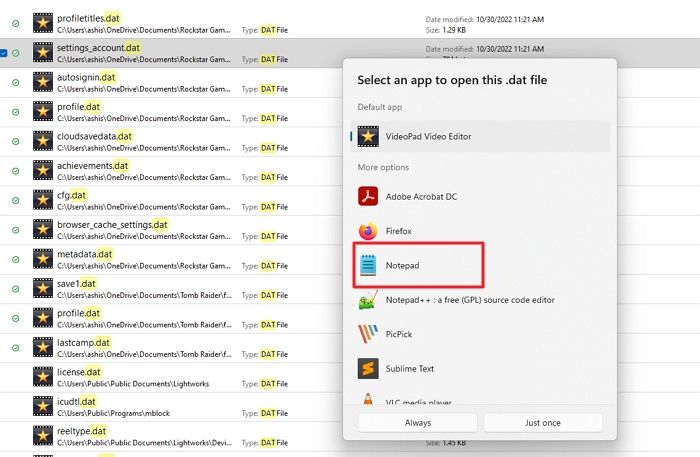
To open a DAT file on PC, right-click on the file and select the "Open with" option, then choose Notepad.
If it doesn't open in Notepad, you can try opening it in Notepad ++ or other apps from the Microsoft Store.
Media players/Video editors
Since video-If you have a DAT file, it's likely from video editing software, and you can access it using that same software. If you're unsure where the file came from, try opening it with a regular video player or editor, or check if you have video editing software like PowerDirector installed on your PC, as it might be the source of the file.
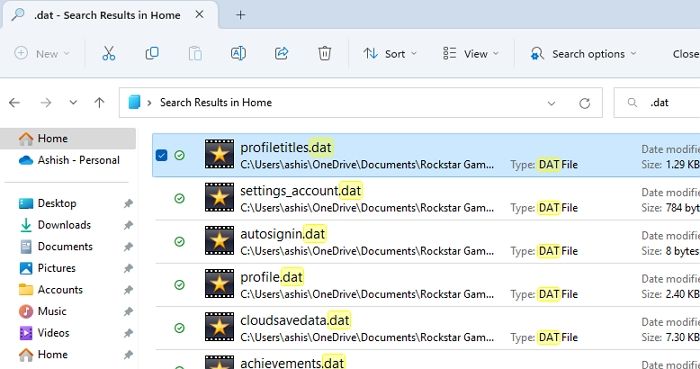
Windows lacks a built-You can play DAT files using a third-party video player/editor like VLC media player or Qiling Video Editor, as Windows Media Player only supports common formats.
Image viewers
The DAT file can be viewed by opening it with image editing apps like Microsoft Photos, IrfanView, etc. To do so, right-click on the file and select "Open with" and choose an image editor instead of Notepad or VLC.
Troubleshooting Issues with Opening .DAT Files
If your DAT file is not opening, you can try the list of applications mentioned below to open it, depending on the DAT file type, such as Microsoft Access, Microsoft Excel, or Notepad, among others.
You can open your DAT file via:
- Notepad
- Notepad ++,
- VS Code
- Text Edit
- Microsoft Word
- Windows Media Player
- VLC, Microsoft Photos
- Irfan View etc.
The .DAT file can be opened by identifying the correct program to use, and if none of the listed applications are working, troubleshooting techniques such as checking the file type and association can be employed.
Update the Applications
If you already have any of these applications installed on your PC that can open the .DAT file, and you still cannot open it, checking for updates to the associated program and updating it might help you to open the .DAT file.
Repair or Reinstall the Applications
You can repair or reinstall the associated program that opens a .DAT file by running a repair program from the application's menu or by downloading and running the repair program of the particular application online.
To resolve the issue of a DAT file not opening, uninstall the application that's supposed to open it, restart your PC, and then reinstall the application. Once the application is reinstalled, try opening the DAT file with it to see if it works.
Conclusion
You've learned how to open a .DAT file, but keep in mind that not all DAT files need to be accessed manually, such as those found in program folders, which store special data needed by the software.
Since the original contents of the .DAT file are unknown, it's a trial-and-error process to determine what it was used for.
The .DAT file extension is commonly used in various applications, but it cannot be accessed directly using a standard text editor. To open a .DAT file, alternative methods such as using a specific software or a data viewer can be employed, providing access to the file's data. These techniques can be effective in opening .DAT files on a PC.
Related Articles
- Solved: CMD.exe/CMD Keeps Popping up in Windows 10
- [Fixed Lately] How to Perform a Netsh Winsock Reset on Windows
- Efficient Tutorial: Create Multiple Partitions on USB Drive Using Diskpart
- [FIXED] Could Not Initialize Graphics System on Windows 10 Computer
- Free Download Easy Recovery Software to Restore Lost Data in 2022
Easy recovery software - Deep Data Recovery is available supports to recovering lost data like pictures, videos, documents, etc. on Windows 10/8/7/XP, etc., PC. Free download Qiling easy data recovery software and follow the instructions here to bring back your lost files immediately. - What Are Fsck Commands and How to Use It in Linux? [2023 Guide]
Learn what fsck commands are and how to use them in Linux to check and repair file system errors. Covers common fsck options, syntax, and step-by-step repair instructions.
Products
Articles & Tutorials
- Data Recovery
- Data Backup
- File Recovery
- File Backup
- System Backup and Restore
- Disk and Partition Clone
- Technical articles
- Mobile articles
- Disk Master Help
- Windows Data Recovery Tutorials
- Windows Secure Delete Tutorials
- Windows Partition Management Tutorials
- Windows File Backup and Restore Tutorials
- Windows System Backup and Restore Tutorials
- Windows Disk Backup and Restore Tutorials
- Windows Clone Tutorials