USB 3.2 Explained: Gen 1, Gen 2 and Gen 2x2 Speeds Compared
USB 3.2 is not one speed. The name covers three generations with different signalling: 5 Gbps, 10 Gbps and 20 Gbps. To make it more confusing, the 5 Gbps mode was once called USB 3.0 and then USB 3.1 Gen 1, and the 10 Gbps mode was USB 3.1 Gen 2 before both were renamed again.
For anyone buying an enclosure, a cable or a dock, the practical question is simple: which generation does this port actually run, and what will a real SSD achieve on it?
The Naming Problem
The USB Implementers Forum renamed the standards rather than changing the connectors, so the same hardware can carry two or three labels:
- USB 3.0 became USB 3.1 Gen 1, then USB 3.2 Gen 1.
- USB 3.1 Gen 2 became USB 3.2 Gen 2.
- USB 3.2 Gen 2x2 is new: it uses two 10 Gbps lanes at once.
A product labelled "USB 3.2" without a generation may be running at 5 Gbps. The label alone is not enough to judge performance.
The Three Generations
| Name | Link speed | Typical real throughput | Connector |
|---|---|---|---|
| USB 3.2 Gen 1 | 5 Gbps | 400 to 450 MB/s | Type-A or Type-C |
| USB 3.2 Gen 2 | 10 Gbps | 900 to 1000 MB/s | Type-A or Type-C |
| USB 3.2 Gen 2x2 | 20 Gbps | 1.5 to 1.8 GB/s | Type-C only |
Gen 1 uses 8b/10b encoding, which spends 20% of the link on overhead. Gen 2 and Gen 2x2 use 128b/132b encoding, so a larger share of the nominal speed reaches the drive. Neither number accounts for protocol overhead, which is why a 5 Gbps link tops out near 450 MB/s rather than 625 MB/s.
What Real Drives Achieve
The interface is usually not the limit for a spinning disk. A 2.5-inch hard drive transfers 80 to 150 MB/s, so even Gen 1 has room to spare. The difference appears with SSDs:
- A SATA SSD peaks around 550 MB/s internally, but a USB bridge usually limits it to 400 to 470 MB/s on Gen 1.
- An NVMe SSD in a Gen 2 enclosure can reach 900 to 1000 MB/s, still far below its internal speed.
- A Gen 2x2 enclosure is the first USB link that lets a fast NVMe drive stretch beyond 1 GB/s, and only with a compatible port and cable.
Random performance is governed by the bridge and the protocol, not only by the link speed. A Gen 2 enclosure that falls back to the older BOT protocol can be slower than a well-implemented Gen 1 unit.
Ports, Labels and Cables
Colour is a hint, not a standard. Blue ports are usually Gen 1, teal or red ports are often Gen 2, and vendors change the scheme without notice. Look for printed labels such as SS, SS 10 or 20Gbps, or read the motherboard manual.
Type-C says nothing about speed. A Type-C port can carry USB 2.0, 5 Gbps, 10 Gbps, 20 Gbps, USB4 or Thunderbolt, and the cable matters just as much:
- A charge-only cable may have no SuperSpeed pairs at all.
- Long passive cables may not sustain 20 Gbps. Gen 2x2 usually needs a short, full-featured Type-C cable.
- A hub shares one upstream link among its ports. A 5 Gbps hub cannot give two devices 5 Gbps each.
How to Check the Negotiated Speed
On Windows, a USB descriptor viewer such as USBTreeView shows the device tree, the negotiated link speed and the protocol in use. Device Manager shows the controller and the device but not the link rate directly.
On Linux, lsusb -t prints the tree with speeds in Mb/s, which makes a 480 Mbps fallback immediately visible.
A practical check is a large file copy. A SATA SSD that copies at 40 MB/s is running on USB 2.0, no matter what the port colour suggests. Move the cable to a rear port, remove hubs and try another cable before blaming the drive.
How USB4 Fits In
USB4 is a newer standard built on the Thunderbolt 3 protocol. It runs at 20 or 40 Gbps over Type-C, supports display and power delivery, and is backward compatible with USB 3.2 devices at their own speed. USB4 Version 2.0 raises the ceiling to 80 Gbps on certified hardware.
A USB 3.2 Gen 2 SSD in a USB4 port still runs at 10 Gbps. The port does not make the device faster; it only removes the port as a bottleneck for devices that can go higher.
For backups, a fast link shortens the window in which the drive must stay connected. Qiling Disk Master writes the image at whatever speed the link and the drive allow, and the job finishes when the last block is flushed.
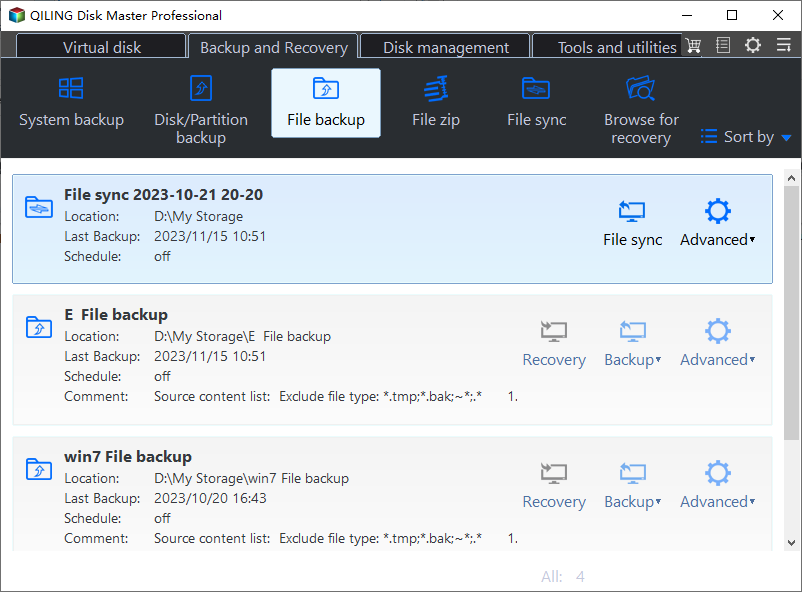
Step 1. Connect the external SSD to the fastest port you have, launch Qiling Disk Master, open the Backup and Recovery tab and click File backup.
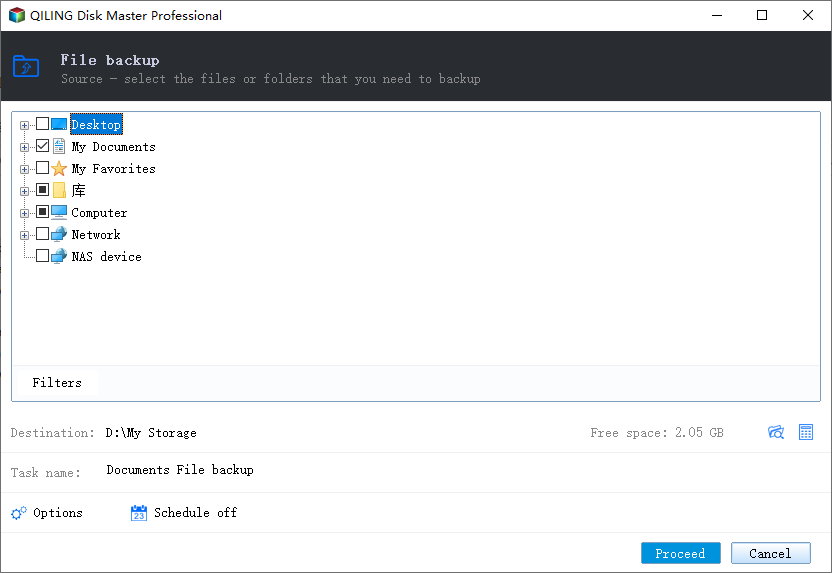
Step 2. Tick the files you want to protect and click the folder icon to set the destination.
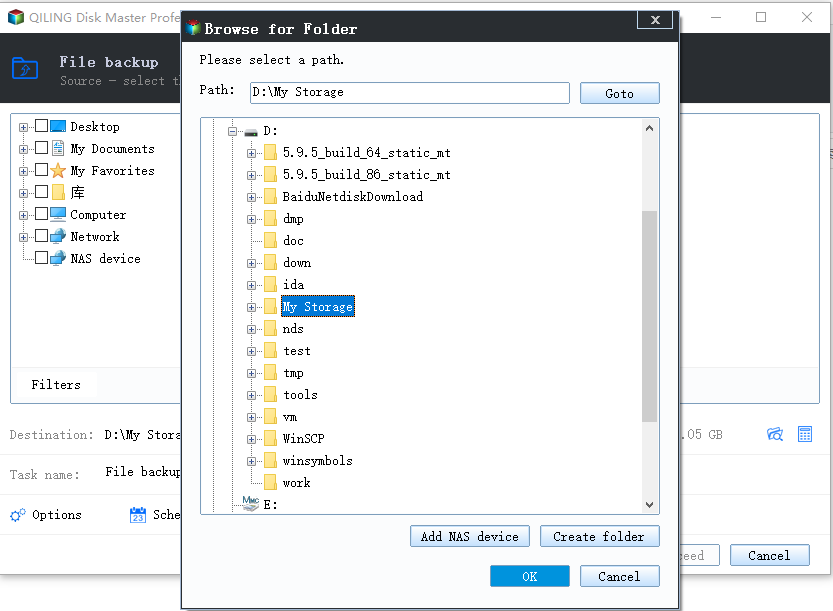
Step 3. Choose a folder on the USB 3.2 drive and click OK.
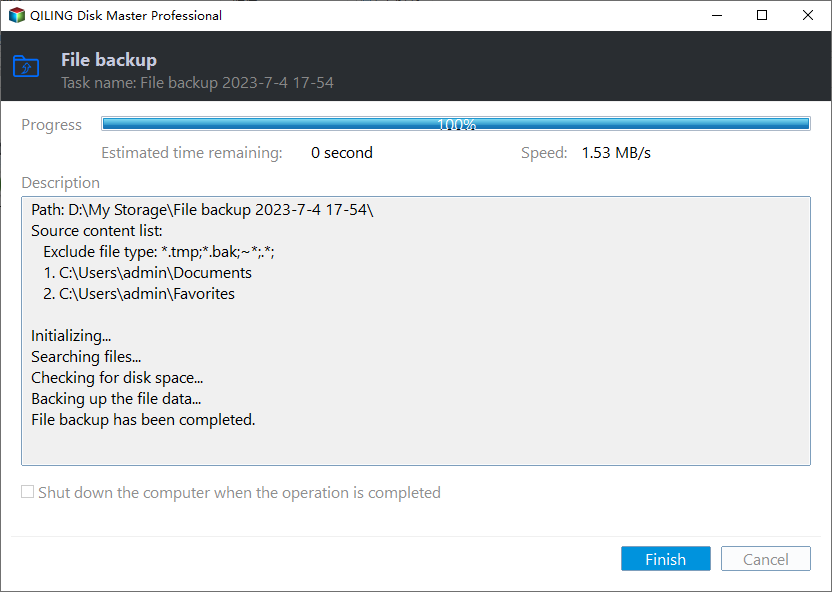
Step 4. Click Proceed and wait for the job to reach 100%. Check the reported speed: if it is far below the drive's rating, the link has negotiated a lower generation.
Is USB 3.2 the same as USB-C?
No. USB 3.2 is a speed standard; USB-C is a connector shape. A Type-C port can be slower than USB 3.2 Gen 1 or much faster than Gen 2x2.
Will a USB 3.2 drive work in a USB 2.0 port?
Yes, at USB 2.0 speed, roughly 40 MB/s. The connector may need an adapter, but the protocol negotiates downward automatically.
Do I need a special cable for 20 Gbps?
Yes. Gen 2x2 requires a full-featured Type-C cable rated for the speed, and both ends must support two lanes. Many cables sold as "USB-C" are limited to 5 or 10 Gbps.
Related Articles
- UASP vs BOT: Why Your USB Enclosure Is Slower Than It Should Be
The protocol that decides whether a fast link actually reaches the drive. - Quick Removal Policy in Windows
Write caching, safe eject and what changes when you unplug a drive. - Turn an Old Laptop Hard Drive Into an External USB Drive
Pairing a retired 2.5-inch drive with a USB enclosure and checking it first.
Products
Articles & Tutorials
- Data Recovery
- Data Backup
- File Recovery
- File Backup
- System Backup and Restore
- Disk and Partition Clone
- Technical articles
- Mobile articles
- Disk Master Help
- Windows Data Recovery Tutorials
- Windows Secure Delete Tutorials
- Windows Partition Management Tutorials
- Windows File Backup and Restore Tutorials
- Windows System Backup and Restore Tutorials
- Windows Disk Backup and Restore Tutorials
- Windows Clone Tutorials