UASP vs BOT: Why Your USB Enclosure Is Slower Than It Should Be
Two USB enclosures with the same chipset family and the same SSD can differ by more than 100 MB/s. The usual reason is the protocol they negotiate: UASP (USB Attached SCSI Protocol) or the older BOT (Bulk-Only Transport). Both move data over the same cable, but they organise commands very differently.
Understanding the difference explains why a drive that benchmarks well internally feels sluggish in an enclosure, and why a "USB 3.0" label says nothing about the protocol underneath.
What UASP Is
UASP is a standard that carries SCSI commands over USB 3.0 and later. It supports multiple commands in flight, uses separate queues for reads and writes, and reduces the CPU work needed for each transfer. In practice it behaves more like the AHCI or NVMe interface inside a computer than like a legacy USB mass-storage device.
It was introduced alongside USB 3.0 and is supported natively by Windows 8 and later, by modern Linux kernels and by macOS. Windows 7 needs a driver from the chipset or enclosure vendor.
UASP vs BOT
| Feature | BOT | UASP |
|---|---|---|
| Command model | One command at a time | Multiple queued commands |
| CPU load | Higher per transfer | Lower |
| Random small I/O | Weak, large latency per request | Much better with queue depth |
| Typical ceiling | Around 300 to 350 MB/s on SATA | Around 450 to 500 MB/s on SATA |
| TRIM pass-through | Usually no | Supported by many bridges |
The ceiling matters most for SSDs. A spinning drive rarely exceeds 150 MB/s, so BOT is not the limiting factor there. An SSD can saturate the link, and the protocol becomes the bottleneck.
What Both Ends Need
UASP is negotiated, not forced. Four things must line up:
- The enclosure bridge must support it. Most USB 3.0 bridges do; some very cheap ones do not.
- The USB port must be USB 3.0 or faster. A USB 2.0 port caps the link at about 40 MB/s regardless of protocol.
- The cable must carry the SuperSpeed pairs. A charge-only or damaged cable falls back to USB 2.0.
- The operating system must have a driver. Windows 8 and later include one; Windows 7 may need a vendor driver.
How to Check Which One Is Active
Open Device Manager and expand Storage controllers. If the enclosure is running UASP, the device is listed as USB Attached SCSI (UASP) Mass Storage Device. If it appears under Disk drives as a plain USB Mass Storage Device, or under Universal Serial Bus controllers without the UASP label, it is using BOT.
For more detail, use a USB descriptor viewer such as USBTreeView. It shows the negotiated speed, the interface protocol and whether the device exposes the UASP interface. A device can advertise UASP and still fall back if the port or cable cannot support SuperSpeed.
Why a Drive Falls Back to BOT
- Connected through a USB 2.0 hub or extension. The whole chain drops to the slowest link.
- Faulty or low-quality cable. The SuperSpeed pairs fail, and the device renegotiates at USB 2.0.
- Older enclosure firmware. Some bridges need a firmware update before they expose UASP reliably.
- Front-panel port wiring. A case with long internal USB 3.0 cables can cause negotiation failures; try a rear port.
- Windows 7 without a driver. The device works, but only through the generic mass-storage driver.
Swapping one variable at a time, starting with the port and then the cable, identifies the culprit faster than reinstalling drivers.
What to Expect in Real Use
On a 5 Gbps link, a SATA SSD in a UASP enclosure typically reaches 430 to 470 MB/s sequential. The same drive over BOT usually stops near 300 to 350 MB/s. A 10 Gbps NVMe enclosure with UASP can reach 900 to 1000 MB/s, while BOT would waste most of the link.
Random performance shows a larger gap than sequential numbers. Small queued reads are exactly what a clone, a backup or a virtual machine generates, which is why protocol choice matters for disk work, not just for benchmarks.
If you clone a system through an enclosure, confirm the link is running at SuperSpeed before you start. Qiling Disk Master reports the source and destination disks, and the clone time itself is a useful sanity check: a SATA SSD that takes hours to copy 200 GB is almost certainly negotiating at USB 2.0 speeds.
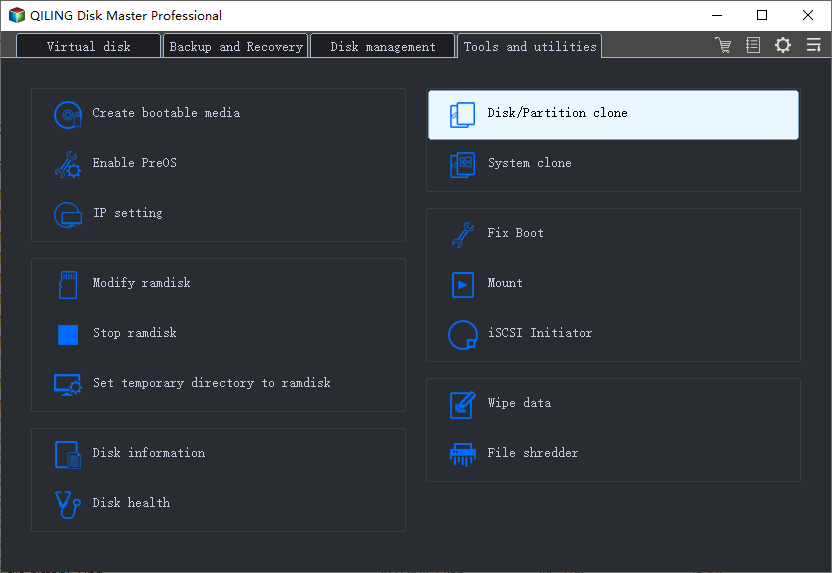
Step 1. Connect the destination drive, open Qiling Disk Master, go to Tools and utilities and click Disk/Partition clone.
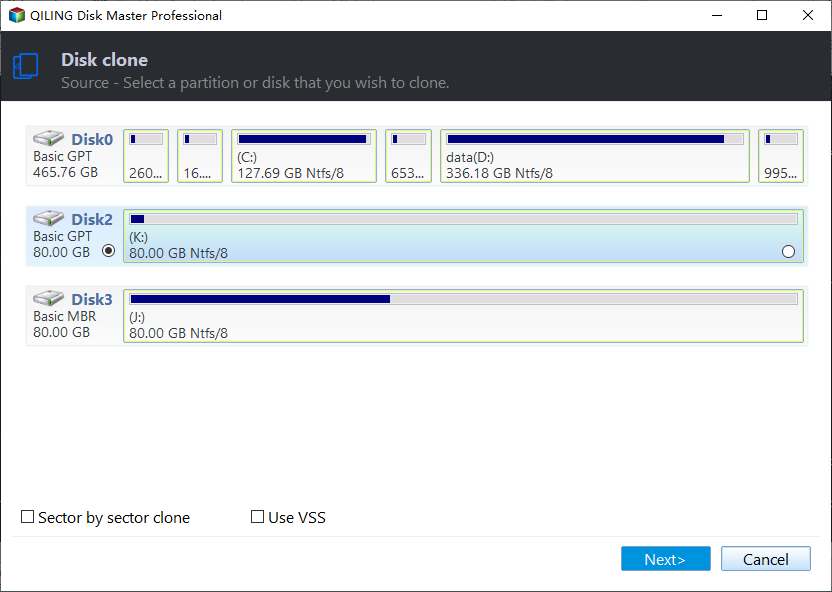
Step 2. Select the source disk and click Next.
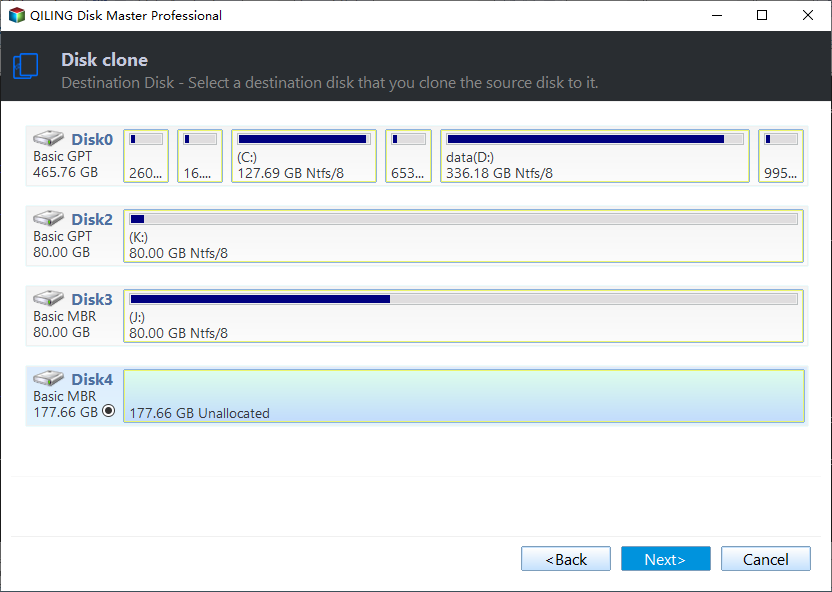
Step 3. Select the destination disk and click Next.
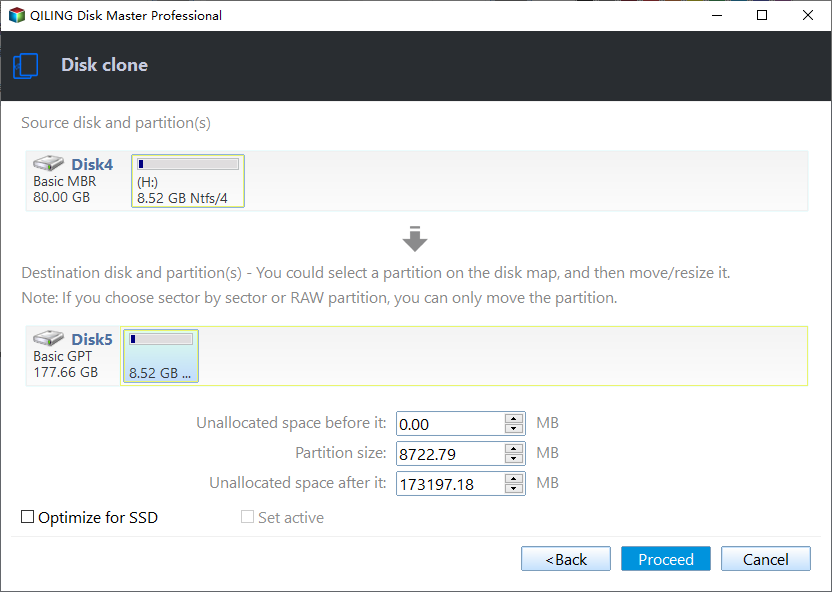
Step 4. Review the layout and click Proceed. If the throughput is far below the drive's rating, cancel and fix the USB link first.
Does UASP require a special cable?
It requires a cable that actually carries the USB 3.0 SuperSpeed pairs. Most data cables do; charge-only cables and damaged cables do not.
Can I force UASP on a BOT-only enclosure?
No. The bridge chip must support the protocol. A firmware update sometimes adds it, but many older bridges never will.
Is UASP safe for ejecting?
Yes, but the drive still needs to be ejected or the write cache flushed before you unplug it. The protocol changes performance, not the rules for safe removal.
Related Articles
- Turn an Old Laptop Hard Drive Into an External USB Drive
Choosing an enclosure and checking the drive before you rely on it. - USB 3.2 Explained: Gen 1, Gen 2 and Gen 2x2
Which link speed your port actually provides and what the labels mean. - Clone a Drive with an NVMe Enclosure
Cloning through an enclosure when the destination drive has no free slot.
Products
Articles & Tutorials
- Data Recovery
- Data Backup
- File Recovery
- File Backup
- System Backup and Restore
- Disk and Partition Clone
- Technical articles
- Mobile articles
- Disk Master Help
- Windows Data Recovery Tutorials
- Windows Secure Delete Tutorials
- Windows Partition Management Tutorials
- Windows File Backup and Restore Tutorials
- Windows System Backup and Restore Tutorials
- Windows Disk Backup and Restore Tutorials
- Windows Clone Tutorials