Quick Removal Policy in Windows: Safe Eject or Just Pull the Cable?
Windows 10 and 11 default external drives to the quick removal policy. The setting is the reason you can usually unplug a USB stick without clicking "Safely Remove Hardware" first, and it is also the reason some drives feel slower than the same hardware on another machine. The policy trades a small amount of write performance for a lower risk of data loss.
Understanding what changes between the two modes makes it easy to choose the right one for a flash drive, an external SSD or a backup disk.
What the Removal Policy Is
The policy controls whether Windows uses write caching for a removable device. With caching enabled, Windows acknowledges a write as soon as the data reaches its cache, then flushes to the device later. That is fast, but data still in the cache is lost if the cable comes out before the flush.
With caching disabled, Windows keeps the device's write queue drained and tells the file system to flush more often. Writes complete sooner on the media, so unplugging at the wrong moment is less likely to leave a damaged file system.
The Two Options
| Option | What it does | Best for |
|---|---|---|
| Quick removal | Disables write caching, keeps the device ready to disconnect | USB sticks, SD cards, drives moved between machines |
| Better performance | Enables write caching, requires an eject before removal | External SSDs used for backups, video editing or cloning |
Quick removal is the default since Windows 10 version 1809. On older builds the default was better performance, which is why advice written before 2018 often insists that every USB drive must be ejected.
How to Check and Change It
- Right-click Start and open Device Manager.
- Expand Disk drives, right-click the external device and choose Properties.
- Open the Policies tab. If the tab is missing, the device does not expose a removal policy.
- Select Quick removal or Better performance, then click OK.
The setting applies to that device, not to all USB drives. Windows remembers it by hardware identifier, so the same enclosure keeps its choice when reconnected to the same machine.
What It Costs in Performance
For large sequential copies the difference is small, because the drive itself is the bottleneck. For many small writes, better performance can be noticeably faster: a backup that creates thousands of files, a development build or a virtual machine stored on the external SSD all benefit from caching.
The cost is risk. With caching enabled, the drive must be ejected, not merely idle, before it is unplugged. A "Safely Remove Hardware" operation flushes the cache and tells the device to stop accepting writes. Skipping it can leave the file system dirty even if no application was writing at that moment.
How to Eject Properly
- Use the Safely Remove Hardware icon in the notification area, or the eject option in File Explorer.
- In Windows 11, Settings > Bluetooth & devices > Devices also offers a remove action for some devices.
- Close programs that hold files open on the drive. An open document or a running backup blocks the eject.
- If Windows refuses, check for a command prompt or terminal whose working directory is on the drive.
- PowerShell users can flush the cache explicitly with
Write-VolumeCache -DriveLetter Xbefore unplugging.
Even under quick removal, never pull the drive while a copy or a backup is still running. The policy reduces the risk; it does not make an active write safe to interrupt.
Common Misunderstandings
- "Quick removal means I can yank it any time." It means the cache is not holding your data. A write in progress can still corrupt the volume.
- "Ejecting is unnecessary on modern Windows." True only for devices set to quick removal and only when they are idle.
- "Better performance makes any USB drive faster." It helps with small writes. A slow flash drive with poor random performance stays slow.
- "The setting affects internal disks." It is a removable-device policy. Internal drives use write caching through a different mechanism.
If the external drive holds backups, the policy is only half the story. The other half is where the data goes. Qiling Disk Master can write a backup image directly to the external drive, and you can switch that drive to better performance while it is connected for the job.
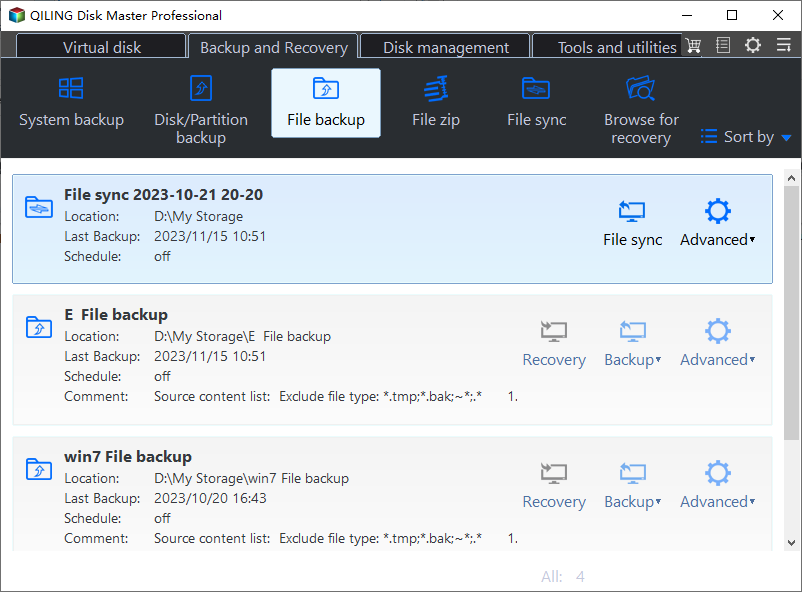
Step 1. Connect the drive, launch Qiling Disk Master, open the Backup and Recovery tab and click File backup.
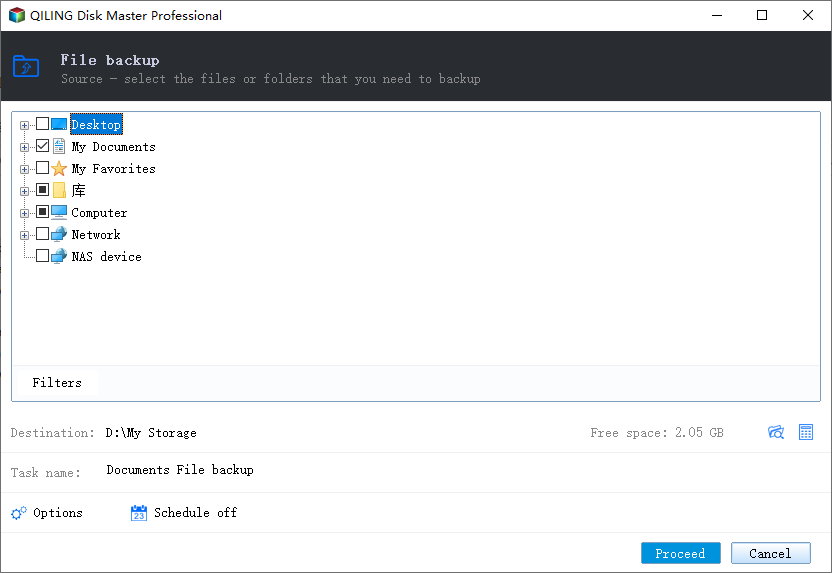
Step 2. Tick the files or folders you want to protect, then click the folder icon to set the destination.
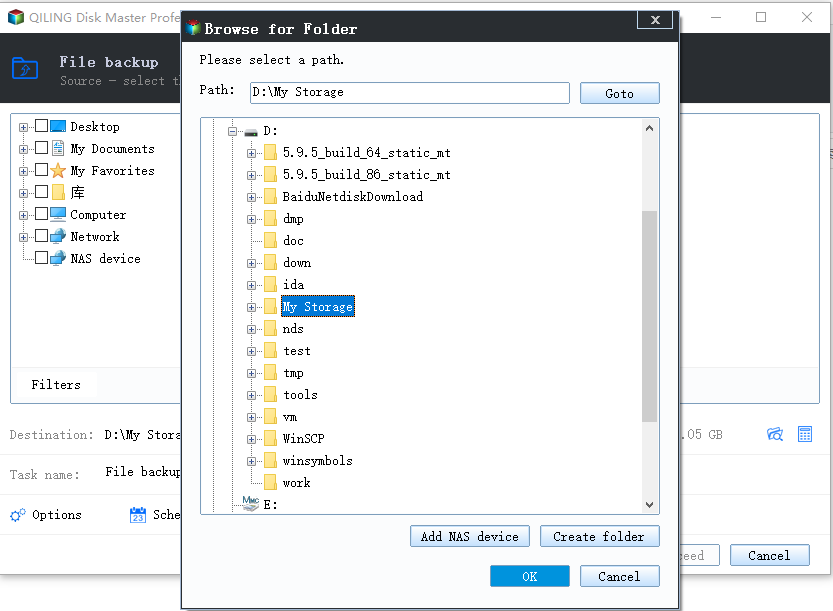
Step 3. Select a folder on the external drive, not on the system disk, and click OK.
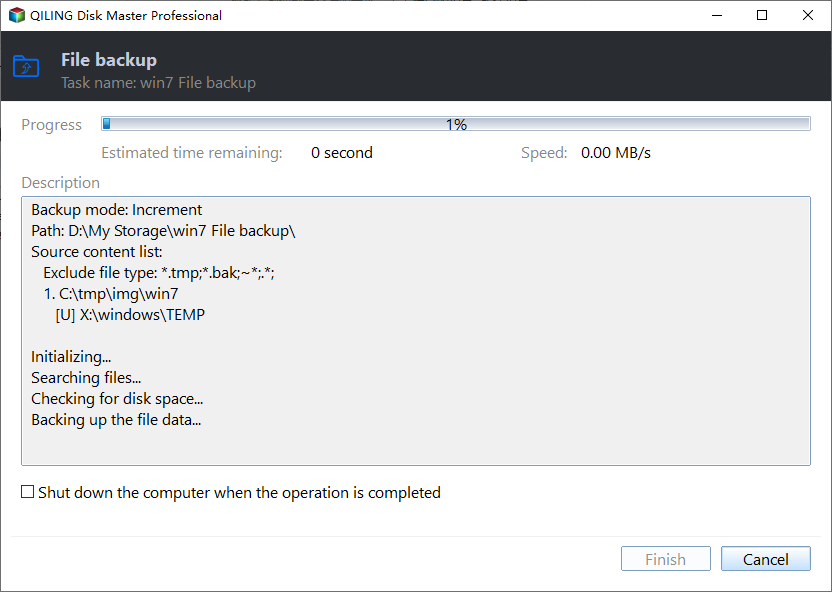
Step 4. Click Proceed to start the backup. When it finishes, eject the drive before unplugging it.
Does quick removal wear out a USB drive faster?
The policy itself does not add writes. Disabling caching can increase the number of small flush operations, but the effect on flash endurance is small compared with normal use.
Why is the Policies tab missing?
The device does not report itself as removable, or the driver does not expose the option. Some NVMe enclosures and card readers fall into this category.
Is it safe to unplug a drive that shows no activity?
Under quick removal, usually yes. Under better performance, eject first. Idle lights do not prove that the cache is empty.
Related Articles
- UASP vs BOT: Why Your USB Enclosure Is Slower Than It Should Be
The protocol behind the transfer, and why the same drive performs differently in two enclosures. - USB 3.2 Explained: Gen 1, Gen 2 and Gen 2x2
How to tell which link speed a port and cable actually deliver. - Air Gap Backup
Turning a removable drive into a copy that malware cannot reach.
Products
Articles & Tutorials
- Data Recovery
- Data Backup
- File Recovery
- File Backup
- System Backup and Restore
- Disk and Partition Clone
- Technical articles
- Mobile articles
- Disk Master Help
- Windows Data Recovery Tutorials
- Windows Secure Delete Tutorials
- Windows Partition Management Tutorials
- Windows File Backup and Restore Tutorials
- Windows System Backup and Restore Tutorials
- Windows Disk Backup and Restore Tutorials
- Windows Clone Tutorials