Genshin Impact Game Folder Empty, Get the Answers Here!
With technological advancements, video games have become more advanced and provide thrilling and realistic gaming experiences. Games like Genshin Impact have captured the attention of millions of gamers worldwide, offering breathtaking graphics, multi-player battles, and vast open worlds. On a PC, the game's files are saved on the hard drive, storing game data and progress.
However, your Genshin Impact game files sometimes might get deleted accidentally or in case of a system crash, resulting in the Genshin Impact folder being empty. This issue can be caused by various factors, and a tool can help recover the deleted files, ensuring a seamless gaming experience.
Help, Genshin Impact Game Folder Empty/File Missing
Genshin Impact players have reported that their game folder has become empty after playing, leaving them frustrated and confused. This issue is likely due to a glitch or bug in the game that is causing the folder to delete itself. If you're experiencing this issue, you may want to try reinstalling the game or contacting the game's support team for assistance.
A player's Genshin Impact game data was lost after restarting their computer, with only a few MBs of data remaining out of tens of GBs, resulting in the loss of all saved progress.
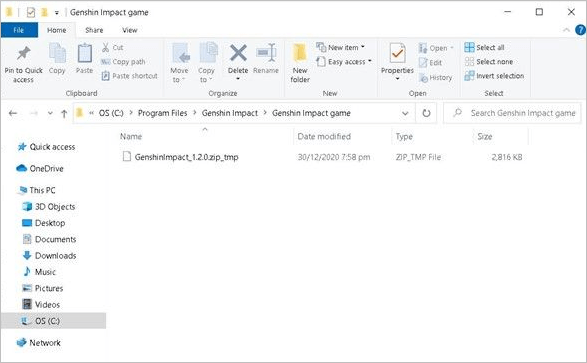
The Genshin Impact folder empty issue is a problem that players face, and in this article, we'll address it and provide solutions. We'll jump into the next part to explore the issue and its possible fixes.
Why Is My Genshin Impact Folder Empty
The Genshin Impact folder may be empty on some players' computers due to various reasons, leading to issues with playing the game or accessing saved game progress. This frustration can be caused by missing files within the folder, and the reasons behind this issue are not yet clear, but some possible explanations include software conflicts, file corruption, or incorrect installation.
Saved game data elsewhere: Players may have saved their game data to a different location on their computer, causing the Genshin Impact folder to appear empty despite the data still being present.
Accidentally deleted game data: Players may accidentally delete their game data, such as the Genshin Impact folder, while cleaning up their computers or trying to free up storage space, resulting in the loss of game progress.
Genshin Impact game bug: A possible reason for the empty Genshin Impact folder is a bug in the game itself, which can cause saved data to be lost.
Virus or malware: A computer infected with a shortcut virus or malware can cause data corruption or loss, potentially affecting saved game data in Genshin Impact.
Incorrect installation or update process: If the Genshin Impact game is not installed or updated correctly, it can result in data loss or corruption, causing the Genshin Impact folder to become empty.
How to Recover Genshin Impact Game Folder
If you're experiencing issues with your game progress on Windows 11/10/8/7, you're not alone. Data loss can be caused by user error or technical glitches, leading to frustration and anxiety. Fortunately, there's a solution: Deep Data Recovery software, which can help you recover your lost data with ease.
Qiling offers various solutions to everyday problems, including a data recovery tool that can recover deleted files from any storage device, regardless of its type. This tool is user-friendly, with an easy-to-use interface that provides multiple scanning and recovery options, making it a convenient solution for recovering lost data.
- This software can recover lost game data from various games, including Cyberpunk 2077, Minecraft, Monster Hunter, and Call of Duty, among others.
- The software offers a deep scan option to thoroughly search for lost files from various storage devices, including HDD, SSD, USB, and SD cards.
- The software allows users to filter and search for specific file types, such as PNG, PDF, DOC, and others, making it easier to locate and manage files of interest.
The tool uses advanced scanning algorithms to recover lost data quickly. To recover missing files from the Genshin Impact folder, follow these steps:
Step 1. Run Deep Data Recovery, choose "Specify a location", browse for the location where you lost the folder, and click "Scan" to start the scan.

Step 2. You can search for the target folder or filter the folder to find specific types of files.

Step 3. After the recovery process, you can preview the recovered folder. To finalize the recovery, click "Recover" and select a new and secure location on your PC or cloud storage to keep the recovered data.

Conclusion
Genshin Impact files can go missing due to various reasons, causing frustration for gamers who have invested hours of gameplay and progress. Whether it's an accidental deletion or a system bug, recovering lost files is crucial. To avoid such situations, downloading a free data recovery software like Qiling can be a handy tool to save your progress and data. This way, you can recover your files with ease and continue playing Genshin Impact without losing your progress.
Genshin Impact File Missing FAQs
This section aims to clarify any remaining doubts by addressing frequently asked questions. Let's get straight to the point and answer your queries without delay.
1. Where is the Genshin Impact game folder?
The Genshin Impact file location can be accessed using the directory: C:\Users\Username\AppData\Local\HoYoverse\GenshinImpact\.cache.
C:\Program Files\Genshin Impact\Genshin Impact Game
2. How do I fix missing files on Genshin?
If you're experiencing missing files on Genshin Impact, try the following steps to resolve the issue. Firstly, check if your game is up-to-date by checking the latest patch notes on the official Genshin Impact website.
Restart the game: Restarting the game can be a quick fix sometimes and resolves the issue of missing files.
Update the game: Ensure you have installed the latest Genshin Impact version.
Check for game file corruption: To check for game file corruption, you can verify the integrity of the game files through your gaming platform, such as Steam. This process checks the game files against a master copy to ensure they are correct and not corrupted.
Download the game again: If the error persists, try re-downloading the game and start with fresh files.
Contact the support team: If none of the above tips work, you can contact the support team of Genshin Impact via email (support@idiskhome.com).
3. What happens if you delete Genshin Impact files?
Deleting Genshin Impact files can cause issues with the game's functionality, including crashes, errors, and inability to launch the game. It may also affect the game's performance, graphics, and overall user experience.
- Deleting the game saves folder will result in the loss of all your progress, requiring you to restart from the beginning.
- Deleting important game files from the Genshin Impact folder may cause some game functionality to not work properly, such as animations.
- Deleting the caches can cause the game to stutter as they store valuable data that ensures faster gameplay.
- Deleting any file will have consequences that will be portrayed in the form of disruptive gameplay.
It's recommended not to delete unnecessary files from the folder, but if you accidentally deleted the local game folder, you can still recover your Genshin Impact data.
4. Will my Genshin account be lost if I delete it?
Deleting a Genshin Impact account will result in the permanent loss of all progress, character data, items, and in-game currency, and may not be recoverable even if linking to a social media profile or email on some platforms.
Related Articles
- How to Fix Character Encoding in PDF | Weird Symbols Fixes
How to fix character encoding in PDF? This page explains what causes PDF file corruption and guides you to repair the PDF file that shows junk characters or PDF's weird symbols with the repair tool - Qiling Fixo Document Repair. - [SOLVED] How to Recover Audio Files on Windows/Mac/Android/iPhone
There are times that you lose audio files like voice recordings, music and songs. Read this post and recover audio files on Windows/Mac/Android/iPhone in a few simple steps. Download and run Qiling audio recovery software to get back your recordings, music and songs on any device. - How to Recover Data from 2TB External Hard Drive in Windows 11/10/8/7
about recovering large amounts of data. Qiling data recovery software is a DIY solution that helps you recover data from a 2TB external or internal hard drive with simple steps, and can be downloaded by clicking the button. - 2023 Solutions| How to Recover Deleted GoPro Files [Videos & Photos]
This post provides the best way to recover deleted GoPro files on Windows and Mac. Download the best GoPro file recovery software - Deep Data Recovery and recover deleted GoPro videos and photos in a few simple steps. Keep reading to get more information. - How to Recover CR2 Files from SD Card on Mac/Windows PC
You can recover CR2 files from an SD card on a Mac or Windows PC, even if they're corrupted. To do this, simply scan the card, preview the deleted or lost files, and then restore them using the software. This will allow you to get back your CR2 files, even if the card has been formatted. - How to Recover Data after Diskpart Clean
Misusing Diskpart can lead to data loss on your computer. If you accidentally clean or delete important data using Diskpart, you can try to recover it by learning how to recover data after Diskpart clean.
Products
Articles & Tutorials
- Data Recovery
- Data Backup
- File Recovery
- File Backup
- System Backup and Restore
- Disk and Partition Clone
- Technical articles
- Mobile articles
- Disk Master Help
- Windows Data Recovery Tutorials
- Windows Secure Delete Tutorials
- Windows Partition Management Tutorials
- Windows File Backup and Restore Tutorials
- Windows System Backup and Restore Tutorials
- Windows Disk Backup and Restore Tutorials
- Windows Clone Tutorials