Hogwarts Legacy Missing Save | Recover Hogwarts Legacy Lost Save
Basic Information About Hogwarts Legacy
Hogwarts Legacy, a new open-world RPG game, was released in 2023 based on the Harry Potter series. Players can experience this fantastic game on Steam, Xbox, and PlayStation 5, with Nintendo Switch and PlayStation 4 releases planned for late 2023.
In Hogwarts Legacy, you play as a witch or wizard, exploring the wizarding world and uncovering a hidden secret from its history. Experience the wizarding world in a previously undiscovered period and face off against a terrifying antagonist who threatens the realm's future, battling trolls, Dark Wizards, goblins, and more.
Encountering Hogwarts Legacy missing save problems on PC can be frustrating. However, there's no need to worry as we have identified four effective methods to help you recover these missing saves with ease.
Keep reading the following parts, and you will recover Hogwarts Legacy Lost save soon.

Fix 1. Recover Hogwarts Legacy Missing Save with Software
If you've lost progress on Hogwarts Legacy on your PC, you can recover it by applying for a game data recovery program. Many players have used Deep Data Recovery, a software that can recover lost game data from your local PC. This tool can help you get your lost progress back.
Qiling Game Save Recovery
- Support for PS4 recovery and PS5 data recovery is available, allowing you to easily recover lost save files, such as those from Hogwarts Legacy.
- If you're experiencing issues with your Steam games, such as lost save games or data loss, don't worry - help is available. Many popular Steam games can have their data recovered, and for Red Dead Redemption 2 specifically, there are solutions to fix lost save game issues.
- Recover deleted or lost game files, including game screenshots, recordings, and saved game progress.
To recover your missing save in Hogwarts Legacy, you can follow these steps. First, make sure you have saved your game recently, as saves are automatically saved every 15 minutes.
Step 1. Run Deep Data Recovery on your computer, choose the drive where files were lost, and click "Scan". If the lost files were on an external storage device, connect it to your computer first.

Step 2. The software quickly scans deleted files and performs a deep scan to find more lost files. Once complete, you can use the "Filter" feature to quickly find specific file types.

Step 3. To recover files, click the "Preview" button or double-click on a file for a full preview. Then, select the desired files, click "Recover", and choose another safe location to save them all at once.

Fix 2. Recover Hogwarts Legacy Missing Save with Game Folder
Many Hogwarts Legacy players may know that there is a default Hogwarts Legacy game data saving folder on your PC, which can be used to restore missing saves.
Step 1. To access saved games for Hogwarts Legacy, open the folder located at C:\Users\%USER%\AppData\Local\Hogwarts Legacy\Saved\SaveGames\%RANDOM NUMBER%.
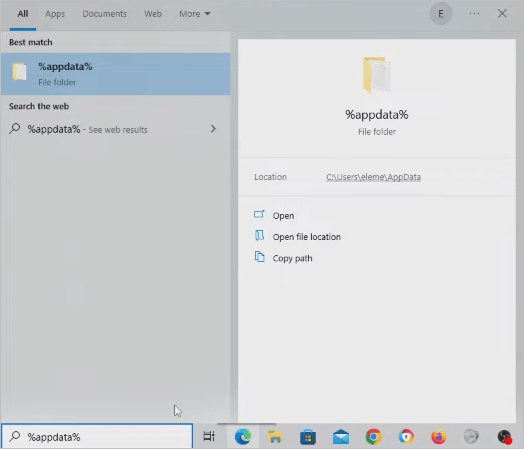
Step 2. To create a backup of the entire folder, copy the entire folder to a safe location, ideally on your desktop, to prevent data loss. This ensures that you have a duplicate of the original folder in case something goes wrong.
Step 3. Remove all Hogwarts Legacy saved files from the original folder except the oldest one.
Step 4. Launch a new save and new game. Play up till the initial autosave point. Copy the name of the most recent save file the game made before quitting.
Step 5. After that, change your original save file to reflect the name of the most recent save. The new save file will be replaced by this one.
Step 6. The saved progress of Hogwarts Legacy on your PC will be restored when you restart the game.
Fix 3. Restore Hogwarts Legacy Lost Save from Steam Cloud
When you lose your Hogwarts Legacy saves on Steam due to OS crashes or viruses, or get a new PC/laptop, you can restore the missing save from the Steam cloud. This method is also helpful for recovering missing Steam installed files.
Step 1. To verify the Steam cloud function is enabled and ensure Hogwarts Legacy supports Steam cloud, check your Steam settings and the game's save file storage preferences. In Steam, go to Steam > Settings > Cloud, and ensure the "Save game data" option is enabled.
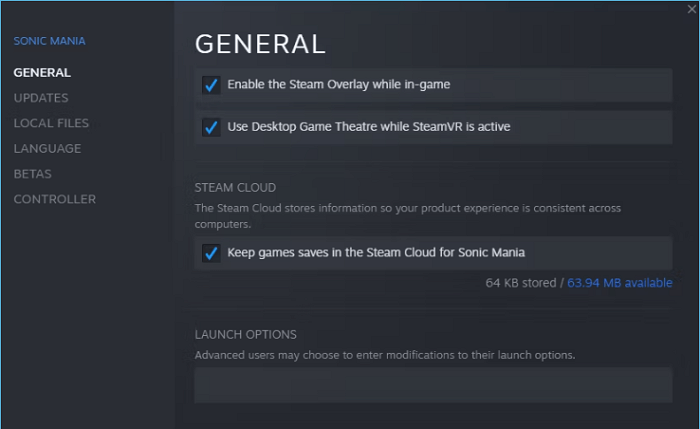
Step 2. To access your Steam Cloud page, you can follow these steps: Log in to your Steam account, then navigate to the Steam Cloud page. This page allows you to access your saved games and other data from any computer with an internet connection. By logging in, you can view and manage your saved games, as well as access any other data that is stored in your Steam Cloud account.

Step 3. You can view a list of your games, the number of available saves, and each save's size under the "Home" tab in your Steam account, specifically in the "See Steam Cloud" section.
Step 4. Click on Show Files for Hogwarts Legacy Steam Cloud.
Step 5. To download a Hogwarts Legacy file, click the "Download" button located on the right side.
Fix 4. Recover Hogwarts Legacy Missing Save Manually
If you can't fix the progress loss issue yourself, you can ask Qiling data recovery services for help. They specialize in data recovery and have been doing it for over 18 years, so you can trust them to quickly and safely recover your lost save in Hogwarts Legacy on Xbox.
Consult with Qiling data recovery experts for one-on-one manual recovery service. After a free diagnosis, we could offer the following services:
- Recover lost data from various storage devices, including hard disk drives (HDD), solid-state drives (SSD), external hard drives, USB flash drives, and pen drives, using data recovery software or services that specialize in retrieving deleted, formatted, or corrupted files and data.
- To fix disks that cannot be read or accessed due to bad sectors, you can try running a disk check or scan using built-in tools like `chkdsk` on Windows or `fsck` on Linux and macOS. These tools can identify and attempt to repair or recover data from bad sectors.
- Fix disks that become GPT-protected partitions
- To repair a damaged RAW drive that needs to be reformatted, you can use a data recovery software such as Deep Data Recovery Wizard. This software can scan the drive and recover any recoverable files, even if the drive is encrypted with BitLocker.
- Repair wiped data, unformat hard drive, install/uninstall software or driver, etc.
Bottom Line
To recover Hogwarts Legacy's missing saves, you can use the four methods we provided, or download the Qiling game recovery program to recover deleted or lost game files and progress, especially when you don't have local backup files or cloud sync.
Hogwarts Legacy Missing Save FAQs
If you're experiencing issues with Hogwarts Legacy and your save is missing, you might be wondering what's going on. Fortunately, there are some answers to common questions about this issue. For example, have you checked if your save is actually missing or if it's just not loading properly? Are you using the correct save slot or have you tried deleting and reinstalling the game?
What to do if Hogwarts Legacy saves data gone on PS5?
Follow the steps to fix Hogwarts Legacy save data gone on PS5:
- 1. To access saved data on your PS5, go to Settings, then Saved Data, followed by Game/App Settings, and finally Saved Data, after powering on your console.
- 2. To download a dataset to Cloud Storage, select Cloud Storage from the list of choices, then choose Download to Console Storage.
- 3. Choose Hogwarts Legacy, then download the saved Hogwarts Legacy game data on PS5.
What to do if Hogwarts Legacy autosave not working?
If you're experiencing issues with Hogwarts Legacy's autosave not working, there are four possible solutions to try. Firstly, you can try restarting your game, as this can sometimes resolve the issue.
- 1. Restore and save the progress manually on the computer.
- 2. Remove the damaged save file of Hogwarts Legacy.
- 3. Check the Hogwarts Legacy game files on Steam.
- 4. Activate the Administrator mode in the game Hogwarts Legacy.
How to restore Hogwarts Legacy missing save on my PC?
To restore your missing save in Hogwarts Legacy on PC, you have four available methods. You can try restarting the game, which may reload your last saved game.
- 1. Recover Hogwarts Legacy missing save with Deep Data Recovery
- 2. Recover Hogwarts Legacy missing save with a local game folder
- 3. Restore Hogwarts Legacy missing save from Steam cloud
- 4. Recover Hogwarts Legacy missing save with data recovery services
How do you save in Hogwarts Legacy?
To manually save your game in Hogwarts Legacy, press the stop button, select "Save your game", and choose one of the 10 available save spots. This is a more reliable way to save compared to auto-save, allowing you to save your progress at your own discretion.
Related Articles
- Unformat USB | Free Download USB Unformat Tool to Recover Data from Formatted USB
- Free Download JPEG Recovery Software to Recover Your Photos
- How to Recover Files from Corrupted External Hard Drive
- How to Recover Deleted Files After Windows 10 Updates [Fast and Safe]
- How to Recover Call Recordings in Mi Phone
If you've accidentally deleted call recordings from your Redmi note. You can recover them by following the guide for how to recover deleted call recordings in Mi Phone, which applies to models like Redmi note 3/4/5/6/7 Pro and more. - How to Recover Deleted Call Recordings from SD Card/Memory Card
To recover deleted call recordings from an SD card or memory card, follow these steps: first, stop using the card to prevent overwriting of data; next, download and install a reliable data recovery software such as Deep Data Recovery; then, connect the SD card to your computer.
Products
Articles & Tutorials
- Data Recovery
- Data Backup
- File Recovery
- File Backup
- System Backup and Restore
- Disk and Partition Clone
- Technical articles
- Mobile articles
- Disk Master Help
- Windows Data Recovery Tutorials
- Windows Secure Delete Tutorials
- Windows Partition Management Tutorials
- Windows File Backup and Restore Tutorials
- Windows System Backup and Restore Tutorials
- Windows Disk Backup and Restore Tutorials
- Windows Clone Tutorials