PS5 Data Recovery: How to Recover PS5 Game Save
PAGE CONTENT:
- Recover Game Data from PS5 Hard Drive
- Recover Lost Game Save from PS5 Backup
- Recover Lost Game Save from PS5 Cloud
If you're a PlayStation 5 gamer looking to recover your game progress, don't worry - it's possible! The PS5 boasts the best and fastest hardware the series has ever had, but saving and recovering game saves can be a bit tricky. However, with the right guidance, you can successfully recover your game progress and continue playing without losing any progress.
Recovering PS5 game data, including save games, is a crucial aspect of gaming, and various methods can help you achieve this. You can use the PS5's built-in features, such as the "Save Data" section in the Settings menu, to back up and restore your game saves. Additionally, cloud storage services like PlayStation Plus can also be used to store and retrieve your game data. Furthermore, third-party solutions and external hard drives can provide extra storage and protection for your game saves, allowing you to access them from anywhere and at any time.
What Is a PlayStation 5 [Overview]
The Sony PlayStation 5 is the latest and greatest video game console, launched in November 2020, and has received critical acclaim for its outstanding features, becoming the best-selling console by Sony since its release.
The PlayStation 5 is a standout console that offers exclusive games, a powerful processor, and a sleek design, making it a must-have for gamers and non-gamers alike. Whether you're a seasoned gamer or just looking for a new entertainment option, the PS5 is sure to be an exciting addition to your setup.

The PS5 has seen a recent spike in sales, particularly with the release of God of War Ragnarök, but many users are experiencing a common issue: the inability to recover saved data. This problem is likely due to the console's NVME Gen 4.0 support, which is 4x faster than its predecessor, the PS4. However, this speed boost may also contribute to data recovery issues.
- It's not easy to find;
- Not many users know how to explore settings;
- It doesn't feature simple options.
How to Recover PS5 Game Save
To recover a PS5 game saved, it's essential to understand the right way to do so, especially when playing games like Spider-Man: Miles Morales, God of War, or Days Gone. Fortunately, there are a few methods to recover PS5 game data, which can be found in the provided video.
- 0:18 - How to recover game save data
- 0:50 - Recover from cloud storage
- 1:18 - Download saved data
If you're struggling to understand the steps to recover PS5 data, don't worry - this article will break it down in a simplified way. We'll explore each method to recover your data in a linear and easy-to-understand manner, making it easier to comprehend. We'll dive in further to explain each step, so you can follow along and recover your PS5 data with confidence.
Method 1. How to Recover Game Data from PS5 Hard Drive
To recover data from a PS5, start by connecting it to a PC or removing the hard drive and attaching it to your computer. This allows for easier data recovery and helps locate specific game saves.
If you need to recover data from your PS5 or its hard drive, you'll require professional data recovery software. Qiling Data Recovery Wizard is a highly-regarded tool among experts globally, making it a top choice for this task. Its professional capabilities and reputation make it the ideal solution for recovering data from your PS5 or hard drive.
Qiling HDD Recovery Tool
- It's known for recovering lost game data and game saves for platforms such as PS4, PS5, and XBOX.
- On PC, it can recover lost game data from various platforms such as Steam, Ubisoft Connect, Rockstar Social Club, and others.
- It can recover deleted files from various devices such as external hard drives, SD Cards, USB flash drives, cameras, and more.
The tool is not only reliable for recovering safe game files but also comprehensively recovers music, video files, and documents. Its user-friendly options make it convenient for users, making it a must-have for restoring lost PS5 game files. To use it, you can follow the steps to recover your lost game files.
To recover PS5 game saves, start by connecting your PS5 hard drive to your PC. This will allow you to access and transfer your game saves to your computer, effectively backing them up. Once connected, you can follow the necessary steps to recover your PS5 game saves.
Step 1. Choose and scan the external hard drive
- Download and install Qiling Data Recovery on your PC or laptop.
- Connect the external hard drive to your computer.
- Run Qiling Data Recovery Wizard and select the external drive from the External drives list. Next, click on "Scan for lost data" to initiate the recovery process.
Step 2. Check the scan results
- Qiling data recovery software scans the selected drive for all data, including deleted, corrupted, and existing data.
- To quickly locate files of a specific type, such as pictures, word documents, excel files, pdfs, videos, or emails, you can utilize the Filter feature.
Step 3. Preview and recover data
- Double-clicking a file from the scanned results to preview.
- Choose the files you want and click "Recover".
- When recovering files from a corrupted drive, select a different drive to save the recovered files instead of the original one to avoid overwriting the existing data. This ensures that the recovered files are safely stored on a separate drive, preserving the original data and preventing any potential loss.
Method 2. Recover Lost Game Save from PS5 Backup
To recover lost saved game data on your PS5, you can use the console's built-in backup feature to restore the files. Make sure your game is downloaded and ready to run, then navigate to the PS5 settings to explore and restore the lost files. This method allows you to recover your saved game data without needing to start over from scratch.
Step 1. Head into Settings and click on "Saved Data and Game/App Settings".

Step 2. In the games, pick either PS4 or PS5 (depending on whichever save game you're trying to recover).

Step 3. Now pick the game and click on "download to Console Storage".

Step 4. Confirm the replacement if asked.
After completing the steps, it'll take a minute or two to download and merge the saved game files with your installed/downloaded game. Once this process is complete, you'll be able to see the saved game in the game's menu.
Method 3. Restore Lost Game Save from PS5 Online Storage
To restore your saved game data using the same settings, but with a slight change in game type, you'll download from cloud storage instead of console storage.
Step 1. To access your saved data and game/app settings on your PS5, go to the Settings menu and scroll down to the Saved Data and Game/App Settings section.
Step 2. Now, pick either the Saved Data from PS5 or PS4.
Step 3. To download a file to the console's storage, first select "Cloud Storage" from the options, then click on "Download to Console Storage" in the next step.
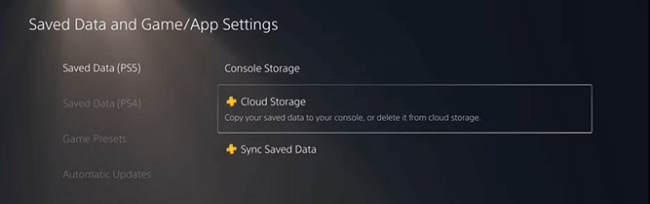
Step 4. And pick the game you wish to recover the saved game for.
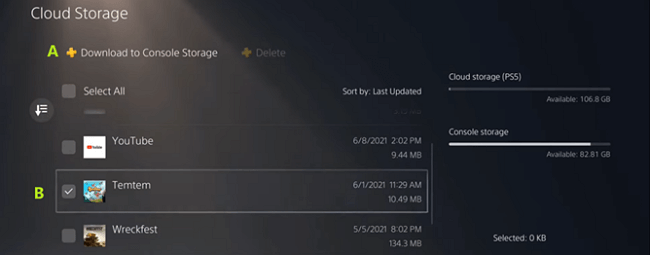
Step 5. Wait for the download to finish and confirm when prompted.
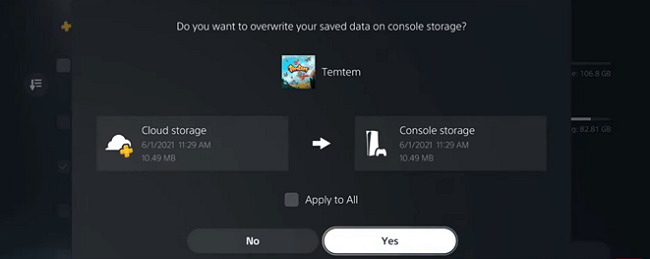
Once you've saved your game, you can access it from the game menu and continue playing from where you left off. This allows you to pick up where you stopped and resume your progress.
Bonus Tips: How to Back Up PS5 Data to USB External Hard Drive
To avoid listing your important saved files again, back up your PS5 game data. If you haven't done that, we'll show you how to thoroughly backup your saved files in this tip.
- To access the Saved Data and Game/App Settings on your PS5, navigate to the console's settings menu and click on the option labeled "Saved Data and Game/App Settings".
- Inside the settings, click on "Saved Data (PS5)".
- Then click on "Sync Saved Data".
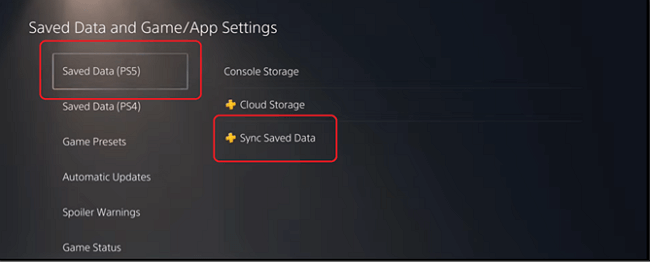
To create an online backup for your saved files on your PS4, repeat the process of saving your data in Saved Data (PS4). This will allow you to easily recover your files if you lose them in the future.
Conclusion
To conduct a successful PS5 data recovery, it's essential to follow these key steps. Not only will they ensure that your data is recovered easily, but they will also secure them for the future. To do this effectively, you may need the help of a third-party tool.
To recover data from your PS5, you can use Qiling data recovery software to restore both deleted and lost files. By following the steps mentioned in this article, you can successfully retrieve your PS5 files.
PS5 Data Recovery FAQs
For any further questions, you will find their answers in this section:
1. How do I recover lost data on PS4?
To recover lost PS4 game files, follow the specific steps for PS4, as the process differs from PS5. You'll need to follow the provided instructions to retrieve your lost data.
- Open Settings and head into Application Saved Data Management
- Find Saved Data in Online Storage
- Then click on Download to System Storage
- Then find the game you need the save file for
- After that, click on Online Storage
- Then click on Download
- This will restore your PS4 game files.
2. How do I fix corrupt game data?
To fix corrupted game data on your PS4, go into Safe Mode, select "Rebuild Database" and then "Update System Software" to restore your system to its original state and fix the corrupted data.
- Turn off your PS4 completely
- Press and hold the power button on your device until you hear two beeps, indicating that it has been successfully shut down.
- To connect your PS4 controller, use a USB cable instead of trying to connect wirelessly, as the wireless connection may not be detected.
- To fix the issue, go to the safe mode menu, click on Rebuild Database, and follow the prompts to complete the process.
3. Can you recover deleted data on PS5?
To recover a game on the PS5, head into Saved Data and Game/App Settings and click on Saved Data (PS5). From there, select the game you want to recover and follow the prompts to restore the game files. This process may take a few seconds to complete.
4. Where is saved data stored PS5?
To find the data storage in PS5, go to Saved Data and Game/App Settings, then click on Saved Data (PS5), and select either cloud storage or console storage to see which one is using more data.
Related Articles
- How to Undo Quick Format on Hard Disk
- How to Repair Windows 11 and Fix Corrupted Files
- Raw Drive Recovery: How to Recover Data from RAW Drive with Ease
- Btrfs RAID Recovery with NAS Data Recovery Software [Solved with Proven Solutions]
- How to Recover Deleted Videos from Webcam in Computer
This article provides a step-by-step guide on how to recover deleted webcam videos, troubleshoot webcam issues, and reinstall webcam drivers. It offers solutions for common problems such as webcam not working, and provides a comprehensive guide on how to recover deleted webcam videos. - How to Recover Deleted WhatsApp Audio from PC/Mac/iPhone
Here are the step-by-step guide for how to recover deleted WhatsApp audio files from PC, Mac and iPhone.
Products
Articles & Tutorials
- Data Recovery
- Data Backup
- File Recovery
- File Backup
- System Backup and Restore
- Disk and Partition Clone
- Technical articles
- Mobile articles
- Disk Master Help
- Windows Data Recovery Tutorials
- Windows Secure Delete Tutorials
- Windows Partition Management Tutorials
- Windows File Backup and Restore Tutorials
- Windows System Backup and Restore Tutorials
- Windows Disk Backup and Restore Tutorials
- Windows Clone Tutorials