2 Proven Ways to Recover Civilization VI Game Save
If you've ever experienced the dread of losing your Civilization VI game progress, there's hope for recovery. Despite the frustration of unexpected crashes or error messages, proven methods exist for retrieving in-game saves and getting back on track. Experienced gamers have successfully used these strategies to recover their Civilization VI game save data, and you can too. Read on to learn how to restore your seemingly lost digital world.
What Is Civilization VI [Everything About This Game]
Civilization VI, developed by Firaxis Games, is a turn-based strategy game released in October 2016, and is the sixth installment in the Civilization series, which has sold over 35 million copies worldwide since its inception in 1991.
In Civilization VI, players can relive world history and build their own empires to conquer the globe. This game focuses on the series' strengths, such as city and empire building, research, combat, and diplomacy, offering an engaging strategy experience. Players can choose to cooperate or compete with each other, making for a unique and immersive experience that takes them on a journey through history.

Some Civilization game players are experiencing an issue where they've lost their saved game files, with many taking to the Steam community to share their frustrations and seek help.
"Sid Meier's Civilization VI - I played for 3 hours today, then before I quit, I hit ESC and pressed quick save. I also have the options set to auto-save every one turn and keep ten auto-saves. Then I started a new game to test some things and never manually saved it. But now my main game saves are just gone. No autosaves (except turn 1 of my test game), and no quick save. What's going on? Does the game automatically wipe every save if you start a new game?"
It was unfortunate that after hours of progress and commitment to Civilization VI, players had an unexpected loss of the game save. Where there's a will, there's a way. You have reliable ways to recover Civilization VI game saves in Windows 11/10/8/7. Read on to restore Civilization VI game data.
Method 1. Recover Civilization VI Saved Game Data via Autosave
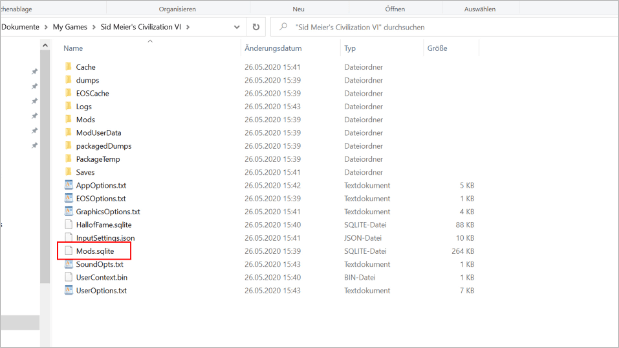
The game Civilization VI has a notable auto-save feature that creates local game saves. Users can find the Civilization VI file location in a specific directory, where they can access and manage their game saves.
C:\Users\\Documents\My Games\Sid Meier's Civilization VI\Saves
- To recreate your PBC game, have the last human player in the list go to Multiplayer > Load Game.
- Navigate to the autosave file for your PBC game, which will launch a fresh instance of the game.
- Players are automatically assigned to a Civilization based on the turn number when they join the game.
If you joined the game with the incorrect assignment, you will know it because the game will not work as intended. If this happens, you will need to delete the game and recreate it with the correct assignment. This will ensure that the game functions properly and that you can enjoy it without any issues.
Method 2. Recover Civilization VI Game Save with Software
If you can't find the Civilization VI game save from your autosave, you can consider using data recovery software like Qiling Data Wizard for assistance. It is known for being easy to use and effective.
Qiling Game Data Recovery Software
- To recover lost PC game data, including Genshin Impact, Monster Hunter, Stray, and others, you can try the following methods: Check your system's Event Viewer for any error messages related to the game, run a System File Checker (SFC) scan to identify and replace corrupted system files, and use a data recovery software to scan your hard drive for lost files. Additionally, you can check your game's cloud save data, if available, and contact the game's support team for assistance.
- You can restore deleted files from various storage devices, including hard drives, SSDs, SD cards, CF cards, TF cards, and USB flash drives, using specialized software or tools. These tools can scan the device and recover deleted files, even if they've been overwritten.
- Data recovery is supported on various operating systems, including Windows 11, 10, 8, and 7, as well as macOS 13.0 and OS X 10.9.
To recover your lost Civilization VI game save, download a data recovery software on your PC or laptop and follow the steps provided to retrieve the lost file.
Step 1. Select a drive and start scanning
Launch Qiling Data Recovery Wizard, hover over the partition where data was lost, and click "Scan".

Step 2. Check and preview scanned files
To narrow down the scan results, use the file format filter on the left or upper right corner. This will help you find the specific files you need. Once you have the desired files, you can click the "Preview" button or double-click a file to view its content, if desired.

Step 3. Recover lost data to a secure location
To recover lost data, select the file, click the checkbox next to it, and then click "Recover". This should restore the lost data to a secure location, and it's recommended that you don't store the recovered data on the original disk to avoid further data loss.

After recovering the files, replace the old files with the recovered ones to ensure that the recovered data is up-to-date and accurate. This step is crucial to prevent any discrepancies or inconsistencies between the original and recovered files.
C:\Users\\Documents\My Games\Sid Meier's Civilization VI\Saves
Conclusion
If you've lost or deleted your Civilization VI game data, there are two methods you can try to recover it. First, check for autosave files, which might still be on your computer. Alternatively, you can use free data recovery software to scan your computer for any remaining game data. Keep in mind that these methods may not always work, but they're worth trying if you want to salvage your progress in the game.
Do you have other tips on recovering Civilization VI game save data? Let us know! If these solutions are workable, share this post on your Twitter, Facebook, or Instagram.
Civilization VI Data Recovery FAQs
To recover your Civilization VI data, first, check if the game is still installed on your computer. If it is, try launching it and see if your saved game is still available.
1. Where are Civ 6 autosave files?
The files for vanilla stuff (except text info, icons info, and set-up screen info) are stored in files located at:
- C:\Program Files (x86)\Steam\SteamApps\common\Sid Meier's Civilization VI\Base\Assets\Gameplay\Data
Set-up screen info (which has its database) is at:
- C:\Program Files (x86)\Steam\SteamApps\common\Sid Meier's Civilization VI\Base\Assets\Configuration\Data
DLC civs and scenarios is at:
- C:\Program Files (x86)\Steam\SteamApps\common\Sid Meier's Civilization VI\DLC
2. How do I transfer saves in Civ 6?
To link your 2K account and enable multi-platform cloud save, go to the in-game options, select the 2K account option, and tick the multi-platform cloud save box. This will allow you to save and load your game across different platforms.
3. How do I get my game progress back?
To recover lost Civilization VI game data without a backup, you can use Qiling hard drive recovery software to scan and retrieve the deleted files.
- Open the software and select the drive
- Click the Scan button to start the scanning process
- To recover game data, select the desired game data and click the "Recover" button to restore it.
- Replace the old data with the new data at: C:\Users\Documents\My Games\Sid Meier's Civilization VI\Saves
Related Articles
- Top 10 Best Video Recovery Software [Free]
- MP4 Repair | Repair Corrupted MP4 Files on Windows and Mac [5 Top Tips]
- How to Recover Deleted VHD and VHDX Files in Windows 10/11
- The Top 10 Data Recovery Services Near Me in New York City
- Recover My Files Free Download | Recover My Files in Windows PC
Recover My Files is a tool that helps users recover deleted and lost files on their Windows PC, but there's an alternative available for both Windows and Mac. - How to Recover Deleted Photos/Videos/Files from Phone Memory Card
If you've lost photos, videos, or deleted files from your phone's memory card, you can try using Deep Data Recovery software to recover them quickly.
Products
Articles & Tutorials
- Data Recovery
- Data Backup
- File Recovery
- File Backup
- System Backup and Restore
- Disk and Partition Clone
- Technical articles
- Mobile articles
- Disk Master Help
- Windows Data Recovery Tutorials
- Windows Secure Delete Tutorials
- Windows Partition Management Tutorials
- Windows File Backup and Restore Tutorials
- Windows System Backup and Restore Tutorials
- Windows Disk Backup and Restore Tutorials
- Windows Clone Tutorials