Top 10 Best Video Recovery Software [Free]
Losing essential video files can be stressful, especially when they contain cherished memories. Whether it's due to syncing issues with your smartphone, ransomware, or accidentally deleting files, the situation can be frustrating. Fortunately, there are solutions available to help you recover lost video files. In this article, we've compiled a list of the 10 best video recovery software for PC, which can help you retrieve your lost data and restore your memories.
Selection Criteria of Video Recovery Software
Choosing a video recovery solution can be a daunting task, as there are many options available, each with varying levels of effectiveness. Without personal experience or recommendations from others who have successfully recovered lost videos, it's difficult to know which tool to choose, and selecting a random option may result in a tool that is vulnerable and fails to deliver on its recovery claims.
To make the process easier, we've developed selection criteria that should be considered before choosing a video recovery software. These criteria will help you understand how to select the best video recovery tool, taking into account factors that ensure a successful video recovery.
Ease of Navigation: Video recovery software with a simple interface is easy to operate, even for non-tech-savvy users, making it a crucial factor to consider when selecting the right software.
Features: When choosing a data recovery software, consider its features to ensure they meet your needs. For instance, if you want to preview files before recovering them, select a software that offers this capability. This will help you verify the recoverability of your data and make an informed decision.
Compatibility: Before buying video recovery software, it's essential to check its compatibility with your device. A good recovery utility software should be compatible with both old and new operating system versions, including Windows and Mac. This ensures that the software can effectively recover your lost videos regardless of your device's specifications.
Damage and Recovery: Video files may not be recoverable due to malware, ransomware, or hard drive issues, and sometimes the device is damaged or broken. So, it's essential to ensure that the software or service you're buying can resolve your actual problem and recover data from your drive.
Location scanning:Before making your final decision, ensure that the software you choose can efficiently and reliably locate your lost video files from your hard drive without altering the file extension.
Top 10 Best Video Recovery Software [Free]
There are numerous video recovery software available online, but many may not be safe or reliable, and some may charge a fee. To save time and money, we've compiled a list of the top 10 free video recovery software that can meet your needs, each with its own pros and cons, so you can choose the one that best suits your requirements.
Here is the list of top 10 video recovery software:
- 1. Deep Data Recovery Free
- 2. Stellar Photo Recovery
- 3. Recuva
- 4. Disk Drill Data Recovery
- 5. Disk Doctor Photo Recovery
- 6. Remo Recover Media
- 7. DMDE Free Edition
- 8. TestDisk
- 9. Puran Data Recovery
- 10. DiskDigger
1. Deep Data Recovery Free - Highly Recommended
Deep Data Recovery Free is highly recommended and has a higher success rate. It can restore videos from desktops and laptops in 3 simple steps: Select, Scan, and Recover. It can recover data from memory cards, SD cards, and other external devices, even if it was lost.
Qiling Video Recovery Software
- Recover lost or deleted files, documents, photos, audio, music, and emails with the help of data recovery software, which can scan your device, identify deleted files, and restore them to their original location, or save them to a new location, helping you retrieve important data that was lost or deleted due to accidental deletion, formatting, virus attacks, or other reasons.
- You can recover deleted videos from various storage devices, including hard drives, memory cards, flash drives, digital cameras, and camcorders, even after emptying the recycle bin.
- Video recovery software can help salvage lost footage under various circumstances, including sudden deletion, formatting, hard drive corruption, virus attacks, and system crashes. This technology enables users to recover their videos even after they've been accidentally deleted, reformatted, or corrupted due to hardware or software issues.
This software offers a range of data recovery programs to tackle data loss issues from simple to complex cases, recovering files such as photos, videos, and text documents on Windows computers with its advanced technology.
Features:
- Recovering your data while scanning it can help you save time, as you don't have to wait for the scanning process to complete before you can start using your data again. This allows you to work on other tasks while the scanning is ongoing.
- The program provides two scanning options: a quick scan for a faster result and an advanced scan for a more detailed analysis, which takes longer but ensures accurate results.
- After scanning, the software allows you to preview and recover specific files, rather than recovering the entire location, giving you more control over the recovery process.
Filter Option: The software allows you to search for specific files among hundreds, making it easier to find the required ones and recover them.
System compatibility: Deep Data Recovery Free is compatible with Windows and Mac computers and also has apps for iOS and Android devices.
Video formats: It supports video formats like MP4 and MOV, and image formats like JPG and JPEG.
Free limit: The free version of the software allows users to recover up to 2 GB of data for free.
Pros:
- Easy to use, user-friendly design
- The file can be restored in 3 simple steps
- It supports both Windows and Mac users
- Supports a wide range of file extensions
- Preview the files before recovering your data
- You stop or pause the software during the scanning process
Cons:
- The free version provides only 2GB of file size
- Sometimes data is not recovered as desired
Final Verdict:
Deep Data Recovery Free offers an easy-to-use interface, supports multiple file extensions, and has advanced scanning, filtering, and previewing capabilities, making it a recommended option for video recovery, including recovering permanently deleted videos from Android and iPhone.
This software is a game-changer, saving you time and effort while making your process incredibly simple.
2. Stellar Photo Recovery
Stellar Photo Recovery is a professional tool that recovers deleted media from various storage devices, including camera memory cards, DSLR, Android, iPhone, Mac, and SD cards.
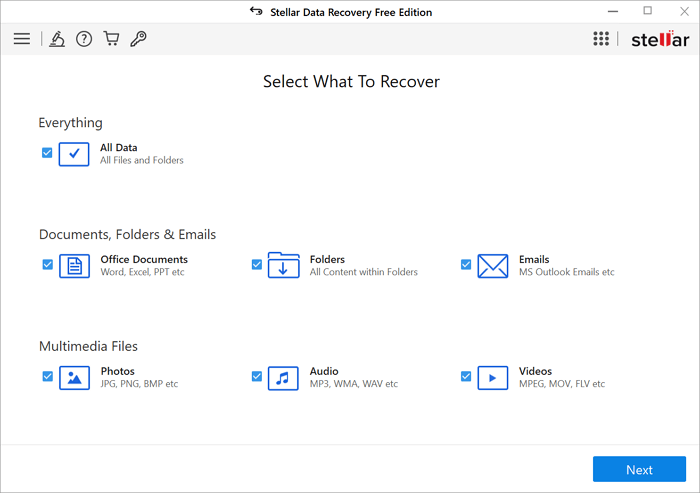
System compatibility: This software is compatible with Windows (7, 8.1, 10, and 11) and MacOS operating systems.
Video formats: For video, it supports Matroska Video File (MKV), MP4, AVI, 3PG, and many other formats.
Free limit: 1GB of data can be recovered for free.
Pros:
- Easy to use
- Can recover unlimited videos in no time
- It can help you recover videos with their previous original names by using its built-in video recovery feature, which scans your device for deleted videos and attempts to retrieve them, including their original file names. This can be especially useful for recovering videos that were accidentally deleted or lost due to a formatting issue.
Cons:
- Scanning is slow, especially when criteria are complex
- Scanning options are very limited
Final Verdict:
Stellar Photo Recovery is ideal for users working with various storage media and multiple video file extensions. However, its slow scanning speeds may not be suitable for those with large data sizes to recover, as it can be time-consuming. For small video recoveries, this tool is perfect, but for large video restorations, it's not recommended.
3. Recuva
Recuva is a free Windows utility that helps recover audio, video, and photo files, restoring them even if they were deleted or lost, including from the Recycle Bin.
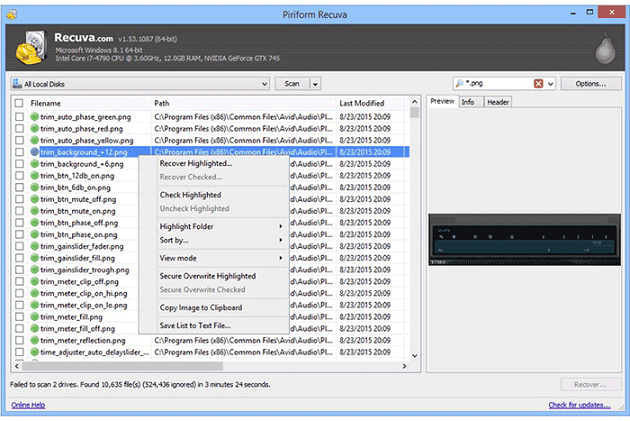
System Compatibility: The software is compatible with Windows only.
Video formats: It supports all the video formats.
Free limit: Recuva's free version allows users to scan and recover deleted files without any limit, but the pro version is required for better recovery results.
Pros:
- Quickly recover data from damaged or formatted drives
- Capable of doing most complex scans in a short time
- An advanced scanning process can be used to identify and recover files that were deleted a long time ago, even if they have been overwritten or removed from the system. This process involves using specialized software that can scan the entire hard drive or storage device to locate any remaining fragments of the deleted files.
Cons:
- The software has a free version that sometimes fails to recover complex files, making it less reliable for users who need to retrieve intricate data.
- The software is not suitable for beginners because it has the ability to overwrite files, which can lead to data loss.
Final Verdict:
Recuva is a professional tool that offers many recovery options, including those not found in other free recovery tool versions. However, it does not guarantee complete recovery of deleted data and has a complicated user interface.
4. Disk Drill Data Recovery
Disk Drill Data Recovery can recover a wide range of lost files from your Windows computer, including audio, video, and photo files, as well as messages and documents. It also supports recovering files from corrupt or lost drives, and its freeware version allows you to restore deleted files from various storage media, such as hard disks, USB drives, SD/CF cards, and digital cameras, within a few clicks.
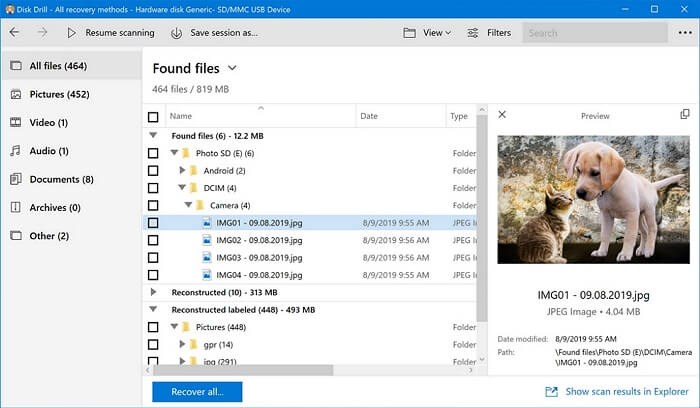
Software Compatibility: The software is compatible with Windows (11, 10, 8, 7) and Mac operating systems, allowing for a wide range of users to access and utilize it.
Video formats: The software supports various file formats for video, audio, images, and documents, including MPG, WMV, AVI, FLV, and MP4 for video, as well as other formats for audio, images, and documents.
Free limit: The software offers a free version that allows for up to 500MB of data recovery.
Pros:
- It has a simple and user-friendly interface
- Data recovery software can recover data from various file formats, including audio, documents, and archives.
- The preview option is available before Recovery
- It can recover files that were deleted from the Recycle Bin, allowing users to retrieve accidentally deleted files.
- Even if a memory card is corrupted, it's still possible to recover the data stored on it.
Cons:
- Very limited video files are supported
- It can overwrite some files during the recovery process
- The scan results only indicate the presence or absence of malware, viruses, and other security threats, but do not provide information on the file's quality or health, such as its format, size, or potential errors.
Final Verdict:
Disk Drill Data Recovery is a safe and user-friendly software with a step-by-step recovery process, but its limitations, especially in the free version, may not be suitable for users with extensive collections of critically damaged and multiple file types. Additionally, it's not recommended for beginners, as it can potentially overwrite important files.
5. Disk Doctor Photo Recovery
Disk Doctor Photo Recovery is a software that helps you recover deleted or lost media from your camera, iPod, or smartphone. It provides a user-friendly, fast, safe, and powerful interface to recover lost pictures, audio files, and video files, even if the memory card is showing as "Unformatted/unallocated".
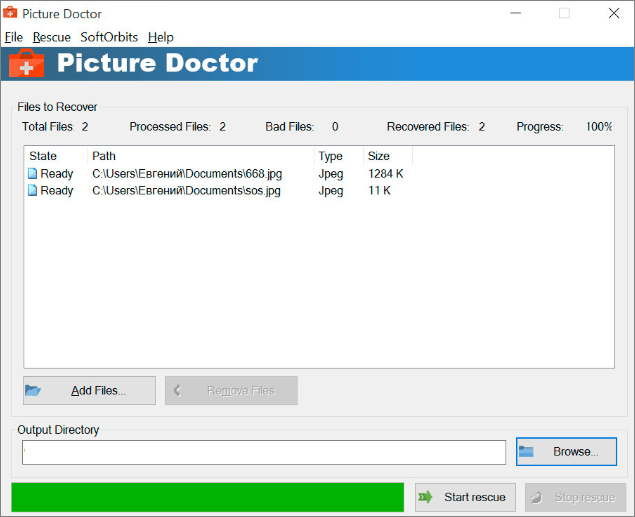
System Compatibility: Disk Doctor Photo Recovery software is only available for Windows.
Video formats: For video files, it supports AVI, MP4, MOV, and MPG.
Free limits: 500MB of data can be recovered using the trial version.
Pros:
- Easy to use and has a user-friendly interface
- Deep search algorithms of the program
- Does not harm existing files
Cons:
- Scanning can take some extra time
Final Verdict:
The software is user-friendly but has limited formats for recovery, and the free version only allows for minimal content restoration, making it unsuitable for video recovery.
6. Remo Recover Media
Remo Recover Media is a handy program that can recover deleted or lost files, folders, and partitions from both Windows and Mac, and even restore data from corrupted hard drives, with dual scanning modes for faster recovery.
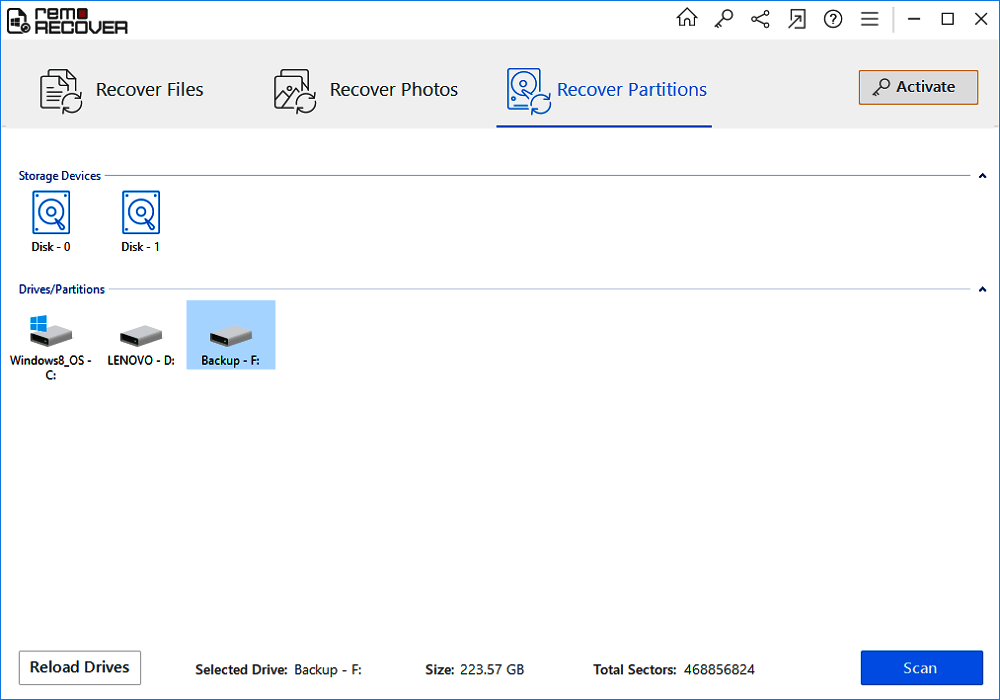
System Compatibility: The program supports both Windows and Mac operating systems.
Video formats: FFmpeg supports more than 300 video and photo formats, including MP4, MPG, AVI, and 3GP.
Free limits: The free edition of Remo Recover Windows software allows you to recover and save up to 1 GB of data.
Pros:
- Easy-to-use graphical user interface
- ExFAT, FAT32, FAT16, NTFS, and NTFS5 file systems are supported for data recovery.
- Recovers data from Mac, as well as Windows
- The scanner has two scanning modes that allow for faster scanning and more accurate results, improving the overall scanning experience.
Cons:
- Scanning a highly dense drive can take longer due to the increased time needed to process and read the data from the drive.
- If you lose data after saving your recovery session, you'll be unable to recover the lost data using that session.
- The preview option is only available for images and not for other file types, such as documents, videos, or audio files.
Final Verdict:
This software is a top-notch video recovery tool due to its ability to support all file extensions, making it ideal for recovering data quickly. However, its free version has limited features, and you can't preview videos before recovering them.
The data recovery software can recover photos but not videos, and once the data is lost after the recovery process, it can't be recovered from the same session, which can be a time-consuming process.
7. DMDE Free Edition
DMDE Free Edition is a user-friendly software that can recover lost files from a hard drive due to various reasons such as accidents, failures, or viruses, and has a high success rate compared to other alternatives.
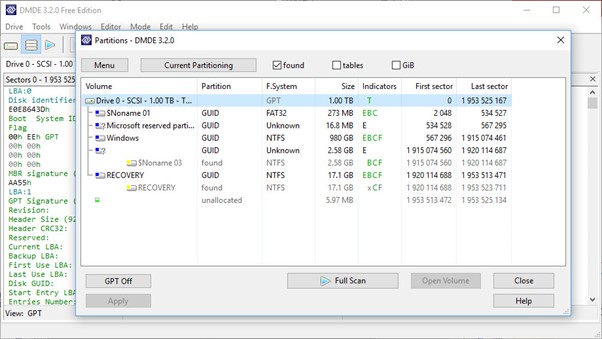
System Compatibility: The software is only supported for Windows.
Video Formats: This software can recover all types of hard drive data, including various formats.
Free Limits: The free version of the software has a file recovery limit of 4000 files per recovery session.
Pros:
- The high success rate of recovery
- Low-level disk editing
- The software can be installed on multiple devices using the same user credentials, making it convenient for users who need to access it from different devices.
Cons:
- Only possible to recover files available in the current directory
- The trial version of the software offers a limited recovery of up to 4000 files, allowing users to test its functionality before purchasing the full version.
Final Verdict:
DMDE is a portable app that runs directly off a USB stick, eliminating the risk of overwriting data. While it's not specifically designed for video recovery, its primary function is to search, edit, and recover data from NTFS and FAT12/16 systems. The free version is limited to personal use and isn't suitable for bulk data recovery, making the paid version a necessity for larger-scale operations.
8. TestDisk
TestDisk is a free data recovery program that was initially designed to recover lost partitions and reboot non-booting devices, but it also has the capability to recover data. It's a technical tool that requires expertise to use effectively, and can even restore the NTFS boot sector from its backup.
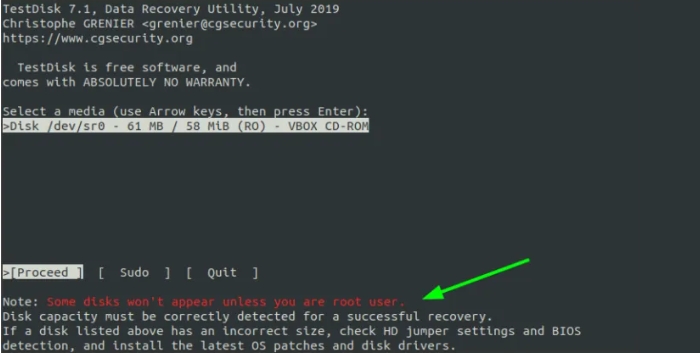
System Compatibility: TestDisk is a free and open-source data recovery software that can run on a variety of operating systems, including Windows, DOS, Linux, FreeBSD, NetBSD, OpenBSD, SunOS, and MacOS X.
Video formats: The tool can recover the complete partition, allowing you to retrieve media of all formats.
Free limits: The program can be downloaded and used by anyone without any cost or restrictions.
Pros:
- An open-source program that can be tailored as desired
- There are no versions and no limits to data recovery
- Rebuild boot sectors
Cons:
- Not a user-friendly interface. The new interface is designed to be simple and easy to use, with a focus on functionality over flashy graphics.
- The code only works in a command prompt window, which is a significant limitation as it prevents users from utilizing it in other environments. This restriction makes it impractical for everyday use, as most users prefer to interact with applications through a graphical user interface.
- Difficult to use
Final Verdict:
TestDisk is a tool that's more suitable for tech-savvy individuals who are familiar with onsite recovery techniques. However, its lack of an easy-to-use interface makes it less accessible to others. Unlike some other recovery tools, TestDisk can only recover entire partitions or drives, not individual files or media, which is why it's recommended for restoring complete hard drives. Additionally, users won't have the option to preview recovered files, making it a less user-friendly option for those who aren't familiar with technical recovery processes.
9. Puran Data Recovery
Puran Data Recovery is a free program that helps recover data from damaged media, such as scratched CDs, DVDs, and USB drives, with a simple interface and fast results.
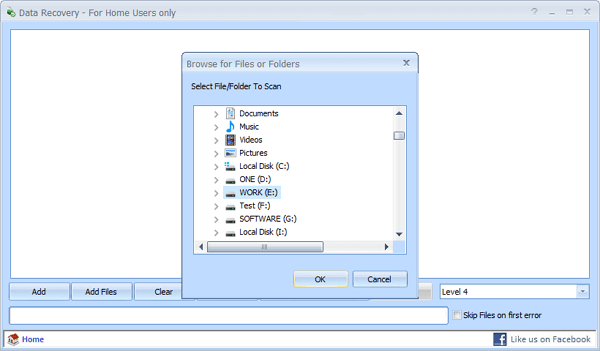
System compatibility: The software is compatible with Windows XP, Vista, 2003, 2007, 2008, and 2010, and supports 64-bit versions.
Video formats: Any format that can be detected by the software can be restored.
Free limit: The software is free to use. There's no trial version.
Pros:
- Easy-to-use interface
- Can recover data from corrupted devices
- Provides a customized scan list
- Offers a good scan speed
Cons:
- A lower data recovery rate
- Deep scans are at slower speeds
- Files do not appear in real-time during the process
- Has not been updated since 2016
Final Verdict:
Puran Data Recovery works by copying data from a file, ignoring any bad sectors found and continuing until the file's end, allowing for the best possible data restoration. It's suitable for recovering data from CDs, DVDs, and memory cards, as well as damaged external drives.
10. DiskDigger
DiskDigger is a program that recovers deleted files from various storage devices, including hard drives, memory cards, USB flash drives, and more. It's a top-notch video recovery tool that can help you retrieve important files or images you've accidentally deleted, as well as check what's on old storage devices.
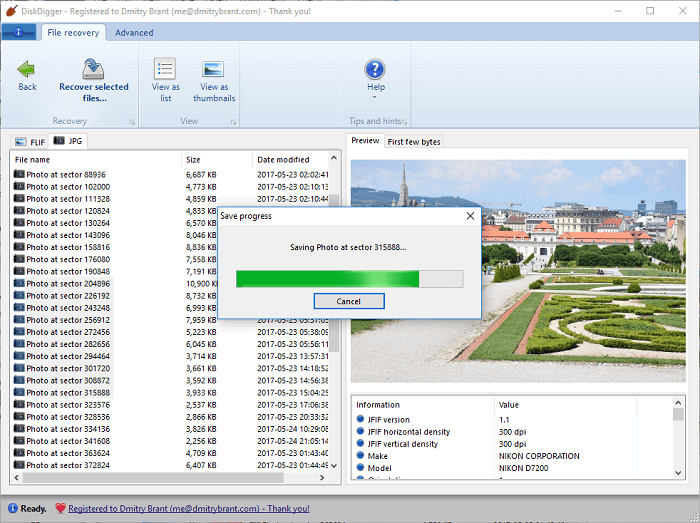
System compatibility: the program is compatible with Windows and Linux.
Video formats: it supports MP4, FLV, AVI, MPEG, etc.
Free limit: Only photos can be recovered from the free version
Pros:
- User-friendly interface
- Fast scanning process
- Recoverable files can be viewed as a list or displayed as thumbnail previews, allowing users to quickly scan and identify the files that were lost or deleted.
Cons:
- Deep scanning takes a lot of time to retrieve data
- The data recovery rate isn't particularly high
- If your video has been missing for a long time or is substantially damaged, it might not receive the desired results.
Final Verdict:
DiskDigger is a data recovery program that works with all versions of Windows, allowing you to restore lost or erased video files and other data. Its user-friendly interface enables you to select the location to scan, but unfortunately, the free version has limitations, including not being able to restore videos. As such, it's not recommended for those seeking to recover video files.
What Is the Best Free Video Recovery Software
We've compiled a list of the top 10 video recovery software for Windows and other operating systems, but to make it easier, we've narrowed it down to the top 3 software based on their unique features and compared them.
Let's have a look at these, and then you can finalize which software you should go for:
| Recuva | Deep Data Recovery | Stellar Data Recovery | |
| User Interface | Moderate | Very Easy to Use | Moderate |
| Supported Systems | Windows | Windows, Mac, iOS, Android | Windows, Mac |
| Video Formats | Supports all video formats | MP4, WAV, AIFF, AAC, OGG, MPEG-4, AVI and MOV | MKV, MP4, AVI, 3PG |
| Scanning and Recover Process | Average | Fast | Slow |
| Call Support | ✘ | ✔ | ✔ |
| Deep scan process | ✔ | ✔ | ✔ |
| Scan to locate lost partitions | ✘ | ✔ | ✔ |
| Preview during scan | ✘ | ✔ | Partial |
| Create and load disk images | ✘ | ✘ | ✔ |
| Save and load scan sessions | ✘ | ✔ | partial |
| Free Limit | No limit | 2GB | 1GB |
How to Recover Deleted Videos in Windows 10
Video recovery software can help restore personal or commercial videos that have been accidentally deleted, hidden by viruses or malware, or lost without backup. This software can recover lost videos even without a backup, making it a convenient solution for many users.
The best video recovery software for Windows can be selected based on budget, user-friendly interface, and features. A suitable software should have easy-to-understand features, save time and effort, and Deep Data Recovery is a good example of such a software.
The software, Deep Data Recovery, helps you recover important videos in just a few simple steps. You can preview the files before recovering them, and the deep scanning process saves time. This solution is perfect for any video recovery needs, and you can follow the steps to recover deleted videos in Windows 11/10/8/7.
Step 1. Launch Deep Data Recovery, select the file types you want to recover, and click "Fast Scan" to begin the recovery process.

Note: You can choose different search modes based on where and why the data was lost.
Step 2. Select the location or device where you lost/deleted videos. Click "Scan" to find the missing videos.

Step 3. After scanning, select "Videos" in the left panel, go to "Lost" or "All" to find the desired videos, select them, and click "Preview".

Step 4. Select the video files you want to recover, then click "Recover" to save them to a secure location.
Tips on How to Prevent Video Data Loss
Data is a valuable asset that should be prioritized, whether it's personal or business-related. Securing it helps prevent financial loss and ensures its integrity. With content readily available, it's essential to remember the importance of data security to protect against potential threats.
Although using video recovery software for Windows offers several advantages, such as quick data recovery and the ability to recover lost or formatted data, it also has some drawbacks, including making computers prone to viruses and malware, and sometimes being unable to recover specific file types, even after investing time and money.
To keep your data secure, one must:
- Develop a habit of backing up data
- Use antivirus to protect data and computers from virus attacks
- Implementing robust firewall solutions is crucial to safeguard data and systems from malicious threats, including malware and ransomware attacks. By configuring firewalls to block unauthorized access and monitor network traffic, organizations can significantly reduce the risk of cyber-attacks and protect sensitive information.
- Do not download or browse files from unknown sources
- Regularly scan the system for any bugs
Conclusion
Backup is crucial for data protection, and frequent backups - ideally daily or weekly - can safeguard essential files from data loss due to system crashes, malware attacks, hard disk failures, and other recurring events. There are various video recovery tools available, each with its own features, prices, and requirements, so it's essential to select one that meets your needs. It's often recommended to start with a trial version before committing to a pro version, ensuring you get the best tool for your specific needs.
Related Articles
- Does Updating to Windows 11 Delete Files? Here's the Answer
- Windows.old Restore: Restore Files from Windows.old Folder
- Get Data Back for NTFS | Best NTFS Data Recovery Software to Get Data Back
- Top 8 Best Professional Data Recovery Software 2022 Update
- Chrome Cache Viewer to View/Recover Google Chrome Cache Files
Here are full solutions to view or recover images, videos, scripts, as well as temporary Internet files that you viewed previously on a web page in Google Chrome. Qiling data recovery software is also recommended to help you recover deleted or lost Google Chrome cache files. - How to Recover Canon Videos| Free Canon Video Recovery
Qiling data recovery software makes Canon video recovery easy and fast. It only takes three steps to recover Canon videos. Follow this guide to recover deleted videos from Canon camcorders if you have deleted or formatted your SD card.
Products
Articles & Tutorials
- Data Recovery
- Data Backup
- File Recovery
- File Backup
- System Backup and Restore
- Disk and Partition Clone
- Technical articles
- Mobile articles
- Disk Master Help
- Windows Data Recovery Tutorials
- Windows Secure Delete Tutorials
- Windows Partition Management Tutorials
- Windows File Backup and Restore Tutorials
- Windows System Backup and Restore Tutorials
- Windows Disk Backup and Restore Tutorials
- Windows Clone Tutorials