Top 6 iPhone Data Recovery Software for Mac/Windows
Summary
If you store all your essential data on your iPhone, you may face a nightmare if you accidentally delete it or your device gets damaged. Fortunately, there are 6 best free iPhone data recovery software for Mac & Windows that can help you recover your lost data, each with its pros and cons, allowing you to select the best one for your needs.
6 Best Free iPhone Data Recovery Software for Mac & Windows
If you've accidentally deleted important files or your iPhone has been damaged, you can recover your data using various free software options available for both Mac and Windows. These tools can help you retrieve deleted files, photos, and other data from your iPhone, regardless of the reason for the loss.
- 1. Qiling MobiSaver (for Mac & Win)
- 2. FoneLab Mac iPhone Data Recovery
- 3. AppGeeker iOS Data Recovery for Mac
- 4. Stellar iPhone Data Recovery for Mac
- 5. Disk Drill iPhone Data Recovery
- 6. Tipard iOS Data Recovery for Mac
This software allows for the recovery of various types of data from an iPhone, including photos, videos, contacts, messages, call history, WhatsApp chats, and other types of data.
Free iPhone Data Recovery Software Selection Criteria
When considering a free iPhone Data Recovery Software, it's essential to note that not all software ensures secure recovery of data, so several factors should be taken into account before making a purchase.
User interface
Choosing the right software for data recovery is crucial, and one key factor to consider is the user interface. An intuitive interface can make a big difference, especially for amateur users, as it can help avoid confusion and ensure a smooth recovery process. By opting for software with a user-friendly interface, you can minimize the risk of errors and maximize the chances of successful data recovery.
Recovery Performance
The app supports multiple file types, quickly and securely retrieves data, and can recover large amounts of data, with the option to save the recovered data.
Price
With numerous competitors in the market, price is another crucial aspect to consider. Not all software is free, and the free versions of this software come with limited support. To make the most out of it, you would need to purchase a license key.
User Reviews
Check online user reviews to understand the challenges faced by previous users and consider software with more than 4-star ratings.
1. Qiling MobiSaver (for Mac & Win)
Qiling MobiSaver Free is a powerful data recovery software for iOS devices that can recover various types of files, including photos, audio, documents, videos, WhatsApp chat history, WeChat chat log, SMS, and contacts, making it an excellent tool for retrieving lost data from any iOS device.
Deep Data Recovery Wizard is an ideal software for beginners or those new to data recovery tools, thanks to its user-friendly interface. It can be used on both Mac and Windows devices, displaying all recoverable data for selection. The software comes with lifetime technical support and free updates to the latest version.
Price: For free technical support, you can also buy its Professional version at $59.95. It's free.
Compatibility:Compatible with both macOS and Windows.
Pros
- Easy three-step data recovery.
- Recover data from all iOS versions and devices.
- Capable of recovering data from iCloud backup and iTunes backup.
- You can see the preview before retrieving the data.
- User-friendly interface.
- Free Lifetime upgrades in the Professional Edition.
Cons
- We didn't find any cons.
Editor's Suggestion
Qiling MobiSaver hassle-The best free iPhone recovery software offers an easy 3-step process for recovering various types of data, including contacts, messages, photos, and videos, with a preview option. Additionally, it allows recovery from iCloud, making it a comprehensive tool. A 30-day money-back guarantee is also provided, giving users peace of mind. Overall, we consider it one of the top free iPhone data recovery software options available.
How to Recover iPhone Data for Free
Download the free data recovery software and follow these steps to recover your lost data.
Step 1. Choose the Recovery Mode
Connect your iPhone to your PC, launch Qiling MobiSaver, and select the recovery mode "Recover from iOS Device" to start the process.
Step 2. Scan iPhone and Find Lost Data
Qiling MobiSaver will automatically scan your iPhone (models 13, 12, 11, X, XR, XS, 8, 7, 6, 5, 4) and recover both existing and lost data for you.
Step 3. Preview and Restore iPhone Data
You can recover lost data from your iPhone, including photos, videos, contacts, SMS, notes, voice mails, and other files, regardless of the model you have, such as iPhone 13, 12, 11, X, XR, XS, 8, 7, 6, 5, or 4. Then, click "Recover" and save those data to another location.
2. FoneLab Mac iPhone Data Recovery
FoneLab iPhone Data Recovery is a professional software that can recover various types of files, including photos, videos, contacts, messages, call history, WhatsApp chats, and more, from several iOS devices, with a user-friendly interface.
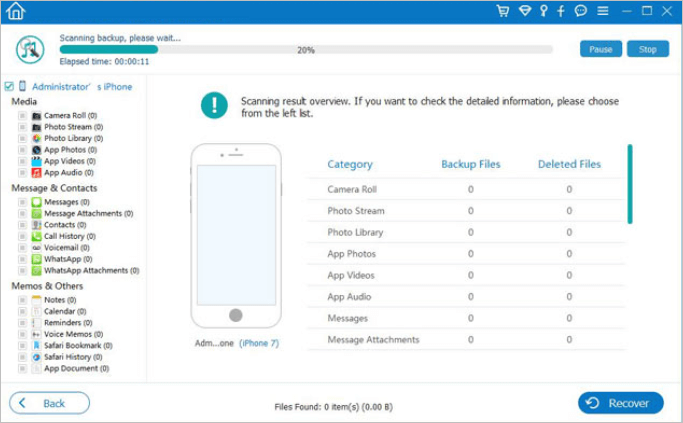
The software offers easy navigation, making it simple for beginners to quickly recover their data. Additionally, it features an iCloud backup restoration facility, along with 19 different types of restoration options.
Price:$55.96
Compatibility: Compatible with both macOS and Windows PC
Pros
- It can recover data from third-party applications
- Easy and quick to navigate
- Can support iOS 14
- Detailed lost data preview
- Easy and simple interface
Cons
- Customer Support is limited
- The free version does not allow data recovery
Editor's Suggestion:
This app is effective in recovering data from damaged or locked phones, and repairing software glitches related to file loading and booting.
3. AppGeeker iOS Data Recovery for Mac
AppGeeker iOS Data Recovery for Mac is a comprehensive software that can recover various types of files, including photos, videos, contacts, messages, call history, WhatsApp chats, and more. It can also efficiently deal with common iOS issues such as the Apple logo stuck, boot loop, and frozen software. The software is user-friendly and has a straightforward interface.
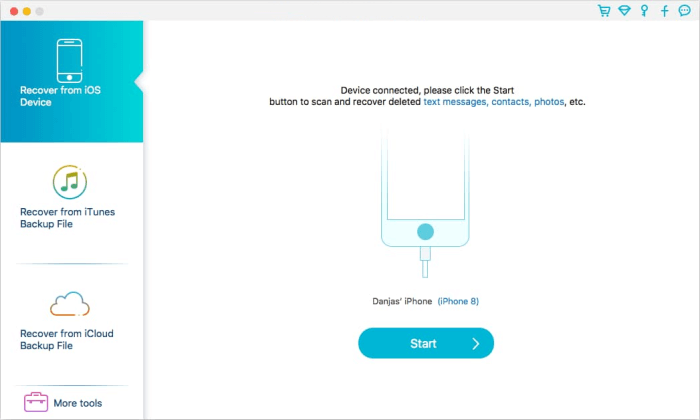
A free iPhone data recovery app allows users to scan and sift through their results, quickly recovering and storing data on their iPad and iPhone devices.
Price:The Windows version of the software costs $59.95, while the Mac version is priced at $69.95.
Compatibility: macOS and Windows
Pros
- Scans your mobile deeply
- Support up to 12+ data types
- This software fixes common issues of iOS
- Salvage data access before restoration
Cons
- Not able to support all devices
Editor's Suggestion:
If you're looking for the best free iPhone data recovery software, it's worth considering its ability to access and interface with salvage data, as well as its efficiency in resolving minor software issues.
4. Stellar iPhone Data Recovery for Mac
This advanced data recovery app offers complete functionality for secure data restoration, featuring an intuitive GUI and the ability to recover unlimited file formats on Windows and storage media. It also allows for data recovery up to 1 GB for free from an iPhone, and can even recover data from an encrypted drive.
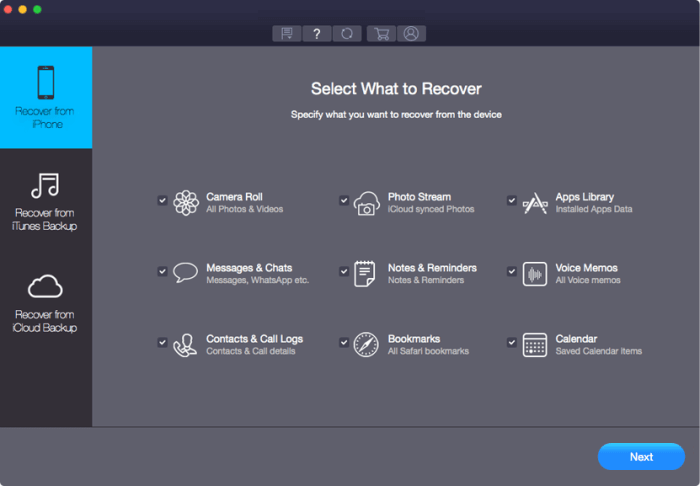
Recovering data from iTunes, iPhone, and iCloud is a straightforward process with the Stellat iPhone Data Recovery toolkit, which makes it easy to retrieve your important files quickly.
Price: Start at$39.99 for one year license
Compatibility: Supports macOS and Windows also
Pros
- Can import data from your computer to your iPhone
- The intuitive interface makes it easy to use
- Can retrieve the Chat message attachments
- Advanced scanning
- The recovery process is quick
Cons
- Not able to save the recovered files
Editor's suggestion:
It's a top data recovery app that can retrieve chat message attachments, allowing users to preview and select the desired files for recovery, saving time and effort by avoiding unnecessary recoveries.
5. Disk Drill iPhone Data Recovery
If you're looking for a reliable recovery app that can retrieve missing data from iPhones, PCs, and Mac OS, Disk Drill is a good option, offering a quick and easy visual experience with a sleek and straightforward interface.
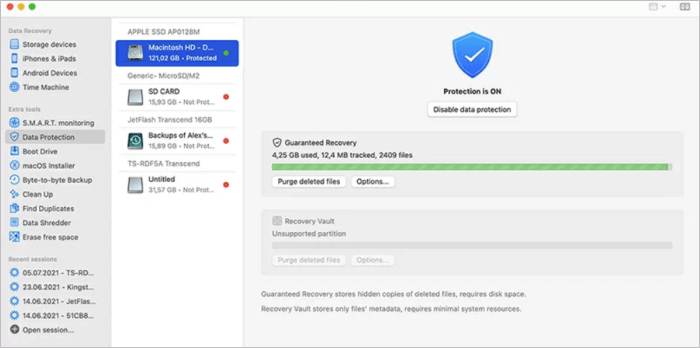
The tool supports data protection and can recover data from multiple file formats, as well as from the internal disk of a device.
Price: The basic free version has limited recovery capabilities, but for unlimited recovery, you need to upgrade to the Pro version, which starts at $89 for a lifetime license.
Compatibility: It works on macOS only
Pros
- A preview of files to be recovered is available
- Can support more than 400 file formats
- The user interface is advanced
- Available with a lifetime license
- Free up to 500MB on Windows
Cons
- The free version does not support data recovery.
- It's available for Mac OS only, not for Windows OS.
Editor's Suggestion:
Deep Data Recovery is a top-notch iPhone data recovery tool that boasts an intuitive interface and extensive file format support. The app is user-friendly and can easily be downloaded to retrieve data from various devices.
6. Tipard iOS Data Recovery for Mac
Tipard iPhone Data Recovery can easily support iPhone 3GS models and above, retrieving eight types of file formats on the latest iPhones and 19 files on previous iPhone versions. It has a user-friendly interface and is a lightweight software that can install quickly on your computer.
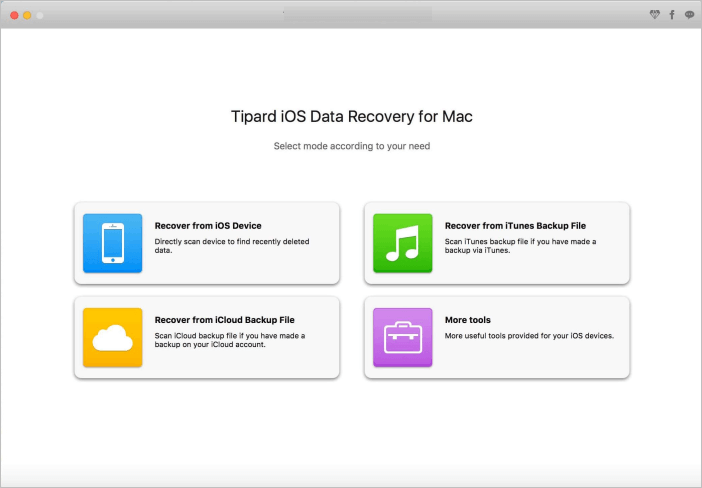
The app provides tutorials on its official website to help users understand how it works and address various issues. Additionally, the software license is available in two versions: lifetime and one year, giving users a choice of which option to select.
Price: $55.96
Compatibility: Available for Windows and Mac OS
Pros
- Fixes major issues without deleting any data
- Allows the installation of new firmware in iPhone
- Data transfer between Android and iOS devices
- Retrieve the information without overwriting
- Good customer support
Cons
- The trial version only scans the data
- Not able to retrieve all the media files successfully
Editor's Suggestion:
This software is a great tool to retrieve text-based files and media files from older iPhone versions. It's fast, secure, and allows for a full preview of all content before recovery, making it a reliable option under its licensed arrangement.
Which iPhone Data Recovery Software for Mac Is Best for You?
While many free data recovery software for Mac come with limited features in their free version, they can still support relevant file formats and provide a preview before restoring data.
Qiling MobiSaver stands out for its user-friendly interface and streamlined three-step scan process, making it the ideal choice for those seeking a software that balances price and features effectively.
Related Articles
- How to Download iCloud Backup to PC in 3 Ways
- Free Download and Install iOS 10.2 Update without Losing Data
- How to recover data from your iPhone
- 2 Methods to Recover Deleted/Lost iOS 11 Data from iPhone 8/8 Plus/iPhone X
- Top 9 Ways to Recover Folders Disappeared from Desktop Mac and Windows 10/8/7
If your folders have disappeared from your desktop on Mac or Windows, you can restore lost desktop files in 9 ways. One effective method is using Qiling data recovery software, which can retrieve lost or missing files with simple steps. - Fixed: Recover Lost Google Play Music Files
If you're having trouble restoring music on your PC using the Google Play Music web player, professional Google Play Music file recovery services are available to help you recover lost or deleted files without any issues.
Products
Articles & Tutorials
- Data Recovery
- Data Backup
- File Recovery
- File Backup
- System Backup and Restore
- Disk and Partition Clone
- Technical articles
- Mobile articles
- Disk Master Help
- Windows Data Recovery Tutorials
- Windows Secure Delete Tutorials
- Windows Partition Management Tutorials
- Windows File Backup and Restore Tutorials
- Windows System Backup and Restore Tutorials
- Windows Disk Backup and Restore Tutorials
- Windows Clone Tutorials