Get Deep Data Recovery for Mac with a License Code
Deep Data Recovery for Mac is a data recovery software designed for Mac users to recover lost data. It offers a free version with limited functions and data recovery size, while the full version supports recovering unlimited data lost due to virus attacks, formatting errors, accidental deletion, and system crashes.
Deep Data Recovery for Mac 2022:
- File size: 32MB
- System: macOS 10.9 or later
- File System: APFS, HFS+, HFS X, exFAT, NTFS, FAT(FAT16/32)
- CPU: at least 16Hz
Is It Safe to Download Deep Data Recovery for Mac Crack?
When searching for Deep Data Recovery for Mac online, be cautious of numerous results claiming a free full version download, often accompanied by provided license keys. However, it's essential to exercise caution, as these may be unsafe and potentially malicious downloads, rather than a genuine free version.
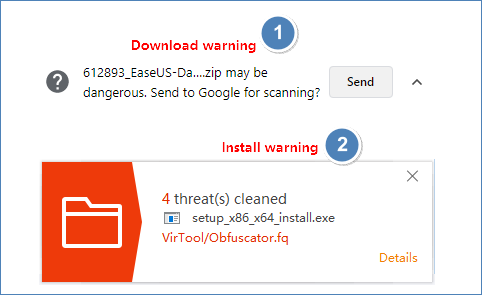
Crack websites often provide download links for unofficial software, which may contain viruses. Installing such software on your Mac can also install the virus, and you may receive security warnings during the download or installation process. In contrast, purchasing Deep Data Recovery for Mac provides access to 7/24 remote assistance, offering professional solutions and support.
[30% OFF] Download and Get Deep Data Recovery for Mac Safe and Sound
We highly recommend downloading and purchasing Qiling Mac data recovery software from its official website, as trading your computer and data safety for dozens of dollars is not worthwhile. As a bonus, we'll give you a 30% discount. The software offers more features beyond the discount, making it a valuable investment for your data safety.
- Get 30% off the full version of Deep Data Recovery for Mac, allowing for unlimited file recovery.
- 100% protection for your data security. Two data protection modes prevent your data from being accidentally deleted, ensuring your files are safe from unwanted deletion.
- If your macOS is unable to boot up, you can create a bootable USB drive and recover data from it. To do this, you'll need a USB drive with at least 16GB of free space.
- The software can recover over 1000 different file types, including popular formats like DOC, XLS, XLSX, PPT, PPTX, as well as image files like JPG, JPEG, TIFF, TIF, and PNG, and various video and audio files such as AVI, MOV, MP4, and MP3.
- This software has the fastest scanning speed among all data recovery software available, allowing it to run smoothly and efficiently, and focus better on personal recovery tasks.
- Monitoring your hard drive's status in real-time can help you take proactive measures to prevent disk failure, allowing you to take action before it's too late.
3-Steps Recovery | Recover Lost Data with Deep Data Recovery for Mac
To recover your Mac data, download Deep Data Recovery for Mac and follow these 3 simple steps: follow the steps below with Deep Data Recovery.
Step 1. Launch Deep Data Recovery. Select file types and click "Fast Scan" to start the recovery process.

Note: You can choose different search modes based on where and why the data was lost.
Step 2. Select the location where your important data & files were deleted and click the "Scan" button. This will initiate a scan of the selected location to find any deleted files.

Step 3. The software will conduct both quick and deep scans on the selected volume to thoroughly find deleted files.

Step 4. Scan results will be displayed in the left pane. Select the desired file(s) and click the "Recover" button to retrieve them.
Sum Up
The process of downloading Deep Data Recovery for Mac involves obtaining a crack version, which is not safe and not official. Instead, users can take advantage of a 30% discount to recover lost data on their Mac.
Related Articles
- Help! Mac Trash Bin Won't Let Me Empty it, How to Fix?
- Photo Recovery on Mac - Recover the Lost/Deleted Photos and Videos from Camera SD Card
- How to Recover Formatted Hard Drive on Mac with Unformat Software
- MacBook Pro/Air Won't Turn on? 10 Fixes + Bootable Recovery Tips
- Guide to Recover Deleted Files with System Restore in Windows 10, 11
You can recover deleted files with System Restore, and for further assistance, you can also use another data recovery tool to recover deleted files in Windows 10/11. - How to Recover Hidden Files in USB using CMD [Full Guide]
How to recover hidden files in USB using CMD? Here is a stepwise guide. Also, we will show you alternative ways to unhide files hidden by viruses and find lost USB data.
Products
Articles & Tutorials
- Data Recovery
- Data Backup
- File Recovery
- File Backup
- System Backup and Restore
- Disk and Partition Clone
- Technical articles
- Mobile articles
- Disk Master Help
- Windows Data Recovery Tutorials
- Windows Secure Delete Tutorials
- Windows Partition Management Tutorials
- Windows File Backup and Restore Tutorials
- Windows System Backup and Restore Tutorials
- Windows Disk Backup and Restore Tutorials
- Windows Clone Tutorials