4 Ways to Recover Kik Messages After Logging Out [iPhone/Android]
Summary
To recover old messages after logging out of your Kik account, you can refer to the detailed guide on your iPhone or Android device. Among the methods, Qiling MobiSaver offers a simpler and easier way to access your previous data.
| Workable Solutions | Step-by-step Troubleshooting |
|---|---|
| Fix 1. Recover Kik Messages from iCloud Backup |
Open Settings -> General -> Reset. Now click on "Erase All Content and Settings"...Full steps |
| Fix 2. Recover Kik Messages from iPhone |
We will give you the steps to recover Kik messages from iPhone using Qiling MobiSaver...Full steps |
| Fix 3. Recover Kik Messages from iTunes Backup |
The process will delete all your latest data and then overwrite it with the old backup data, so proceed with caution...Full steps |
| Fix 4. Recover Kik Messages from Android Backup |
Open "Settings" on your device. Now tap on the "Account" option...Full steps |
Kik Messenger is a popular instant messaging app that offers features like anonymous random chats and live streams, making it a go-to platform for users looking for a more engaging and interactive experience.
Kik's messaging app lacks backup and restore functionality, resulting in data loss upon logout, logging into another device, uninstalling, or exceeding message limits. This means users will lose saved data, chats, contacts, and login information if they log out or engage in these activities.
Kik is a messaging app that can be challenging to use due to the risk of losing data, but there are solutions available to recover deleted chats and data, including the use of Qiling MobiSaver, a recommended tool for recovery purposes.
Where Is Kik Data Stored
Kik chats are saved locally on the device through the Kik app, with no messages stored on the server. This means that chat recovery through the company's server is not possible. If you want to recover a chat, you'll need to have a backup of your entire device, including Kik app data.
Kik's chat history is limited due to storage constraints, allowing only a certain amount of chat history to be viewed, with older chats being deleted to maintain a limited storage usage. This results in a limited amount of recoverable data.
Recover Kik Messages After Logging Out on iPhone
Since logging out deletes all your messages and Kik has no backup and restore features, it's essential to note that you won't be able to recover your messages once you log out. However, you can take a screenshot of your messages before logging out to preserve them.
Solution 1. Recover Kik Messages from iCloud Backup
iCloud is the iOS built-To proceed with backing up your device using a cloud service, you must first have a backup available on your iCloud. If you don't have a backup, the process won't work.
To recover your Kik data, follow these steps. Note that this process will restore all data from the backup file, and you won't be able to selectively restore individual data points. The entire backup will be restored.
Note: The process will delete all your latest data and then overwrite it with the old backup data, so proceed with caution.
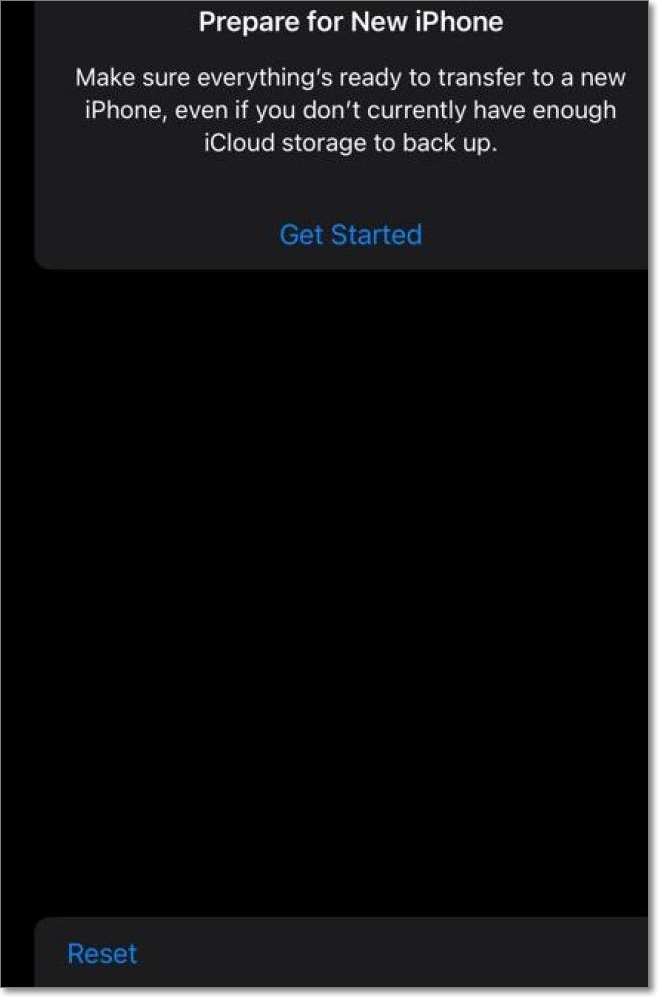
Step 1. Open Settings -> General -> Reset.
Step 2. Now click on "Erase All Content and Settings".
Step 3. Wait for the process to finish and the setup screen to appear.
Step 4. Proceed with prompts and enter your required data till the "Apps & Data"screen appears.
Step 5. Here, choose "Restore from iCloud Backup".
Step 6. To access your Kik messages, enter your Apple login credentials and select the backup that contains your Kik messages. This will allow you to restore your messages and view them on your device.
Note: Qiling MobiSaver is a reliable data recovery software that allows you to recover deleted or lost data from your Android device. It supports various file types, including photos, videos, documents, and more. With Qiling MobiSaver, you can recover your Kik data in two ways: by scanning your device's internal storage or by scanning your device's SD card. The software is user-friendly and provides a simple and intuitive interface, making it easy to navigate and recover your data.
Recover Kik MessagesUsingQiling MobiSaver for iOS
Recovering Kik messages using the backup process can be problematic, as it requires having a backup in the first place, which is not always the case. Additionally, even if a backup exists, the data is at risk of being reset, making the recovery process unreliable.
MobiSaver is a professional data recovery tool designed by Qiling that saves you from the hassle of dealing with lost or deleted data on your device. Rather than extending on this, let's look into its highlights and important other points.
Highlights:
- Easy-To-Use UI:MobiSaver has all its options on its home screen, making it easy to navigate without needing a guide, and its simple prompts guide users through the process.
- Works in Diverse Situations:MobiSaver allows you to recover your lost data due to various reasons such as accidental deletion, software upgrades or downgrades, water damage, jailbreak failures, factory resets, device loss or theft, and more.
- Extensive Compatibility:This software is compatible with Windows XP, Vista, 7, and above, as well as macOS 10.11 and later. It also supports a wide range of iPhone, iPad, and iPod models.
- Recovery Modes: This software supports two recovery modes: recover data directly from an iOS device or recover data from an iTunes backup. Choose the mode based on where the data you want to recover is stored.
- Recover Chat or Attachments of WhatsApp And Kik:MobiSaver can quickly recover deleted messages from WhatsApp, Kik, and LINE, among other features.
Solution 2. Recover Kik Messages from iPhone
Here, we will give you the full steps to recover kik messages from iPhone using Qiling MobiSaver. You can follow the instructions to finish it.
Step 1. Select Device Storage
Connect your iPhone to your PC, launch Qiling MobiSaver, click the "Kik" button, and select "Device Storage" to recover Kik data from your iPhone.
Step 2. Make Sure Your Phone Has Kik
If the Kikis app is not installed on your device, it will not be detected.
Step 3. Scan iPhone to Find Kik Data
Qiling MobiSaver will automatically scan your iPhone and find any present or lost Kik data, taking a few minutes to complete. Please wait patiently.
Step 4. Preview and Restore Kik Chats/Attachments
Select the "Kik" button on the left, and the missing chats and Kik files will be displayed. Preview and select the data you want to recover, then click "Recover to PC" or "Recover to Device".
Solution 3. Recover Kik Messages from iTunes Backup
iTunes is a management tool that allows for easy exchange of information and data between PCs and iOS devices, and also enables users to create backups of their iOS devices on their PC.
To recover your Kik data, you can use a backup of your iOS device on your PC, specifically if the backup file contains Kik data. This process involves using the iTunes backup to restore your device, and then accessing the Kik data from the backup. The steps include connecting your device to your PC, opening iTunes, and selecting the backup that contains the Kik data. From there, you can restore your device and access the Kik data within the backup.
Step 1. Connect iPhone to Your PC
Open Qiling MobiSaver, clickthe "Kik" button, and choose "iTunes Backup".
Step 2. Select a Backup to Recover Data
If your iTunes backup is not listed, check that your device has been successfully backed up. Alternatively, click "Select" to choose a backup file from another folder.
Step 3. Enter the iTunes Password
If the iTunes backup is encrypted, you will need to enter the password to unlock it and then click the "Continue" button.
Step 4. Scan Lost Kik Data and Recover
Qiling MobiSaver will automatically scan your backup file to find the lost Kik chats and attachments, allowing you to preview them before clicking the "Recover" button to save them on your computer.
Note: The process will delete all your latest data and then overwrite it with the old backup data, so proceed with caution.
Recover Kik Messages After Logging Out on Android
On Android devices, logging out of Kik deletes all data, similar to iPhones, with no backup or restore option available. However, there are still ways to retrieve your data, which will be explored.
Recover Kik Messages from Android Backup
Android devices allow entire device backups, similar to iPhones. However, manual settings changes are required to include Kik messages in the backup file.
You can also recover photos and videos using this method, but it requires a backup or Kik in your backup. If you have a backup, you can follow these steps to restore your content: (insert steps here).
Note: The process will restore all the data in the backup file, so proceed with caution.
Step 1. Open "Settings" on your device.
Step 2. Now tap on the "Account" option.
Step 3. Tap on "Backup & Restore" and click "Restore".
Step 4. Once the data is synced, you can see your Kik data on your device. It may take some time for the process to complete. Once the process finishes, your Kik data will be visible on your device.
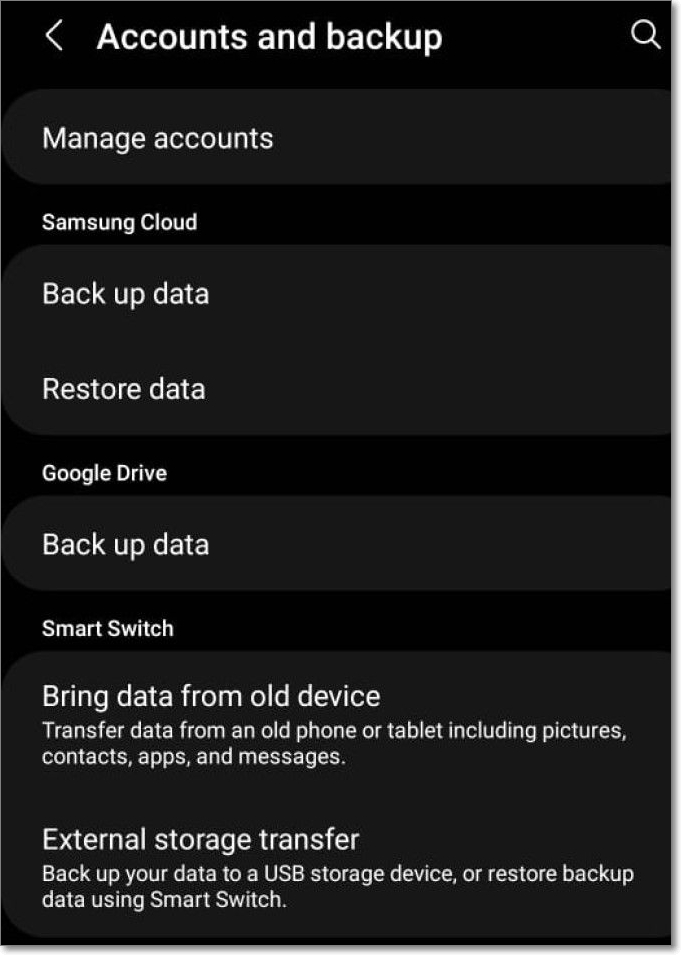
Note: To backup your Kik data, go to your device's settings, search for "Backup & Restore", and follow the prompts to create a backup. This will ensure you have a copy of your Kik data in case you need to restore it.
If you were unable to recover your data or encountered data protection issues, you can try using Qiling MobiSaver for Android instead.
Qiling MobiSaver for Android is a capable application that can help you recover your data without deleting the existing data or needing a backup of your files.
This recovery tool is a professional tool that can recover many deleted items, including SMS, notes, call history, photos, and videos.
Summary
Kik is a standout messaging app with unique features, but its lack of backup and restore options, as well as limited chat history, may deter some users.
Device backups can restore data, but it's a risk, especially when considering all the data on the device versus just Kik data. This makes it difficult to declare a winner in this scenario.
If you're facing issues with your Kik app and need to recover your messages and data, I recommend using Qiling MobiSaver. This tool allows you to quickly recover your Kik messages and data without having to reset your device or lose any other files. It's a convenient solution for getting your messages back in a timely manner.
Related Articles
- [Real Fixes] Photos Disappeared from iPhone After Update
- Free Download Kik Messenger for PC and Mac
- Easiest way to Fix iTunes Error 3194
- What Is the Latest Version of iTunes 2022
- Best HDD Data Recovery Services in San Diego, CA
When you come across data loss, especially data loss from external or internal hard drives, you may turn to professional data recovery services for help. This post selects the information of the top 9 data recovery services in San Diego for your reference. - The Best 7 Data Recovery Services in San Francisco, CA
If you're facing an emergency situation like a broken hard drive, smartphone, or computer that won't boot, you'll need a reliable data recovery service.
Products
Articles & Tutorials
- Data Recovery
- Data Backup
- File Recovery
- File Backup
- System Backup and Restore
- Disk and Partition Clone
- Technical articles
- Mobile articles
- Disk Master Help
- Windows Data Recovery Tutorials
- Windows Secure Delete Tutorials
- Windows Partition Management Tutorials
- Windows File Backup and Restore Tutorials
- Windows System Backup and Restore Tutorials
- Windows Disk Backup and Restore Tutorials
- Windows Clone Tutorials