NTFS Alternate Data Streams: The Hidden Data on Your Drive
An NTFS alternate data stream (ADS) is a second, third or hundredth piece of content attached to a single file. The file you see in File Explorer is only the unnamed stream. Everything else is invisible to Explorer, to most copy commands, and to many backup tools, yet it occupies real space on the volume.
Streams are a normal part of NTFS and not a sign of infection. Once you know how to list them, you can decide which ones to keep, which to clean up, and why some files behave differently after being copied to a USB stick.
What an Alternate Data Stream Is
On NTFS, a file is a set of attributes, and its content is stored in a named stream. The default stream has no name, which is why report.docx opens normally. A stream can be addressed by adding a colon and a name after the file path:
C:\Users\John\Downloads\report.docx:Zone.Identifier
The main file can be opened, edited and deleted without touching the stream, and the stream can be replaced without changing the main content. One file can carry many streams, each with its own size.
Where Streams Come From
Most streams on a typical PC are created by Windows itself:
- Mark of the Web. When you download a file with a browser, Windows adds a
Zone.Identifierstream containing the zone the file came from. That stream is why Office shows Protected View and why some installers ask for confirmation. - Office and collaboration tools. Some document properties and sync metadata are stored in streams rather than in the document body.
- Backup and imaging software. Tools that preserve NTFS metadata may keep streams as part of the file record.
- Files copied from macOS or a NAS. Extended attributes are sometimes mapped into streams when a file lands on NTFS.
- Security software. Some scanners attach scan results or hashes to the file instead of a separate database.
Malware has also used streams to hide payloads, which is why the feature has a reputation. Modern antivirus engines scan streams, and Windows does not run an executable directly from a stream by double-clicking it, so an ADS is a hiding place rather than a launch button.
How to See and Measure Them
From Command Prompt, dir /r lists every file and prints any streams underneath it. A line such as 26 report.docx:Zone.Identifier:$DATA means a 26-byte stream is attached.
PowerShell gives more control:
Get-Item .\report.docx -Stream *lists every stream with its length.Get-Content .\report.docx -Stream Zone.Identifierprints the stream content, usually a short[ZoneTransfer]block.Get-ChildItem -Recurse | Get-Item -Stream *scans a folder tree.
For bulk work, Sysinternals Streams is faster: streams.exe -s C:\Folder reports streams recursively, and adding -d deletes them. Third-party disk analyzers that read the MFT can also show stream sizes per file.
How to Remove a Stream
Removing the Zone.Identifier stream is the standard way to clear the "file came from another computer" flag without editing the file itself:
Remove-Item .\report.docx -Stream Zone.Identifier
To unblock a whole folder, use Unblock-File -Path C:\Folder\*, which removes the mark of the web from each file. Only remove streams you understand. A stream written by a backup or synchronization tool may hold data that the tool needs on the next run.
What Happens When You Copy the File
Streams survive only on file systems that support them. Copy a file from NTFS to a FAT32 or exFAT USB stick and every stream is dropped; the file content arrives intact, but the metadata does not. The same happens with ZIP archives created by tools that ignore streams, and with some network shares and cloud sync clients.
This explains a common surprise: a document loses Protected View after being copied to a USB drive and back, because the Zone.Identifier stream was lost on the way. It is also why a file can look identical after a copy yet behave differently.
If streams must be preserved, use a sector-level disk clone instead of a file copy. A clone duplicates every sector, including the MFT records that describe the streams, so the destination is an exact replica.
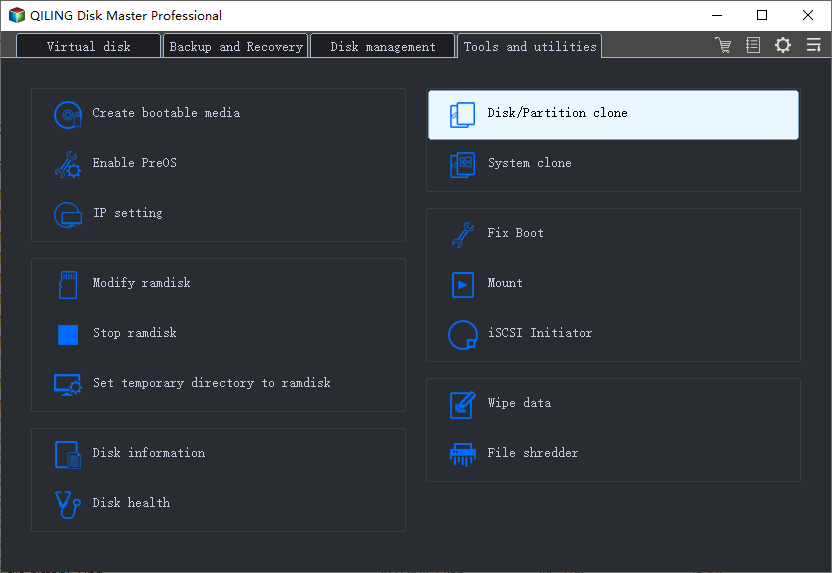
Step 1. Launch Qiling Disk Master, open the Tools and utilities tab and click Disk/Partition clone.
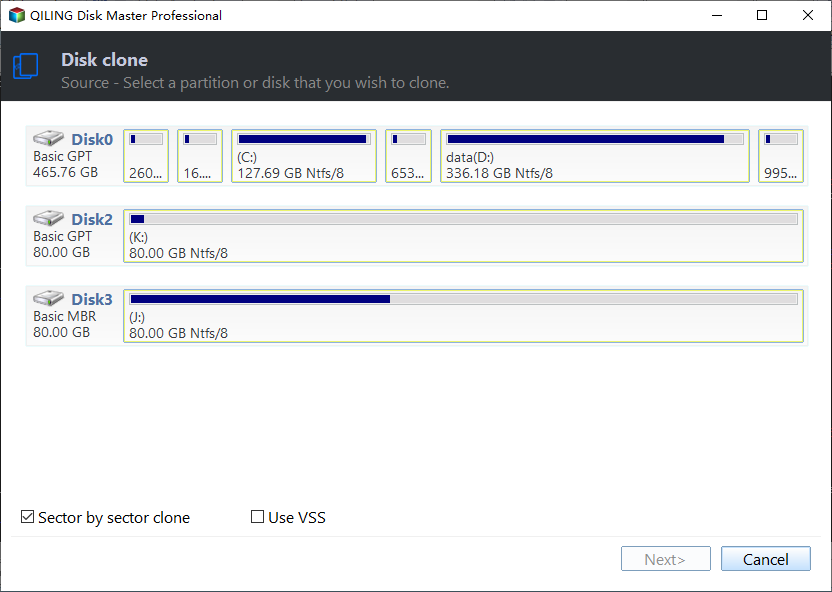
Step 2. Select the source disk and tick Sector by sector clone so that the file records and their streams are copied exactly.
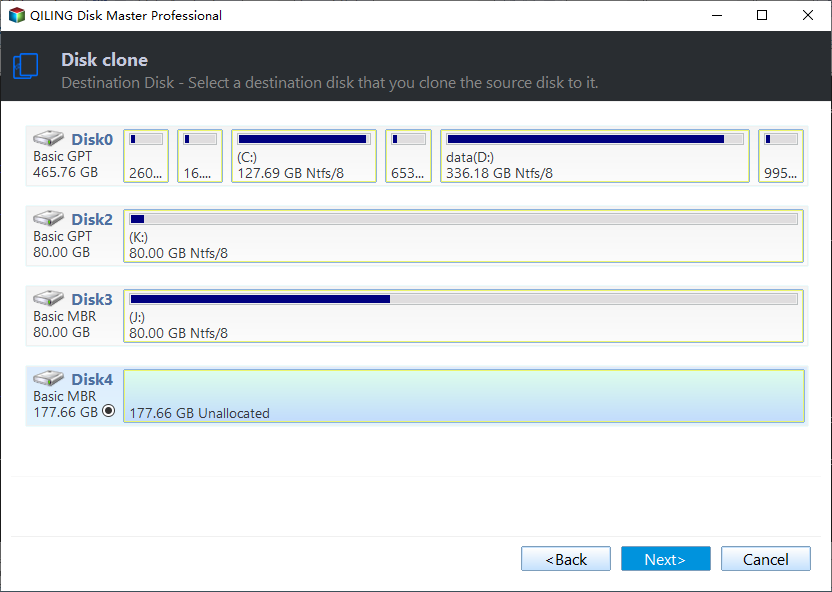
Step 3. Select the destination disk and click Next.
Step 4. Review the layout, click Proceed and wait for the clone to finish.
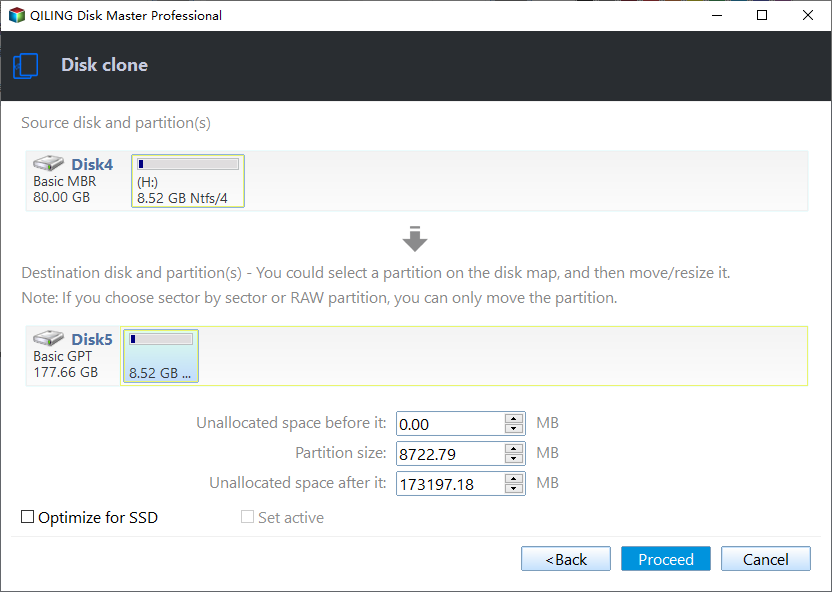
Sector-by-sector mode copies unused space too, so it takes longer and needs a destination at least as large as the source.
Do Streams Waste Disk Space?
Yes, but usually very little. A Zone.Identifier stream is a few dozen bytes and fits inside space that NTFS has already allocated or inside the file record itself. Problems appear when a program writes large amounts of data into streams, for example some sync clients or database tools, because Explorer's Size and Size on disk columns describe only the unnamed stream.
If a folder's reported usage does not match the sum of its visible files, list the streams before assuming the drive is failing. If you need to reclaim space and remove all traces at once, a disk wipe overwrites the whole volume, including stream data and slack space.
Are alternate data streams dangerous?
They can hide data, and malware has abused them, but Windows does not launch programs straight from a stream and current antivirus engines inspect stream content. Treat unknown streams as a reason to scan the file, not as proof of infection.
Why did my file lose its "downloaded from the internet" warning?
The Zone.Identifier stream was removed, either by you, by an unblock action, or by a copy to a file system that does not support streams.
Can I create a stream on purpose?
Yes: Set-Content .\file.txt -Stream notes -Value "text" creates one. Remember that it will not travel with the file to FAT32, exFAT or most cloud storage.
Related Articles
- NTFS File System: Features and Limits
How NTFS stores files, permissions and metadata, and what changes when you leave it. - What Is exFAT Format
Where exFAT fits between FAT32 and NTFS, and which metadata it cannot carry. - Slack Space: Why Size on Disk Is Bigger Than File Size
The other kind of hidden space on NTFS, and how to measure what each file really costs.
Products
Articles & Tutorials
- Data Recovery
- Data Backup
- File Recovery
- File Backup
- System Backup and Restore
- Disk and Partition Clone
- Technical articles
- Mobile articles
- Disk Master Help
- Windows Data Recovery Tutorials
- Windows Secure Delete Tutorials
- Windows Partition Management Tutorials
- Windows File Backup and Restore Tutorials
- Windows System Backup and Restore Tutorials
- Windows Disk Backup and Restore Tutorials
- Windows Clone Tutorials