Slack Space: Why Size on Disk Is Bigger Than File Size
Right-click a file in File Explorer, open Properties, and two numbers rarely match: Size and Size on disk. The difference is slack space, the unused tail of the last cluster that a file occupies. On a drive with thousands of small files, it can quietly consume gigabytes.
Slack space is not an error and not a sign of corruption. It is the unavoidable result of allocating storage in fixed-size blocks, and once you understand the arithmetic you can decide whether a different cluster size is worth it.
What Slack Space Is
A file system does not hand out single bytes. It hands out clusters, also called allocation units. On most NTFS volumes a cluster is 4,096 bytes (4 KB). A file of 5,000 bytes therefore needs two clusters, or 8,192 bytes, and the last 3,192 bytes are slack.
The file system cannot split a cluster between two files, because each cluster must belong to exactly one file. The leftover space stays reserved for that file until it grows into it or is deleted.
How to Calculate It
The formula is short:
slack = cluster size - (file size mod cluster size)
If the file size divides evenly by the cluster size, slack is zero. Three examples with 4 KB clusters:
| File size | Clusters used | Slack space |
|---|---|---|
| 1,000 bytes | 1 (4,096 bytes) | 3,096 bytes |
| 10,240 bytes | 3 (12,288 bytes) | 2,048 bytes |
| 4,096 bytes | 1 (4,096 bytes) | 0 bytes |
A single file wastes a few kilobytes at most. Multiply that by a folder of 200,000 photos, source files or log fragments and the total becomes significant: at an average of 2 KB per file, the loss is about 390 MB.
Why Small Files Waste the Most
Slack is bounded by the cluster size, so its share of a file's cost is largest when the file is small. A 100 MB video wastes the same 2 KB as a 2 KB text file in absolute terms, but that is 0.002% of the video and 100% of the text file.
NTFS has one useful exception: files smaller than roughly 700 bytes can be stored resident inside their MFT record, which means no cluster is allocated and no slack is created. This helps with tiny configuration files but does little for photos, documents and code.
Cluster Size Trade-Offs
Choosing a cluster size is a balance between wasted tail space and efficiency on large files:
- Smaller clusters (512 bytes to 2 KB) reduce slack but increase the size of the file table and the number of operations needed to read a large file. On modern drives they can also misalign writes to 4 KB physical sectors.
- 4 KB clusters are the NTFS default and match the physical sector size of most drives, including 4Kn models. This is the best general choice.
- Larger clusters (16 KB to 128 KB) speed up very large files and reduce metadata, but each small file then wastes far more. exFAT uses 32 KB clusters on many mid-size volumes and up to 128 KB on larger ones, which is one reason a card full of small files loses more capacity than expected.
For a drive that stores mostly video, backups or disk images, a 64 KB cluster can be reasonable. For a system drive or a folder of documents, stay at 4 KB.
How to Check Your Cluster Size
On NTFS, run fsutil fsinfo ntfsinfo C: and read the Bytes Per Cluster line. On any file system, chkdsk C: reports the allocation unit size in its summary, and formatting tools show the value in their cluster size drop-down.
To see slack per folder, compare the total Size with the total Size on disk in File Explorer properties for that folder. The difference approximates the wasted tail space.
How to Reduce the Loss
- Keep the default 4 KB cluster on system and document drives. Do not shrink below it to chase a few megabytes.
- Group small files into archives or container formats when the application allows it. One 1 GB archive has one tail, not a million.
- Enable NTFS compression on folders that hold many small text or log files. Compression works in 16-cluster units and can absorb some of the waste.
- Reformat with a different cluster size only when the workload clearly justifies it, and back up first because formatting erases the volume.
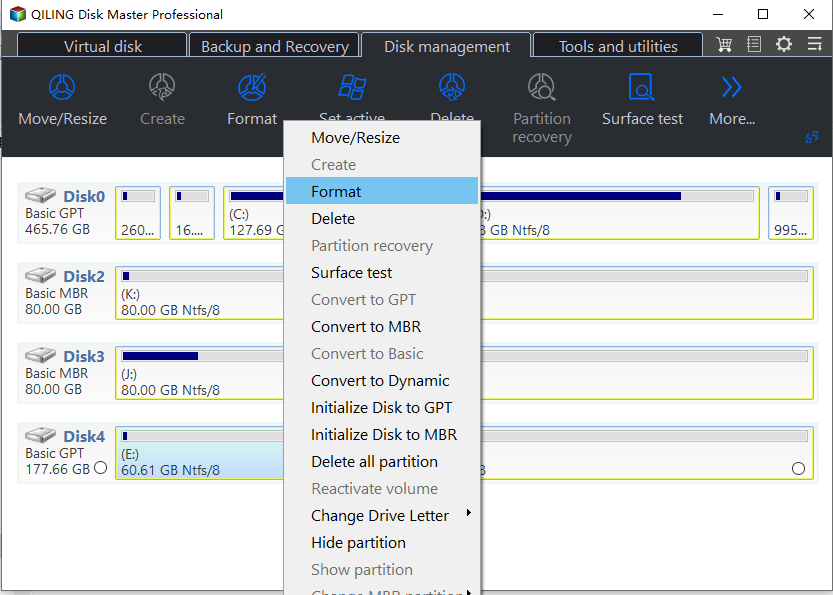
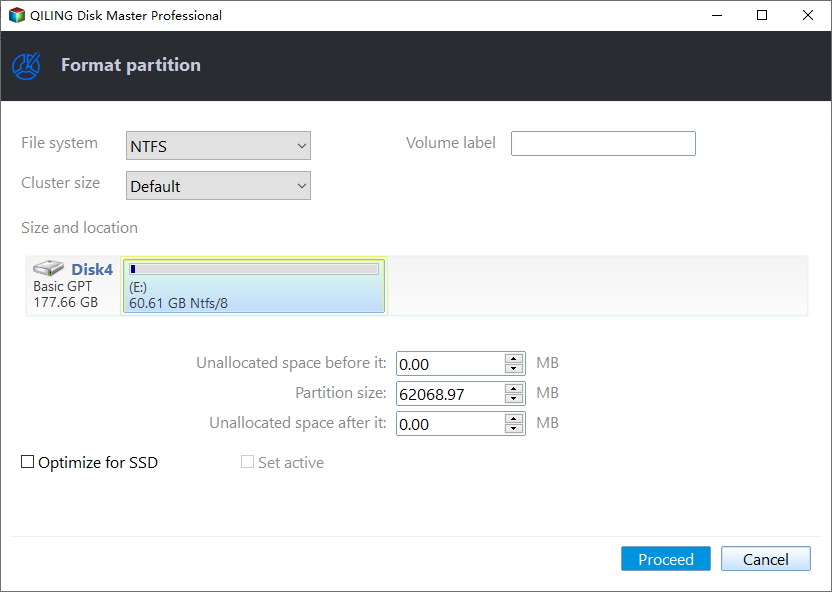
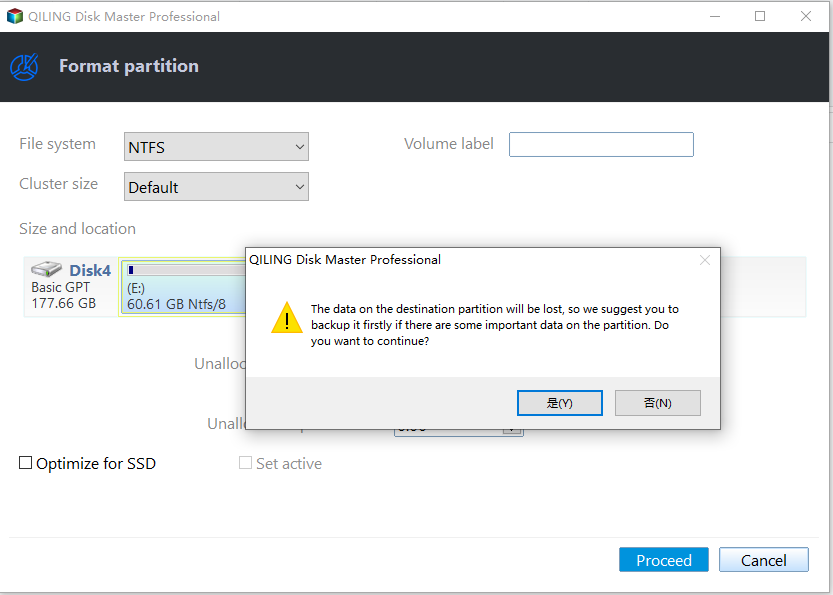
Qiling Disk Master exposes the cluster size in its format dialog:
Step 1. Right-click the partition you want to reformat and choose Format.
Step 2. Select the file system, the cluster size and, if needed, a volume label.
Step 3. Click Proceed, confirm the warning that the data will be lost, and wait for the format to finish.
Slack also has a privacy side. When a file shrinks or is deleted, the tail of its last cluster can still hold fragments of older content, which is why forensic tools examine slack space. Before selling or recycling a drive, wipe it rather than formatting it.
Does deleting files recover slack space?
Yes. Once a file is deleted, its clusters are marked free and can be reused, so the slack disappears with the file.
Is slack space the same as unallocated space?
No. Slack belongs to an existing file and is reserved for it. Unallocated space belongs to no file and is available for new data.
Can I see which files waste the most?
Sort a folder by Size on disk and compare it with Size. Files with a large gap relative to their content are the ones losing the most to their final cluster.
Related Articles
- NTFS Alternate Data Streams: The Hidden Data on Your Drive
Another kind of invisible data on NTFS, and how to find the space it occupies. - What Is exFAT Format
Why exFAT uses larger clusters and how that changes capacity on SD cards and USB drives. - FAT File System Format
The original allocation table design, its cluster limits and where it still makes sense.
Products
Articles & Tutorials
- Data Recovery
- Data Backup
- File Recovery
- File Backup
- System Backup and Restore
- Disk and Partition Clone
- Technical articles
- Mobile articles
- Disk Master Help
- Windows Data Recovery Tutorials
- Windows Secure Delete Tutorials
- Windows Partition Management Tutorials
- Windows File Backup and Restore Tutorials
- Windows System Backup and Restore Tutorials
- Windows Disk Backup and Restore Tutorials
- Windows Clone Tutorials