Sparse Files Explained: Why a 100 GB File Uses 2 GB of Space
A virtual disk file reports a size of 100 GB, yet the folder it sits in grows by only 2 GB. Nothing is wrong: the file is sparse. It has a large logical length, but only the regions that were actually written occupy space on the physical disk. The rest is a hole that NTFS represents without storing zeros.
Sparse files are why dynamic VHDX disks, WSL distributions and database snapshots can be created at a huge nominal size without consuming it. They are also why copying such a file can suddenly fill a drive.
What a Sparse File Is
Every file on NTFS has a logical size, which is what applications see, and an allocated size, which is what the volume actually spends. For an ordinary file the two are close. For a sparse file the allocated size can be a tiny fraction of the logical size.
When a program writes at an offset far beyond the current end of the data, NTFS records the write and leaves the gap as unallocated. Reading the gap returns zeros, but no clusters are reserved for those zeros. The file behaves as if it were full of zero bytes while using almost no disk space.
Where Sparse Files Appear
- Dynamic VHDX and VHD disks. Hyper-V creates a small file and grows it as the guest writes. A 2 TB virtual disk with 40 GB of data occupies roughly 40 GB on the host.
- WSL 2. Each Linux distribution keeps its file system in an
ext4.vhdxfile under%LOCALAPPDATA%\Packages, and that file is sparse. - Windows containers. Layer files and sandbox disks use the same technique.
- Database snapshots. SQL Server and some backup products create sparse files that record only changed pages.
- Checkpoints and differencing disks. Hyper-V checkpoints are stored in files that share unchanged blocks with the parent.
How NTFS Stores the Holes
NTFS marks the file with the sparse attribute and maintains a valid data length separate from the file size. Bytes between the valid data length and the logical end have never been written, so the file system can return zeros without reading a disk.
When an application writes into a hole, NTFS allocates clusters for the affected range and updates the valid data length. The hole shrinks; the logical size does not. This is why a sparse file can appear to "grow" in Size on disk while its reported Size stays the same.
How to Check a File's Real Size
Open the file's Properties in File Explorer and compare Size with Size on disk. The gap is the hole. If Size on disk is much larger than Size, the file is not sparse and may be compressed or simply allocated in full.
At the command line, fsutil sparse queryflag "D:\VMs\Disk.vhdx" reports whether the sparse attribute is set. fsutil sparse queryrange lists the ranges that are allocated and the ranges that are holes. To mark an existing file as sparse, use fsutil sparse setflag, then fsutil sparse setrange to tell NTFS which ranges are zeros. These commands are powerful and can corrupt a file if the ranges are wrong, so work on a copy.
Why Copies Grow
A normal copy reads the logical content and writes it to the destination. When the source contains holes, the copy reads zeros and writes real clusters for them, so a 2 GB sparse file can become a 100 GB ordinary file.
- Copying to FAT32 or exFAT always expands, because neither file system supports sparse files.
- Most ZIP tools expand unless they store the file with sparseness awareness.
- Some network shares and sync clients expand because they transfer content rather than allocation.
- Disk-level imaging that copies every sector also writes the holes as zeros.
To keep the file compact, move it with a tool that understands sparse files, or back up the volume at the partition level rather than copying the file through Explorer.
How to Reclaim the Space
Deleting a virtual machine does not always return its disk space, and shrinking a VHDX is a two-step process: first remove the data inside the guest, then compact the file on the host.
- Hyper-V. Shut down the VM, open Edit Disk, choose the virtual disk and select Compact. The wizard rewrites the file without the unused blocks.
- Diskpart. Attach the disk read-only with
select vdisk file="D:\VMs\Disk.vhdx"andattach vdisk readonly, then runcompact vdiskanddetach vdisk. - WSL 2. Shut down WSL with
wsl --shutdown, then compact theext4.vhdxfile with the diskpart steps above. - Databases. Remove old snapshots and let the engine release the sparse files.
For a regular backup of a volume that contains large sparse files, use a partition or disk backup rather than a file copy. Qiling Disk Master reads the volume at the partition level, so the image reflects allocated data and does not inflate the holes into real zeros.
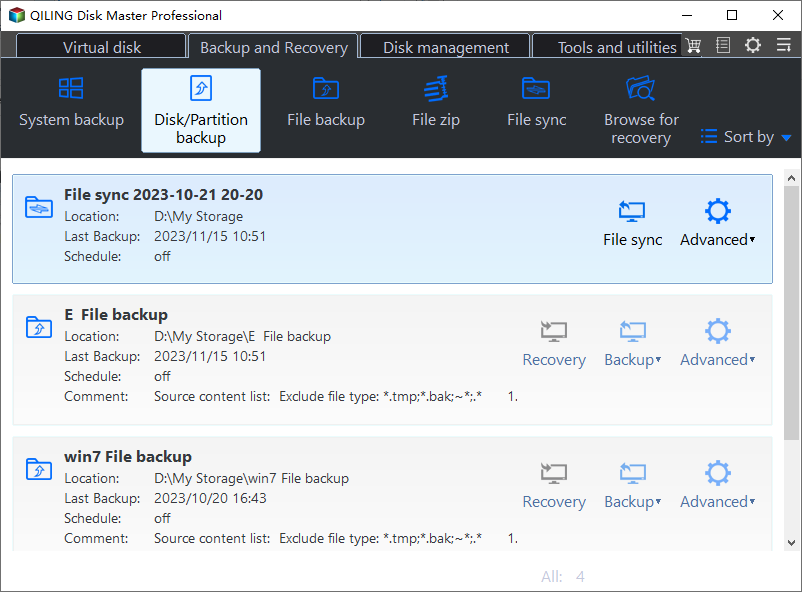
Step 1. Launch Qiling Disk Master, open the Backup and Recovery tab and click Disk/Partition backup.
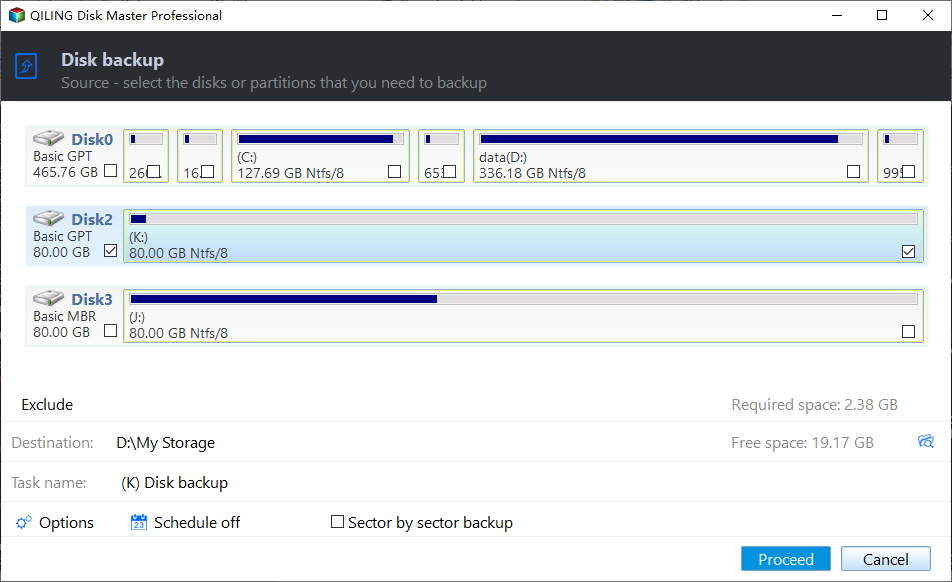
Step 2. Tick the partition that holds the virtual disks and click the folder icon to choose a destination.
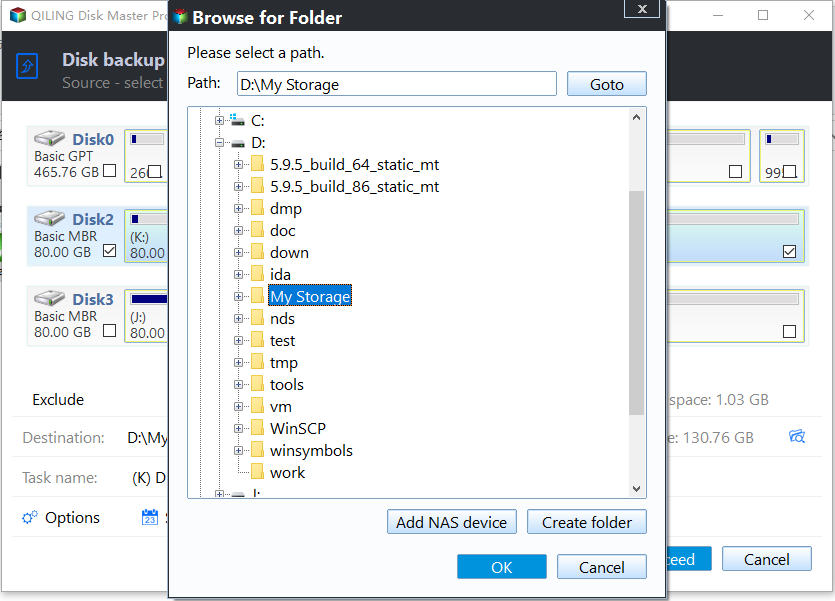
Step 3. Select a folder on a drive that is not being backed up and click OK.
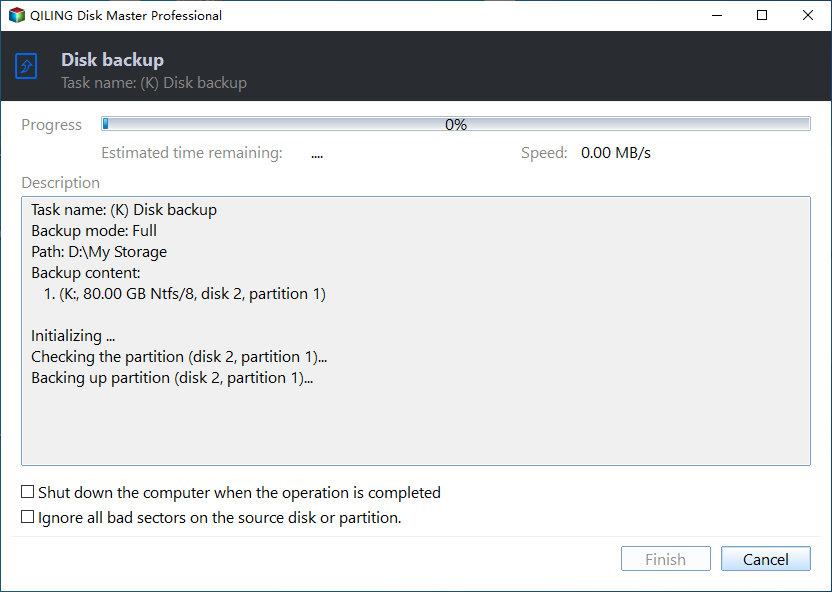
Step 4. Click Proceed to create the image and wait for the task to complete.
Are sparse files safe?
Yes. They are a standard NTFS feature used by Hyper-V, WSL and databases. Problems appear only when a tool does not understand them and expands the holes during a copy.
Does deleting a sparse file free its logical size?
It frees the allocated size, which is what the volume actually used. The logical size was never consumed, so the free-space figure changes by the smaller amount.
Can I make any file sparse?
You can set the attribute on NTFS, but it only saves space when the file contains long runs of zeros. Random binary data is stored in full regardless of the flag.
Related Articles
- Slack Space: Why Size on Disk Is Bigger Than File Size
The opposite mismatch, where a file uses more space than its content requires. - NTFS File System: Features and Limits
How NTFS tracks allocation, attributes and metadata on large volumes. - NTFS Alternate Data Streams: The Hidden Data on Your Drive
Another form of NTFS data that does not show up in the file's main content.
Products
Articles & Tutorials
- Data Recovery
- Data Backup
- File Recovery
- File Backup
- System Backup and Restore
- Disk and Partition Clone
- Technical articles
- Mobile articles
- Disk Master Help
- Windows Data Recovery Tutorials
- Windows Secure Delete Tutorials
- Windows Partition Management Tutorials
- Windows File Backup and Restore Tutorials
- Windows System Backup and Restore Tutorials
- Windows Disk Backup and Restore Tutorials
- Windows Clone Tutorials