[Fixed] What/Where Are Temp Files? Should You Delete or Keep Them?
Temporary files, also known as temp files, are files that are created by a computer program to store temporary data or information. They are usually stored in a designated area on the computer, such as the "Temp" folder in Windows or the "tmp" folder in macOS.
These files are intended to be deleted when the program is closed or when a certain amount of time has passed. The purpose of temp files is to provide a temporary storage space for data that is being processed or used by a program, and they can be used for a variety of tasks, such as storing intermediate results, caching data, or storing temporary settings.
Computers and laptops use various operating systems, but those that run on Windows often experience a slow and heavy system after a fresh installation, which is later exacerbated by the creation of cache files by the computer and its software.

Some cache files are essential, such as settings and configuration, while others are unnecessary and take up space. Temp files, in particular, can accumulate on the primary Windows drive and become a storage hog.
These files are often created during the execution of programs and processes, but they can be safely deleted, freeing up disk space and improving system performance. By understanding what temp files are and why they're not essential, you can take steps to manage and remove them, keeping your system running smoothly.
What Are Temp Files
Temp files are created by applications or the operating system to store data temporarily, and their amount is determined by installed programs and usage frequency.
Here's what you need to understand about temp files:
- When you freshly install a new OS, the computer performs better due to the absence of junk and temp file build-up, which accumulates over time and slows down the system.
- Having many programs that create temporary files can lead to a large number of temp files on your computer, whereas someone who uses fewer programs will have fewer temp files.
- Programs create temporary files using a naming convention of "temp" followed by a number and letters, making it impossible to determine which program created which file.
Temp files are created automatically and can build up inside a computer, even when users delete or remove them. They will eventually be created again.
Where Are Temp Files
In Windows operating systems, the location of temporary files varies. While Windows 8 and 7 stored temp files within the Windows folder, Windows 10 and 11 create them in the Users' AppData folder.
To find the temporary files in Windows, you can use the command `dir /x /s "%temp%*.*"` in the Command Prompt.
Step 1. Press Windows + R on your keyboard
Step 2. Type %temp% and press enter
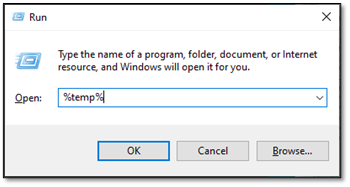
Step 3. Wait for the temp folder to open
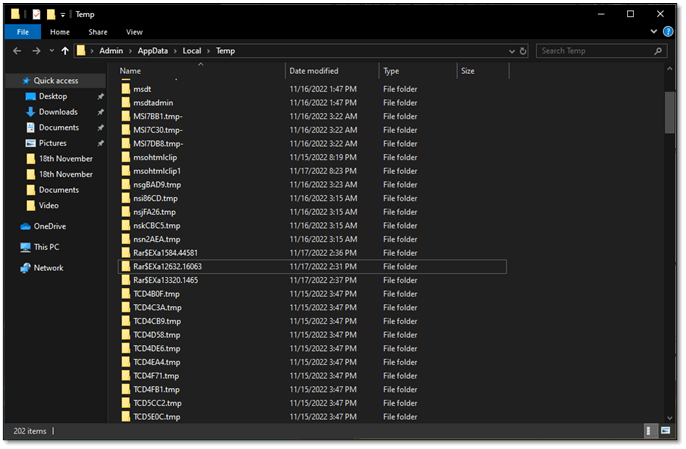
Step 4. Done
This folder is filled with temporary files, which is where Windows stores these types of files.
Should You Delete Temp Files
Deleting temp files is essential for freeing up space and ensuring your PC runs smoothly. It's a simple yet crucial task that should be done regularly to maintain your computer's performance.
By deleting temp files, you can free up disk space, improve your computer's speed, and prevent issues caused by cluttered temporary folders. So, it's a good idea to regularly clean out temp files to keep your PC running at its best.
- Speed up your PC once again
- Get programs/software to work again
- Clear up necessary space on your boot drive
- Avoid driver-related issues
Deleting temporary files regularly is a good practice as it helps free up space on your computer and improves its performance. If you use your PC for around 5-6 hours a day, it's recommended to delete temp files once a week. This will help keep your computer running smoothly and efficiently.
How To Delete Temp Files
Deleting temp files is crucial, and one of the simplest methods to do so is by following a straightforward process. To get started, you can take action by deleting these unnecessary files.
Step 1. Press Windows + R again on your PC
Step 2. Type %temp% and press enter
Step 3. Wait for the temp folder to open
Step 4. Press CTRL + A to select all files
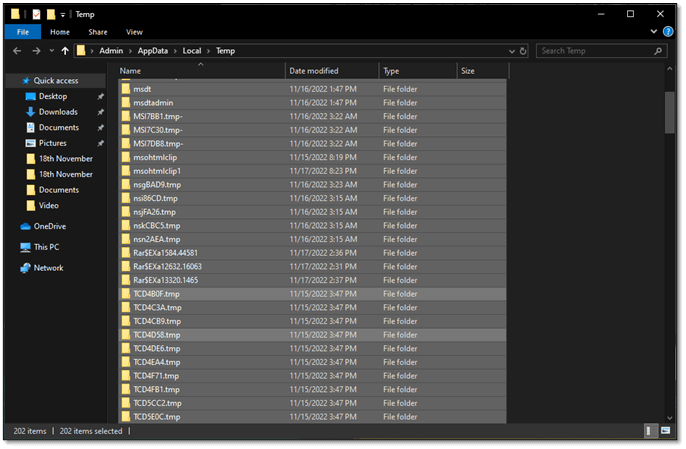
Step 5. Press the Shift + Delete keys on your keyboard
Step 6. Confirm when prompted
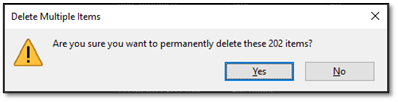
Step 7. Done
To delete temporary files from your PC, simply navigate to the Windows Disk Cleanup tool, select the files you want to delete, and confirm the deletion. Alternatively, you can use the built-in Disk Cleanup tool in Windows to automatically delete temporary files, system logs, and other items you don't need.
Conclusion
Deleting temp files from your PC can indeed speed it up, but it's essential to do it regularly, such as weekly or monthly, to maintain optimal performance.
Related Articles
- All Information About the Disk Utility on Mac [Updated 2023]
- RAR vs ZIP. What Is The Difference Between ZIP and RAR?
- Mac Spotlight Shortcut You Should Use [Full Guide]
- What Is the SysWOW64 Folder? SysWOW64 vs System32
- REFS Volume Showing as RAW: How to Fix Without Lossing Data
Is your REFS partition showing as RAW? Are you unable to access the data? Then follow this easy guide where we share the reasons and solutions that can help you fix the problem where REFS Volume Shows as RAW and without any data loss. - How to Remove Active Flag From Partition [Efficient Solution]
If you're looking to remove the active flag from a partition on your PC, you can do so by using the built-in Disk Management tool in Windows. To access this tool, press the Windows key + R to open the Run dialog, type “diskmgmt.msc,” and press Enter.
Products
Articles & Tutorials
- Data Recovery
- Data Backup
- File Recovery
- File Backup
- System Backup and Restore
- Disk and Partition Clone
- Technical articles
- Mobile articles
- Disk Master Help
- Windows Data Recovery Tutorials
- Windows Secure Delete Tutorials
- Windows Partition Management Tutorials
- Windows File Backup and Restore Tutorials
- Windows System Backup and Restore Tutorials
- Windows Disk Backup and Restore Tutorials
- Windows Clone Tutorials