RAR vs ZIP. What Is The Difference Between ZIP and RAR?
What Is ZIP?
ZIP files are a standard file format for compressing files or folders, known for supporting data archiving and compression. Developed by Gary Conway and Phil Katz in 1989, they have become a popular and widely used file format among computer users.
ZIP files are data containers for one or more files that use ZIP compression, a widely supported and used format by software companies like Apple and Microsoft. This format is also accessible to any program that can create ZIP files.
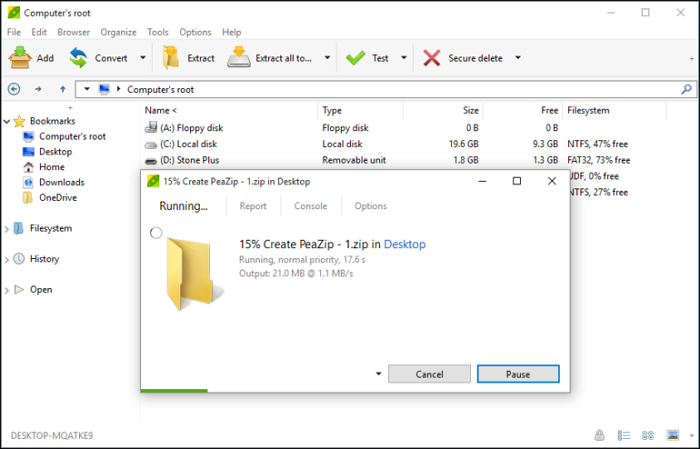
ZIP archives not only compress files but also offer additional features, such as encrypting files with a password and splitting them into manageable parts with ease. Each file within the zipped folder is stored separately, allowing for random access and making it simple to extract or add new files without having to rezip the entire archive.
Files and folders can be zipped (compressed) using various methods like WavPack, BZIP2, PPMd, DEFLATE, LZMA, and many more, allowing for additional content unrelated to the archive, making it self-extracting.
Fun fact: Unlike RAR, ZIP is not an acronym.
What Is RAR?
RAR is a compressed file format created by Eugene Roshal, a Russian developer. It's similar to ZIP, storing one or more folders in a single archive, allowing users to keep multiple documents in a single, easily manageable folder.
Unlike ZIP archives, which can be opened using a built-in tool on a PC, RAR files require a third-party software application to open or extract their contents, as they are the native file format of the WinRAR archiver.
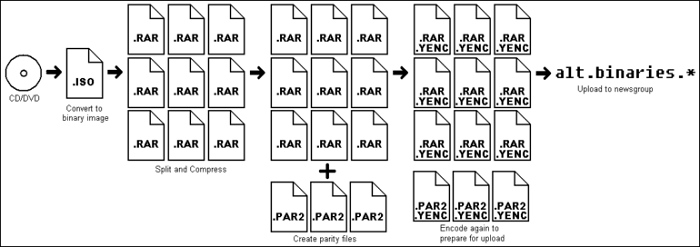
The RAR file format is a proprietary archive file format that supports compression, error recovery, and file spanning, with a higher compression ratio than ZIP, and can handle various file types, indicated by the '.RAR' extension.
What Is The Difference Between ZIP And RAR?
The debate between ZIP and RAR files has been ongoing, but a comparison chart reveals their key differences. These distinctions are based on various parameters, ultimately influencing your decision depending on your needs and available resources.
| ZIP | RAR |
|---|---|
| ZIP is a free and open standard archive format widely supported by many software globally. | RAR is not free and requires a third-party tool called "WinRAR archiver" to compress or extract files. |
| Phil Katz created it as an archive file format for lossless data compression. | The RAR file format is a proprietary archive file format developed by Eugene Roshal for lossless data compression. |
| It offers password-based encryption using the ZIP 2.0 algorithm. | It provides password-based encryption using the more secure AES-128 algorithm. |
| The compression ratio is lower when compared to RAR. | The rate of compression is better/higher than the ZIP format. |
| The ZIP file format utilizes a ZIP 2.0 encryption algorithm, which is considered relatively weak in terms of security. This encryption method is not as robust as modern encryption standards, making it potentially vulnerable to decryption. | RAR uses a more efficient AES-128 algorithm for encryption. |
| Zip files are created using programs like Freebyte Zip, WinZIP, and WinRAR. | RAR files can only be made using WinRAR. |
| It uses the DEFLATE compression algorithm, which is less efficient for compression. | The algorithm used is more efficient than DEFLATE compression, which is a widely used compression method. |
| The filename extension is limited to .zip and .zipx. | Filename extensions include .rev, .rar, .r00, and .r01. |
Conclusion
ZIP and RAR are both compression algorithms with their own strengths and weaknesses, making the choice between them depend on the specific use case.
ZIP is a well-known and older format that often comes with built-in system features. RAR is generally more efficient and faster, but requires third-party software to open.
Despite their differences, both formats effectively compress files without compromising quality.
Related Articles
- All About Novo Button [2023 Full Guide]
- What Is a TPM, How to Check and Enable TPM 2.0 for Windows 11 [Full Guide]
- 7 Days to Die Save File Location [Every Detail You Want to Know]
- What Is Verbose Mode Mac and How to Boot into It? [2023 Guide]
- How to Make Bookmark Folders to Organize Bookmarks
Bookmark folders provide great utility to manage all your bookmarks in an efficient way. This article discusses how to make bookmark folders in top-tier browsers like Google Chrome, Safari, and Firefox. - How to Open .DAT Files in Windows 10/11
Do you want to see what application stores in a DAT file? Then follow this guide, where we show how to open .dat file using various applications. It is essential to understand that every application stores a DAT file as per its requirement, and opening it might not be straightforward.
Products
Articles & Tutorials
- Data Recovery
- Data Backup
- File Recovery
- File Backup
- System Backup and Restore
- Disk and Partition Clone
- Technical articles
- Mobile articles
- Disk Master Help
- Windows Data Recovery Tutorials
- Windows Secure Delete Tutorials
- Windows Partition Management Tutorials
- Windows File Backup and Restore Tutorials
- Windows System Backup and Restore Tutorials
- Windows Disk Backup and Restore Tutorials
- Windows Clone Tutorials