All About Novo Button [2023 Full Guide]
What Is Novo Button
The Novo button, found on Lenovo-branded PCs, serves as a small pinhole or button that allows users to access a variety of settings and functions. This feature is designed to provide a quick and easy way to navigate and troubleshoot the device, making it a convenient tool for users.
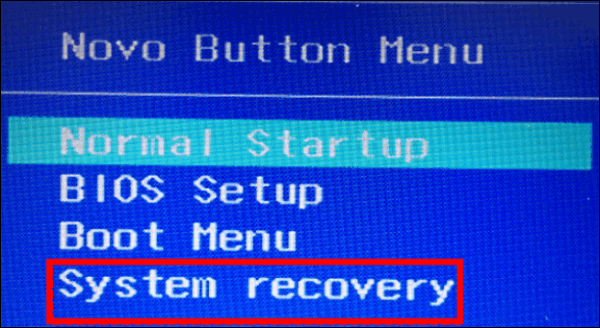
The Novo Button Menu, found on some Lenovo PCs, offers a range of features, including system recovery, setting the boot menu, and helping users access the BIOS. This menu can be accessed through the Novo Button, which may have a different layout depending on the PC model or software version.
These functions make the Novo Button Menu a useful tool for troubleshooting and maintenance tasks on your Lenovo PC.
Where to Find Novo Button
The Novo button is usually located near the PC power button, as shown in the provided figure.
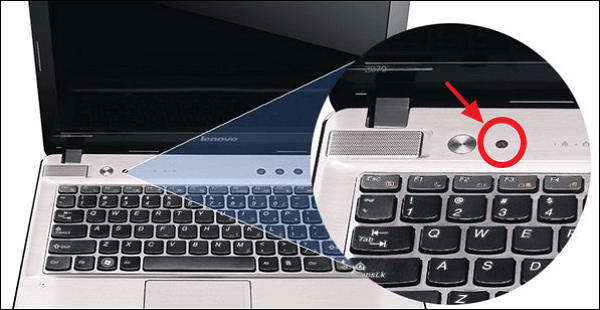
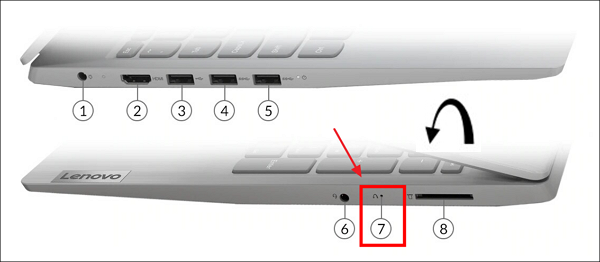
The Novo button, which is used to access the BIOS settings, may be located on the top, bottom, left, or right side of a Lenovo computer, depending on the specific model.
The Novo button is easy to find, as its position is indicated by a curved arrow next to it.
How Does Novo Button Work
OneKey Recovery
OneKey Recovery is a backup and recovery software pre-installed on some Lenovo laptops, which includes a hidden partition that saves system image files and recovery program files. This software helps with resetting and restoring the computer system.
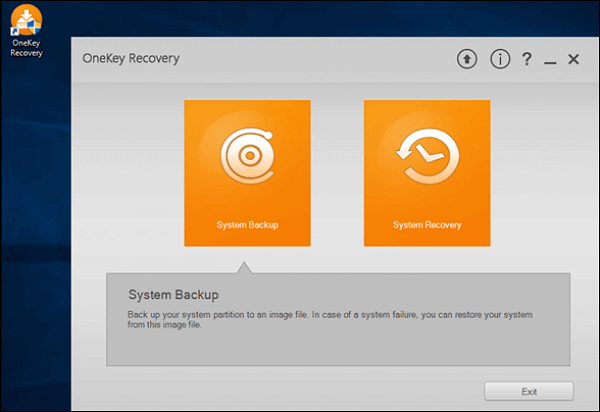
If your computer fails to start due to unknown reasons, you can use the Lenovo Novo button to access OneKey Recovery and perform a system recovery.
Press the Novo Button
If your Lenovo computer won't start properly, press the Novo button, located near the power button, to access the BIOS settings and troubleshoot the issue.
If your computer's Novo Button is not a small button but a small hole, you'll need to use a sharp object like the tip of an unfolded paper clip to gently prick the hole.

Once the computer boots up, the Novo Button Menu will appear on the screen, allowing you to access various options.
Enter System Recovery
When the Novo Button Menu appears, select System Recovery and press Enter. The recovery partition will boot, and the OneKey Recovery will be displayed.
Lenovo users can now reset their laptops using the Start button, or press the Novo button to initiate the OneKey Recovery process, which allows for a reset without losing any data.
Conclusion
When your Lenovo PC won't boot properly, the Novo button can help you troubleshoot the issue.
The Novo button is a feature on Lenovo PCs that allows users to access various settings and tools. It can be found on the side or top of the laptop, and its function may vary depending on the device.
When pressed, the Novo button can take you to a boot menu, BIOS settings, or other diagnostic tools, providing a convenient way to troubleshoot or customize your Lenovo PC.
You can get more Lenovo PC information from these posts:
Related Articles
- Windows 11 Is Affecting Performance on AMD CPUs, Fixes Are Coming Soon
- Hot Backup vs Cold Backup: Definition, Pros & Cons
- What Is Microsoft Identity Manager? Overview, Features & Deployment [Everything You Need]
- Highlights of SanDisk Extreme | Is it Worth Buying and How to Choose it
- OneDrive Files Corrupted | How to Restore Them in 2024
Learn how to fix and recover corrupted OneDrive files, check sync issues, restore previous versions, and protect cloud files. - How to Open Files With No Extension in Windows 10/11? [Updated 2023]
There are some files that come with no extension. Qiling shows you a guide to identify their types and open it easily.
Products
Articles & Tutorials
- Data Recovery
- Data Backup
- File Recovery
- File Backup
- System Backup and Restore
- Disk and Partition Clone
- Technical articles
- Mobile articles
- Disk Master Help
- Windows Data Recovery Tutorials
- Windows Secure Delete Tutorials
- Windows Partition Management Tutorials
- Windows File Backup and Restore Tutorials
- Windows System Backup and Restore Tutorials
- Windows Disk Backup and Restore Tutorials
- Windows Clone Tutorials