What Is Microsoft Identity Manager? Overview, Features & Deployment [Everything You Need]
Managing user data is a critical requirement in today's world, and data analysis and management have become a significant field. Microsoft Identity Manager (MIM) is a tool designed for managing user data on Windows devices, and this article will explore its functionality.
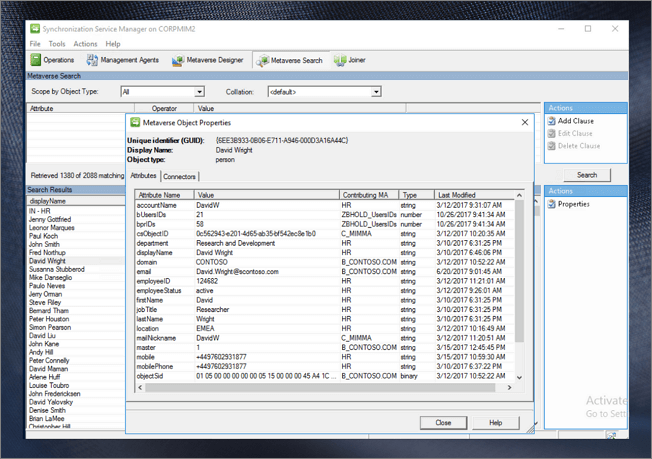
Overview of Microsoft Identity Manager
Microsoft Identity Manager (MIM) 2016 is a server-based synchronization service that synchronizes users' digital identity data among systems. As an on-premises tool, it allows organizations to manage access, policies, and credentials, providing enterprise-level security. MIM 2016 succeeded Microsoft Forefront Identity Manager 2012, offering a more comprehensive solution for identity management.
MIM is primarily designed for advanced system administrators handling industrial-level identity management tasks. It's highly flexible in connecting to various systems, including Active Directory, HR systems, ERP, and email systems, among others. Additionally, MIM offers options for portals and reporting, although these have been taken over by other implementations.
Features of Microsoft Identity Manager
Microsoft Identity Manager's components handle multiple identity-related tasks and functions, including managing identities, self-service password reset, multi-factor authentication, and conditional access. These features enable efficient identity management and are widely utilized in enterprise environments.
1. Identity Management with Privileges: This feature provides a temporary access system for users, granting them limited administrative capabilities. It helps minimize the risk of hacking and malicious attacks by restricting privileged access, making it a convenient and secure option for administrators.
2. Management of Policies: MIM enables the use of authentication techniques, authorization models, and codeless accessibility, combined with an admin portal offered on SharePoint, allowing for streamlined management and security.
3. Access Control: MIM can be integrated into an enterprise system with other minor functionalities, such as certificate management and reporting, to provide defined roles in accessibility. This implementation enables the system to effectively manage and track accessibility-related tasks.
4. Management of Groups: The feature includes manual, manager-based, or dynamic groups, and Microsoft Identity Manager allows for self-service workflows with requests and approvals.
5. Management of Credentials: A self-service and multi-factor authentication system with a built-in ecosystem for managing credentials, synchronized with password updates.
Deployment of Microsoft Identity Manager
To deploy Microsoft Identity Manager (MIM) in your system environment, follow these steps: First, ensure that your system meets the minimum requirements for MIM, which typically include a 64-bit operating system, sufficient RAM, and disk space. Next, download the MIM installation package from the official Microsoft website and run the installer. Follow the on-screen instructions to complete the installation, which may involve accepting the license agreement, choosing the installation location, and specifying the database server details.
Step 1. To prepare the domain for MIM, you can either set up the Active Directory domain controller using the "Domain Setup" or the "Domain Setup for Group Managed Service Accounts".
Step 2. To prepare the identity management servers, you'll need to set up servers like Windows Server, SQL Server, and SharePoint Server. This step follows the domain setup process.
Step 3. After completing the prerequisites, you can proceed with installing the MIM components and synchronizing them with Active Directory, which completes the deployment of the Microsoft Identity Manager.
FAQs
1. Is MIM deprecated?
Microsoft Identity Manager (MIM) is still available in extended support until early 2029, but its mainstream support ended in January 2021, and its services and portals are being deprecated.
2. What is replacing Microsoft MIM?
Microsoft MIM will be fully replaced by Azure AD, which provides cloud-based identity and access management functionality.
3. Is Microsoft Identity Manager free?
Microsoft Identity Manager is a free identity management tool, but it's no longer supported and is only included with a Microsoft Azure license.
4. What is the latest version of MIM?
The latest released version of MIM is Version 4.6.607.0, released on February 10, 2022.
Related Articles
- What Is CD-RW? Compact Disc Re-Writable Explained
- Turn On Secure Boot for Windows 11 Installation
- Mac Dock | Ultimate Guide on Mac Dock
- What Is optical Disc Drive (Definition & Function & Types)
- How to Fix No Bootable Device Acer in Windows 11/10/7
We've discussed all the efficient solutions in this guide for no bootable device Acer problem. And you should be able to deal with the related issues. - [Quick Fixed] No Login Screen on Windows 10/11 Issue
No login screen on startup may sometimes occur when you boot into your computer, resulting in you can't enter your account and password. This issue can be resolved by trying six quick and practical solutions, which are provided in the post to help you fix the problem.
Products
Articles & Tutorials
- Data Recovery
- Data Backup
- File Recovery
- File Backup
- System Backup and Restore
- Disk and Partition Clone
- Technical articles
- Mobile articles
- Disk Master Help
- Windows Data Recovery Tutorials
- Windows Secure Delete Tutorials
- Windows Partition Management Tutorials
- Windows File Backup and Restore Tutorials
- Windows System Backup and Restore Tutorials
- Windows Disk Backup and Restore Tutorials
- Windows Clone Tutorials