Forgot an HP Windows 10 Password? Authorized Recovery Options
A locked HP laptop may use a Microsoft account, a local account, a Windows Hello PIN, or a work account. No single 'bypass' method applies to all of them. Use the recovery route belonging to the account and device you own or administer.
Identify the Account and Use Built-In Recovery
If the sign-in screen shows an email address, recover the Microsoft account through its Forgot password process and complete identity verification on another device. Reconnect the HP laptop to the internet before trying the new password. If the PIN alone is forgotten, choose Sign-in options and use the password or I forgot my PIN where offered.
For a local account, answer its configured security questions. If you prepared a Windows password-reset disk before the lockout, attach it, select Reset password after a failed attempt, choose the disk in the wizard, and set a new password and hint. A second administrator account that belongs to you may help manage the local user. A work or school machine should go to its administrator.
Preserve Files and Encryption Keys
Before external boot media or Windows reset, find the BitLocker or Device Encryption recovery key in the authorized account or organization. Offline tools cannot promise access to encrypted files without it. If another administrator can sign in, back up files to a separate physical device first. Do not assume an HP factory recovery option preserves installed apps and data.
Use Qiling for a Supported Local Account
Qiling Disk Master's Reset Windows password function is only for a local Windows installation that the owner can legitimately access. It does not reset a Microsoft account online and does not directly repair a PIN.
Step 1. On another Windows PC, create Qiling bootable media and test that the HP laptop can boot it using its model's one-time boot menu. Record the original firmware settings.
Step 2. In the Qiling environment, choose Tools and utilities > Reset Windows password.
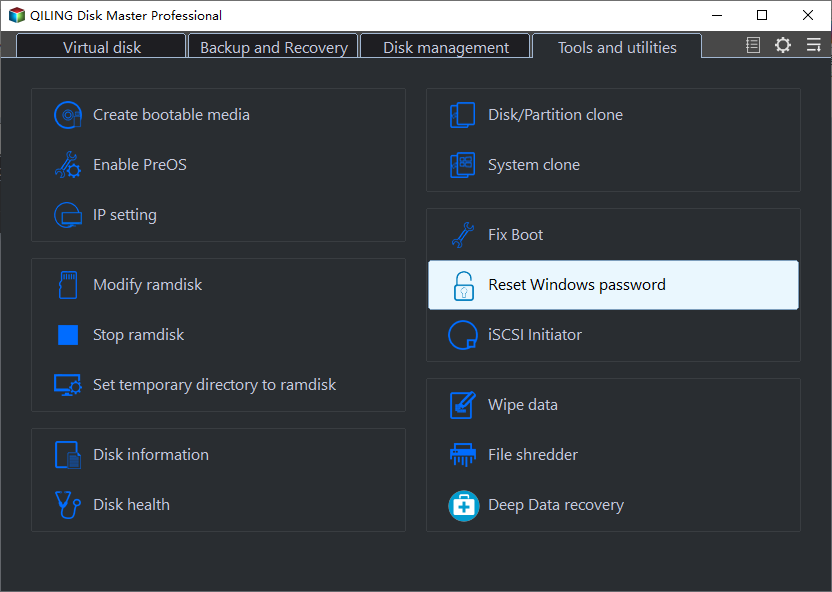
Step 3. Select the correct Windows installation and local account by name. Click Reset only for the account you are authorized to manage.

Step 4. Confirm the reported result, remove the USB, restart, and set a new strong password. Verify personal files and any encrypted content. Stop if the disk is locked or the account is not local.
When Only a Windows Reset Remains
HP recovery menus and Windows Reset this PC vary by model and installation. Read the option's data-removal summary, back up files if possible, and do not choose Remove everything unless loss is acceptable. For a second-hand or managed device, contact the seller or administrator; a factory reset does not remove ownership or management obligations.
Conclusion
Match the recovery method to the account type, protect the encryption key, and use password tools only on a device you are authorized to administer.
Related Articles
- Reset a Forgotten Windows Password
Compare Microsoft and local account routes. - Unlock a Surface Without a Password
Understand authorized recovery and BitLocker limits.
Products
Articles & Tutorials
- Data Recovery
- Data Backup
- File Recovery
- File Backup
- System Backup and Restore
- Disk and Partition Clone
- Technical articles
- Mobile articles
- Disk Master Help
- Windows Data Recovery Tutorials
- Windows Secure Delete Tutorials
- Windows Partition Management Tutorials
- Windows File Backup and Restore Tutorials
- Windows System Backup and Restore Tutorials
- Windows Disk Backup and Restore Tutorials
- Windows Clone Tutorials