Fixed: Command Prompt Not Working in Windows 11/10
Command Prompt is not working in Windows 11/10
"I go to Search box and type CMD and hit Enter. But no Command Prompt window pops up. Then I right-clicked on the Windows button and select Command Prompt or Command Prompt (Admin), nothing worked.
You're trying to create a new partition using the Command Prompt, but you're encountering an issue. To troubleshoot this, you can try running the command "diskmgmt.msc" in the Command Prompt to open the Disk Management tool, which will allow you to create a new partition. If that doesn't work, you can try running the command "format" followed by the drive letter and colon (e.g. "format c:") to format the drive and then create a new partition."
Many Windows 10 users have encountered issues with the CMD command not working after updating their system. As a result, they are now seeking solutions to make the CMD command functional again.
If your Command Prompt is not working in Windows 10, there are quick fixes and reliable methods to resolve the issue. A one-quick fix is to restart your PC, which can resolve the problem in some cases.
| Workable Solutions | Step-by-step Troubleshooting |
|---|---|
| Fix 1. Use CMD Alternative | Run CMD alternative software > Right-click target partition to "Check File System"...Full steps |
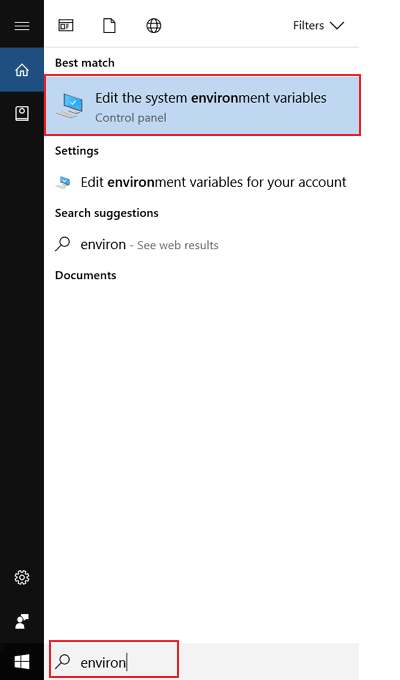
| Fix 2. Enable CMD to Work | Type environ To open System Properties in Windows, click on "Start", then "Control Panel", and finally "System". Alternatively, you can press the Windows key + Pause/Break key on your keyboard. Once System Properties is open, click on "Advanced" and then on "Environment Variables".Full steps |
| Fix 3. Perform System Restore | Type system restore To open System Restore, select the Start button, type "System Restore" in the search bar, and press Enter. Then, select a recent restore point from the list of available restore points, and follow the on-screen instructions to complete the restore process.Full steps |
Quick Fix: Use CMD alternative software
If you're unable to use the Command Prompt to create a partition, clear a disk, or convert a disk to MBR (Master Boot Record) or GPT (GUID Partition Table), A professional alternative software, Qiling Partition Master, can effectively assist you with these tasks.
You can use Qiling Partition Master to fix and repair bad sectors and corrupted file systems, which can help resolve issues that prevent CMD from working in Windows 10.
Step 1. To check the file system on a disk using Open Qiling Partition Master, open the program, select the disk, click on the partition you want to check, and navigate to "Advanced" > "Check File System".
Step 2. In the Check File System window, select the "Fix the error on the disk" option and click "Proceed".
Step 3. The software will start scanning your disk's partition file system. Once it's done, click "Finish".
If not, follow Method 1 or Method 2 to get this issue solved then.
Method 1. Update PATH System Environment Variable to enable CMD to work
1. Type: environ in the Search box and select "Edit" the system environment variables to open "System Properties with Advanced".
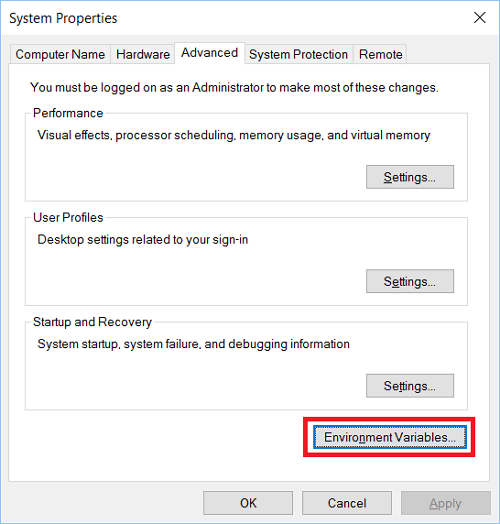
2. Open Advanced Tab on "System Properties" and click "Environment Variables".
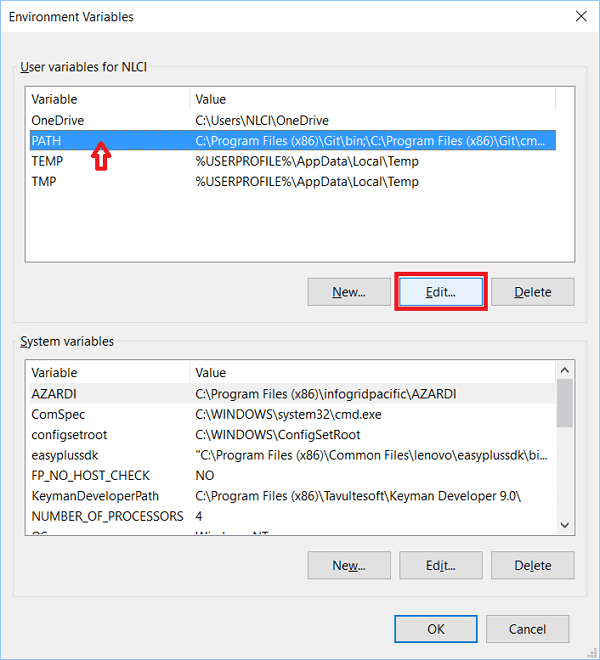
3. Click "PATH" in Environment Variables and click on "Edition".
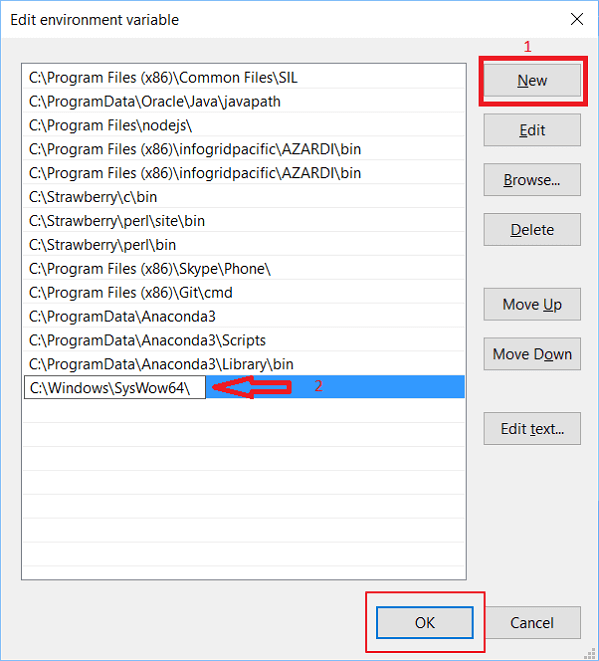
4. Create "New entry" and add: C:\Windows\SysWow64\, then click "OK".
5. Reboot PC and then you shall be able to use CMD in Windows 10 again.
Method 2. Try System Restore to fix Windows 11/10 Command Prompt not working issue
1. Click "Start" and type: System Restore in the Search box.
2. To restore your system, click "System Restore" and select a recent restore point you've created, then click "Next".
3. Confirm the selected restore point is the right one and click "Finish" to restore Windows 10 to the previous version which would allow you to run Windows 10 without any problems.
After installing the software, you can use the CMD command to easily delete files, create a partition, or even convert the disk partition table without any issues.
Related Articles
- How to Set SSD as Boot Drive [2022 Updated]
- Get Qiling Partition Master Key (v6.0) in 2022 | No Cracking
- NTFS or exFAT, Which is Better for HDD, SSD, M.2, or NVMe? Find Your Answer Here
- All You Want to Know about exFAT, FAT32, and NTFS
- 6 Tips to Fix Recovery Drive Full in Windows 10/8/7
In Windows 10, 8.1, 8, and 7, the recovery drive can become full, causing a low space error to pop up. This issue can be resolved by implementing six useful solutions, which include freeing up space on the recovery drive. - Is 8GB RAM Enough? Get the Answers Here!
With memory prices dropping, you might be tempted to get a high-capacity upgrade, but how much RAM do you need for your laptop or desktop computer? Is 8GB RAM enough, or do you need more? You'll find the answers here.
Products
Articles & Tutorials
- Data Recovery
- Data Backup
- File Recovery
- File Backup
- System Backup and Restore
- Disk and Partition Clone
- Technical articles
- Mobile articles
- Disk Master Help
- Windows Data Recovery Tutorials
- Windows Secure Delete Tutorials
- Windows Partition Management Tutorials
- Windows File Backup and Restore Tutorials
- Windows System Backup and Restore Tutorials
- Windows Disk Backup and Restore Tutorials
- Windows Clone Tutorials