Is 8GB RAM Enough? Get the Answers Here!
| Workable Solutions | Step-by-step Troubleshooting |
|---|---|
| How Much RAM Do You Need? | There is not much difference between 8GB and 16GB of RAM in daily use of office, entertainment, games, etc...Full steps |
| Is 8GB RAM Enough? | Here is the answer. It depends on what you are going to do on your computer/laptop. If you are going to...Full steps |
| To speed up your PC without adding RAM, start by closing unnecessary programs and background applications to free up memory. Next, run a disk cleanup to remove temporary files and other data that's no longer needed. | Step 1. Click "Adjust with 1-Click" to extend C drive; Step 2. Click "OK" to extend C drive automatically...Full steps |
What Is RAM
The performance of a computer can be influenced by various factors, but RAM (Random Access Memory) plays a particularly significant role in determining overall system efficiency.
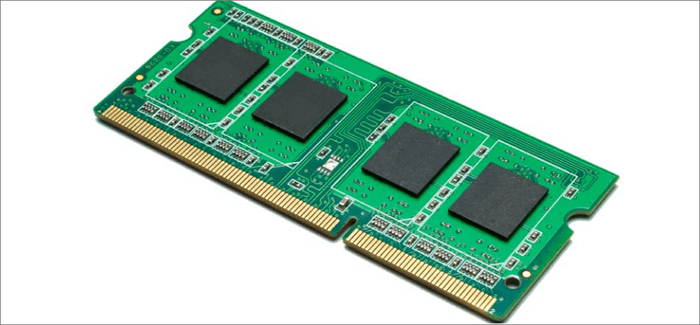
RAM, random-RAM, or Random Access Memory, is an internal memory that directly exchanges data with the CPU, allowing for fast reading and writing at any time. It acts as short-term memory, storing data that programs need to access quickly, such as when you open programs on your computer. This system memory is where data is stored temporarily as the processor needs it, making it an essential component for smooth computer performance.
How Much RAM Do You Need: 8, 16, or 32GB?
16GB of RAM is not significantly more effective than 8GB in general daily use, but it can provide a noticeable performance boost for professional users, such as those who use Photoshop or play demanding games.
How much RAM do you need for daily use?
8GB of RAM is sufficient for basic productivity and non-demanding tasks, allowing for efficient performance without excessive page file usage.
How much RAM do you need for gaming?
16GB of RAM is recommended for gaming laptops, as it provides enough memory for most games and allows for multitasking.
How much RAM do you need for high-end editing?
32GB is recommended for professional users who work with video and audio, as it provides faster loading and calculation processes compared to 16GB.
Choosing the right RAM for your tablet depends on your specific needs. For general use, such as browsing, social media, and streaming, 2GB or 3GB of RAM is sufficient.
- 8GB is OK for lightweight users.
- 16GB is a better fit in most tablet cases.
- 64GB is needed if you plan to use a tablet as your primary PC. 32GB is sufficient for general use, but 64GB is recommended for heavy use, such as video editing or gaming.
If you are still confused, you can check the Chart.
| Usage | Description | 8GB | 16GB | 32GB |
|---|---|---|---|---|
| Office productivity | Basic document work | √ | √ | √ |
| Web browsing | Basic multitab browsing | √ | √ | √ |
| Photo editing | 10+ photos | × | × | √ |
| Gaming | High-end | × | × | √ |
| Media streaming | Audio or video | × | × | √ |
Is 8GB RAM Enough?
The amount of RAM needed depends on the computer's intended use, with 8 GB being sufficient for general use but insufficient for heavy virtualization or high-resolution gaming, requiring more than 8 GB for optimal performance.
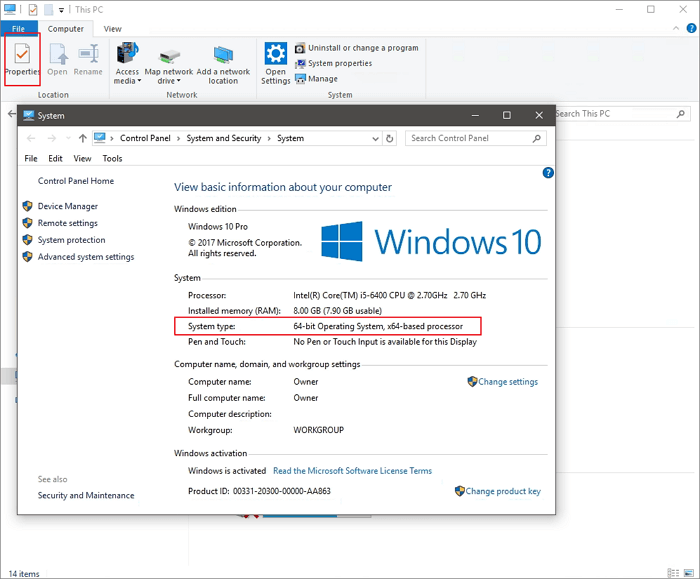
If your PC is 32-A 32-bit operating system can only access up to 4GB of RAM, making RAM size beyond 4GB useless to it. Only a 64-bit operating system can utilize RAM beyond 4GB. To check your system type, follow this tutorial:
Step 1. Open "File Explorer".
Step 2. Right-click on "This PC" and choose "Properties", and you will see System type information.
Extra Tips: How to Speed Up Your PC Without Adding RAM
You can improve your computer's performance by extending the system drive, aside from increasing the RAM size. This can be easily done with a disk management tool like Qiling Partition Master, which makes it simple to extend the C drive space.
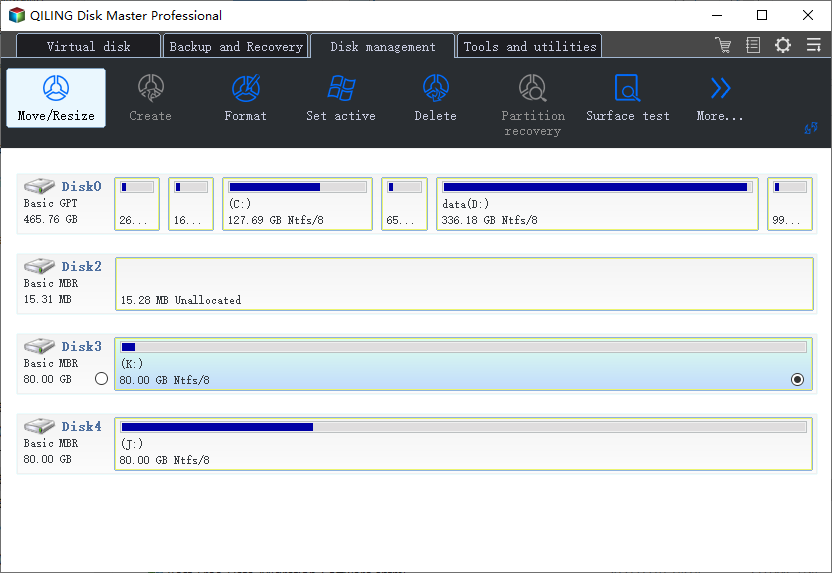
Step 1. Click "Move/resize" to extend C drive.
When your C drive is out of space, you will see the Low Disk Space alert on Qiling Partition Master. Select the C drive, click the "Move/resize" button to extend it.
Step 2. Drag the partition panel to extend C drive.
To add more space to the C drive, drag the dots to the right to increase the allocated space. Once you're satisfied with the new size, click "OK" to confirm the changes.
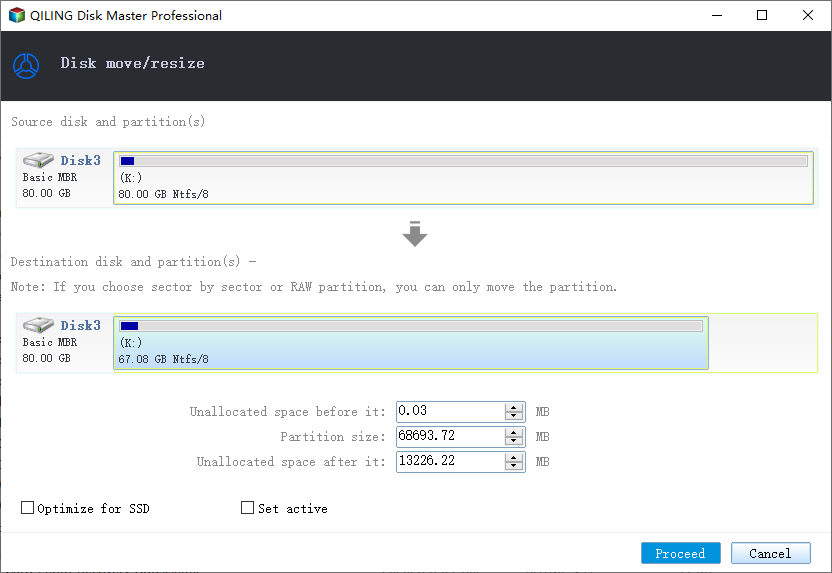
Step 3. Confirm to resolve low disk space in C drive
Click the "Proceed" button to adjust C Drive space.
Conclusion
8GB RAM is sufficient for general use, but for more demanding tasks, 16GB RAM is recommended.
Related Articles
- 6 Tips to Fix Recovery Drive Full in Windows 10/8/7
- How to Convert FAT32 to NTFS Windows 10 Without Losing Data in 3 Ways
- How to Wipe a Hard Drive in Windows XP Without CD
- How to Wipe or Erase Hard Drive in Windows Server - Qiling
- Fixes: BitLocker Password & Recovery Key Not Working
Learn effective solutions to resolve BitLocker password and recovery key issues, and regain access swiftly. This article will provide you with the help you need to fix all BitLocker errors and get back on track. - Fixed: Boot Drive Not Showing Up in BIOS | 2024 Best Tips🔥
This guide provides solutions to the problem of a boot drive not showing up in BIOS, offering seven different methods to resolve the issue. To help you troubleshoot and fix the problem, you'll find detailed explanations and steps to take in this article.
Products
Articles & Tutorials
- Data Recovery
- Data Backup
- File Recovery
- File Backup
- System Backup and Restore
- Disk and Partition Clone
- Technical articles
- Mobile articles
- Disk Master Help
- Windows Data Recovery Tutorials
- Windows Secure Delete Tutorials
- Windows Partition Management Tutorials
- Windows File Backup and Restore Tutorials
- Windows System Backup and Restore Tutorials
- Windows Disk Backup and Restore Tutorials
- Windows Clone Tutorials