Accidentally Formatted/Deleted HP Recovery Partition, How to Recover
HP Recovery Partition Gets Deleted/Formatted Cases
Tom'sHardware Unfortunately, deleting the recovery partition can make it difficult to restore your computer to its original state. However, you may be able to recover it using a third-party data recovery software. You can try using a tool like Deep Data Recovery Wizard or Recuva to scan your hard drive and see if it can recover any data from the deleted partition. If the partition was not properly deleted, it's possible that some data may still be recoverable.
Makeuseof - "My recovery partition on my HP netbook was accidentally deleted. I would like to have my netbook back to its out-of-box state."
SevenForums I understand your concern. Unfortunately, once a partition is formatted, its original data is lost. However, you can try to restore the HP recovery partition by using the HP Recovery Manager or by creating a new recovery partition. Please check the HP website for instructions on how to do this. Additionally, you can also try using a third-party software like Deep Data Recovery or Recuva to recover any remaining data from the formatted partition. However, please note that the success of data recovery depends on various factors, including the type of data and the condition of the partition. I recommend checking the HP website for official guidance on restoring the recovery partition.
Everything About Recovery Partition in Windows 10/8/7
The recovery partition is a special partition on the system hard drive used to restore the system to factory settings, helping to prevent computer crashes. To protect it from being changed or deleted, recovery partitions typically do not have a drive letter and only offer a "Help" option in Disk Management, making them inaccessible for modification. There are usually two types of recovery partitions.
Installing Windows on a GPT (GUID Partition Table) disk creates a recovery partition that takes up only a few hundred megabytes of disk space, as it only contains the bare operating system.
The other one is created by computer manufacturers like HP, Dell, Lenovo before delivery, and contains a copy of all software installed at the factory, including the Microsoft Operating System and supplemental products.
- Important
- Most recovery partitions from computer brands can only be installed on their branded computers, with Lenovo Onekey Recovery only supporting Lenovo computers. This means that system images created by these recovery partitions cannot be distinguished or installed by other recovery software.
The recovery partition allows you to restore the computer to its factory default settings, including the OS, drivers, and some built-in applications. This partition takes up more space than the Windows recovery partition and is usually marked as an OEM Partition.
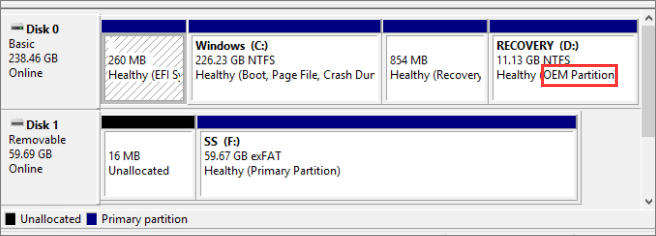
1 - How to Recover Deleted HP Recovery Partition
If you accidentally deleted the HP recovery partition, there's still hope to recover it. You don't need to reformat the partition or rebuild its table, but rather use professional partition recovery software, such as Qiling Partition Recovery, which is specifically designed to recover deleted or lost partitions safely and effectively. This software is a reliable solution to recover your partitions and data, making it a great option to try.
Step 1. Run Qiling Partition Recovery on your PC.
Select the disk or device where you lost partition(s), then click "Scan" to proceed.
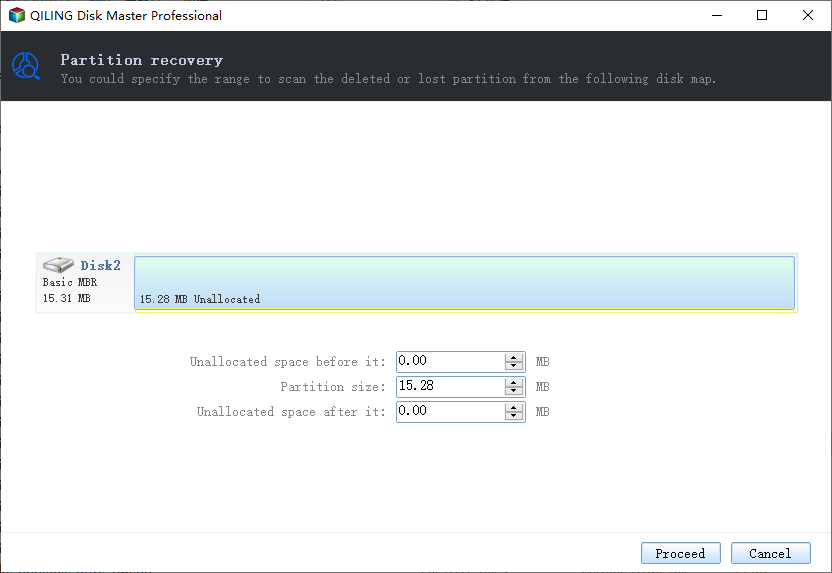
Step 2. Wait for the scanning process to complete.
Let the program scan the selected disk and find the lost partition(s).
Step 3. Preview and restore the lost partition(s).
Double-click on the partition which is marked as "Lost" with "Good" recoverability.
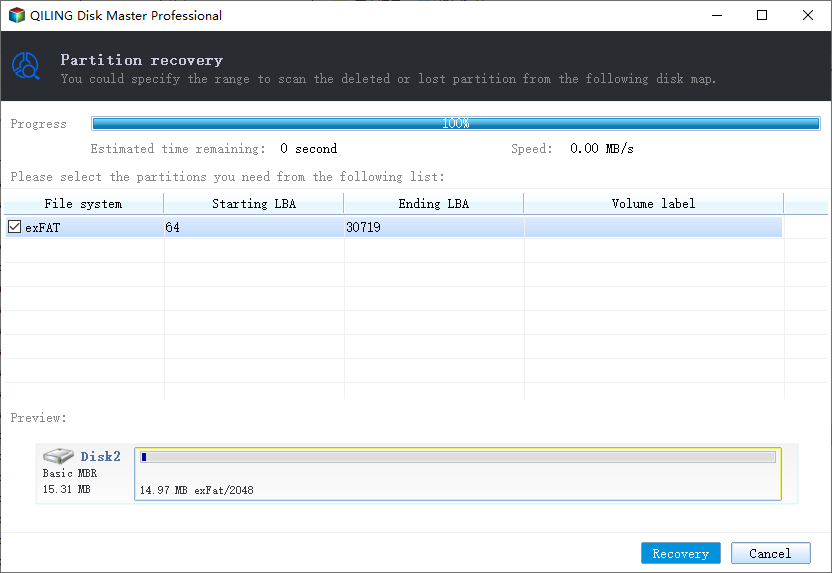
Preview the content of the lost partition.
Step 4. Click "Recover" to finish the partition recovery process.
If the program warns you that there is a conflict, back up the listed partition with essential data to an external hard drive first, then execute the final operation to restore your lost partition.
2 - How to Restore Formatted HP Recovery Partition Data
When you format your recovery partition, the partition itself isn't lost, but the data on the HP partition is. To recover the lost data, you can use a professional data recovery software like Qiling, which has helped millions of users recover their lost files from formatted hard disks, partitions, SD cards, USB flash drives, and other Windows-compatible storage devices.
Step 1: Choose the recovery partition.
Step 2: Initiate the scan process.
Step 3: Recover data to a secure location.
Extra Tips - Copy HP Recovery Partition to a New Hard Drive
You are likely to delete or format the recovery partition, but you can easily clone it to a new hard drive with Qiling Backup, ensuring you have a backup and won't worry about losing the recovery partition.
Related Articles
- Qiling Partition Recovery Software Free Download Full Version Windows 10/11
- 2 Effective Ways to Fix Asus Recovery Partition Missing Problem
- Partition Repair Software: Repair Corrupted Corrupted Partition on Windows 10/11
- How to Rebuild and Repair Partition Table
- How to Format Raw Micro SD Card [Quick Guide]
This article provides quick and efficient ways to format raw Micro SD card and introduce a professional third-party tool to manage your Micro SD card - How Do I Format Samsung SSD in Windows 10/11 [Easy & Efficient Ways]
Formatting a Samsung SSD in Windows 10/11 is a straightforward process that can be accomplished using two easy methods. The first approach involves using the built-in Disk Management tool, which allows you to format the SSD to a desired file system, such as NTFS or FAT32.
Products
Articles & Tutorials
- Data Recovery
- Data Backup
- File Recovery
- File Backup
- System Backup and Restore
- Disk and Partition Clone
- Technical articles
- Mobile articles
- Disk Master Help
- Windows Data Recovery Tutorials
- Windows Secure Delete Tutorials
- Windows Partition Management Tutorials
- Windows File Backup and Restore Tutorials
- Windows System Backup and Restore Tutorials
- Windows Disk Backup and Restore Tutorials
- Windows Clone Tutorials