How to Fix Corrupted Database/Data on PS4
Quick Navigation:
- Given below are some common symptoms of a corrupted database:
- Reasons and Causes for PS4 Database Corruption:
- How to Fix Corrupted Database on PS4 with the "Rebuild Database"
- How to Fix It When PS4 Data Is Corrupted
- We have enlisted two options for you given below. You can use the one that works best for you:
PS4 data or database corruption can be a frustrating experience, but it's not the end of the world. With the right steps, you can resolve the issue and get back to enjoying your favorite games. If you've lost data on your connected hard drive, don't panic – Deep Data Recovery can help you recover the lost files.
The PS4 database is a crucial part of your gaming experience, storing vital information about your device and games. When it becomes corrupted, it can cause frustration and disrupt your gaming sessions. Don't worry; we're here to help you fix the corrupted database on your PS4.

Given below are some common symptoms of a corrupted database:
- PS4 will warn that database is corrupted and will restart automatically;
- Games will take a longer duration to load and it may become abnormally slow;
- PS4 will fail to read a disc;
- It may become way too slow to navigate via the menu;
- You may witness some stuttering while playing games.
Reasons and Causes for PS4 Database Corruption:
PS4 database corruption can be frustrating, especially when you're in the middle of a gaming session. Don't worry; we're here to help you understand the causes of PS4 database corruption and provide you with effective solutions.
- File header corruption
- Storage media corruption
- Power failure
- Hardware failure
Apart from the above causes, there may be other possible causes as well. However, it is not necessary to list them all here. After you understand the symptoms and causes, you should proceed to tackle the issue.
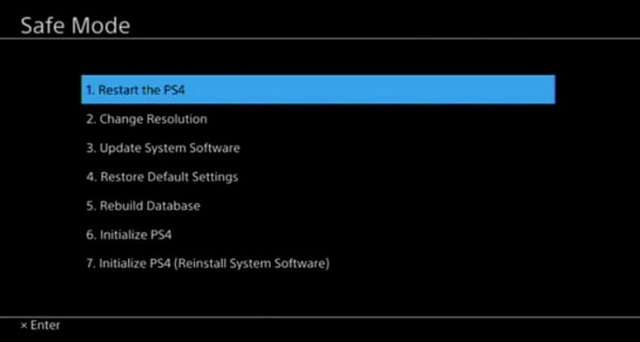
How to Fix Corrupted Database on PS4 with the "Rebuild Database"
Rebuilding the PS4 database in Safe Mode is a straightforward process that can help resolve database corruption issues. Follow these steps to rebuild your PS4 database:
- 1. Switch off the console and wait until the light fades out fully;
- 2. Press the power button on the console until you hear two beeps. It will allow PS4 to boot into Safe Mode;
- 3. Now you must connect the PS4 controller to the console with the help of a USB cable;
- 4. You will find many options in the Safe Mode. Here, you need to choose the option Rebuild Database and wait for the process to complete.
How to Fix It When PS4 Data Is Corrupted
Corrupted data on a PS4 can be caused by a variety of factors. Some common causes include:
- If there is a malfunctioning hard drive;
- If you've recently installed a game and are experiencing data corruption, here are some steps you can take to troubleshoot the issue:
- If a downloaded file failed to get installed to the system effectively, here are some steps you can take to troubleshoot the issue:
- When the data on the system gets corrupted.
We have enlisted two options for you given below. You can use the one that works best for you:
Fix 1. Under this method, you may proceed to delete the corrupted data manually. The main cause of this error is that a specific file linked to your game has become corrupted. Deleting the corrupted file is the right way to fix the problem. Given below are the key steps to follow when PS4 data is corrupted:
- 1. If you're experiencing corrupted data on your PS4, there are a few methods you can try to resolve the issue. Here's a step-by-step guide on how to fix corrupted data on PS4:
- 2. To enter the Media Player folder and delete the corrupted data, follow these steps:
- 3. To delete the corrupted data file, follow these steps:
- 4. To complete the process, you need to exit the Media Player app and then reopen it. This will ensure that the changes you made are applied and the corrupted data is removed.
Fix 2. Under this method, you must delete the downloaded and corrupted PS4 files and then redownload them immediately. The main reason behind this issue is that the downloaded file failed to be installed in the system properly. It is possible that the data became corrupted during the download process. Follow the steps given below:
- 1. To resolve the issue, you must delete the downloaded file without delay. Here's how to do it on your PS4:
- 2. Now you may proceed to retry downloading the file.
There are times when you may experience data loss on your PS4 after resolving errors. This highlights the importance of data protection. You can follow two approaches to avoid data loss on PS4.
First, you may proceed to upgrade PS4 to a larger HDD. Before doing it, you're supposed to back up your PS4 first and QILING Disk Master Professional is a great software to back up important files, folders, or even the whole hard drive.
If you've lost data after upgrading your PS4 to a larger HDD, don't worry. Deep Data Recovery is a powerful tool that can help you recover your lost files.
If you're experiencing issues with your PS4's rebuild database, don't panic. There are several solutions you can try to resolve the problem. Rebuilding the database has been a helpful approach in many cases, and it's a good idea to try this before resorting to more drastic measures like initializing your device.
Related Articles
- How to Fix the Problem of Cannot Format SanDisk SD Card
- How to Fix PSP Not Reading Games in Memory Stick
- Total Word File Recovery Solution to Recover A Word Document
If you accidentally deleted a Word document or lost the file due to system errors or other reasons. This article guides you on the ways for a speedy Word file recovery in multiple situations. Stay tuned for quick access to your lost Word files. - How to Install Windows 10 Step by Step with Pictures
To install Windows 10, follow these steps: this guide. Alternatively, you can also install Windows 10 without any hassle by following these simplified steps: this guide. - 2 Fixes to Resolve Memory SD Card Says Full But No Files On It Error
If your camera's memory SD card shows as full but doesn't display any files. This issue can be resolved by following the instructions on this page. - Files Disappeared and Missing from Hard Drive
Files or folders may suddenly disappear from a computer's hard drive without being deleted or formatted, leaving users wondering where they went. Fortunately, there are ways to recover them.
Products
Articles & Tutorials
- Data Recovery
- Data Backup
- File Recovery
- File Backup
- System Backup and Restore
- Disk and Partition Clone
- Technical articles
- Mobile articles
- Disk Master Help
- Windows Data Recovery Tutorials
- Windows Secure Delete Tutorials
- Windows Partition Management Tutorials
- Windows File Backup and Restore Tutorials
- Windows System Backup and Restore Tutorials
- Windows Disk Backup and Restore Tutorials
- Windows Clone Tutorials