Recover Files From a Disk That Keeps Disconnecting
Quick Navigation:
- Why the Disk Leaves the Bus
- Image the Disk Before Scanning
- Read Slowly, Rescue in Order
- Recover with Qiling Deep Data Recovery
- Frequently Asked Questions
A disk that vanishes from Explorer and returns a minute later is telling you it can no longer hold a stable connection. Copying files from it in the usual way is the worst approach, because each retry loads the drive again and pushes it closer to failing for good. The safe path is an image of the whole disk, taken once and slowly.
Why the Disk Leaves the Bus
Event ID 153 records an I/O operation that had to be retried, and Event ID 129 records a reset of the device by the controller. Seen together, they describe a drive that stops answering long enough for Windows to restart the link and try again.
The cause can be inside the drive, in the bridge of an enclosure, or in the cable. A weak sector, a worn head, a marginal USB connector, and a power supply that sags under load all produce the same pattern, and all of them get worse with each attempt.
Event Viewer is part of Windows and not part of Qiling Deep Data Recovery. Reading the log tells you how often the link dropped and when; it does not repair the disk or protect the data.
Image the Disk Before Scanning
Every disconnect interrupts a scan. A tool that has read 200 GB and loses the device has to start again, and each restart re-reads the areas that already caused trouble, which is the fastest way to turn a weak disk into a dead one.
Make a sector-level image of the whole disk to a healthy drive with more free space than the failing disk's used size. The image freezes one pass of the data, and every later attempt reads the file instead of the hardware.
A drive that drops every few minutes may not finish in one run. An imaging tool that records read errors, skips the bad block, and can resume at the last good sector is worth the extra setup time, because it converts one unstable pass into many short stable ones.
Read Slowly, Rescue in Order
Limit the read rate. A slow, steady pass produces less heat and fewer retries than a full-speed one, and heat is what usually pushes a marginal drive past its limits. Connecting through a slower port is a crude but effective way to cap the speed.
Use a rear port on the motherboard or a powered adapter, and disable sleep for the session. A drive that spins down between passes may not come back, and an enclosure that loses power mid-read costs the whole attempt.
Rescue in order of value, not size. Documents, financial records, and small photo folders come first because they are quick to read and painful to lose; large video files come last because they take hours and are often replaceable.
Stop when the drive starts making clicking or beeping sounds. Mechanical noise means the head is in trouble, and further reading can destroy the platters that a professional service would otherwise be able to read.
Recover with Qiling Deep Data Recovery
Qiling Deep Data Recovery scans the image file or the disk itself and rebuilds the folder tree from the file records it finds. When the drive is unstable, point the scan at the image, so the failing hardware is read once and never again.
The workflow matches recovering files from a drive with bad sectors: read around the damage, preview before saving, and never write to the source.
Step 1. Choose the Recovery Mode
Use Fast Scan when the volume still mounts and the folders are visible. Use Format Scan when the drive drops before Windows can mount it or the volume reports RAW.
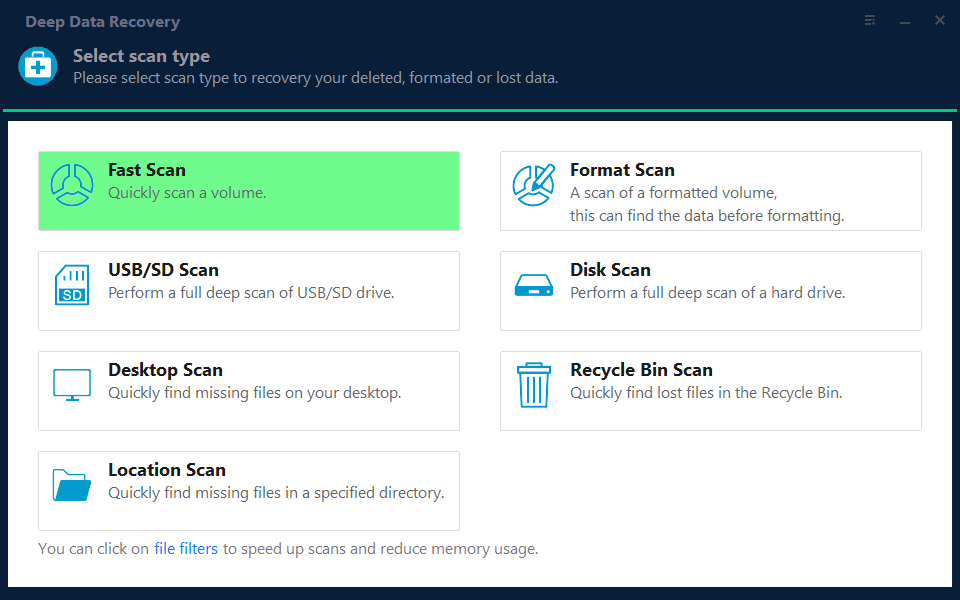
Step 2. Select the Disk or the Image
Pick the failing disk by capacity and model, or attach the image you made and select that instead. Do not select the healthy disk that will receive the results.
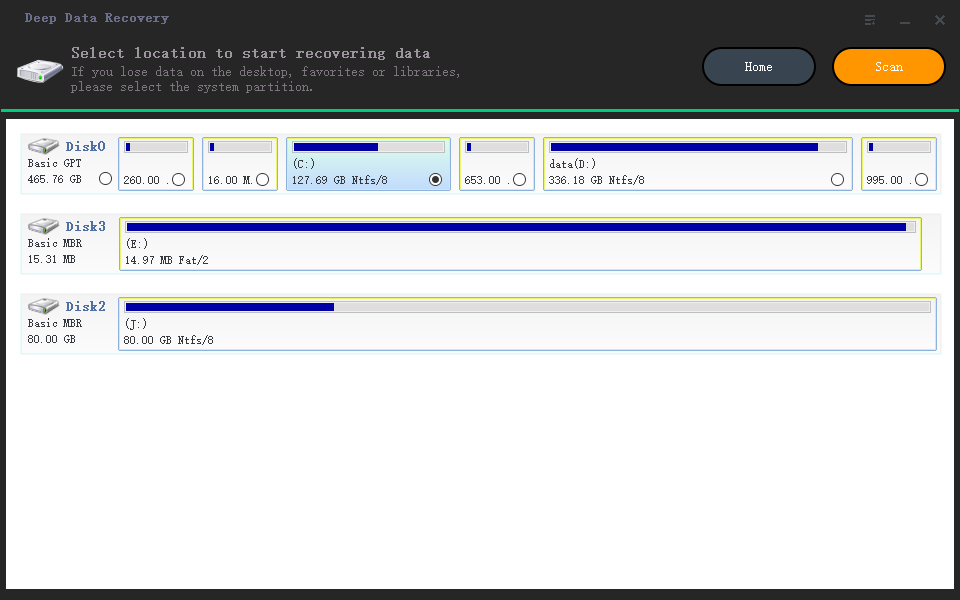
Step 3. Review the Results by Priority
Filter by type so the small, important files appear first, and open previews before committing to a long save. A file that previews correctly is a file that can be written out.
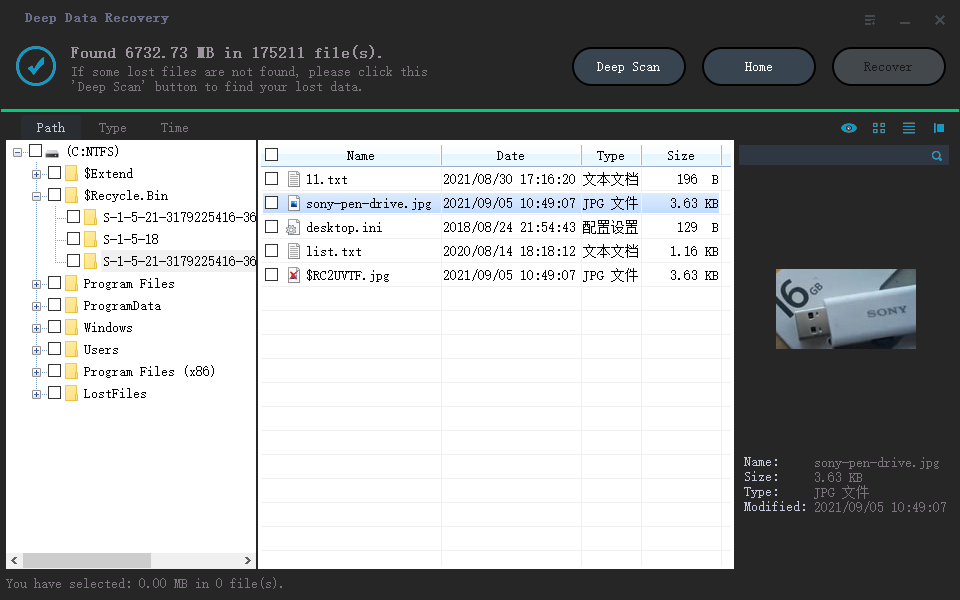
Step 4. Save to a Healthy Disk
Write everything to a disk that was never part of the problem, then keep that copy until the failing drive has been replaced and the files verified.
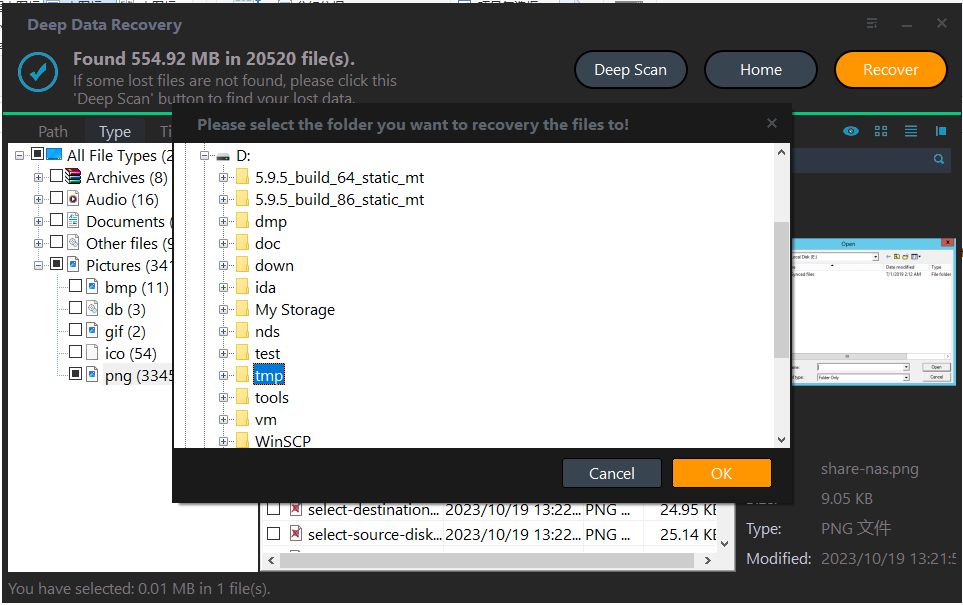
Frequently Asked Questions
The disk disappears after ten minutes. Can anything still be recovered?
Yes, if you work in short passes or from a partial image. Restarting a scan from the beginning each time is what makes the situation worse, so build the image in stages and scan the result.
Could another USB port be the whole problem?
Sometimes. A marginal cable, a hub, or a front-panel port can drop a healthy drive. Test the drive through a rear port with a known good cable before assuming the disk is failing, but stop testing once clicking begins.
Should I keep retrying a drive that clicks?
No. Clicking points at a mechanical fault that no software can fix. Power it down and use a professional recovery service if the data matters, because each further spin reduces the chance of a successful read.
Related Articles
- USB4 SSD Enclosure Randomly Disconnects
- How to Recover Files from Bad Sectors on a Hard Drive
- How to Repair a Corrupted External Hard Drive
- Hard Drive Won't Spin: Causes and Options
- External Hard Drive Disconnects During Large File Copies
Products
Articles & Tutorials
- Data Recovery
- Data Backup
- File Recovery
- File Backup
- System Backup and Restore
- Disk and Partition Clone
- Technical articles
- Mobile articles
- Disk Master Help
- Windows Data Recovery Tutorials
- Windows Secure Delete Tutorials
- Windows Partition Management Tutorials
- Windows File Backup and Restore Tutorials
- Windows System Backup and Restore Tutorials
- Windows Disk Backup and Restore Tutorials
- Windows Clone Tutorials