USB4 SSD Enclosure Randomly Disconnects
Quick Navigation:
- Why USB4 Enclosures Drop Out
- Test Power, Cable, and Heat
- Check the Driver and the Event Log
- Recover Files After an Interrupted Write
- Frequently Asked Questions
A USB4 enclosure is a small computer: it negotiates power, tunnels PCI Express to an NVMe drive, and translates the result into a USB mass storage device. Each of those layers can fail on its own, and the result looks identical from Explorer, where the drive simply disappears for a few seconds. The fix depends on which layer is dropping.
Why USB4 Enclosures Drop Out
Four causes dominate. The enclosure asks for more power than the port guarantees, and the link resets under load. The drive throttles when the aluminium body cannot shed heat, and the bridge drops the device. The PCIe tunnel reports a correctable error that the host escalates to a disconnect. Or the cable is rated for charging rather than for full speed data.
The pattern tells you which one. A drop minutes into a large copy points to heat. A drop at the moment of plugging in a second device points to power. Random drops while idle point to the tunnel or the cable.
None of these causes damages the SSD by itself. Damage comes from a file system that is interrupted mid-write, which is why the recovery step comes after the connection is stable.
Test Power, Cable, and Heat
Connect the enclosure directly to a port on the machine, without a hub, dock, or extension cable. On a laptop, use a port that supports power delivery if the enclosure has no separate supply.
Replace the cable with one rated for the speed of the port. A cable that carries power but not the high speed lanes produces a link that trains and then drops as soon as traffic starts.
Touch the enclosure after ten minutes of copying. A case that is too hot to hold is throttling, and a small thermal pad between the drive and the shell often fixes it. Lay the enclosure on a hard surface rather than on fabric.
Check the Driver and the Event Log
Open Device Manager and look for a warning on the USB4 or Thunderbolt controller. A controller that failed to start explains every disconnect at once, and reinstalling the platform driver is the fix.
Read the system event log around the time of a drop. Hardware error records from the PCIe layer are logged by the operating system and point straight at a tunnel that could not be maintained.
Update the enclosure firmware if the vendor provides one. Bridge firmware fixes are common for USB4 models, and the update is applied from the host while the enclosure is empty or idle.
Recover Files After an Interrupted Write
If the volume now shows as RAW, or a folder has disappeared, the file system took the damage rather than the drive. Qiling Deep Data Recovery can scan the enclosure as an ordinary disk once it stays connected long enough to read.
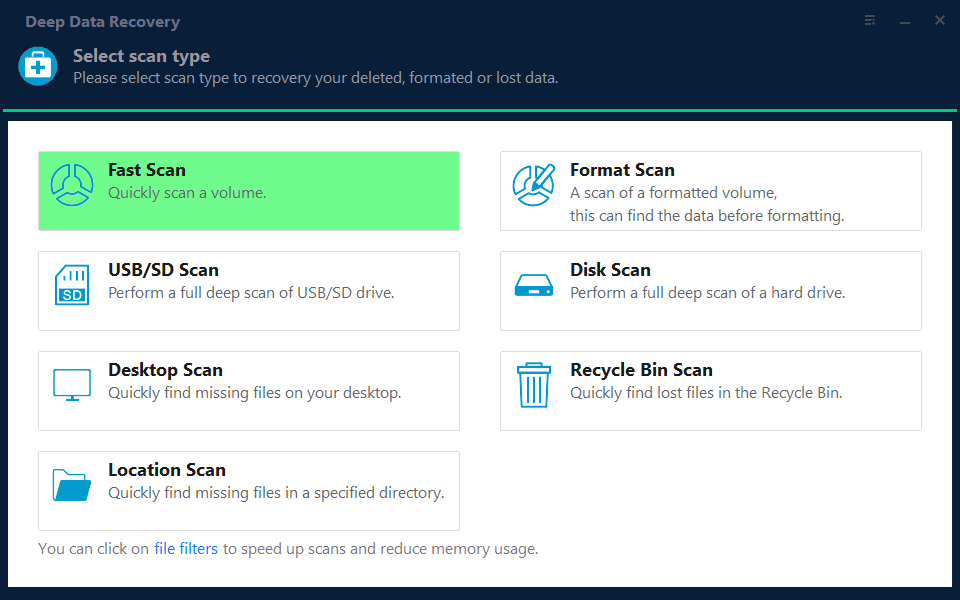
Step 1. Choose the Recovery Mode
Use Fast Scan for missing folders on an intact volume, and Format Scan when the volume shows as RAW.
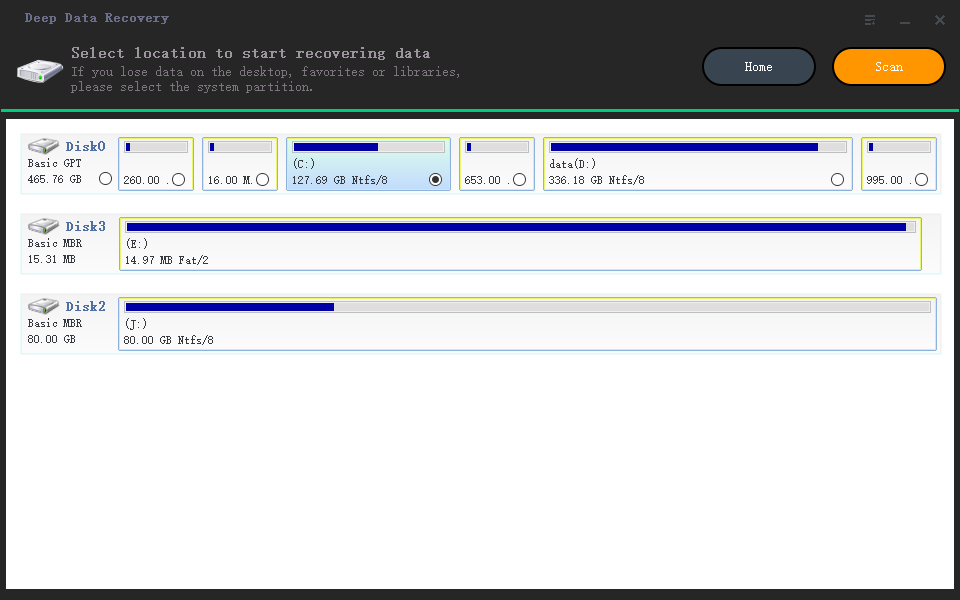
Step 2. Select the Enclosure
Pick the external disk by capacity. Start the scan only after the enclosure has stayed connected for several minutes without a drop.
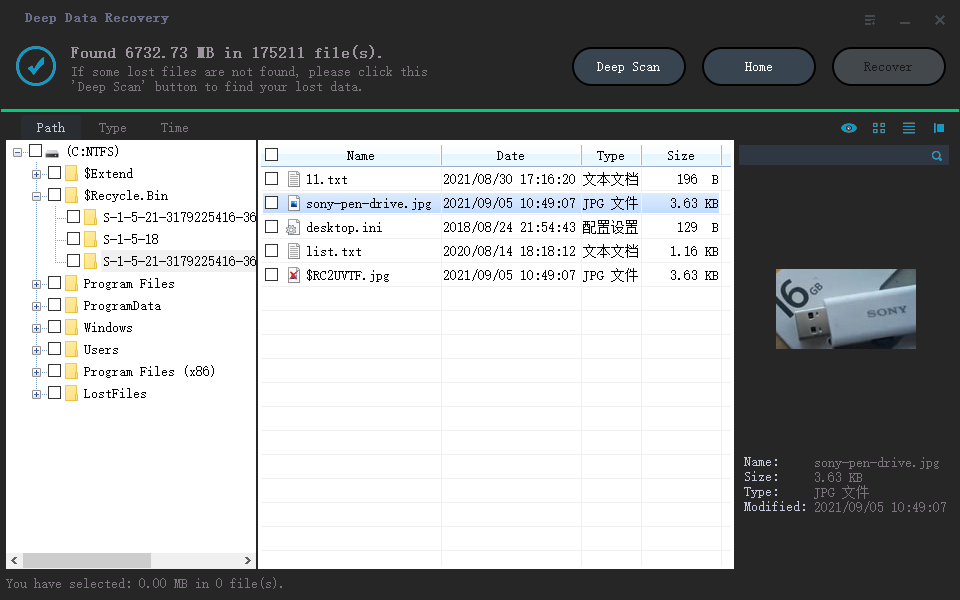
Step 3. Review the Results
Preview files before selecting them, and sort by date to find what was written just before the disconnect. Files that preview correctly are intact.
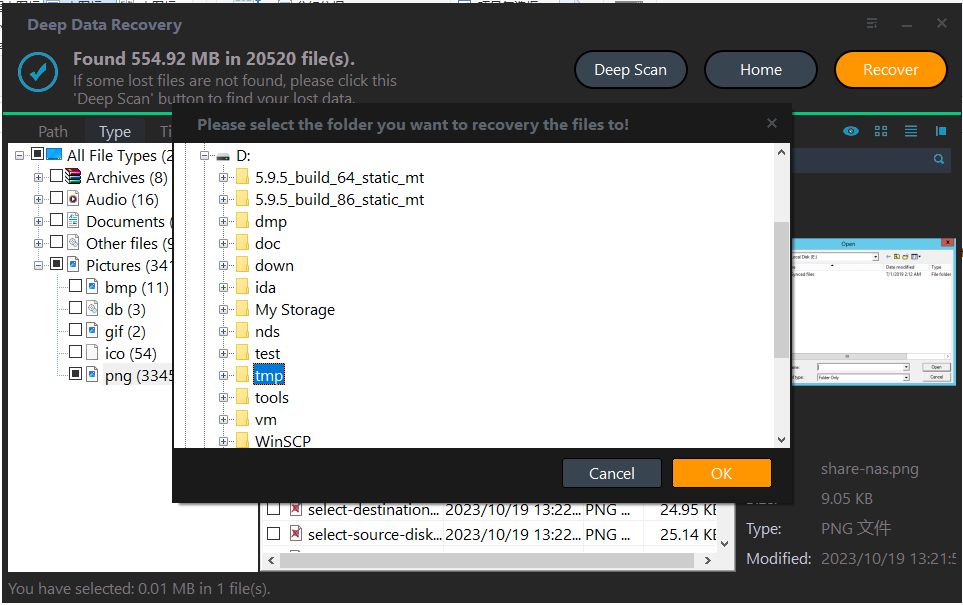
Step 4. Save to the Internal Disk
Write the results to the internal disk, not to the same enclosure. A drop during the recovery would corrupt the output as well as the source.
Frequently Asked Questions
Is the SSD damaged by the disconnects?
Rarely. The drive survives, but an interrupted write can leave the file system inconsistent. That is a logical problem rather than a hardware one.
Why does the enclosure work on one port and fail on another?
Ports differ in the power they guarantee and in the controller behind them. A port that shares lanes with a dock or a display has less headroom.
Does a USB4 enclosure need a special cable?
Yes. It needs a cable rated for the data rate of the link. Charging cables often carry only USB 2.0 data and will cause exactly this kind of instability.
Should I format the volume to make it usable again?
Only after the data is copied. Formatting removes the remaining pointers to the files, and the recovery then becomes much harder.
For a spinning external disk with the same symptom, see an external hard drive that disconnects during a copy.
Related Articles
- External Hard Drive Disconnects During Copy
- Cannot Safely Eject an External Hard Drive
- SSD Shows 0 MB: Controller Failure
- Perform a RAW Drive Recovery
- Cannot Preview Files in Data Recovery Software
Products
Articles & Tutorials
- Data Recovery
- Data Backup
- File Recovery
- File Backup
- System Backup and Restore
- Disk and Partition Clone
- Technical articles
- Mobile articles
- Disk Master Help
- Windows Data Recovery Tutorials
- Windows Secure Delete Tutorials
- Windows Partition Management Tutorials
- Windows File Backup and Restore Tutorials
- Windows System Backup and Restore Tutorials
- Windows Disk Backup and Restore Tutorials
- Windows Clone Tutorials