SSD Shows 0 MB: SATAfirm Controller Failure
Quick Navigation:
- Why an SSD Reports 0 MB
- Confirm What Windows and the Firmware See
- Do Not Reflash or Initialise Yet
- Scan the Drive with Qiling Deep Data Recovery
- Frequently Asked Questions
An SSD that appears in the firmware setup with a strange model string and a capacity of zero is not empty. The controller has started in a service mode after failing to load its normal firmware, and it reports a placeholder identity instead of the real one. The NAND still holds the data; what is missing is the table that maps logical addresses to it.
Why an SSD Reports 0 MB
A solid state drive keeps a translation table in NAND and loads it at power on. If that table cannot be read, or the firmware image fails a checksum, the controller falls back to a minimal mode and identifies itself with a firmware or service string rather than the product name.
The most common symptom is a model name such as SATAFIRM followed by a revision, with a capacity of zero bytes. The drive may also show up as an unknown device that cannot be initialised, or may disappear entirely after a few seconds.
This is a controller level failure rather than a worn out NAND. The chips usually still respond, which is why recovery labs can read them directly when the controller will not cooperate.
Confirm What Windows and the Firmware See
Enter the firmware setup and read the storage page. A drive listed with a service string and no capacity needs a different approach from a drive that is simply missing from the list.
Open Disk Management and check whether the disk appears as unknown or not initialised. Windows may offer to initialise it; decline that prompt, because initialising writes a new partition table over the area a recovery tool needs.
Note whether the drive appears for a few seconds and then vanishes. A disappearing drive suggests a power or controller fault that a firmware level repair will not fix.
Do Not Reflash or Initialise Yet
A vendor firmware update run on a drive in this state can rebuild the translation table with empty entries. The drive becomes usable and the previous content becomes unreachable by any software tool.
Initialising the disk in Windows has the same effect at a smaller scale: it writes a new partition table and can trigger a trim pass that clears the pages where the old data lived.
If the drive still reports a capacity for a short window, use that window to copy data rather than to run a repair. Once the content is safe, a reflash is a reasonable way to return the drive to service.
Scan the Drive with Qiling Deep Data Recovery
Qiling Deep Data Recovery can scan the drive while it still exposes a readable capacity, even when the partition table is gone. It works at the level below the file system, so a volume that Windows shows as unallocated can still yield files.
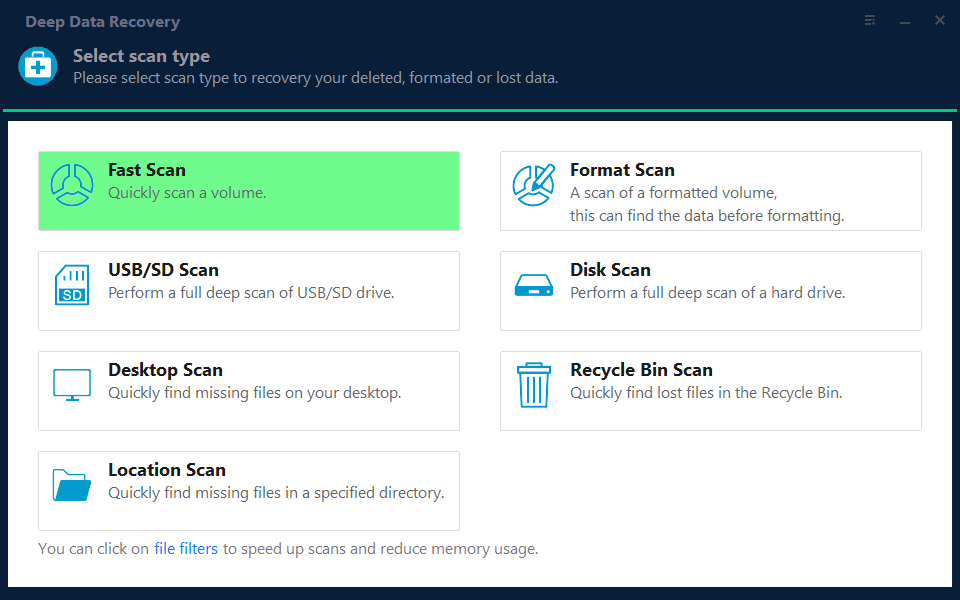
Step 1. Choose the Recovery Mode
Use Format Scan when the disk shows as unallocated or uninitialised, and Fast Scan when it still has a readable volume with missing files.
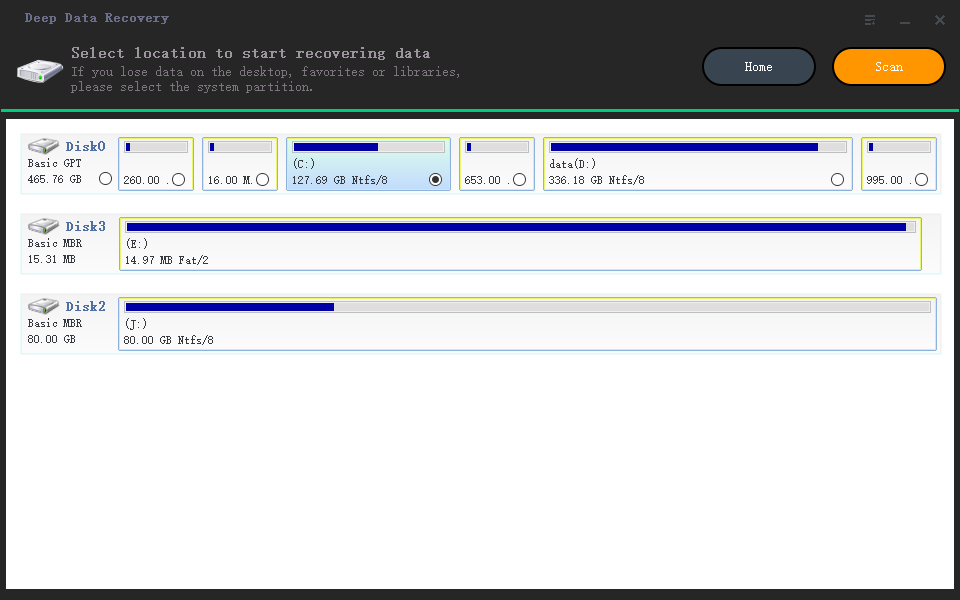
Step 2. Select the SSD
Pick the disk by capacity and position in the list. Do not select the disk you intend to save files to, and confirm the serial number when two identical drives are fitted.
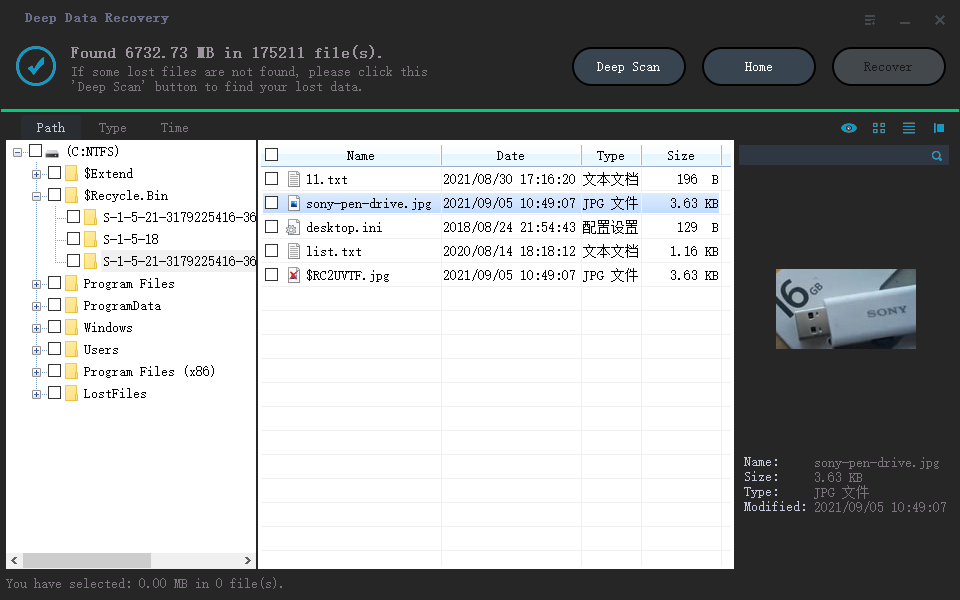
Step 3. Run the Deep Scan and Review
Let the deep scan finish even when it is slow. Sort the results by type and preview files, because a scan of a damaged file system often returns more entries than the user expects.
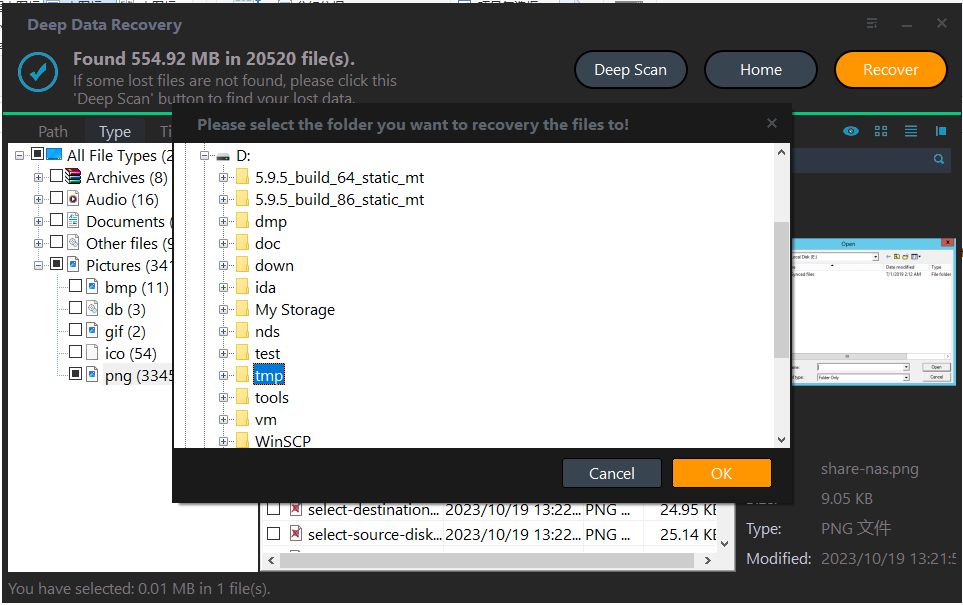
Step 4. Recover to a Healthy Disk
Save the results to another drive and stop using the SSD. Keep the copy until you have opened a sample of each file type and confirmed that the content is complete.
Frequently Asked Questions
Is my data still on the drive?
Usually yes. The NAND stores the data and the translation table together; a controller that cannot load the table does not erase the pages.
Will a firmware reflash bring the drive back?
It often makes the drive usable again, but it can also clear the mapping that points at the old data. Recover first, reflash second.
Why does the model name look like a firmware version?
Because the controller is running a minimal service image and reports that string in place of the product name. It is a symptom, not the real hardware identity.
When is a recovery lab needed?
When the drive no longer enumerates, or when it reports a capacity but returns nothing after a scan. Both point to work below the level that software on Windows can reach.
For a drive that vanished after a failed firmware update, see SSD not detected after a firmware update.
Related Articles
- SSD Not Detected After a Firmware Update
- Perform a RAW Drive Recovery
- Cannot Initialize Disk
- USB4 SSD Enclosure Randomly Disconnects
- Cannot Preview Files in Data Recovery Software
Products
Articles & Tutorials
- Data Recovery
- Data Backup
- File Recovery
- File Backup
- System Backup and Restore
- Disk and Partition Clone
- Technical articles
- Mobile articles
- Disk Master Help
- Windows Data Recovery Tutorials
- Windows Secure Delete Tutorials
- Windows Partition Management Tutorials
- Windows File Backup and Restore Tutorials
- Windows System Backup and Restore Tutorials
- Windows Disk Backup and Restore Tutorials
- Windows Clone Tutorials