SSD Firmware Update Failed and the Drive Is Not Detected
Quick Navigation:
- What a Failed Firmware Flash Leaves Behind
- Try the Safe Recovery Options
- Identify the Controller and the Model
- Recover the Data with Qiling Deep Data Recovery
- Frequently Asked Questions
A firmware update on an SSD rewrites the code that sits between the NAND and the controller. If the flash is interrupted by a power loss, a crash, or a closed tool, the drive can come back in a bootloader state where it no longer reports a usable capacity. The NAND is usually untouched, and that is the part that matters for recovery.
What a Failed Firmware Flash Leaves Behind
Firmware on an SSD handles bad block management, wear levelling, and the translation table that maps logical addresses to physical NAND pages. A flash replaces that code in place, so an interruption can leave the controller running a minimal loader instead of the full firmware.
In that state the drive may not enumerate at all, may appear with a generic model name and zero capacity, or may be visible only to the vendor utility. Windows then shows nothing in Disk Management, or shows a disk that cannot be initialized.
The important point is that mapping loss is not data loss. The NAND pages still hold the old content; what is missing is the table that says which page belongs to which file.
Try the Safe Recovery Options
Power the machine off completely, disconnect the drive, and reconnect it to a different port with a different cable. A drive that enumerates once more often does so on a machine with different controller timings.
Some controllers rebuild part of their internal state when the drive is left powered but idle for thirty minutes. Connect the drive, power on, and leave it alone without touching a tool; forcing a scan during that window restarts the process.
Do not run a firmware flash yet. A reflash rewrites the mapping tables along with the code, and those tables are what recovery software needs. Reflash only after the data has been copied or the drive has been declared unrecoverable.
Identify the Controller and the Model
Read the label on the drive and note the exact model, capacity, and controller family. Utilities report the controller when the drive still enumerates, and the report is what a recovery lab or a vendor tool asks for first.
Check whether the drive appears in the firmware setup with an odd name. A model string that looks like a firmware version rather than a product name is the classic sign that the controller is in a service mode.
Keep the drive out of any enclosure that adds a bridge chip. A USB bridge hides the real model and blocks the low level access that the vendor tool needs.
Recover the Data with Qiling Deep Data Recovery
Qiling Deep Data Recovery reads the drive through the normal storage stack, so it can help in the cases where the drive still enumerates with a readable, if wrong, capacity. It cannot talk to a controller that is stuck in a bootloader with no capacity reported; that state needs the vendor tool or a lab.
Step 1. Choose the Recovery Mode
Use Fast Scan for a drive that still reports its capacity. Choose Format Scan when a repair or an update attempt reformatted the volume.
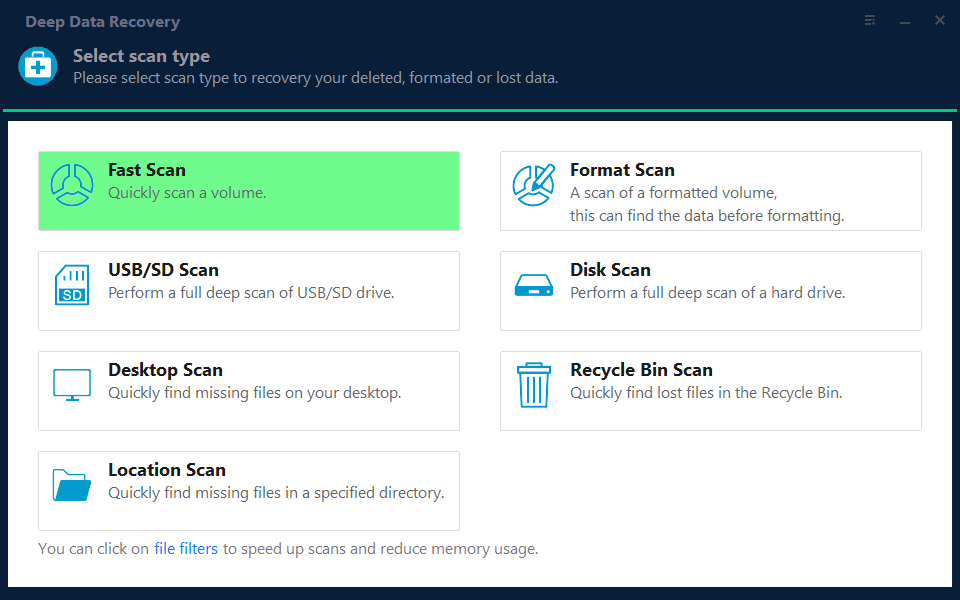
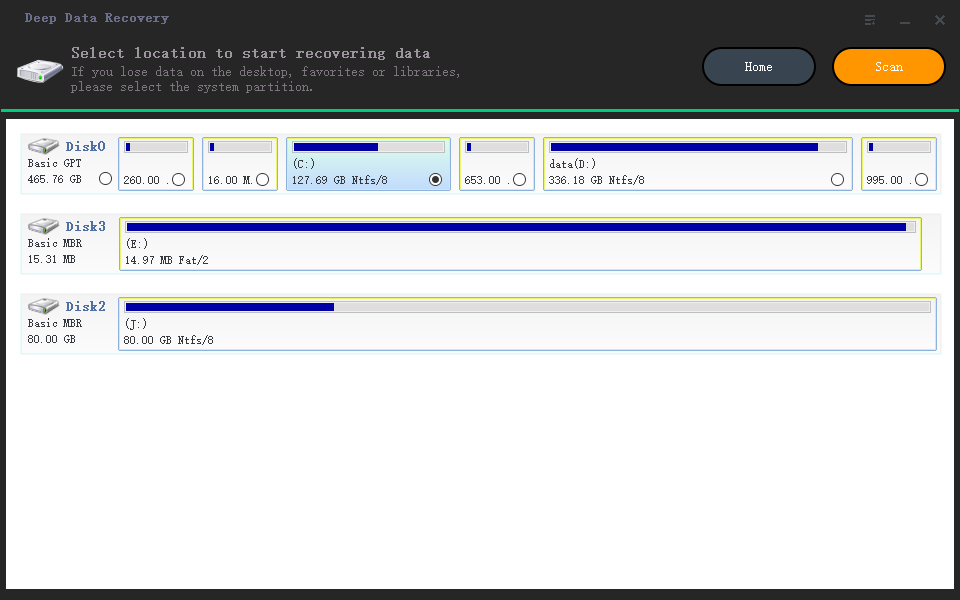
Step 2. Select the SSD
Select the disk by model and capacity. If a second SSD of the same model is fitted, compare the serial numbers before you continue.
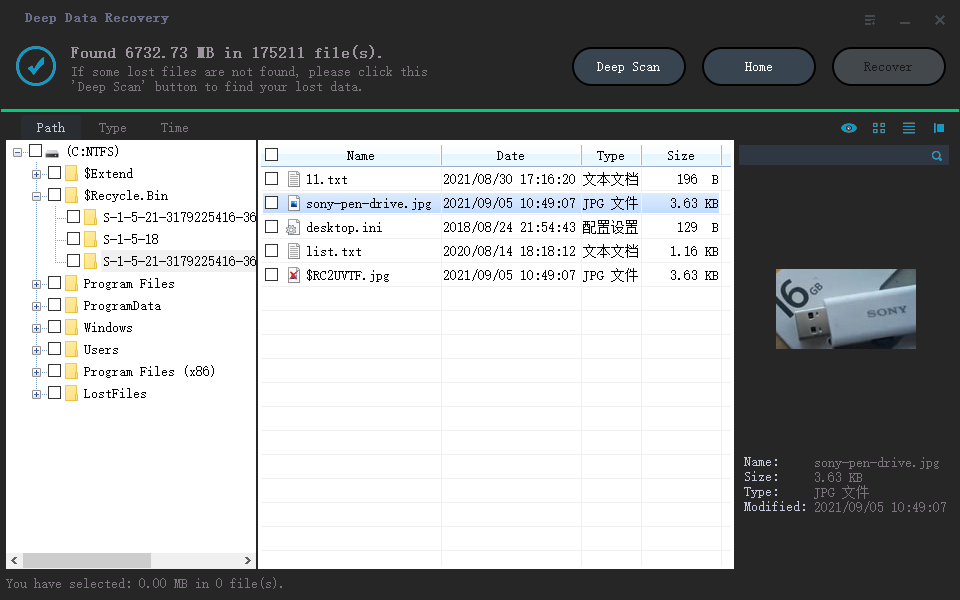
Step 3. Review the Scan Results
Filter by file type and date, and preview a few documents before selecting anything. A preview that renders correctly shows that the file content is still readable.
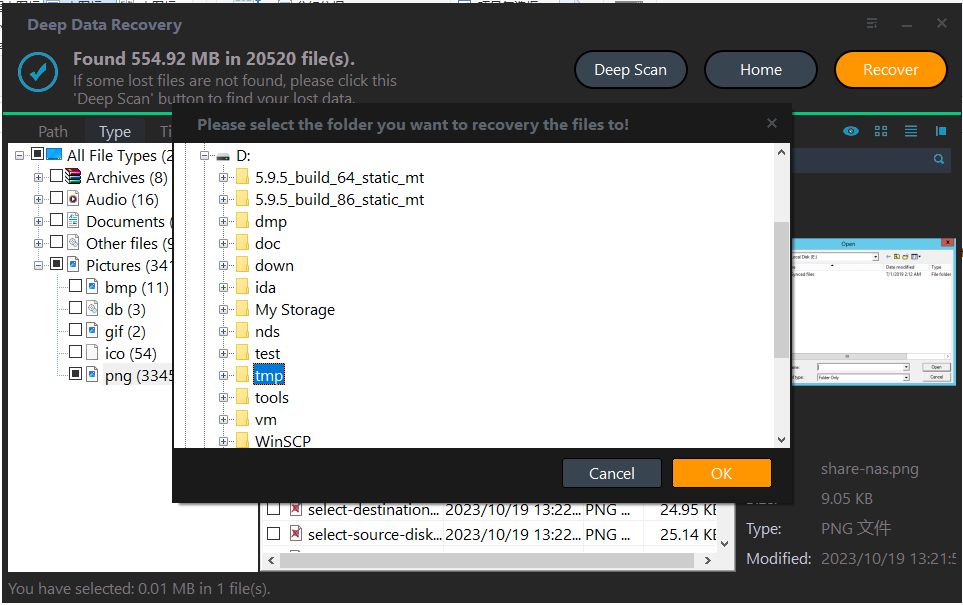
Step 4. Save to Another Disk
Write the recovered files to a different disk or an external drive. Never save back to the drive whose firmware is in question, because another write can disturb the mapping state further.
Frequently Asked Questions
Can I reflash the firmware and keep my data?
Sometimes, but not reliably. A reflash can rebuild the mapping tables with empty entries, which makes the old data unreachable. Copy the data first if the drive reports any capacity.
Will the manufacturer warranty cover the data?
The warranty replaces the hardware, not the content. Ask the vendor whether the service centre performs data extraction before it reflashes a replacement unit.
Does a firmware failure damage the NAND chips?
Usually not. The failure is in the controller code and its tables. A recovery lab can read the NAND directly when the controller no longer responds.
How long can I keep trying?
Limit powered-on attempts. Each failed enumeration stresses the controller, and a drive that stops responding entirely becomes a chip-off job rather than a software recovery.
For a drive that reports zero capacity instead of disappearing, see an SSD that shows 0 MB.
Related Articles
- SSD Shows 0 MB: Controller Failure
- Perform a RAW Drive Recovery
- How to Check an NVMe SSD for Health
- Recover Files After a Failed Disk Clone
- Cannot Preview Files in Data Recovery Software
Products
Articles & Tutorials
- Data Recovery
- Data Backup
- File Recovery
- File Backup
- System Backup and Restore
- Disk and Partition Clone
- Technical articles
- Mobile articles
- Disk Master Help
- Windows Data Recovery Tutorials
- Windows Secure Delete Tutorials
- Windows Partition Management Tutorials
- Windows File Backup and Restore Tutorials
- Windows System Backup and Restore Tutorials
- Windows Disk Backup and Restore Tutorials
- Windows Clone Tutorials