Recover Files From an Overwritten Clone Destination
Quick Navigation:
- A Clone Writes Sectors, Not a Format
- How Much Survived the Overwrite
- Stop the Disk and Image It First
- Scan the Image with Qiling Deep Data Recovery
- Frequently Asked Questions
A clone that runs backwards writes the source over the disk that held your only copy of something else. The volume vanishes within seconds, but most of the content usually stays on the platters until the job reaches it, so the first hour decides how much comes back.
A Clone Writes Sectors, Not a Format
A disk clone never formats the destination. It writes the source partition table and boot records first, then copies the partition contents sector by sector, which is why the old volume disappears from Explorer almost immediately.
What remains depends on where the job stopped. The first part of the disk is replaced early, while the far end can hold untouched data for a long time, including the old file records that a recovery scan needs.
Nothing is deleted in an orderly way, so no volume, folder, or recycle bin keeps a record of the old files. Recovery depends entirely on finding content that the clone has not written over yet.
How Much Survived the Overwrite
Read the progress the job had reached before it was stopped. A clone that failed at five percent left most of the destination intact, while one that reported one hundred percent replaced everything the source actually used.
The copy mode matters as much as the percentage. A copy of used space writes only the allocated area of each partition, so the destination's unallocated space keeps its old content, and files that lived there can survive a completed clone.
A sector-by-sector copy writes the whole source including its free space, which leaves almost nothing behind on a destination of the same size.
An SSD destination is the harder case. Writing over it with TRIM enabled lets the drive erase the old blocks in the background, so content that the clone never logically touched may already be gone at the hardware level.
Stop the Disk and Image It First
Disconnect the disk as soon as you know it was overwritten, and do not boot from it or let Windows mount it. A mounted volume receives timestamp, index, and log updates, and every one of those writes lands somewhere the old files still live.
Make a sector-level image of the whole disk to a file on a larger healthy drive before you scan. The image freezes the current state, so a second attempt starts from the same bytes instead of from a disk that has changed in between.
Do not run a check, a repair, or a defragmentation on the disk. All three write, and none of them can restore the volume that the clone replaced.
If imaging is not possible, connect the disk through a USB adapter and scan it without assigning a letter. The scan reads the device and writes nothing to it, which keeps the remaining data where it is.
Scan the Image with Qiling Deep Data Recovery
Qiling Deep Data Recovery reads the disk or its image and looks for the file records the clone left behind, including files that no longer belong to any folder. The date of the clone is the dividing line: content from before that date, still present on the disk, is worth previewing first.
This is the same situation covered in recovering files after a failed disk clone, with one difference: here the damaged disk is the one you meant to keep, so its contents matter more than the copy that was written onto it.
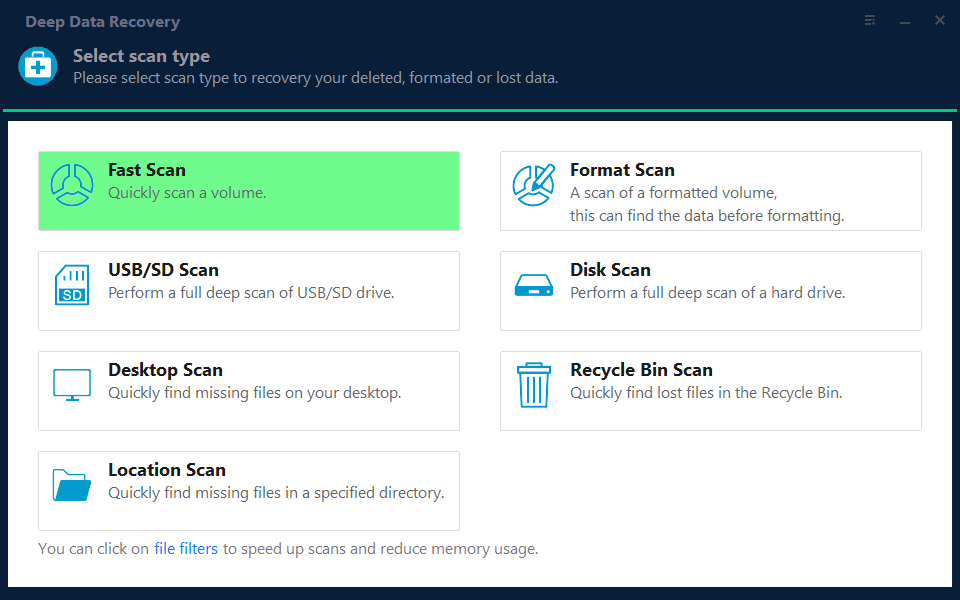
Step 1. Choose the Recovery Mode
Use the format scan when the clone replaced the partition table, which is the usual result. A standard scan applies only when the old volume still mounts and files are merely missing from it.
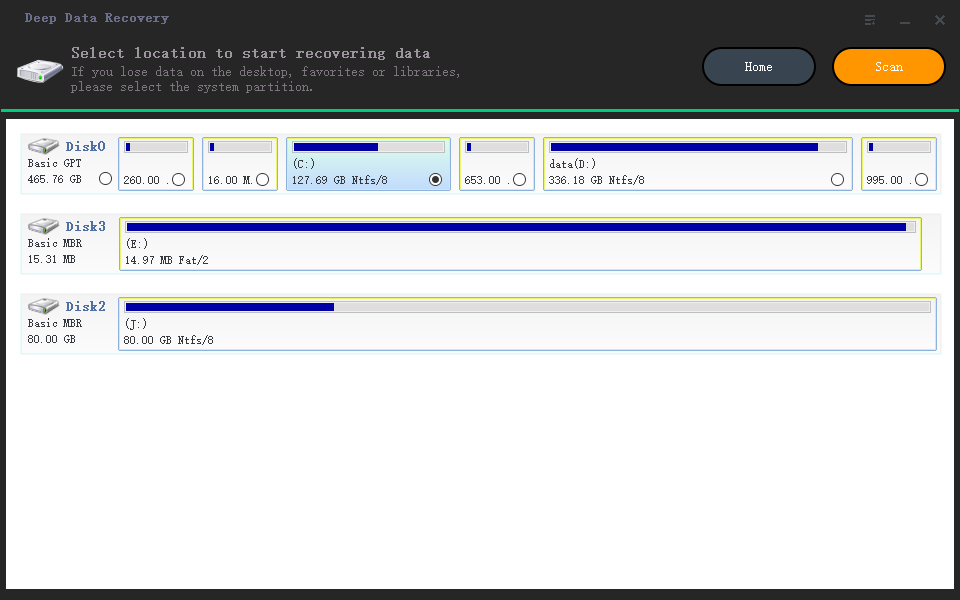
Step 2. Select the Overwritten Disk
Pick the disk by capacity and model rather than by drive letter, because the clone may have reused the old letter on a different device. If you made an image, attach it and select that instead.
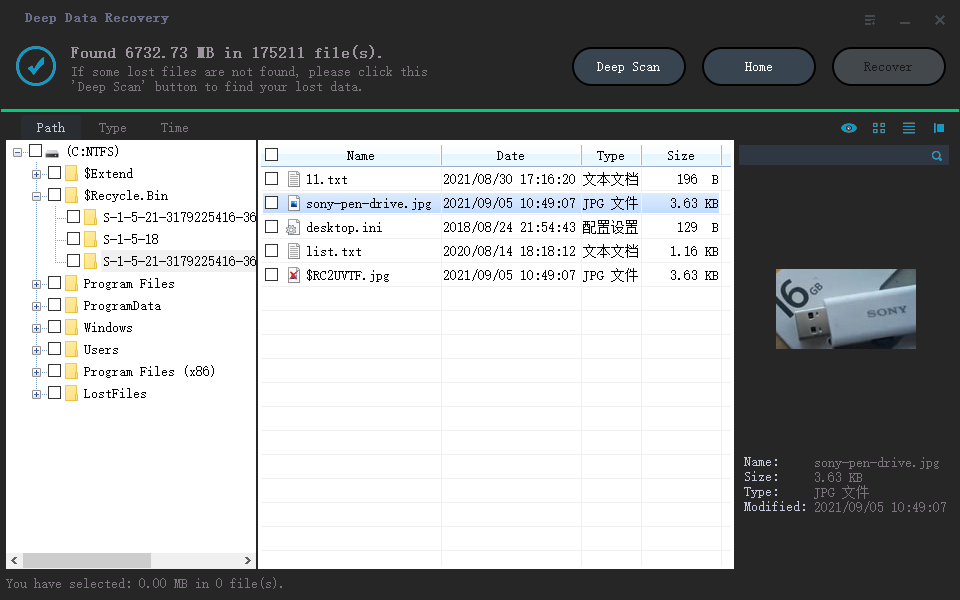
Step 3. Review and Preview the Results
Sort by date and start with the files created before the clone ran. Open the previews, because a document that renders is one whose content survived the overwrite intact.
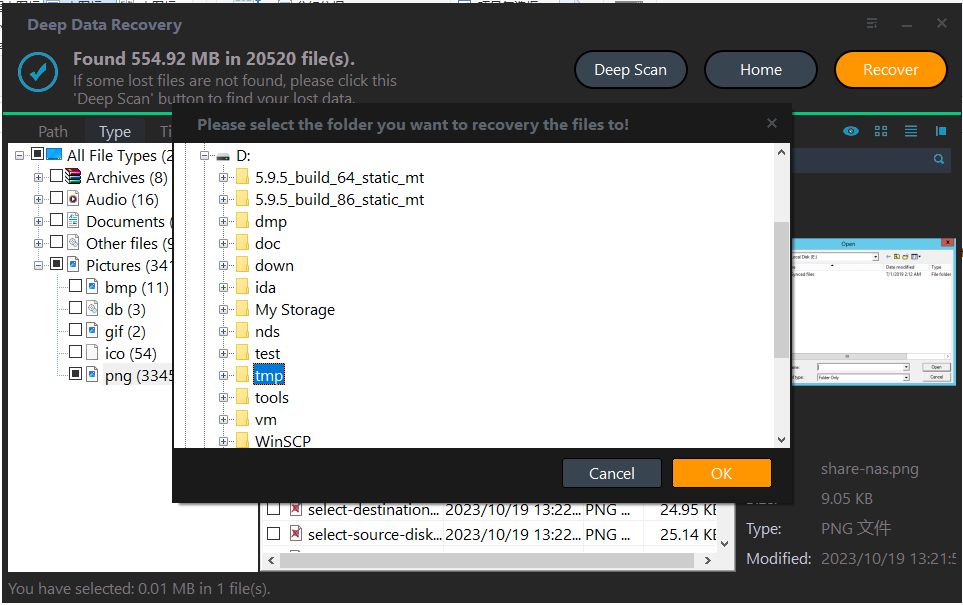
Step 4. Save to a Third Disk
Write the results to a disk that played no part in the clone. Saving back to the overwritten disk destroys the blocks the next pass needs, and saving to the source disk risks the copy you were trying to protect.
Frequently Asked Questions
Does a completed clone leave anything to recover?
Sometimes. A used-space copy leaves the destination's unallocated area alone, and old files that sat there can still be found even after the job reports success.
Can I recover the files straight back to the same disk?
No. Writing the results back overwrites the blocks the scan is still reading. Use a third disk, and copy files off the recovered disk only after everything is saved elsewhere.
Is a failed clone easier to recover than a finished one?
Usually yes. A job that stopped early replaced a small part of the disk, so the old volume records near the end are often still intact when the scan begins.
If the overwritten disk now shows up as RAW, see a cloned drive that shows as RAW for the next checks.
Related Articles
- Recover Files After a Failed Disk Clone
- How to Recover Overwritten or Replaced Photos, Excel, Word Files
- Cloned Drive Shows as RAW: Recover Data and Fix It
- How to Recover Files from Corrupted/Failed Hard Drive
- Clone Fails at Finalizing: Causes and Fixes
Products
Articles & Tutorials
- Data Recovery
- Data Backup
- File Recovery
- File Backup
- System Backup and Restore
- Disk and Partition Clone
- Technical articles
- Mobile articles
- Disk Master Help
- Windows Data Recovery Tutorials
- Windows Secure Delete Tutorials
- Windows Partition Management Tutorials
- Windows File Backup and Restore Tutorials
- Windows System Backup and Restore Tutorials
- Windows Disk Backup and Restore Tutorials
- Windows Clone Tutorials