Recover OneDrive Online-Only Files: Cloud or Local Recovery?
Quick Navigation:
- Understand the Problem
- Check Before Another Recovery Attempt
- Recover With Qiling Deep Data Recovery
- Verify the Recovered Files
- Frequently Asked Questions
If a missing file was marked online-only, its contents may never have been stored on the PC. Scanning that computer cannot retrieve bytes it never held. First determine whether the loss is in OneDrive, a local downloaded copy, or a different account.
Understand the Problem
An online-only entry represents content stored in the cloud. A locally available or always-available file has downloaded content. The distinction matters after deletion, a sign-in problem or an attempted copy to an external drive.
Freeing local space is not the same action as deleting the cloud file. Before interpreting a missing local copy as permanent loss, inspect the correct OneDrive web account. Local recovery is a separate fallback for data that really existed on local storage.
Check Before Another Recovery Attempt
Check 1. Confirm the account and original status
Use the OneDrive account associated with the folder, including the correct personal or organization account. Review what you know about its previous cloud or check-mark icon. A visible filename alone did not prove a complete local copy existed.
Check 2. Search the web account first
Open OneDrive in a browser and search for the file and parent folder. Check its web recycle bin and available version history. For a managed account, ask the administrator about permitted recovery options rather than assuming personal-account rules apply.
Check 3. Download a verified cloud copy elsewhere
If the intact item exists online, download it to a healthy destination and open it. Do not use the affected local disk for that download when you are also trying to recover deleted local data.
Check 4. Use local scanning only for real local content
If the file had been downloaded and was deleted locally, identify the physical disk that held it. A scan may help if the bytes remain, but cannot replace a missing cloud object that was never downloaded.
Recover With Qiling Deep Data Recovery
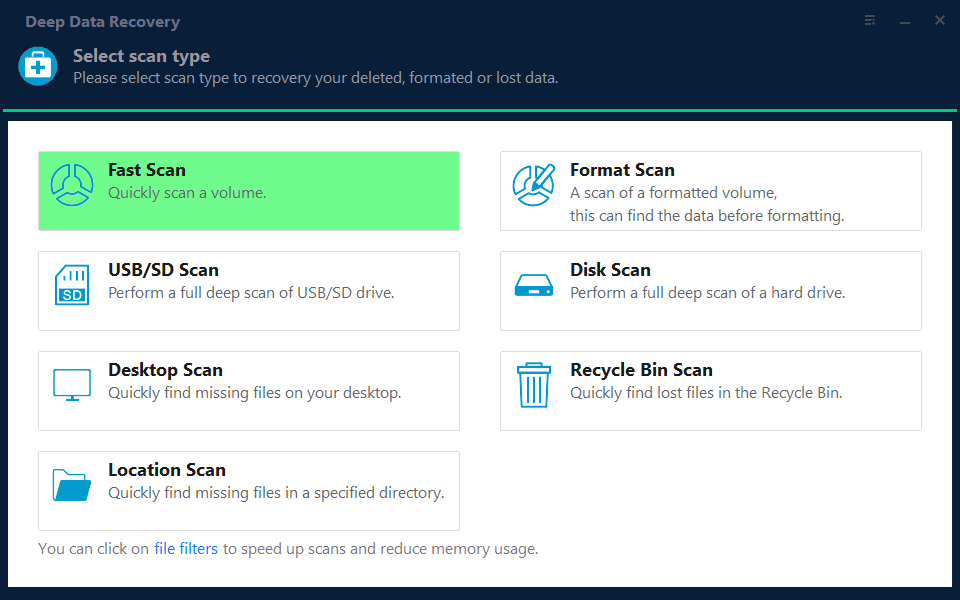
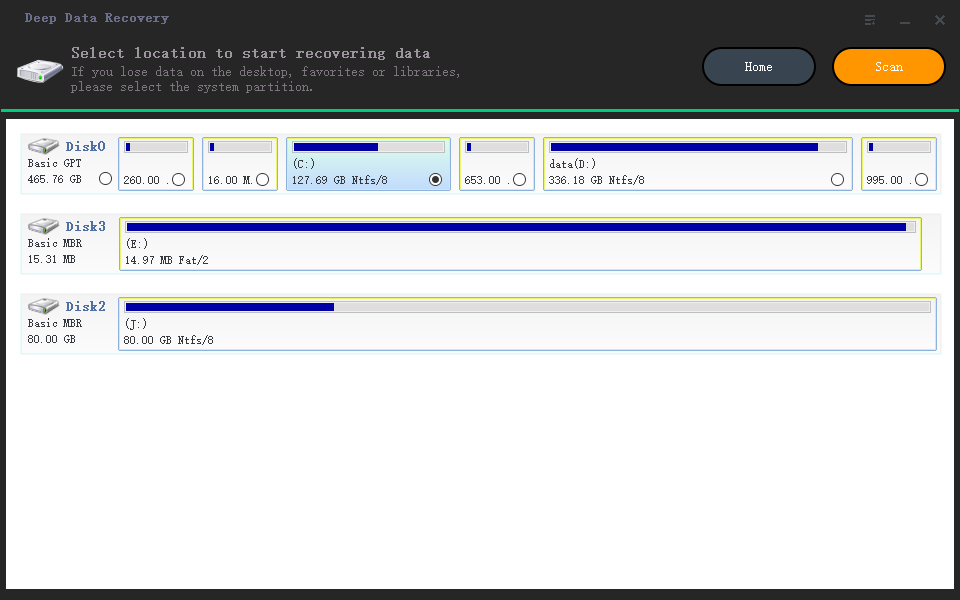
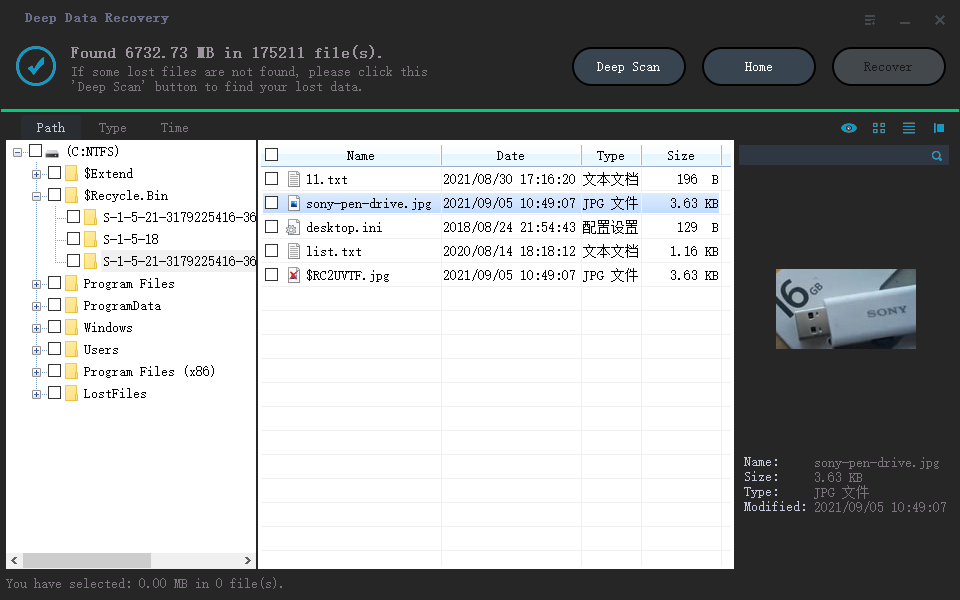
Qiling Deep Data Recovery offers a visual mode chooser, a source-location screen, file results with supported previews and a separate recovery destination dialog. Use this workflow only when Windows can read the source reliably. It does not bypass encryption or guarantee recovery of overwritten data.
The screenshots are examples from the product interface. Their drive letters, file counts and sample selections are not instructions to choose the same disks on your computer. The download is not a promise of unlimited free recovery; check the current edition and license terms.
Step 1. Prepare the Source and a Separate Destination
Stop routine use of the affected device. Check independent backups first, then connect a healthy destination with adequate free space. Download and install Qiling on healthy storage, not the volume holding the missing files. If the system disk is affected, consider another suitable computer or specialist assistance to limit background writes.
Step 2. Choose the Scan Mode for the Original Loss
For deleted, previously downloaded local files, use Fast Scan on the relevant volume. Do not select a scan mode expecting it to access the OneDrive server or reconstruct a cloud-only object.
Step 3. Select the Original Source and Start the Scan
Select the local volume that actually contained the downloaded content and click Scan. Do not treat a mapped cloud folder as a separate physical source.
Step 4. Inspect Results and Preview Suitable Candidates
Inspect candidates for meaningful size and available previews. A placeholder or thumbnail is not proof that the complete document or photo was local.
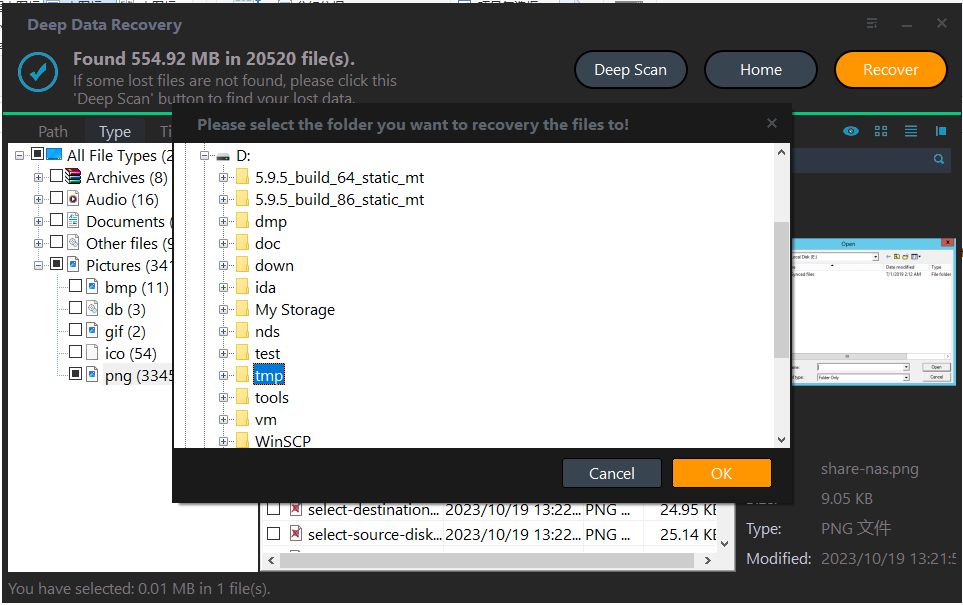
Step 5. Recover to Healthy Independent Storage
Recover plausible local candidates to another physical disk. Keep this output separate from any files downloaded directly from OneDrive so their origins remain clear.
In the destination dialog, choose the intended folder and confirm with OK. Wait for the selected export to finish without disconnecting either device. If an error occurs, record it and keep any incomplete output separate rather than assuming the batch succeeded.
Verify the Recovered Files
Open both cloud-restored and locally recovered copies in their normal application and compare required edits. Choose by content rather than the newest destination creation date.
If the cloud account has no recoverable copy and no local content ever existed, explain that limit plainly. Local disk recovery cannot promise a substitute.
Stop condition: Do not repeatedly reset or reinstall OneDrive on the affected disk while attempting local recovery. Those writes may reduce recovery prospects.
Frequently Asked Questions
Can Qiling scan OneDrive servers?
This local-disk workflow does not access OneDrive's server-side deleted data. Use OneDrive and organization recovery tools for that.
Does a blue cloud icon prove there is no local content anywhere?
It describes that entry's current availability. Another device, backup or earlier downloaded copy may still exist.
Is Free up space the same as deleting?
No. It can remove the local downloaded content while keeping the cloud item. Check the web account before starting disk recovery.
Technical References
Related Articles
- No Files Found After a Data Recovery Scan: What to Check
Check the source, scan mode and hidden filters when a recovery scan finds no files. Learn when a deeper Qiling scan is useful and when to stop. - Can I Recover Files to the Same Drive? Use a Separate Disk
Saving recovered files to their source can overwrite missing data. Learn how to identify separate physical disks and choose a safe Qiling destination. - Recover Deleted Local OneDrive Files on Windows 11
Products
Articles & Tutorials
- Data Recovery
- Data Backup
- File Recovery
- File Backup
- System Backup and Restore
- Disk and Partition Clone
- Technical articles
- Mobile articles
- Disk Master Help
- Windows Data Recovery Tutorials
- Windows Secure Delete Tutorials
- Windows Partition Management Tutorials
- Windows File Backup and Restore Tutorials
- Windows System Backup and Restore Tutorials
- Windows Disk Backup and Restore Tutorials
- Windows Clone Tutorials