Top 10 Best Data Recovery Software for Windows 10 PC and Mac in 2026 (Pros vs. Cons)
Losing important files can be frustrating, especially when you need them most. Fortunately, data recovery software can help you retrieve lost data without having to find replacements or re-write them. This article provides a guide to the best data recovery software available, helping you tackle data loss and recover your valuable files.
To help you choose the best tool, we've thoroughly reviewed the top data recovery software, considering factors like versatility, features, price, and user reviews. Based on your specific needs, consider selecting a powerful and easy-to-use data restoration application from our list of the 10 best data recovery software available today.
Data Recovery Software Picker
- Windows Mac
- Free Paid
- Beginners Advanced
If you've lost data, you'll want to retrieve it quickly. To help you choose the best data recovery software, consider your system, budget, and computer proficiency. Depending on these factors, we can suggest a suitable product for you. For more tailored recommendations, click on the three tabs above.
We recommend:
-
Qiling
Qiling is a simple and popular data recovery tool that gets back lost files in a few clicks, with advanced algorithms that can recover over 1000 types of files, and a free version allowing up to 2GB of data recovery.
-
R-Studio
R-Studio is a commercial data recovery tool that runs on Windows, Mac, and Linux, designed for experienced professionals to restore lost or deleted data. Its free demo version can recover files less than 256KB in size.
-
Recuva
Recuva, developed by Piriform, is a 100% free data recovery application for Windows that can retrieve deleted or permanently deleted files from various storage devices, including HDD, USB, memory cards, and MP3 players.
-
SysTools
SysTools supports granular recovery of lost files on Windows laptops or PCs, effortlessly recovering deleted data and restoring various types of files from corrupted or formatted NTFS, FAT, exFAT file systems.
-
Qiling
Qiling is a user-friendly data recovery tool for Windows and macOS that can quickly retrieve lost files with just a few clicks. Its advanced algorithms perform a deep scan to recover over 1000 types of files, regardless of the situation. The free version allows for the recovery of up to 2GB of data.
-
DiskDrill
Disk Drill is a data recovery software that's famous for recovering Mac data, but it also works on Windows. It can help you recover deleted files, including photos, videos, music, documents, from internal or external hard drives, USB drives, SD cards, and more.
-
Stellar
Stellar offers a user-friendly interface for both personal and enterprise users, allowing data recovery in three steps on Windows and Mac computers. It also has a free version that recovers up to 1 GB of data for free.
-
Recuva
Recuva is a free data recovery application developed by Piriform that can retrieve deleted or permanently deleted files on Windows, including HDD, USB, memory cards, and more.
-
Qiling
Qiling is a user-friendly data recovery software for Windows and macOS that can recover lost files with just a few clicks. Its advanced algorithms can perform a deep scan to retrieve over 1000 types of files, regardless of the situation. The free version of Qiling allows for the recovery of up to 2GB of data, making it a convenient option for minor data loss.
-
Remo
Remo data recovery software for Windows and Mac finds files, photos, videos, documents from any storage device, offering complete partition recovery solutions to restore partitions in various formats.
-
Stellar
Stellar offers a user-friendly interface for both personal and enterprise users, allowing data recovery in three steps on Windows and Mac computers. Its free version recovers up to 1 GB of data for free.
-
Disk Drill
Disk Drill is famous for Mac data recovery, but it can also help recover deleted files from internal or external hard drives, USB flash drives, and SD cards. It supports recovering photos, videos, music files, and documents, and also offers a Windows version for recovering Windows files.
-
Qiling
Qiling is a user-friendly data recovery tool for Windows and macOS that can recover lost files with just a few clicks. Its advanced algorithms can perform a deep scan to recover over 1000 types of files, including documents, photos, and more. The free version of Qiling allows for the recovery of up to 2GB of data.
-
Partition Recovery
Partition Recovery is a tool that helps restore deleted or lost partitions on Windows operating systems, including Windows 11, 10, 8, 7, and Server. It features a user-friendly interface and supports recovery from FAT and NTFS file systems, as well as advanced RAW recovery capabilities.
-
Stellar
Stellar is a user-friendly data recovery software that can recover deleted or lost data in three steps on both Windows and Mac computers, with a free version that allows for up to 1 GB of free data recovery.
-
Disk Drill
Disk Drill is a data recovery software that specializes in Mac data recovery, but also offers a Windows version. It can help you recover deleted files such as photos, videos, music, and documents from various storage devices like internal or external hard drives, USB flash drives, and SD cards.
-
R-Studio
R-Studio is a commercial data recovery tool that runs on Windows, Mac, and Linux, designed for experienced professionals to restore lost or deleted data. Its free demo version can recover files under 256KB in size.
-
Ontrack
Ontrack offers data recovery software for Windows and Mac, allowing users to recover deleted files or restore data from a crashed hard drive, while also providing a manual data recovery service.
-
Prosoft
Prosoft Data Rescue allows you to recover lost files from various storage devices, including hard drives, external hard drives, USB, memory cards, and more, and is compatible with both Windows and Mac computers. The program's demo version allows you to run a full scan and preview recoverable files, giving you a chance to test its capabilities before purchasing the paid version.
Best Data Recovery Software Selection Criteria
The data recovery process can be challenging if the wrong tool is used. As per Wikipedia, the process varies depending on the scenario and device. Therefore, it's essential to have a clear understanding of the selection criteria and suggestions for data recovery software to ensure a successful recovery process.
Versatility:
Data recovery is not limited to PCs, as external hard drives, USB flash drives, and other storage devices also require data recovery services. Therefore, it's essential to consider whether the application supports multiple devices. Additionally, effective software should be able to recover various file types, including files, videos, and pictures.
Features:
The software is suitable for various file loss scenarios, features high recovery rates, and is easy to use with a simple interface. It can be applied flexibly to a wide range of file loss situations, making it a good-performing tool for various needs. The highlights of the product include its ability to recover lost files quickly and efficiently, making it a valuable tool for those who need to restore lost data. The software's simple interface and easy-to-use steps make it accessible to users who may not be tech-savvy, making it a great option for those who need to quickly recover lost files. The software's recovery rate is high, making it a reliable choice for those who need to recover lost files. Overall, the software is a good-performing tool that can be applied flexibly to a wide range of file loss scenarios, making it a valuable tool for those who need to recover lost data.
Price:
You're considering paying for data recovery software, but want to know if it's worth the cost. To decide, you can try the free version first to recover and preview your files, which is a secure way to test the software. Be aware that once you've paid, it can be difficult to get a refund. If budget is a concern, some freeware options are also available. Ultimately, the decision to buy is up to you, and we can provide recommendations based on price and reviews.
User-Friendly:
There are various data recovery products that can be broadly categorized into two types: software with a graphical interface and products that require code manipulation. For ordinary computer users, it's best to choose software with a graphical interface, as it's often easier to understand and use. Ease of use is an important factor to consider when selecting data recovery software, as complicated interfaces can be overwhelming.
Technical Support:
When recovering data, technical issues can arise, affecting disk scanning, previewing, and final data recovery. To overcome these challenges, users often seek assistance through phone, email, live chat, or remote customer service. When selecting data recovery software, it's essential to choose a product that offers clear and accessible technical support.
Now you figure out the selection criteria. Time to navigate to the list. You can use the search bar to find specific items, or browse through the categories to find what you're looking for.
Comparison Among Top 10 Data Recovery Software: Qiling vs. Recuva vs. R-studio...
When choosing a data recovery software from the 10 options available, consider the main features of each tool before diving into detailed information. A quick comparison of the 7 key points, such as ease of use, compatibility, and file recovery capabilities, can help you decide which software suits your preference and needs.
- Brands
- Reviews
- Platform
- Free Version
- Pro Version
- User-Friendly
- Preview
- File Formats
-
Deep Data Recovery
- Best overall
- Windows & Mac
- 2GB
- $69.95
- Yes
- Yes
- Supports over 1,000
file formats
-
Recuva
- 100% free
- Windows
- Unlimited
- $99.95
- Yes
- Yes
- Supports only basic
file formats
-
R-studio
- Adavanced pick
- Win/Mac/Linux
- No free version
- $79.99
- No
- Yes
- Several hundred file
formats
-
Disk Drill
- High-end pick
- Windows & Mac
- 500MB
- $89
- Yes
- Yes
- Over 400 file
formats
-
Stellar
- Reputable brand
- Windows & Mac
- 1GB
- $79.99
- Yes
- Yes
- Supports over 200
file types
-
SysTools Data Recovery Software
- Best for a person
- Windows
- No free version
- $39 per feature
- Yes
- No
- Most standard file
formats
Choosing the right data recovery software can be overwhelming, but by weighing the pros and cons, user experiences, and prices of each option, you can make an informed decision. While each program may be good, their combined performance still varies, making it essential to consider the key factors of each application to determine which one suits your needs best.
-
1. Deep Data Recovery (Best Overall)
00 -
Qiling data recovery software is a top-notch data recovery tool for Windows and Mac users, offering an effortless experience for both beginners and experts. It can recover files from various storage devices, including hard drives, external hard drives, USB flash drives, and SD cards. Whether you need to retrieve data from an emptied Recycle Bin, a formatted or damaged internal disk, or an external disk, Qiling data recovery software can help you recover your data in just three simple steps.
This software has helped millions of users over the past 17 years in the data recovery field, offering fast scanning speeds and high data recovery quality.
Buy Now $59.9
 Pros
Pros- Hundreds of file formats are supported
- MP4/MOV video repair features are available
- Various ways to sort and filter lost files
- There are a wealth of purchase plans to choose from
- The free version recovers up to 2GB of data
 Cons
Cons- The portable version requires a separate download link
- The scanning speed is dependent on the size of your data, with larger files taking longer to scan.
-
This data recovery tool uses guaranteed scanning algorithms and enables users to perform various types of scans. It includes a Quick Scan that typically recovers deleted files exactly as they were before deletion, and a Deep Scan that finds more data but takes longer to scan.

Limitations on the free/pro versions:
The free version allows the recovery of up to 2 GB of data for free.
The pro version has no recovery restrictions.
System requirements:
Qiling data recovery software is compatible with Windows 11/10/8/7, Windows Server, and macOS systems.
Supported file systems:
FAT(FAT12,FAT16,FAT32)/exFAT/NTFS/NTFS5/ext2/ext3/HFS+/ReFS/APFS is supported.
Author's suggestion
Qiling, with 17 years of experience in data recovery, boasts a high success rate and expertise in the field. The latest version of Deep Data Recovery can recover data from over 1000 file types across various storage devices and file systems.
This data recovery software has an intuitive process that doesn't require any expert knowledge, with a simple three-step process to recover lost data. You can filter the scan results to find a specific file and preview it before recovery inside the software's Wizard.
Qiling's free version can recover up to 2GB of data on Windows, making it suitable for users with smaller data needs. For those with larger data sets, the paid Deep Data Recovery Pro version is available for $69.95 per month, offering unlimited data recovery with a user-friendly interface that even inexperienced users can navigate with ease.
-
2. Recuva (100% Free)
00 -
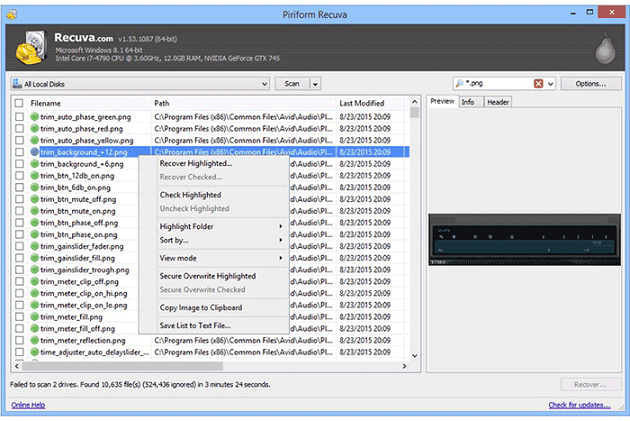
Recuva, a free file recovery software developed by Piriform, is a powerful tool for recovering lost files on Windows. It can restore deleted pictures, music, documents, videos, emails, and other file types from any rewritable media, including memory cards, external hard drives, and USB sticks, after a quick or deep scan.
Pros- The free version is for unlimited data recovery
- Simple operation with a very intuitive wizard guide
- The paid version of the product is priced competitively low compared to other similar products on the market.
- A preview screen is available for documents, pictures, and videos before recovery, allowing users to verify the file's integrity and authenticity. This feature enables users to inspect the content of the file before deciding whether to recover it, helping to prevent the recovery of corrupted or malicious files.
Cons- Deep scan technology lags behind others
- Can't recover as many files as high-priced rivals
- Customer support is very limited for unsubscribled users
-
You can proceed immediately after downloading Recuva due to its simple and intuitive wizard guide.
Price:
Recuva Free Free Recuva Pro $99.95 Limitations on the free/pro versions:
The free version allows for unlimited data recovery.
System requirements:
Recuva is compatible with Windows 11, 10, 8.1, 7, Vista, and XP, making it a versatile recovery software for various Windows operating systems.
Supported file systems:
FAT, exFAT, and NTFS are supported.
Author's suggestion
Recuva's client interface is not particularly well-designed, but it's simple and effective overall. Additionally, the free version includes features like a secure file overwriter and formatted drive scanning, which may not be particularly useful. For Windows users seeking a reliable and inexpensive data recovery tool for occasional or personal use, Recuva remains a top option among the data recovery programs we've tested.
-
3. R-Studio (Advanced Pick)
00 -
R-studio is a powerful data recovery software that's geared towards advanced users. Its advanced file analysis and unique recovery algorithm make it a top contender for data recovery, with a high success rate. It supports a range of recovery tasks, including partition recovery, recovering deleted or formatted files, corrupted hard drive recovery, and bad sector data recovery. Additionally, it can recover files from unknown file systems, including HD, CD, and DVDs.
Pros- Strong ability to recover lost data caused by complex scenarios
- You can retrieve data from a deteriorating drive by using a previously created hard drive image. This image can be used to clone the deteriorating drive to a new, healthy drive, effectively bypassing the issues with the original drive.
Cons- The product does not provide a free trial for either home or business use.
- The interface is rather technical, Unfriendly to average computer users
-
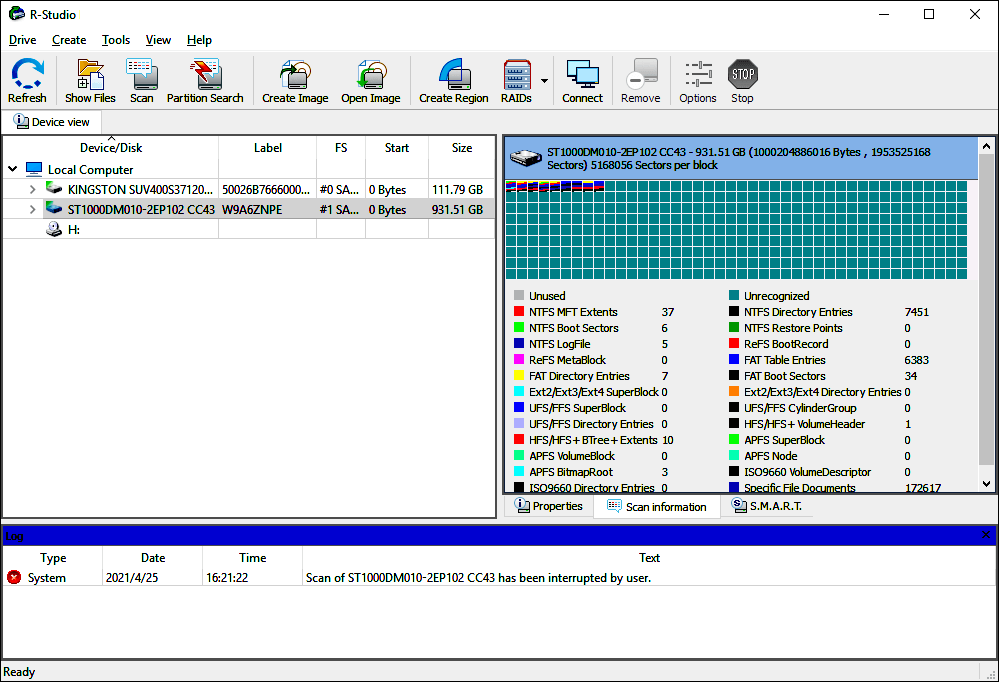
There is only one download button for each operating system, and if you don't want to try before you buy, you can purchase online instead. However, during the installation process, you still have the opportunity to try a demo version to test the software's capabilities.
Price:
R-Studio Network $179.99 R-STUDIO $79.99 R-Studio NTFS $59.99 R-Studio FAT $49.99 R-Studio Technician $899.99 Limitations on the free/pro versions:
The free version allows for unlimited data recovery.
System requirements:
R-Studio is a powerful data recovery software that is compatible with Windows 11, 10, 8.1, 7, Vista, and XP, making it a versatile and reliable option for recovering lost or deleted files.
Recuva supports macOS 11 - 10.5 Leopard and OS X Server 10.5 Leopard can run on computers with Apple M1 chip, Intel, PowerPC G5, or PowerPC G4 processors.
Supported file systems:
R-studio supports file recovery on various file systems, including NTFS, NTFS5, ReFS, FAT12/16/32, exFAT, HFS/HFS+, and APFS.
Author's suggestion
It takes me almost two hours to fully understand the menu options and recovery process, but the "Help & Manual" button on their home webpage is a helpful resource. While the price and ease of use may not be ideal for average computer users, R-Studio's performance in dealing with complex data loss cases is unmatched. Its ability to manage data recovery across HDDs, SSDs, and Raid drives makes it a valuable tool for business owners.
When you search for "R-Studio" data recovery software, be careful not to confuse it with RStudio, which is a tool for data science and statistical computing. The correct tool you're looking for is actually called R-Studio, with a dash between "R" and "Studio". You can check the screenshot provided for reference.
-
4. Disk Drill (High-End Pick)
00 -
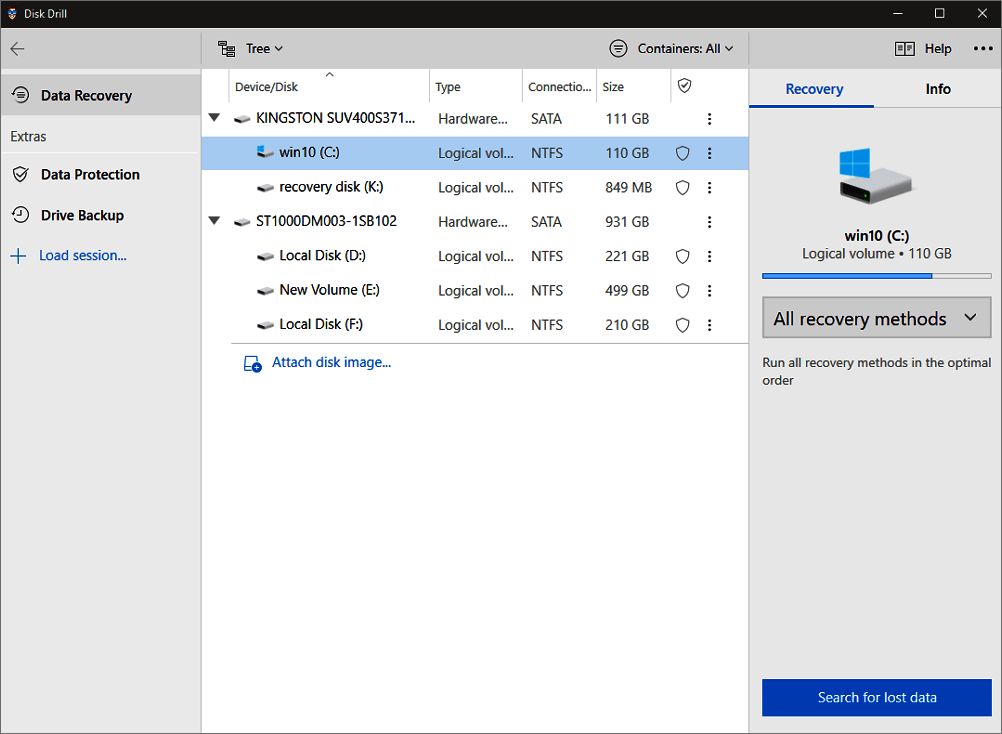
Disk Drill is a reliable data recovery tool that can easily restore deleted or lost data in just a few clicks. It works well on both Windows and Mac laptops or PCs, and can recover deleted photos, videos, music files, and documents from internal or external drives. Additionally, Disk Drill provides enhanced data protection with its Recovery Vault and Drive backup features, making it a fantastic tool for various data recovery scenarios. Overall, the process is straightforward, requiring only 4 steps to recover data.
Pros- Hundreds of file formats are supported
- Data protection and backup features are available
- Lost files are organized by category for easy view
- Free version recovers up to 500MB of data
Cons- Lack of phone technical support
- Very slow to install this software
- A restart is needed before you can use it
-
Disk Drill has a user-friendly interface. This data recovery software stands out from the crowd with its intuitive design, making it easy to recover lost files from a wide range of storage devices, including external hard drives, memory cards, and USB sticks.
Price:
Disk Drill Basic Free Disk Drill Pro $89.00 Disk Drill Enterprise $499 Limitations on the free/pro versions:
Disk Drill for Windows allows users to recover up to 500MB of data for free.
System requirements:
Disk Drill supports Mac OS X 10.11.6 - 12.0.
Disk Drill is compatible with Windows 7 SP1, 8, 8.1, 10, and 11 operating systems.
Supported file systems:
FAT(FAT12,FAT16,FAT32)/exFAT/NTFS/NTFS5/ext2/ext3/HFS+/APFS is supported.
Author's suggestion
Disk Drill, developed by CleverFiles, is a powerful tool for recovering deleted data from various storage devices, including hard drives, SD cards, and USB flash drives. It can restore files in hundreds of formats, including popular types like PDF, DOC/DOCX, XLS, and TXT.
The data recovery process with Disk Drill is easy and fast, making it accessible even to beginners. Additionally, the app has two important features that help prevent data loss: Recovery Vault and Guaranteed Recovery. This sets it apart from other data recovery tools.
The free version of Disk Drill allows for the recovery of up to 500MB of data on Windows, while the paid Pro version offers unlimited data recovery. Upgrading to Pro costs $89, with the option to purchase a lifetime upgrade for $29.
-
5. Stellar Data Recovery (Reputable Brand)
00 -
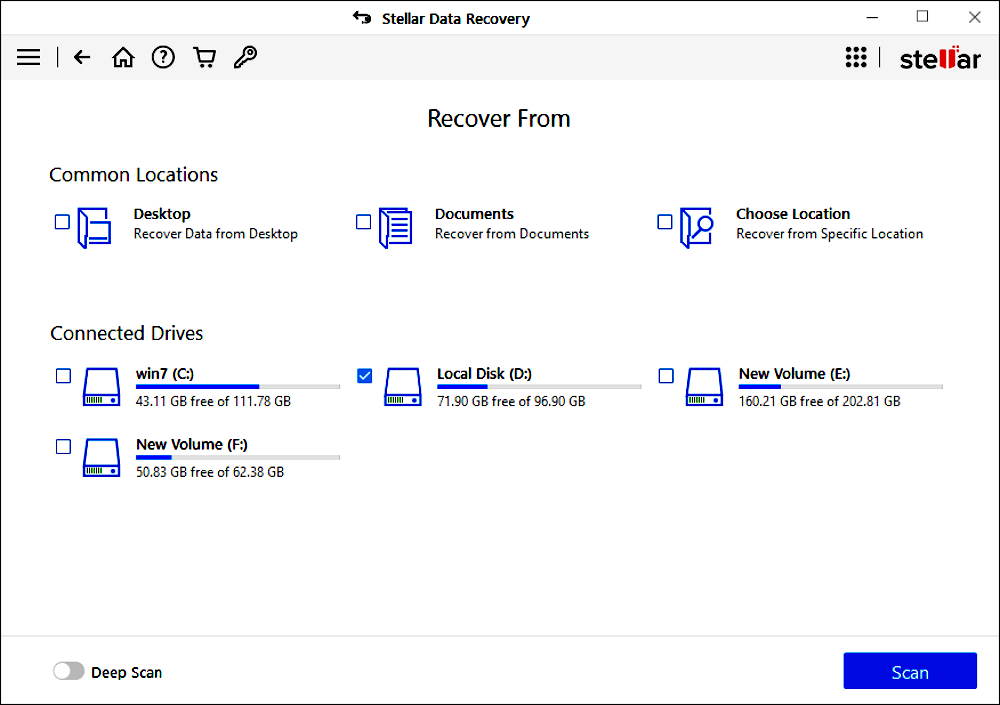
Stellar's website and application interface stand out with their dominant red and grey color scheme, setting them apart from most competitors. The unique design is a plus, but what really shines is Stellar's data recovery capabilities - it's fast, highly customizable, and supports all known file types, with the option to add custom types in advanced settings.
Stellar data recovery software supports data recovery from various storage devices, including computer hard drives, portable drives, flash drives, and SD cards. It can also retrieve lost partitions and data from encrypted drives, and even clone entire disks. The software features powerful scanning and file browsing abilities, making it easy to recover lost data intuitively.
Pros- Have both free and trial version
- Support recovering 1GB files for free
- Smooth and enjoyable user experience
Cons- Scanning progress is really slow
- The price of the paid version is higher than others
-
Stellar offers various plans, including Free, Standard, Professional, Premium, Technician, and Toolkit, with prices ranging from free to $299 per year, and capabilities to resolve complex data loss problems, also available for Mac.
Price:
Stellar Data Recovery Free Free Stellar Data Recovery Standard $49.99 Stellar Data Recovery Professional $79.99 Stellar Data Recovery Premium $99.99 Stellar Data Recovery Technician $199 Stellar Data Recovery Toolkit $299 Limitations on the free/pro versions:
The free version of the software only provides up to 1GB of free data recovery for both Windows and Mac users.
System requirements:
Stellar Data Recovery supports Windows operating systems from XP to Windows 10, including 8.1 and 8.
Stellar Data Recovery supports a wide range of macOS versions, including Catalina 10.15, Mojave 10.14, High Sierra 10.13, and down to 10.7.
Supported file systems:
NTFS, exFAT, FAT(FAT16/FAT32), HFS, HFS+, ext2, ext3, ext4 is supported.
Author's suggestion
Stellar, a leading data care corporation in India, offers a creative yet powerful data recovery solution with standby technicians. With a strong online presence, the Stellar brand is ubiquitous in search results, articles, and paid ads, making it a go-to choice for data recovery software or services. While the company excels at self-promotion, its investment in advertising has paid off, with revenue generated from satisfied customers worldwide. Its qualified products and responsive technicians make Stellar a reliable option for those seeking a reliable data recovery solution.
-
6. SysTools Hard Drive Recovery (Best for a Person)
00 -
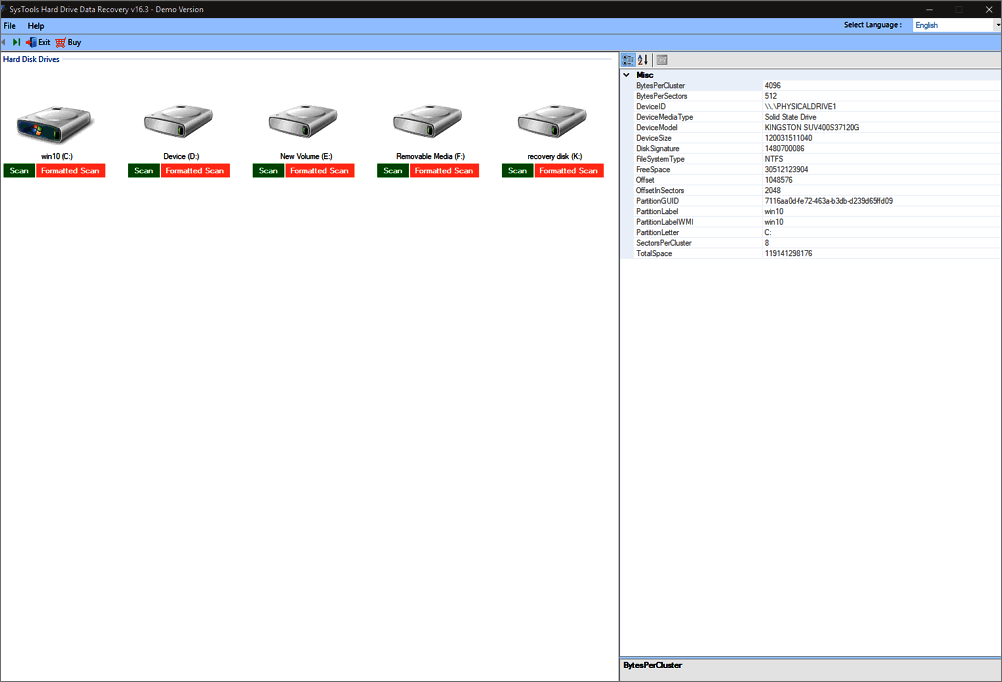
SysTools Hard Drive Recovery is a comprehensive solution to recover deleted files from NTFS and FAT file systems, including data after formatting a hard disk, and supports RAW hard drive data recovery. It can restore various multimedia and document files from internal and external hard drives with a few steps.
SysTools data restoration applications allow users to preview deleted data before deciding which files and folders to restore.
Pros- Intuitive interface and options
- Most of the file formats are supported
- Lost files can be viewed by category filter
- The free version provides preview only
Cons- Can't preview scanned photos
- The process is a little bit difficult
- No forever-free version available
- Unable to resize the window of the product
-
SysTools has become a well-known name in the data recovery software market, offering a good track record of successfully recovering common file types. While it may lack some advanced features compared to other solutions, it can still recover lost and deleted files from a variety of digital storage devices.
Price:
SysTools Hard Drive Recovery Full Version $39 SysTools Hard Drive Recovery + Pen Drive Recovery $59 SysTools Hard Drive Recovery + Pen Drive Recovery + SSD Recovery is a software that helps in recovering data from failed, corrupted, or damaged hard drives, pen drives, and solid-state drives (SSDs). It provides a user-friendly interface to scan and recover lost files, folders, and documents from these storage devices. $69 Limitations on the free/pro versions:
The software does not offer a free version or a trial period, and it does not support free recovery of data.
System requirements:
SysTools Hard Drive Recovery is compatible with Windows operating systems including Windows 10, 8.1, 8, 7, Vista, XP, and others.
Supported file systems:
The supported formats include FAT, ExFAT, NTFS, and exFAT.
Author's suggestion
SysTools Hard Disk Data Recovery Software is a reliable solution for recovering lost, deleted, and formatted data from any size hard drive. With 14 years of experience, it has helped numerous people worldwide, making it a trustworthy option for those in need.
The Hard Disk Recovery Wizard has a preview feature, allowing you to see your data before repairing the drive. However, the Demo version only previews the recovered items, and you must pay at least $39 to recover deleted or formatted files, with the benefit of only needing a one-time payment.
-
7. Remo Recover (Safe Choice)
00 -
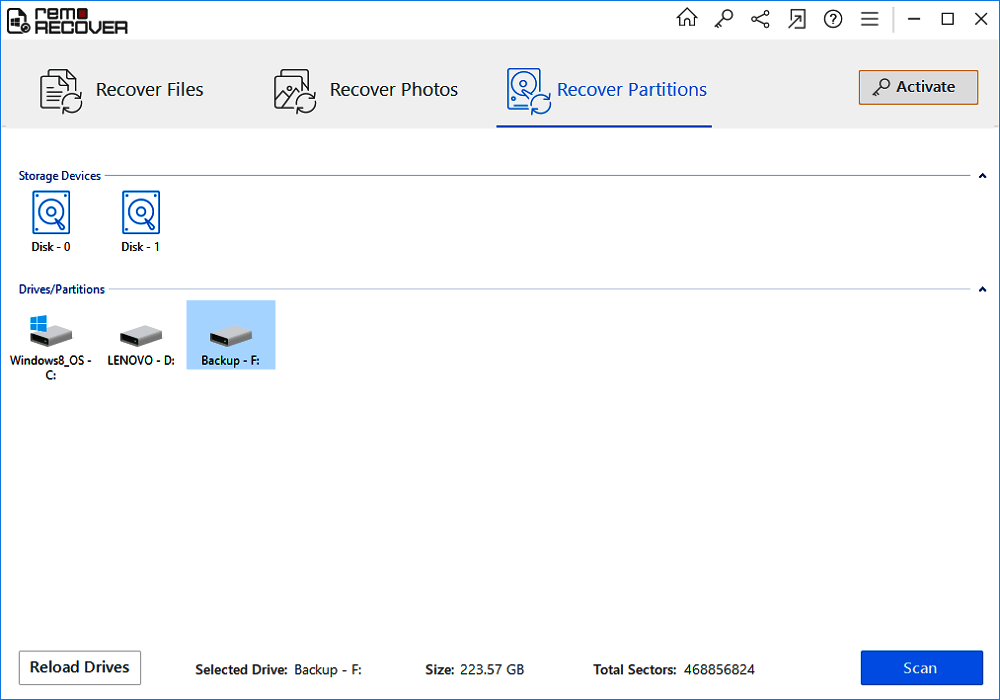
Remo Software entered the data recovery field in 2011 with Remo Recover, a powerful tool that can recover files, photos, and videos from Windows and Mac computers, even from crashed or corrupt hard drives, using dual scanning modes that safely recover deleted or formatted partitions.
Remo data recovery software allows users to preview recovered data before saving it, and is designed to execute data recovery on Windows, Mac, and Android devices.
Pros- Simple and clear user interface
- Dual scan modes
- Supports users to preview before actual recovery
- Recover more than 300 file types
Cons- The price plan is pricey
- Preview function only available for image files
-
For novice users, Remo Recover is a good choice due to its simple and clear interface, which guides users through the recovery process with clear prompts.
 Download for Mac
Price:
Remo Recover Basic Edition $39.97 Remo Recover Media Edition $49.97 Remo Recover Pro Edition $99.97 Remo Recover Tech/Corp Edition $399.97 Limitations on the free/pro versions:
The free demo allows users to scan and preview deleted and lost data.
System requirements:
Remo data recovery software supports various Windows versions, including Windows 10, 8.1, 8, 7, Vista, and XP.
Remo data recovery software supports all versions of macOS, including the latest macOS Big Sur.
Supported file systems:
The supported formats include ExFAT, FAT32, FAT16, NTFS, NTFS5, HFS+, APFS, etc.
Author's suggestion
Remo Recover is an excellent tool in the field of formatted hard drive recovery, allowing users to scan and list lost data with simple steps, and preview files to recover.
Remo Recover offers a flexible scanning mode to search for lost data in various situations. It provides two options: Normal scanning, suitable for less serious data loss, and Deep scanning, which can go deep into each sector of the hard drive to recover data lost due to severe drive damage.
Remo Recover offers various price plans to cater to different user needs, ranging from the Basic Edition for recovering basic file documents to the Media and Pro Editions for recovering lost photos, videos, and partitions.
-
8. Ontrack EasyRecovery (Highly-Rated by Customer)
00 -
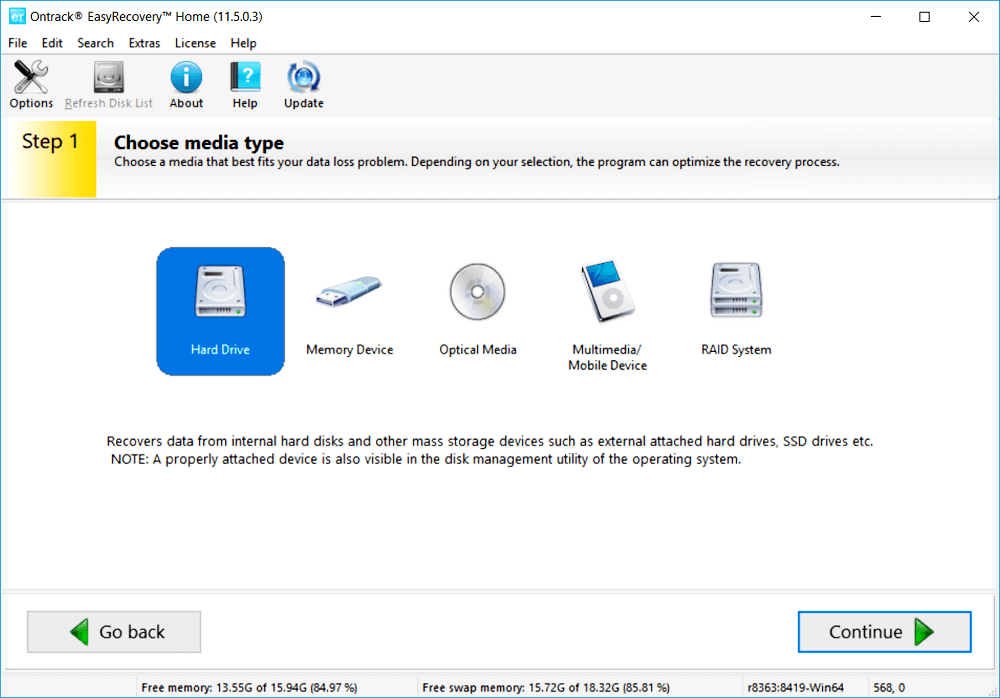
Ontrack EasyRecovery is a data recovery software that supports both Windows and Mac users, offering comprehensive recovery capabilities for corrupted, damaged, deleted, or reformatted files. It can recover over 300 file types from various storage devices, including hard drives, SSDs, USB flash drives, SD cards, and removable media.
Ontrack EasyRecovery works with various types of storage devices, including internal and external drives, SSD, RAID, USB, memory cards, and optical media, and can also repair damaged photo and video files.
Pros- Easy-to-use interface
- Supports users to recover 1GB data for free
- Able to repair damaged photos and videos
- Advanced RAID recovery ability
Cons- The free version of the software only allows for the recovery of files that are less than 25 MB in size.
- Only Premium version can repair corrupted photos and videos
- Can't preview the recoverable files
-
Ontrack, a software company founded in 1985, offers a powerful tool for recovering lost data, utilizing an experienced development team to provide effective solutions.
Price:
Ontrack EasyRecovery Free Free Ontrack EasyRecovery Home $75.24 Ontrack EasyRecovery Professional $103.81 Ontrack EasyRecovery Premium $141.90 Ontrack EasyRecovery Technician $284.76 Ontrack EasyRecovery Toolkit $475.24 Limitations on the free/pro versions:
The free version recovers up to 1 GB of data for free.
For file sizes less than 25 MB.
System requirements:
Ontrack Data Recovery Software supports Microsoft Windows versions from Windows 10 down to Windows XP.
Ontrack Data Recovery Software for Mac supports macOS Big Sur as well as all former versions.
Supported file systems:
The supported file systems include FAT (FAT16, FAT32), NTFS, HFS+, APFS, and others.
Author's suggestion
Ontrack EasyRecovery is a highly-regarded data recovery software, praised for its user-friendly interface and robust functionality. The main interface allows users to select a media type that best suits their data loss needs, and like other recovery software, it offers various scanning modes to cater to different situations.
Ontrack EasyRecovery scans large hard drives quickly, listing lost files in just a few minutes. Users can search for specific files by name, but finding recovered files under normal scan mode can be challenging.
Ontrack EasyRecovery offers a free version that can recover up to 1GB of data, but with a 25MB file size limit, and a paid Home version for unlimited data recovery at $79.
-
9. Prosoft Data Rescue (Trustable Choice)
00 -
Prosoft Data Rescue is a data recovery software with a long history, dating back to 1985. Like Ontrack, it specializes in recovering data from internal and external hard drives, USB flash drives, and SD cards. Its comprehensive scanning options and exceptional recovery results make it a reliable tool for retrieving lost data.
Prosoft Data Rescue offers a cost-effective option by only charging for the files you want to recover, and its FileIQ function allows it to learn and recover new file types.
Pros- Modern and user-friendly interface
- Find all your lost files for free
- Recover more than 150 file types
- Advanced search, filter, and file preview functions
Cons- Deep scan can take a long time
- No pause and resume functions for scanning
-
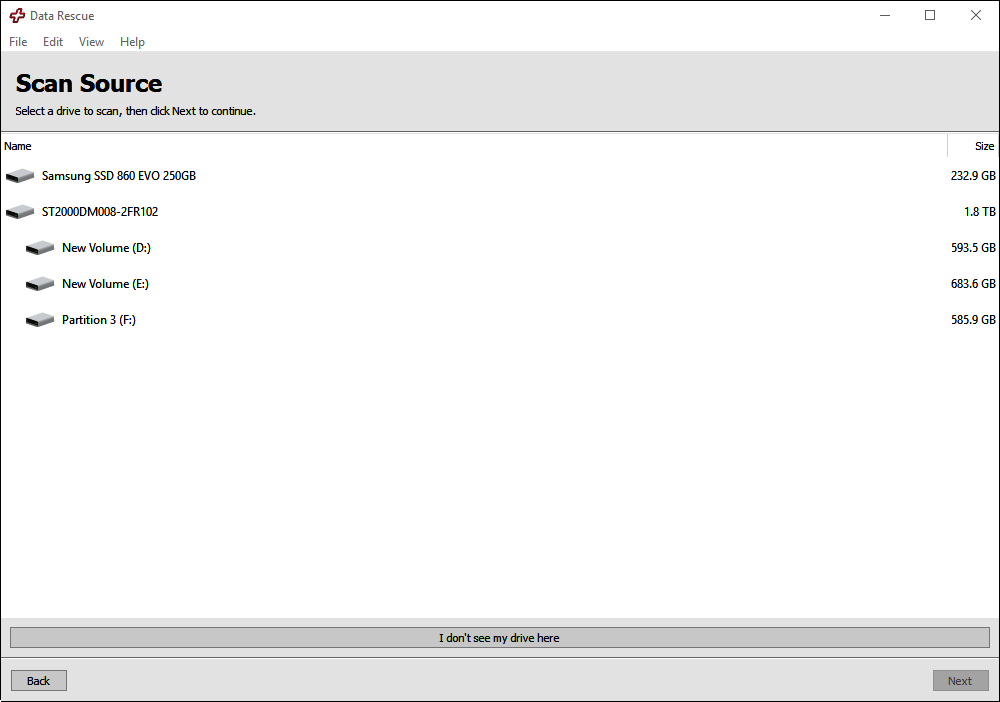
Prosoft Data Rescue is a reliable tool for recovering data in various loss scenarios, including deletion, formatting, and virus attacks. It employs multiple techniques to locate and retrieve as many files as possible, making it a trustworthy solution for data recovery.
Price:
Prosoft Data Rescue Standard $19 (Only pay for specific files) Data Rescue Professional (Annual Version) $399 Limitations on the free/pro versions:
The standard version of the software can locate lost files without any cost, but any data recovery process requires a paid subscription.
System requirements:
Prosoft Data Rescue is compatible with Windows operating systems, including Windows 10, 8.1, 8, 7, and also supports secondary storage devices and internet connections.
Prosoft Data Rescue can be installed on macOS 10.12 or later, including M1 devices, and requires a secondary storage device and an internet connection.
Supported file systems:
The supported file systems include FAT (FAT16, FAT32), NTFS, HFS+, APFS, and others.
Author's suggestion
For users new to data recovery software, Prosoft Data Rescue is a great option. It supports both Windows and Mac computers and has a clear, user-friendly interface, making it easy for beginners to navigate and recover their data quickly.
Prosoft, a company with over 30 years of experience, offers reliable data recovery services. They can recover not only intentionally deleted files but also files deleted years ago, giving users peace of mind and confidence in their data recovery abilities.
Prosoft Data Rescue offers two scanning modes: a quick scan for resolving OS startup issues or external drive mounting problems, and a deep scan for recovering deleted or reformatted files, but the deep scan is time-consuming and cannot be paused.
-
10. Partition Recovery (Wise Choice)
00 -
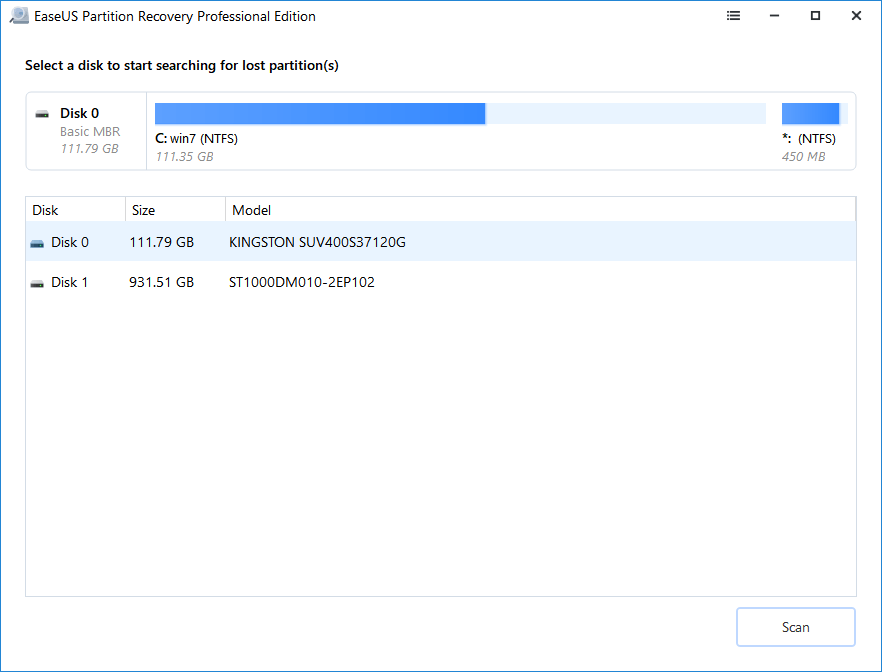
Partition Recovery is a specialized software that excels in partition recovery, unlike other data recovery tools. It supports various partition types, including FAT, NTFS, EXT2, and EXT3, within the Windows operating system. If you've experienced unexpected issues like improper operation, power failure, or accidental erasure resulting in the loss of an entire partition, Qiling Partition Recovery can recover the deleted partitions and their contents.
Partition Recovery scans your whole drive or specific disks quickly, and its Raw recovery feature allows for data recovery by file signature without any data loss.
Pros- This tool is user-friendly and can be used by anyone to restore lost partitions, making it a convenient solution for recovering lost data.
- Quick scan mode lists deleted files in just seconds
- Recovery of partitions with multiple file systems
- Offers Raw recovery feature
Cons- One license only available for one computer
- Does not support EXT4 file system
-
The Partition Recovery software has a user-friendly interface that is easy to navigate, even for non-experts. Despite its simplicity, it offers powerful recovery capabilities, making it possible for anyone to perform a partition recovery with ease.
Price:
Partition Recovery Monthly $49.95 Partition Recovery Annual $69.95 Partition Recovery Lifetime Upgrade $99.95 Limitations on the free/pro versions:
The free trial version won't allow for free recovery.
System requirements:
Partition Recovery is compatible with Windows 11/10/8/7/Server.
Supported file systems:
Partition Recovery supports various partition types, including FAT, NTFS, Ext2, and Ext3, in Windows.
Author's suggestion
Losing an entire partition is a more dire situation compared to common data loss, as it means the loss of all contents within that partition, including hundreds of files, documents, or application files. This is more alarming than losing just some files or documents, making users more panicked.
Partition Recovery is a safe and efficient solution that can recover deleted partitions and protect your data. It can handle various partition loss scenarios, including improper operation, corrupted partition table, power failure, bad sector, and system upgrades. The recovery process is straightforward, requiring only three steps: selecting a disk to scan, previewing the partitions in the list, and recovering the lost partitions. Once the lost partition is recovered, all the data on it will also be recovered.
For Windows users seeking a reliable partition recovery tool, Partition Recovery software is a good choice to efficiently recover lost data.
Related Articles
- Download Qiling Data Recovery Crack 3.1 [2023 Official]
Deep Data Recovery Crack is software for data recovery tools. It is easier to use the steps of the wizard-style operation. Use it to recover deleted files from memory cards, USB flash drives, or even whole devices. - [SOLVED] How to Recover Audio Files on Windows/Mac/Android/iPhone
There are times that you lose audio files like voice recordings, music and songs. Read this post and recover audio files on Windows/Mac/Android/iPhone with simple steps. Download and run Qiling audio recovery software to get back your recordings, music and songs on any device. - How to Recover Data from 2TB External Hard Drive in Windows 11/10/8/7
about large amounts of data recovery. Here, we come up with a DIY recovery solution - Qiling data recovery software. It helps you recover data from a 2TB external hard drive or internal hard drive with simple steps. You can get this hard drive recovery software by clicking the download button. - Recover Data from SATA Hard Drive in 3 Steps [2023 Guide]
Recover data from SATA hard drive can use backup and recovery software solutions. SATA is a previous-generation technology, and the PCs utilizing it are older. Therefore, there are a few limitations. This article provides the methods for SATA data recovery. - MS SQL Recovery Software to Recover MDF/NDF File
MDF or NDF files can become deleted, damaged, or inaccessible due to various issues like hardware problems, SQL Server bugs, OS malfunctions, sudden system shutdowns, or virus attacks. In such cases, Qiling MS SQL Recovery can be a helpful tool to recover the MDF or NDF file with ease. - 2 Fixes to Resolve Memory SD Card Says Full But No Files On It Error
If your camera's memory SD card shows as full but doesn't display any files. This issue can be resolved by following the instructions on this page.
Products
Articles & Tutorials
- Data Recovery
- Data Backup
- File Recovery
- File Backup
- System Backup and Restore
- Disk and Partition Clone
- Technical articles
- Mobile articles
- Disk Master Help
- Windows Data Recovery Tutorials
- Windows Secure Delete Tutorials
- Windows Partition Management Tutorials
- Windows File Backup and Restore Tutorials
- Windows System Backup and Restore Tutorials
- Windows Disk Backup and Restore Tutorials
- Windows Clone Tutorials