C Drive Is RAW: Fix It Without Losing Data
When the C drive or a system-related partition is shown as RAW, Windows cannot read its file system correctly. You may see messages asking you to format the drive, but formatting should not be your first step if important files are still there.
Why Does the C Drive Become RAW?
- The file system is damaged after a failed update, sudden shutdown, or power loss.
- Disk errors or bad sectors prevent Windows from reading the partition normally.
- The partition table or boot information is corrupted.
- A repair command, cloning operation, or partition change was interrupted.
Check What Windows Can Still Detect
Open Disk Management first. If the partition is listed as RAW but still has the correct capacity, the file system may be damaged while the data area may still be scanable. If the disk is missing from Disk Management, check BIOS/UEFI, cables, the SSD slot, or the external enclosure before running recovery software.
If this is the Windows system drive and the PC cannot boot, use another Windows computer or a bootable recovery environment to check the disk. Avoid initializing the disk or creating a new volume before recovery.
Recover Files from the RAW C Drive First
If Windows can still detect the drive or partition, scan it before running format, clean, or reinstall operations. Qiling Data Recovery can search for lost files on a RAW volume and save them to another disk.
Step 1. Open Qiling Data Recovery and choose a recovery mode for lost files.

Step 2. Select the RAW C drive or the affected partition and start scanning.

Step 3. Preview the found files, select what you need, and click Recover. Save the files to another drive.

Repair the RAW C Drive After Recovery
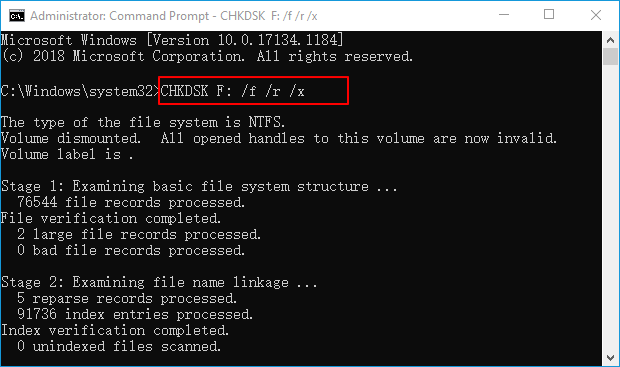
After your files are safe, check the disk with CHKDSK if Windows allows it. If the file system cannot be repaired, format the partition and restore files from the recovery result or a backup.
Conclusion
A RAW C drive is a warning sign, not a prompt to format immediately. Recover files first, then repair the file system or rebuild the partition after the data is protected.
Related Articles
Products
Articles & Tutorials
- Data Recovery
- Data Backup
- File Recovery
- File Backup
- System Backup and Restore
- Disk and Partition Clone
- Technical articles
- Mobile articles
- Disk Master Help
- Windows Data Recovery Tutorials
- Windows Secure Delete Tutorials
- Windows Partition Management Tutorials
- Windows File Backup and Restore Tutorials
- Windows System Backup and Restore Tutorials
- Windows Disk Backup and Restore Tutorials
- Windows Clone Tutorials