Top 5 Free Folder Recovery Software in Windows 10/8/7
Accidentally deleting a folder can be disastrous, as it takes all the files within it with it. This can lead to frustration and lost data. However, there are solutions available in the form of five top-rated folder recovery software that can help you recover a deleted folder, restoring your important files and saving you from the hassle.
Why the Deleted Folders Can Be Recovered After Empty Recycle Bin
When you delete a folder, the files inside it don't actually disappear, but rather, Windows marks the space on the hard drive as available, changing one character in the file table so it's no longer visible, while the data itself remains intact.
The deleted folder can be recovered because Windows marks the space on the hard drive where the folder was as "available" for writing a new file. If you start to undelete files before Windows uses that space, you can set the flag back to "on" and recover the folder, with the sooner you try the more successful your recovery will be.
The Fabulous Folder Recovery Software Is Ready For You
To recover deleted folders, using data recovery software is the way to go, but choosing the right one can be a challenge. After extensive testing of at least 10 data recovery software options, here are the 5 most effective folder recovery software.
Top 1. Qiling Free Folder Recovery Software (Windows & Mac)
Qiling free data recovery software is the most efficient recovery software, capable of recovering deleted files such as Word, Excel, PowerPoint, photos, emails, databases, and all document formats and folders in Windows, even after they have been emptied from the Windows Recycle Bin. Additionally, it can also recover deleted folders, making it an effective tool for recovering lost data.
Formatted recovery:
Formatting a disk does not erase the data on the disk, only the data on the address tables, so you can still retrieve your lost data after a format on your device.
OS crash recovery:
Qiling provides a downloadable WinPE bootable media that allows you to start your computer and recover lost data after a system crash.
RAW partition recovery:
You can retrieve data even if your hard disk or partition suddenly becomes RAW and you cannot access the stored data.
Virus attack recovery:
Virus attacks can be devastating, causing irreparable data loss. However, this tool offers a safe and efficient solution, allowing you to recover your data quickly and effectively after an attack.
Pros
- The easy 3-step recovery process
- Virus-free and plugin-free
- Supports for 1000+ file types
- Photo repair and video repair is available
Cons
- Free trial with a 2GB recovery limit. The Pro version costs $69.95 and has no recovery limits.
Top 2. Recuva - Recover Deleted Files Quickly and Easily (for Win)
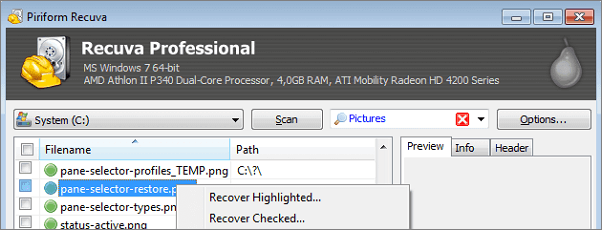
Recuva is a free folder recovery software that recovered 100% of JPG images and most of word, excel, and PPT files in a test. It guides users through the recovery process with user-friendly questions.
Pros
- 100% free data recovery software
- Deep scan mode for hard to find files
- A portable version is available
Cons
- You cannot preview the result during the scanning
- No update version for a long time
Top 3. Wise Data Recovery (Windows Only)
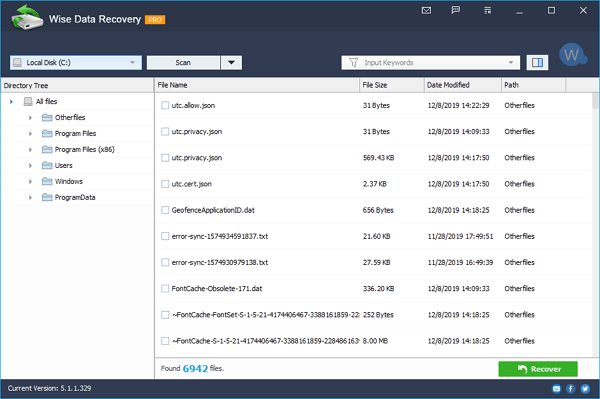
Wise Data Recovery was tested with the same data loss scenarios and it successfully recovered data from various storage devices, including HDD, SSD, External hard disks, Floppy Disks, USB flash drives, Memory cards, Digital cameras, and any other storage device, supporting the recovery of over 1000 types of files.
Pros
- The data recovery software is free
- It can recover all types of files easily
- A portable version is available
Cons
- Shows messy codes in the preview pane for unsupported formats
Top 4. Recover My Files (Windows only)
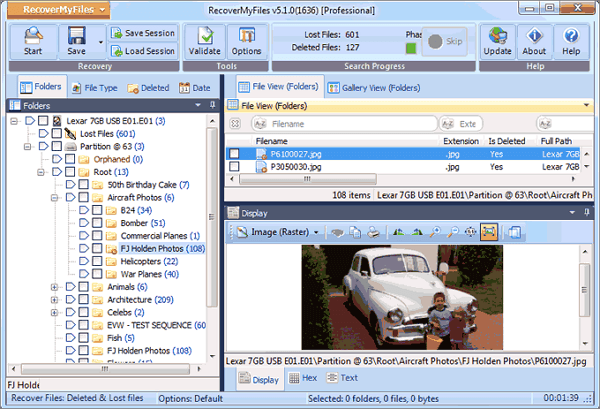
Recover My Files is a free tool that can retrieve deleted data. In my testing, it successfully recovered almost 80% of deleted files from various scenarios, although it took a longer time to scan. However, it's only compatible with Windows, not macOS.
Pros
Allows to scan the backup (image file) of a partition
You can adjust the layout of the items
It is free for advanced file recovery
Cons
The data recovery process is relatively complex than its competitors
Top 5. Photo Rec (Windows, Mac, and Linux)
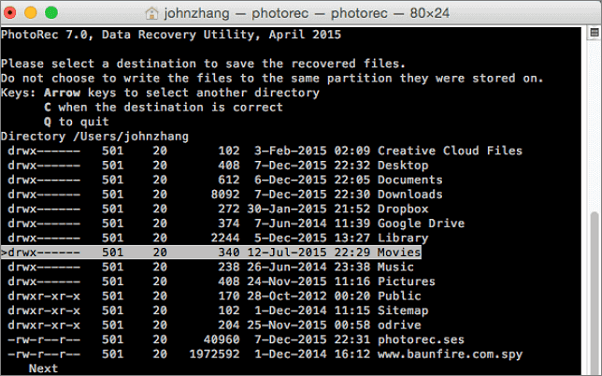
I also tested PhotoRec with the same data loss scenarios, and it successfully recovered images from various digital devices. Additionally, it supports multiple operating systems, including Windows, macOS, and Linux. However, it took the longest time to scan deleted files in any data loss scenario.
Pro
- The data recovery software is free.
- This software works on many file formats, not just images.
Cons
- It is unable to restore file names and folder structure
- It is quite technical for users
Recover Deleted Folders with Free Folder Recovery Software
Here are 5 free data recovery software that can help recover lost or deleted files, including deleted folders. With Qiling data recovery software, you can follow these steps to recover deleted folders.
Step 1. Select file types
Launch Deep Data Recovery, select file types, and click "Fast Scan" to start the recovery process.

Note: You can choose different search modes based on where and why the data was lost.
Step 2. Select a folder to scan for lost files
To recover lost data, select the partition where the data was lost and click "Scan" to initiate the scanning process for the lost folder.

Step 3. Find and preview found files in the lost folder
If you remember the folder name, type it into the search box to quickly find the lost files. You can then open the found folder and double-click on the files to preview them. Alternatively, you can use the Filter feature to search for a specific type of file.

Step 4. Recover and save the lost folder
Select the folder and files you need, click "Recover", and choose a new & secure location on your PC to keep the recovered data.
To Sum Up
Deep Data Recovery can recover lost files and data from various scenarios, including deletions, formatting errors, partition losses, OS crashes, and virus attacks. To prevent data loss, it's recommended to regularly create backups and take precautions to avoid data loss.
Related Articles
- How to Convert RAW to NTFS Without Formatting (3 Ways)
- Use Disk Doctor Freeware to Recover Lost Data
- 7 Data Recovery Software Crack with Serial Key and Registration Code
- Unparalleled RAID Recovery Services for RAID 0, 1, 5, 6 & 10
- How to Get Back Deleted WhatsApp Messages on Computer/iPhone
You can recover deleted WhatsApp messages, making it easy to get back what's been lost. - How to Recover a Deleted Folder in Outlook
Learn how to recover a deleted folder in Outlook from Deleted Items or Recover Deleted Items, and restore emails to the right mailbox location.
Products
Articles & Tutorials
- Data Recovery
- Data Backup
- File Recovery
- File Backup
- System Backup and Restore
- Disk and Partition Clone
- Technical articles
- Mobile articles
- Disk Master Help
- Windows Data Recovery Tutorials
- Windows Secure Delete Tutorials
- Windows Partition Management Tutorials
- Windows File Backup and Restore Tutorials
- Windows System Backup and Restore Tutorials
- Windows Disk Backup and Restore Tutorials
- Windows Clone Tutorials