Recover Access Files with Access Database Recovery Software
Microsoft Access is a database management system (DBMS) from Microsoft that combines the relational Microsoft Jet Database Engine with a graphical user interface and software-development tools. It is part of the Microsoft Office suite, included in the Professional and higher editions or sold separately.
Microsoft Access stores data in its own format using the Access Jet Database Engine, but can also import or link to data from other applications and databases. Access files have a .mdb extension for versions prior to 2007 and a .accdb extension for versions 2007 and later.
If you've lost an important Access file on your hard disk, you can recover it with the help of file recovery software. These tools can help you retrieve deleted or lost files, giving you a second chance to access the information you need.
Free Access Data Recovery Software (Recommended)
Deep Data Recovery Free Edition is a free, fast, safe, and easy-to-use recovery solution that can recover lost Access files from any storage device. It provides a quick and easy data recovery solution, and if the lost file is not damaged or overwritten, it can recover it easily, making it a reliable tool for retrieving lost data.
- 100% secure and clean to install.
- Retrieve your lost data after a format on your device.
- Recover lost data quickly and easily from unexpected losses caused by accidental deletion or virus attacks, restoring your peace of mind and productivity.
- When a hard drive is corrupted, it becomes inaccessible, but this software enables users to regain access to their data.
- Recover all types of lost files, including photos, documents, videos, audio, emails, compressed files, and more, with a reliable data recovery solution.
- If your Windows operating system crashes, you can try to recover files by booting with a downloadable WinPE. This allows you to access your system even when it fails to start normally.
How to Recover Microsoft Access Files
You can use a free Access recovery software to recover lost Access data with ease. Simply download the software and follow the prompts to get your lost data back.
Step 1. Run Deep Data Recovery and select the file types you want to recover, then click "Fast Scan" to begin the recovery process.

Note: You can choose different search modes based on where and why the data was lost.
Step 2. To recover lost files, choose the drive where the files were lost and start scanning. This software allows you to recover lost data from various devices, including hard drives, solid-state drives, USB drives, SD cards, pen drives, and cameras.

Step 3. Qiling data recovery software supports 1000+ file types, including photos, videos, documents, emails, audio files, and more, allowing you to browse full scan results and choose the file type you need.

Step 4. To preview and recover files, select the desired files, click the "Recover" button, and choose a location to save the recovered data.
Extra Tip: Repair Access database and restore Access Files
1. Restore the database from a backup file.
2. Delete the .ldb file that is auto-created by the Jet database engine when the database is opened.
3. The Jet Compact Utility is a tool specifically designed to resolve minor corruptions in Access databases. It can be used to compact and repair the database, which can help to resolve issues such as database corruption, inconsistencies, and errors.
4. You can remove all compiled VBA code from the database using the following command line switch provided by Microsoft:
C:\Program Files\Microsoft Office\Office\MsAccess.exe /decompile C:\DatabasePath\FileName.mdb
Note: You may need to change the path shown above for MsAccess.exe if you installed it to a different location. If the path shown above does not work, try using the path to MsAccess.
5. To resolve issues with an Access database, you can use the built-in "Compact & Repair" feature. This process involves backing up the database, closing any open Access applications, and then using the "Compact & Repair" feature to repair and compact the database. This feature checks the database for errors and repairs them, and it also compacts the database to improve performance.
- To compact and repair an MS Access database, open the MS Access application itself, not the database file, and navigate to Database Tools > Compact & Repair Database. This will launch the compact and repair process, which will optimize the database's performance and integrity by removing unnecessary data and repairing any inconsistencies.
- Locate the corrupted database file and click "OK".
- The selected database file will be fixed once the process is completed.
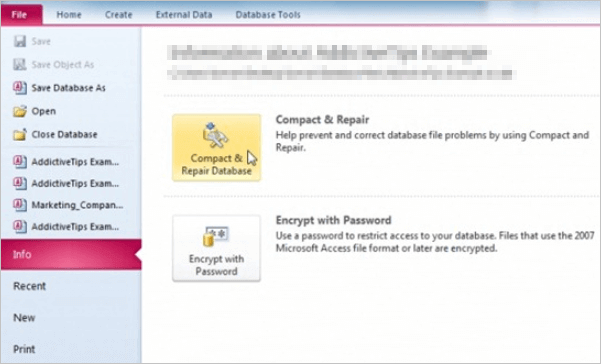
6. To import a corrupt database into a new Access 2010 database file, follow these steps. First, create a new Access 2010 database file.
- Open MS Access and create a new database file.
- To import an Access database, click on the "Access" button under the "External Data" tab in Excel. This will allow you to access and import data from an Access database into your Excel spreadsheet.
7. In the next window that pops up, click "Browse" and locate the database file that is to be imported.
- To store data in the new database, specify the place and technique to store data, such as a file path or a database connection string, and click "OK" to confirm the changes.
- Select all the database objects you want to import from the next window and click "OK".
8. If database corruption persists despite the above techniques, a premium quality third-party Access database repair software or an Access repair company may be the recommended solution.
If the missing database is an Access .accdb file rather than a damaged database that still exists, see how to recover a deleted Access ACCDB database on Windows before trying repair tools.
Related Articles
- Top 10 Best NAS Recovery Software for RAID Recovery in 2022
- How to Repair a Corrupted Hard Disk Without Formatting It in Windows 10/8/7
- How to Force Delete a Folder or File in Windows 10/Windows 11
- Easily Recover Files Larger than 4GB in Size
- How to Recover Files from Seagate External Hard Drive
To recover files from a Seagate external hard drive, you can follow a step-by-step guide that involves using Seagate hard drive data recovery software to get back lost or deleted files. This software allows you to free try and recover your files on both Mac and Windows PC. - How to Recover Files from Formatted HDD in Windows 10/11
Want to restore data from a formatted HDD? You can use the Qiling tool to quickly recover files from a formatted HDD in Windows 11/10. The Qiling tool can help you recover your data, even after formatting your hard drive.
Products
Articles & Tutorials
- Data Recovery
- Data Backup
- File Recovery
- File Backup
- System Backup and Restore
- Disk and Partition Clone
- Technical articles
- Mobile articles
- Disk Master Help
- Windows Data Recovery Tutorials
- Windows Secure Delete Tutorials
- Windows Partition Management Tutorials
- Windows File Backup and Restore Tutorials
- Windows System Backup and Restore Tutorials
- Windows Disk Backup and Restore Tutorials
- Windows Clone Tutorials