Best NAS Recovery Software for RAID and NAS Drives
When you accidentally delete or format an important file from your NAS RAID device, you'll want a reliable and powerful NAS data recovery tool to help you out. Fortunately, there are top-notch software options available that can assist you in recovering your lost data. This tutorial will introduce you to the top 10 best NAS data recovery software that can help you get your files back in no time.
We've selected the top 10 NAS recovery programs based on performance and versatility, user-friendliness, and price. To help you choose the best one, this article provides an overview of each product, allowing you to make an informed decision and select the NAS recovery software that suits your needs.
- 1. Qiling NAS Data Recovery Software
- 2. R-Studio NAS Data Recovery
- 3. Reclaime Free Raid Recovery
- 4. Home NAS Recovery
- 5. Runtime RAID Data Recovery
- 6. UFS Explorer RAID Recovery
- 7. Ontrack Data Recovery
- 8. Stellar RAID Data Recovery Tool
- 9. ZAR NAS Recovery
- 10. DiskInternals RAID Recovery
1. Qiling NAS Data Recovery Software
Qiling NAS data recovery software provides a simple way to recover lost or deleted files from a NAS device, configured as a single drive, RAID 0, RAID 1, or RAID 5, without unplugging the disk.
Features:
- Recover lost files from a Network-Attached Storage (NAS) device due to accidental deletion, formatting, virus attacks, system crashes, or other unforeseen events. This can be achieved through various methods, including using data recovery software, physical recovery tools, or seeking professional help from a data recovery service.
- The device supports popular NAS disk brands, including Synology, QNAP, Buffalo, Western Digital, and NETGEAR, among others.
- Restore data from NAS RAID with ext4 or btrfs file systems
- Retrieve NAS data using a PC running Windows 11/10/8/7
- Recover your NAS in a snap with our intuitive solution, eliminating the need to physically remove the disks. Our user-friendly interface guides you through the recovery process with ease, making it simple to get back up and running in no time.
- Same price as the normal data recovery, very cheap
Price: $69.00 (Free version is available)
Compatibility: Windows 11/10/ 8/7/XP
Easy NAS data recovery processes:
Step 1. Select a NAS server and start recovering.
Download and install Deep Data Recovery on your Windows 11/10 64-bit computer. Once installed, open the software and select "NAS Recovery", which will automatically list all connected NAS servers. Choose your target NAS device and click "Fast Scan" to proceed.

Note: You can choose different search modes based on where and why the data was lost.
Step 2. Enable SSH service on the NAS server.
To enable remote access for Deep Data Recovery, go to the "Control Panel > Terminal & SNMP" and check the box next to "Enable SSH service". Then, note down the port number for remote access. After that, open Deep Data Recovery and click "Next".
Step 3. Connect to the NAS server remotely.
This software automatically detects your IP and Port, requiring only your username and password to be input. If the detected IP address or Port is incorrect, you can manually correct it. Once inputted, simply click "Connect Now" to initiate the connection.

Step 4. Recover lost/deleted NAS data
Qiling data recovery software will connect to your NAS and initiate a scanning process, displaying all deleted, lost, or existing files on your NAS server after the scan.
To find lost files on a hard drive, use the "Filter" feature or click "Search files or folders" to locate them. Select the desired NAS files and click "Recover" to save them to a different location.

Additional Help - NAS/RAID Recovery Service
If you're struggling with NAS data recovery software, consider reaching out to experts who can offer a 1-on-1 manual NAS data recovery service. This can provide the additional help you need to successfully recover your data.
- 1. Data can be restored from various RAID levels, including RAID 0, RAID 1, RAID 5, RAID 6, RAID 10, and more, allowing for recovery of lost data in different configurations.
- 2. Recover data from enterprise RAIDs such as QNAP, Synology, WD, Buffalo, and more, with expert assistance. Our team specializes in retrieving lost data from these complex storage systems, often due to hardware failure, software corruption, or user error.
- 3. Retrieve lost RAID data caused by any issues
- 4. Recover data from RAID remotely, no need to ship
2. R-Studio NAS Data Recovery
R-Studio supports both mdadm and LVM2 Linux RAID technologies and can recover data from Windows PCs, including restoring files from RAID-based NAS storage devices. To do this, you need to remove disks from the NAS devices and connect them to a computer where R-Studio is installed.
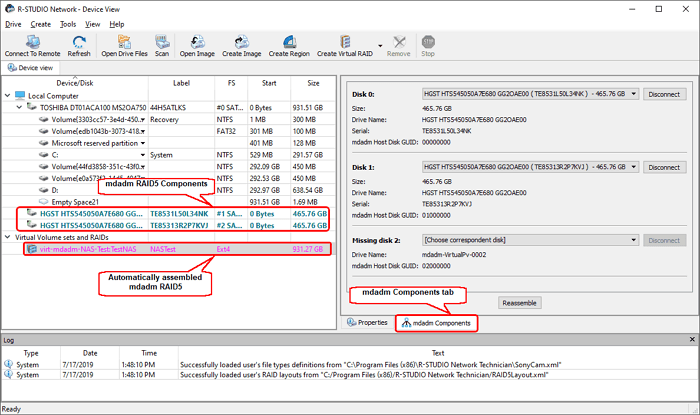
Features:
- Scan and recognize the fragments of the files on RAID disks
- Recover data from formatted ext4FS disk
- Retrieve non-RAID (Redundant Array of Independent Disks) levels are nested configurations that can be applied to HDD or SSD drives. The standard levels include RAID 0 (striped), RAID 1 (mirrored), RAID 5 (striped with parity), RAID 6 (striped with dual parity), RAID 10 (mirrored and striped), RAID 50 (striped with RAID 5), RAID 60 (striped with RAID 6), and RAID Z (striped with parity).
- Provide both free and premium versions
Price: $179.99
Compatibility: Windows 10/ 8/7/XP
3. Reclaime Free Raid Recovery
ReclaiMe file recovery software recovers data from various storage devices, including hard drives, USB drives, memory cards, and NAS devices.
ReclaiMe Free RAID Recovery is a well-developed tool for restoring RAID configuration parameters, including disk order, block size, start offset, and others, but it does not allow for file-by-file recovery, instead working with arrays in their entirety.
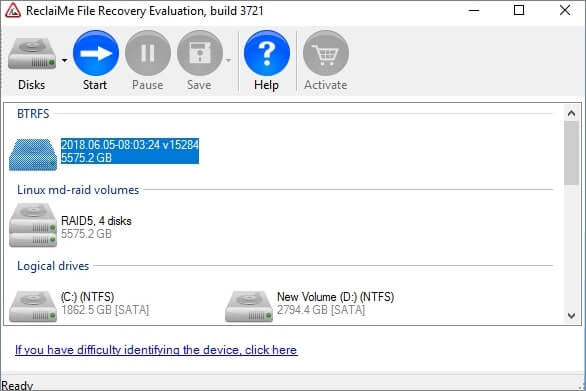
Features:
- QNAP, NETGEAR, Synology, WD MyBook, LaCie, and similar network-attached storage (NAS) devices can be recovered using NAS recovery software, which can restore data from failed, corrupted, or damaged drives. This process typically involves downloading and installing the recovery software, connecting the affected drive to the NAS, and following the on-screen instructions to scan and recover the data.
- Support BTRFS file system used in modern NETGEAR ReadyNAS devices
- RAID (Redundant Array of Independent Disks) comes in various types, each offering distinct benefits and drawbacks. RAID 0, also known as striping, splits data across multiple disks for increased read and write speeds, but lacks redundancy.
- ReclaiMe is a freeware running on Windows PC only
Price: Free
Compatibility: Windows 10/ 8/7/XP
4. Home NAS Recovery
Home NAS Recovery is a brilliant tool for recovering NAS data by removing disks from NAS devices. With this software, you can easily recover deleted NAS data in just five steps: remove the disks from the NAS and connect them to a PC, download and launch Home NAS Recovery, make a few simple steps, and get your NAS data recovered.
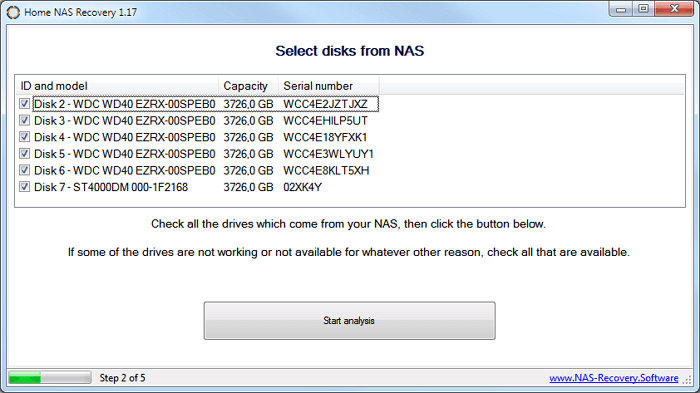
Features:
- The software supports a wide variety of NAS devices, including QNAP, NETGEAR, Buffalo, and many others, allowing users to access and manage their data across multiple devices and brands.
- Support NAS data recovery for small and enterprise NASes
- Easy of use with 24/7 technical support
Prices: 69$ for personal use only
Compatibility: Windows 10/ 8/7/XP
5. Runtime RAID Data Recovery
Runtime RAID Data Recovery can recover data from broken RAID Level 5 or RAID Level 0 Arrays on NAS devices, automatically scanning and finding RAID parameters such as drive order, start sector, rotation, and block size, requiring a disk controller card capable of handling all drives individually.
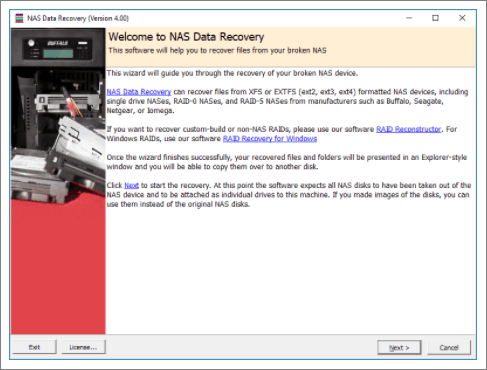
Features:
- Easy to use wizard, no user input required
- Recover data from XFS or EXT formatted NAS devices
- Automatically find RAID parameters
- The device supports Buffalo, Seagate, Western Digital, DLink, or Iomega hard drives and can be configured in single-drive, RAID-0, RAID-1, or RAID-5 settings.
Prices: 99$ for personal use only
Capability: Windows 10/8/7 and Windows Server 2008 - 2016
6. UFS Explorer RAID Recovery
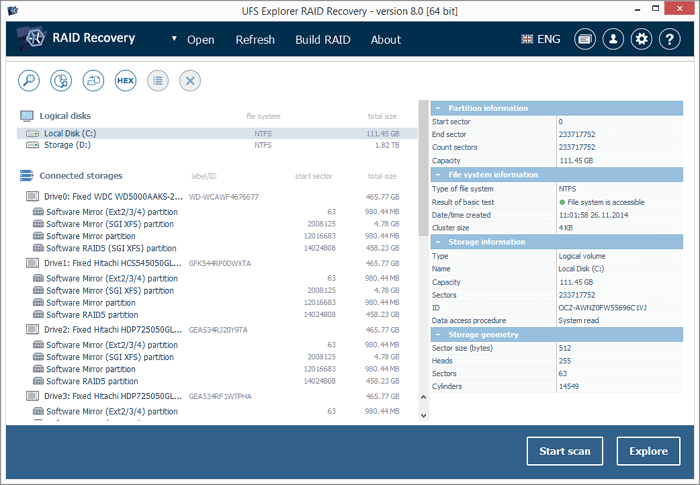
UFS Explorer RAID Recovery is a data recovery tool that effectively retrieves data from RAID systems on NAS or DAS devices, supporting standard, nested, and custom RAID patterns, and also aids in recovering data from RAID disks with hardware defects.
Features:
- Automatically detect RAID parameters and prompt virtual assembly
- The system supports manual configuration of various RAID modes, including Drobo BeyondRAID, Synology Hybrid RAID, and Btrfs-RAID, among others.
- Support for popular NAS devices from vendors such as Drobo, Buffalo Technology (TeraStation, LinkStation), Synology, and QNAP Systems, among others, is also available.
Prices: 199.95 EUR
Capability: Windows, Linux, and macOS
7. Ontrack Data Recovery
Ontrack Data Recovery provides network attached storage (NAS) recovery for all manufacturers, media formats, operating systems, and configurations, allowing you to recover data from various setups like DAS, SAN, NAS, and SD cards, and can help retrieve lost NAS data due to errors such as human mistakes, power outages, overheating, mechanical failures, and defective NAS controllers.
Features:
- Our data recovery services can recover data from various types of NAS servers, including those with different RAID levels and controllers, allowing you to retrieve your valuable files and information even in the event of a system failure or data loss.
- The software supports a wide range of hard disk drives (HDD) and solid-state drives (SSD) from various manufacturers, including ACER, Apple, Buffalo, Cisco, Dell, and LaCie.
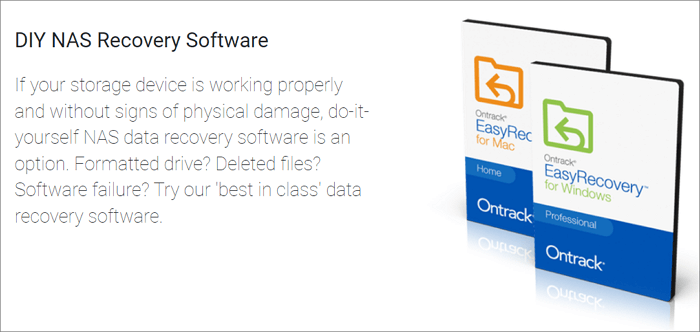
- Provide DIY NAS recovery software
- Support remote data recovery
Prices: 199.95 EUR
Capability: Windows, Linux, and macOS.
8. Stellar RAID Data Recovery Tool
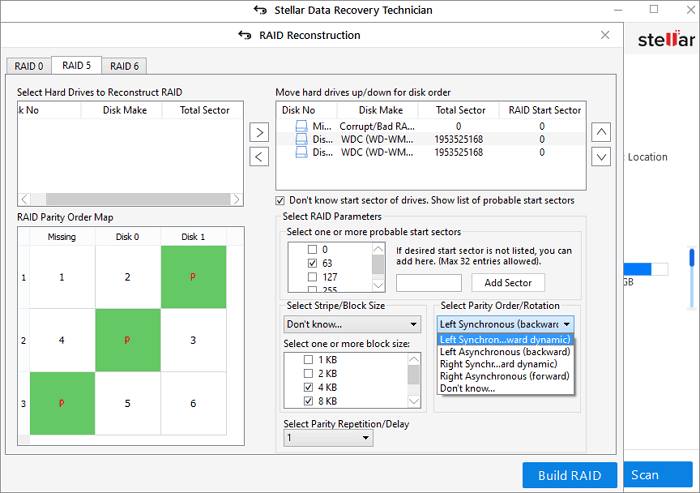
Stellar RAID Data Recovery Tool is a sophisticated software for recovering data from failed RAID arrays and NAS devices. It can automatically detect RAID parameters and rebuild a virtual RAID to restore lost files from broken, corrupt, or failed RAID 0, RAID 5, and RAID 6 arrays in NAS devices.
You can preview scanned data, including documents, photos, videos, and various file types, before recovering them.
Features:
- Recover deleted, lost, and inaccessible data from RAID drives
- To recover lost NAS data from a hardware or software-based RAID without a hardware controller, you can use specialized software tools that can rebuild the RAID configuration and recover the data. These tools can often read the RAID metadata from the NAS's storage devices, even if the original RAID controller is no longer available.
- To recover data from a non-booting Windows system using a bootable USB media, you can follow these steps:
- Supports RAID arrays having FAT, exFAT, and NTFS file system
Prices: Price from $249
Capability: Windows 11/10/8/7
9. ZAR NAS Recovery
ZAR NAS Recovery provides safe solutions for recovering data from NAS devices by disassembling and labeling the devices, connecting the RAID drives to a PC, and using ZAR data recovery software to restore lost files.
Before starting NAS recovery with the ZAR data recovery tool, prepare free disk space equal to or larger than the NAS device's capacity to store the recovered data.
Features:
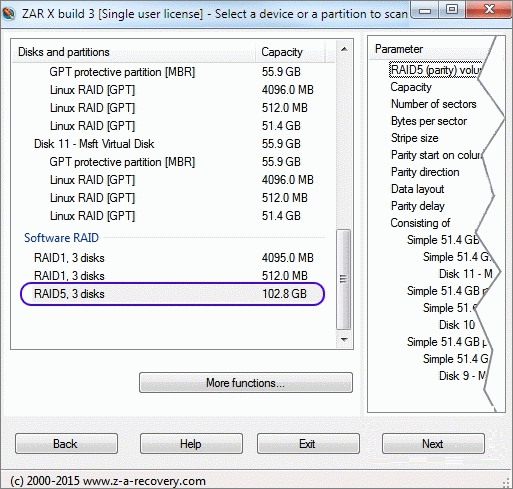
- Recover files from RAID0 and RAID 5 drives
- Perform automatic missing disk detection
- Support Windows FAT, NTFS, Linux ext2/3/4, and XFS volumes
- Restore files from the formatted drive or RAW file system
Prices: $69.95
Capability: Windows and Linux
10. DiskInternals RAID Recovery
DiskInternal RAID Recovery provides a comprehensive solution to recover data from RAID-based NAS devices, addressing various scenarios such as recovering lost or deleted files due to battery or power issues, formatted RAID logical volumes, inaccessible RAID volumes, and more.
This software supports both manual and fully automatic detection of crucial RAID parameters, including the type of array, RAID controller, stripe size, and disk order, which is essential for accurate data recovery.

Features:
- Support NTFS, ReFS with Deduplication
- 100% free preview of your files before recovery
- Provide both manual and automated recovery options
- You can recover files from corrupted RAID configurations using specialized software, such as Deep Data Recovery, Disk Drill, or RAID Recovery. These tools can scan the RAID array, identify the corrupted data, and recover files from RAID 0, RAID 1, RAID 1E, RAID 4, RAID 5, RAID 50, RAID 5EE, RAID 5R, RAID 6, RAID 60, and JBOD configurations.
Prices: $69.95
Capability: Windows 7/8/10/11, Windows 2003 - 2019 Server
Conclusion
Network-attached storage (NAS) devices have become increasingly popular in both homes and offices, offering reliable storage solutions. However, despite their stability and security, data loss can still occur. To recover lost data from NAS devices, the following software can be used: NAS Recovery Software, Deep Data Recovery. These tools can help retrieve lost data from NAS devices, providing a solution for users who have experienced data loss.
Qiling NAS data recovery offers a simple way to restore deleted or lost data from NAS devices on your PC, without needing to disassemble the disk. Users can access and recover their NAS drives in just a few clicks, making it an easy data recovery solution.
Some NAS recovery software requires manual removal of disks from the NAS device and connecting them to a computer for data recovery, a process that should be handled by professionals with care.
Related Articles
- How to Recover Locked SD Card Pictures/Files
- Unformat USB | Free Download USB Unformat Tool to Recover Data from Formatted USB
- How to Fix Corrupted Video on Windows 10/Android/SD Card - 3 Ways
- How to Recover Deleted Photos from SD Card on Android Phone
- How to Open Password Protected Excel Files
To unlock an SD card, check the LOCK switch position and remove digital write protection using CMD. If you need to recover files, you can use Qiling data recovery software, which is easy to complete. - Microsoft Outlook 2016/2013/2010 Not Responding in Windows 10/11 (5 Fixes)
When Outlook not responding in Windows 10, the first thing you should do is restoring the lost Outlook emails. Find effective methods here and you can restore all lost Outlook emails and repair not working Outlook with ease.
Products
Articles & Tutorials
- Data Recovery
- Data Backup
- File Recovery
- File Backup
- System Backup and Restore
- Disk and Partition Clone
- Technical articles
- Mobile articles
- Disk Master Help
- Windows Data Recovery Tutorials
- Windows Secure Delete Tutorials
- Windows Partition Management Tutorials
- Windows File Backup and Restore Tutorials
- Windows System Backup and Restore Tutorials
- Windows Disk Backup and Restore Tutorials
- Windows Clone Tutorials