How to Corrupt a PDF File so That It Can't Be Opened (Step-by-Step Guide)
So you've got a file that you don't want to share with anyone, correct? Most possibly, it is a PDF containing confidential information that you wish to keep hidden. You can accomplish this by corrupting a file.
Corrupting a PDF file is surprisingly easy and doesn't require any paid tools or extensive computer knowledge. In fact, there are several simple ways to make a PDF inaccessible, and we'll explore some of these methods in this article. By following these steps, you can render a PDF file unusable, making it impossible to open or access its contents.
Before attempting to corrupt a PDF file, make a copy of it to avoid losing any data. If you do accidentally lose data during corruption, you can use a tool to repair the PDF file and recover your lost information.
So, stick till the end to get all of your questions answered:
How to Corrupt a PDF File with Notepad
Corrupting a PDF file is easier than you think, taking less than 30 seconds to accomplish. You don't need any high-tech tools, just follow these simple steps and you can corrupt a PDF file in no time.
To avoid any data loss or problems, ensure to corrupt the original file copy.
Step 1. Right-click on the PDF file you want to corrupt and open it with Windows built-in notepad.
Step 2. You will then face a ton of unusual commands you have never seen before.
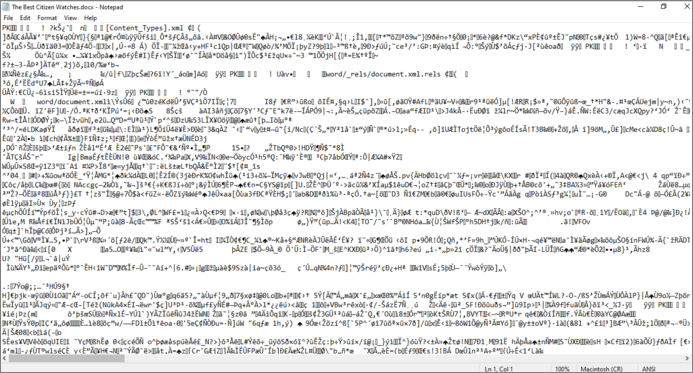
Step 3. Just select 15-20 lines of these commands and remove them.
Step 4. Close the notepad file and save changes.
How to Corrupted a PDF File on Purpose Using Corrupt a File.Net
Corrupting a PDF file and getting an extension is not a new technology. You can use online tools like Corrupt a File (https://corrupt-a-file.net/) to easily corrupt PDF files, along with other common file types like Word, Excel, archives, and MP3. Simply submit your PDF files to the tool and it will corrupt them for you.
Here is how you can corrupt a file using this free online tool:
Step 1. Open their website and scroll down to: Select the file to be corrupt.
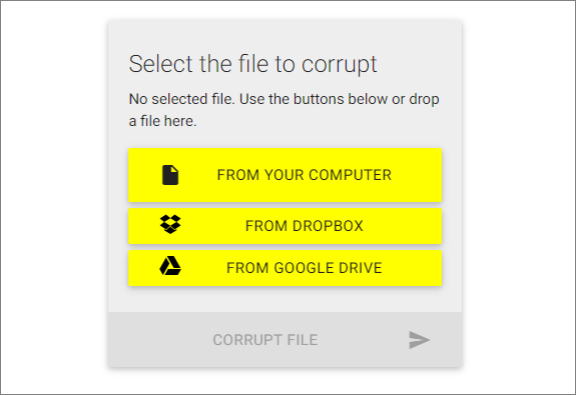
Step 2. Navigate your file and upload it to the website.
Step 3. To remove malware from a file, click on the file and upload it to an online virus scanner. The tool will scan the file for any malicious code and remove it if found.
Step 4. Your file will be corrupted within seconds, and you can download it for free.
How to Repair Corrupted PDF Files That Are Needed
Unfortunately, you've corrupted the PDF file and lost the original, but there is a solution, there's still hope. You can use the Qiling file repair tool to easily retrieve and restore the corrupted files, saving you hours of hard work.
This file recovery tool can easily repair corrupted PDF files, allowing you to use them again in their original format, including headers, footers, formatting, and headings.
Qiling file repair software offers additional benefits beyond PDF repair, including the ability to fix unreadable content in Word documents and resolve issues where Excel cannot open a file.
Step 1. Launch Deep Data Recovery, select file types, and click "Fast Scan" to initiate the recovery process.

Note: You can choose different search modes based on where and why the data was lost.
Step 2. This software allows you to scan a disk with corrupted documents and fix damaged Word, Excel, PPT, and PDF files in a single process.

Step 3. Qiling data recovery and repair tool will scan for all lost and corrupted files, allowing you to find them by file type or by searching for a specific file name.

Step 4. Deep Data Recovery can automatically repair damaged documents. After previewing the file, you can click "Recover" to save the repaired Word, Excel, and PDF document files to a safe location.
More Guides on Corrupting a PDF So It Won't Open On Mac
Corrupting a PDF file on a Macbook is a relatively straightforward process, especially for those familiar with extensions. Unlike Windows corruption, it involves a few more steps, but it's still a quick and easy task that can be completed in just a few minutes. Mac users who are experienced with extensions will find it straightforward to corrupt a PDF file.
On a Mac, file extensions are usually hidden by default, but you can easily enable them to see the file type, such as .pdf,.docx, or .mp3.
To show all filename extensions in Finder, go to "Finder > Preferences > Advanced", and check the box next to "Show all filename extensions". This will display all file extensions, making them visible.
The next step is to select the target file. When you have found the right file, rename it and change its extension to PDF. For example, change the PDF format to .docx and click "Save". Congrats! You have successfully corrupted the PDF file on your Macbook.
You can rest assured that no PDF viewer on Mac will be able to run or open your file because it was never a PDF file.
Wrapping Up
Corrupting a PDF file is a relatively simple process that can be done without using complex steps or paid tools. It can be done either manually or by utilizing the corruptmyfile.net site. Additionally, if a PDF file becomes corrupted, either intentionally or due to a virus, the Deep Data Recovery file recovery tool can be used to repair it.
If you've accidentally corrupted a PDF file, there is a solution! There are ways to recover it. A reliable tool can help you repair the file, so you can breathe a sigh of relief.
Related Articles
- How to Restore IE Edge Favorites/Bookmarks? | IE Edge Recovery
- How to Show Hidden Images in Word and How to Unhide a Word
- How to Recover Corrupted Files from a USB Flash Drive
- How to Open Corrupted Excel, Word, and PPT Files Without Backup
- Create Bootable Media of Data Recovery Wizard for Mac
The software allows you to create a bootable disc on a USB drive, so you could set the computer to boot from the disc and start the data recovery. - Load System Extension to Recover Lost Data from the Mac with M1 & M2Chips
To enable system extensions on your Mac, you'll need to start your Mac in Recovery mode, which is a separate mode that allows you to access and manage your Mac's system settings.
Products
Articles & Tutorials
- Data Recovery
- Data Backup
- File Recovery
- File Backup
- System Backup and Restore
- Disk and Partition Clone
- Technical articles
- Mobile articles
- Disk Master Help
- Windows Data Recovery Tutorials
- Windows Secure Delete Tutorials
- Windows Partition Management Tutorials
- Windows File Backup and Restore Tutorials
- Windows System Backup and Restore Tutorials
- Windows Disk Backup and Restore Tutorials
- Windows Clone Tutorials