How to Recover Deleted Emails in Yahoo from Years Ago
If you're looking to recover long-lost emails on your Yahoo account, you can do so by following these steps. First, go to the Yahoo Account Recovery page and click on "I forgot my password" or "I forgot my username." Then, follow the prompts to verify your account and reset your password.
Yahoo Mail was once the leading emailing platform, launched in 1997 and widely used until around 2007-2008 when Gmail surpassed it. During its reign, it was the go-to choice for emailing and chatting, with many people relying on it as their primary means of online communication. (Yahoo Messenger)

Unfortunately, Yahoo's email recovery process can be quite challenging, especially for emails deleted months or even years ago. However, there are a few methods that may help recover deleted Yahoo emails, including using the Yahoo Mail's built-in recovery feature, contacting Yahoo's customer support, or using third-party email recovery services. These methods may not guarantee the recovery of deleted emails, but they are worth trying if you're desperate to retrieve lost emails.
Are Deleted Yahoo Emails Gone Forever
Yahoo email accounts may be deleted if users don't access them for a long time, but this is not a universal policy. Some users may delete their emails themselves, while others may not. In some cases, Yahoo may clear out inboxes of older accounts that are no longer used. However, this is not a standard practice and depends on various factors.
Emails like spam are automatically deleted and may not appear in your inbox, but are instead stored in a separate folder. Manually deleted emails, on the other hand, are stored in the trash for 30 days before being permanently deleted.
Once thirty days pass, emails will be deleted permanently, so it's a good idea to save or archive them beforehand to avoid losing important information.
- Deleted messages can be recovered from the trash for thirty days.
- Yahoo email allows you to customize how often your spam inbox is cleared, giving you options such as clearing it every one week, two weeks, or one month.
Unfortunately, most deleted emails are unrecoverable. However, there are some methods to recover deleted emails, which will be discussed in this article. These methods may vary depending on the email service provider and the specific circumstances of the deletion.
Three Methods to Recover Deleted Emails from Yahoo
You can recover deleted Yahoo emails in a few specific cases, and if you're looking to restore emails from months ago, there are three main methods to try. Each of these steps can help you recover your lost emails.
If you're looking to recover deleted emails, you can try using the search function in your email client to look for emails that were sent or received within a certain timeframe. You can also try checking your supplementary folders, such as spam or trash, to see if any emails were mistakenly deleted. Additionally, if you have a backup of your email account, you may be able to recover deleted emails from the backup.
We'll be exploring recovery methods for both desktop and mobile phone users, covering various aspects of data recovery. Let's get started.
Method 1. Recover Deleted Yahoo Emails from Deleted Items on Desktop
To sign in to your Yahoo account on a desktop computer browser, follow these steps: Open your desktop browser and navigate to the Yahoo website. Click on the "Sign in" button located at the top right corner of the page. Enter your Yahoo email address and password in the respective fields. Click on the "Next" button to proceed.
Step 1. Sign in to your Yahoo account on Yahoo Mail.
Step 2. Navigate the sidebar.
Step 3. Find and click "Deleted Items".
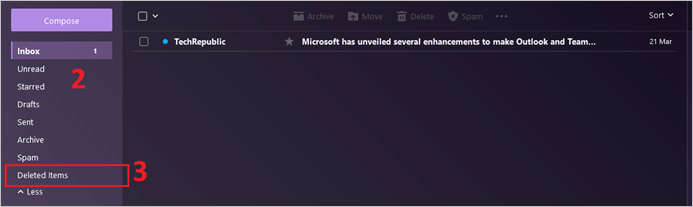
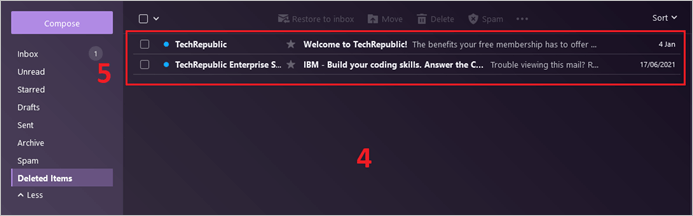
Step 4. Explore "Deleted Emails".
Step 5. Click the email you wish to recover.
There are two ways to recover deleted emails. You can either use a third-party email recovery tool or contact your email service provider's support team to see if they can recover the emails for you. Some email providers, like Google, have their own built-in recovery tools that can help you recover deleted emails, so it's worth checking with them first.
- Recover individual emails
- Recover multiple emails
To recover deleted Yahoo emails, follow these steps:
Step 1. Click the email you wish to recover in "Deleted Items".
Step 2. Navigate the top bar.
Step 3. Find and click "Restore to inbox".
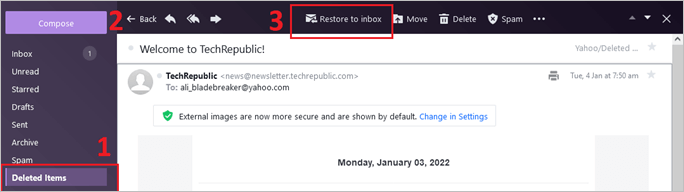
To recover individual emails without hassle, you can follow these steps. However, if you wish to recover multiple emails at a time, you can follow these steps:
Step 1. Head to "Deleted Items".
Step 2. Find checkboxes beside the email.
Step 3. Click the ones you wish to recover.
Step 4. Find and click "Restore to inbox" in the top bar.

You can recover multiple emails at once by accessing the recently deleted inbox. This feature allows you to view and restore emails that have been deleted within a certain timeframe, which can be set according to your preferences. The inbox will display emails deleted recently, potentially including those from months ago, depending on your chosen settings.
Method 2. Recover Deleted Yahoo Emails from Trash on Mobile
The recovery process for Yahoo is similar whether you use the Yahoo app or sign in through Google Chrome or Safari on your phone. It's recommended to download the Yahoo App for a smoother process, but it can also work on a browser.
Here's how to recover deleted emails on a browser on your phone:
Step 1. Open the browser.
Step 2. Head to "Mail.Yahoo.com".
Step 3. Sign in to your account.
Step 4. Click on the sidebar menu.
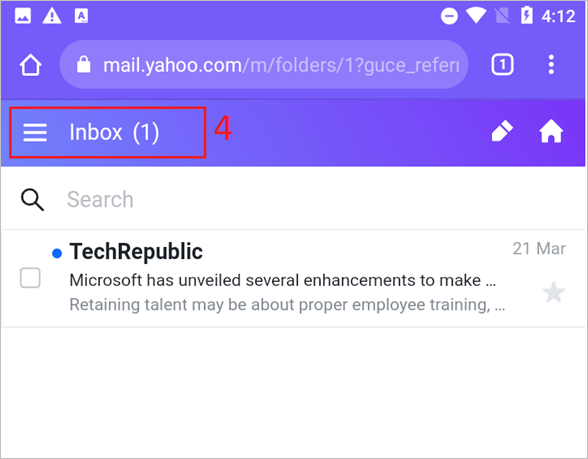
Step 5. Head to "Deleted Items".
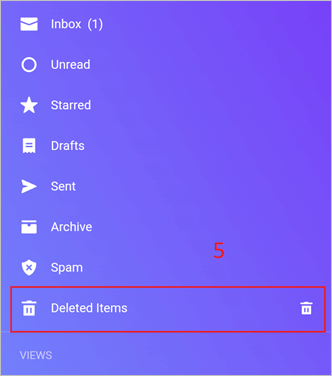
Step 6. Select the emails you want to recover by checking the boxes next to them.
Step 7. Click on "Move To".

Step 8. Click on "inbox".
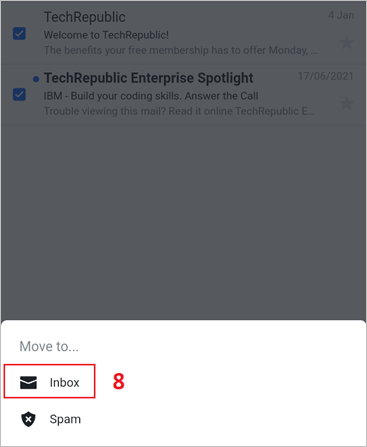
To recover emails on your mobile phone, simply pick the email you want to recover or recover all of them from the Deleted Items folder, just like you would on a computer. This process works the same way on phones, allowing you to easily retrieve the emails you need.
Method 3. Ask Yahoo to Restore Your Deleted Emails
To recover permanently deleted emails on Yahoo, you can ask Yahoo to do it for you by following these steps: Contact Yahoo's customer support directly and explain the situation. They may ask you to provide your account information and the date the emails were deleted. Be prepared to provide any additional information they may request. They may be able to recover the emails for you.
Step 1. Sign in to your Yahoo mail account.
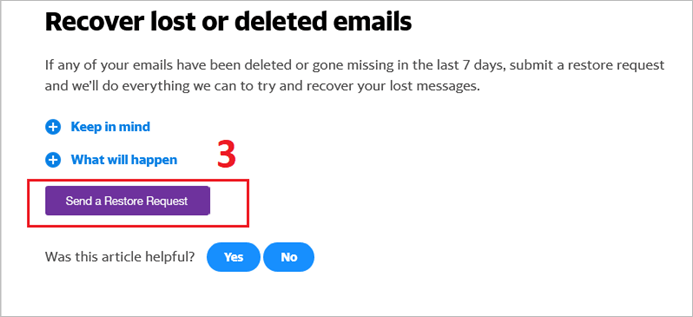
Step 2. Head to the email recovery page.
Step 3. Find and click on "Send a Restore Request".
Step 4. Describe the problem, such as if your account was hacked or if you accidentally deleted messages on the Yahoo mail website or mobile phone app.
Step 5. Answer when did you see the missing messages last, from 0 hours to 7 days.
Step 6. Enter your Yahoo ID.
Step 7. Enter the email address that you have access to.
Step 8. Send a request.

The email recovery process may take a day or two, depending on the volume of emails to be retrieved. However, this process is guaranteed to recover deleted emails that were permanently deleted or lost during the cleaning up of junk emails.
Also read: How to recover Gmail account and password
How to Recover Permanently Deleted Emails
If you're unable to recover permanently deleted emails using the methods mentioned, you can try using data recovery software or seeking professional help from a data recovery service or IT expert. These tools and professionals have advanced techniques and technology to recover emails that have been deleted for a longer period or were deleted using special methods. They can also help you recover emails from damaged or corrupted storage devices. Keep in mind that the success of these methods depends on various factors, including the type of email client used, the storage device's condition, and the time elapsed since the email was deleted.
You can use a third-Introducing Deep Data Recovery, a professional tool designed to help you recover deleted emails from your Yahoo email account. With this program, you can efficiently recover lost emails, giving you a second chance to access important messages that were accidentally deleted. Let's get started!
Brief Introduction to Deep Data Recovery Software
Deep Data Recovery is a leading recovery program that offers various recovery options, allowing users to recover lost files and emails in cases such as accidental deletion, system crashes, and hardware failures.
- Deleted files
- Formatted drive
- Recovery from inaccessible storage
- NAS Recovery
If a program can recover files from a deleted drive, it can certainly recover deleted Yahoo emails. The program in question is easy to use and has many other useful features, but that's a topic for another time.
Steps to Recover Deleted Emails Using Deep Data Recovery
If you want to recover deleted emails with the help of Deep Data Recovery Pro, you can follow these steps: First, download and install the software. Then, select the drive or location where the deleted emails were stored. Then, scan the selected location for deleted emails. Finally, preview and recover the emails that you want to retrieve.
Step 1.Run Deep Data Recovery on your computer, select the file types you want to recover, and click "Fast Scan" to initiate the recovery process.

Note: You can choose different search modes based on where and why the data was lost.
Step 2. To recover lost email files, select the drive or partition where the files were lost, and click on the "Scan" button.

Step 3. The software will start scanning immediately. Wait until the scanning process is finished. To quickly find the email files, click "Others" in the left panel and look for PST files or Outlook files in the file type list.

Step 4. Select the desired email files, click "Recover", and save them to a different location to avoid overwriting the original files.
To recover deleted emails on your Yahoo account, start by logging in to your account using the Yahoo Mail app or website. If you're using the app, tap on the menu icon and select "Settings" or "Options" to access the account settings.
Conclusion
To recover deleted Yahoo emails, first, log in to your Yahoo account and go to the "Trash" folder. If you find the emails you want to recover, select them and click "Restore" to move them back to your inbox. If the emails are not in the "Trash" folder, try checking the "Spam" folder. If you still can't find the emails, go to the Yahoo Help Center and follow the instructions to recover deleted emails.
Using Deep Data Recovery will enable you to restore permanently deleted emails, in addition to recovering lost data.
Recover Deleted Yahoo Emails FAQs
If you have any more questions, then we have them written down. Follow along and find out if these questions answer any of your concerns:
Can I recover permanently deleted emails?
You can recover deleted Yahoo emails, but only with the help of specialized software like Deep Data Recovery Pro, which enables you to restore emails deleted months ago.
Can I recover old deleted Yahoo emails?
If you've deleted emails, you can try recovering them from the "Deleted Items" folder. If they're not there, you can contact Yahoo to see if they can recover them. However, using a professional tool like Deep Data Recovery is usually the most effective way to recover deleted emails.
How do I recover permanently deleted emails from Yahoo?
To recover your deleted emails from your Yahoo account, follow the steps outlined in this article. By doing so, you'll be able to retrieve your deleted emails comprehensively.
Related Articles
- WD External Hard Drive Data Recovery Services (That You Can Afford!)
- How to Fix Windows 11 Installation Stuck at 35%, 85%, 100%
- Elden Ring Stuck on Loading Screen on PC/PS4/XBOX
- Free Download JPEG Recovery Software to Recover Your Photos
- How to Extend Hard Drive Partition in Windows 8/7/10
Extending a hard drive partition involves changing the size of the partition. If you want to maintain the optimal performance of your Windows PC, it is recommended that you extend hard drive partition Windows 8.1, Windows 10, and more. - [Solved] Files Missing from My Documents Folder in Windows
Are you experiencing the frustration of missing files in your 'My Documents' folder in Windows 10, 8, 7, or XP? This article will guide you through the troubleshooting process to help you recover your missing files.
Products
Articles & Tutorials
- Data Recovery
- Data Backup
- File Recovery
- File Backup
- System Backup and Restore
- Disk and Partition Clone
- Technical articles
- Mobile articles
- Disk Master Help
- Windows Data Recovery Tutorials
- Windows Secure Delete Tutorials
- Windows Partition Management Tutorials
- Windows File Backup and Restore Tutorials
- Windows System Backup and Restore Tutorials
- Windows Disk Backup and Restore Tutorials
- Windows Clone Tutorials