Recover Files from BitLocker Drive After Unlocking It
BitLocker protects a drive by encryption. To recover files from a BitLocker drive, you normally need to unlock it first with the password or recovery key. After the drive is unlocked, recovery software can scan lost or deleted files on that volume.
Before You Start
- Prepare the BitLocker password or 48-digit recovery key.
- Do not format the encrypted drive if Windows asks for formatting.
- Save recovered files to another disk, not to the BitLocker drive.
- If Windows asks for a key after an update, read BitLocker recovery key after Windows update.
Step 1. Unlock the BitLocker Drive
Connect the drive, open File Explorer, and unlock it with the password or recovery key. If the drive is internal, use the Windows BitLocker prompt or Control Panel to unlock it.
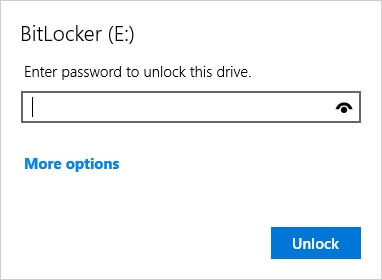
Step 2. Scan the Unlocked Drive with Qiling Data Recovery
Step 1. Open Qiling Data Recovery and choose a recovery mode for deleted or lost files.

Step 2. Use filters to locate documents, photos, videos, archives, or other lost files.
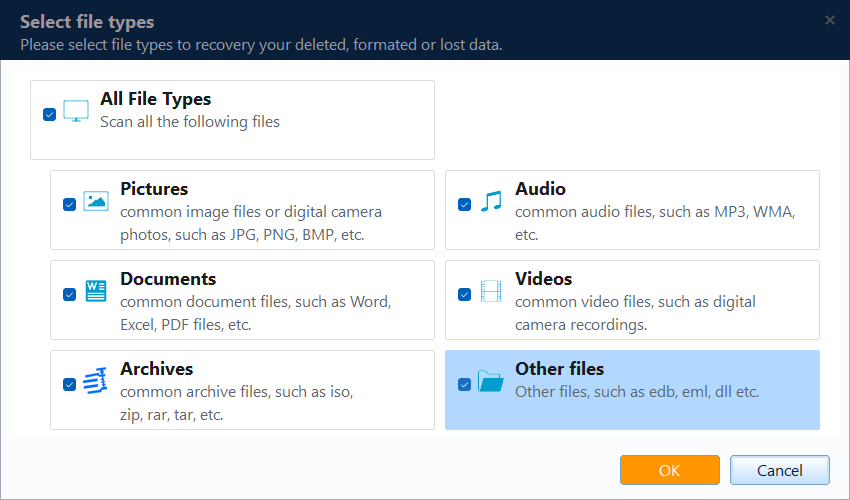
Step 3. Select the unlocked BitLocker drive from the location list and start scanning.

Step 4. Preview the found files and click Recover. Save them to a non-encrypted or another safe drive.

What If You Cannot Unlock the Drive?
Without the password or recovery key, recovery is usually not possible because the drive data is encrypted. Check your Microsoft account, printed recovery key, USB key, work or school account, or administrator records.
Conclusion
BitLocker recovery starts with unlocking the drive. Once it is unlocked, scan it as soon as possible and recover files to another disk to reduce overwrite risk.
Related Articles
Products
Articles & Tutorials
- Data Recovery
- Data Backup
- File Recovery
- File Backup
- System Backup and Restore
- Disk and Partition Clone
- Technical articles
- Mobile articles
- Disk Master Help
- Windows Data Recovery Tutorials
- Windows Secure Delete Tutorials
- Windows Partition Management Tutorials
- Windows File Backup and Restore Tutorials
- Windows System Backup and Restore Tutorials
- Windows Disk Backup and Restore Tutorials
- Windows Clone Tutorials