Recover Deleted Photos from Social Apps and Local Devices
Photos from social apps may exist in several places: the app album, phone storage, SD card, downloads folder, cloud backup, or the computer used for transfer. If photos are deleted, check these locations before assuming they are gone.
Where Deleted App Photos May Be Stored
- Phone gallery, app album, recently deleted folder, or cached media folder.
- SD card, USB drive, camera card, or external storage.
- Windows Pictures, Downloads, Desktop, or app export folder.
- Cloud backup from OneDrive, Google Photos, iCloud, or the app itself.

Recover Deleted Photos with Qiling Data Recovery
If the photos were stored on a Windows drive, USB drive, SD card, or external disk, scan the storage device before saving new files to it.
Step 1. Open Qiling Data Recovery and choose the photo or deleted file recovery mode.

Step 2. Filter scan results by picture file types such as JPG, PNG, HEIC, or RAW image formats.
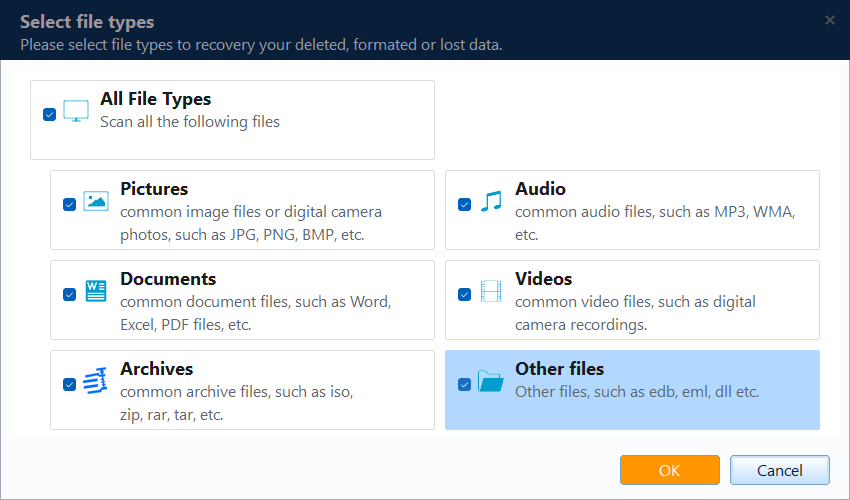
Step 3. Select the device or folder where the deleted photos were stored.

Step 4. Preview photos and click Recover. Save them to a different drive or folder.

Tips for Social App Photo Recovery
Some apps reduce image quality or store only cached copies. If the original file is missing, check the device camera folder, cloud backup, and exported files on your computer.
Conclusion
Deleted social app photos may still be recoverable from local storage. Check app and cloud locations first, then scan the original device and recover photos to a safe location.
Related Articles
Products
Articles & Tutorials
- Data Recovery
- Data Backup
- File Recovery
- File Backup
- System Backup and Restore
- Disk and Partition Clone
- Technical articles
- Mobile articles
- Disk Master Help
- Windows Data Recovery Tutorials
- Windows Secure Delete Tutorials
- Windows Partition Management Tutorials
- Windows File Backup and Restore Tutorials
- Windows System Backup and Restore Tutorials
- Windows Disk Backup and Restore Tutorials
- Windows Clone Tutorials