SSD vs HDD Lifespan, Which Lasts Longer SSD or HDD? What's the Difference
You need a storage device for your computer or laptop to store important data, and there are various types to choose from.
The most common storage option is the Hard Disk Drive (HDD), which is considered reliable and affordable. For users who prioritize performance, Solid State Drives (SSDs) are also available, offering faster read and write speeds but at a higher cost. When it comes to durability, we have a lot to discuss.
Solid-state drives (SSDs) and hard disk drives (HDDs) are two types of storage devices. SSDs use flash memory and have faster data access times, while HDDs use spinning disks and are more prone to mechanical failure. Ultimately, the choice between an SSD and an HDD depends on your specific needs and priorities.
What Are the Differences Between SSD and HDD
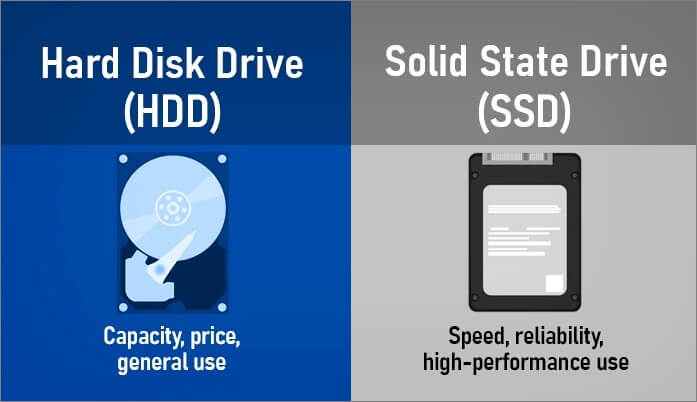
Here's a brief summary:
What Is an HDD
Hard disk drives (HDDs) are the most common type of hard drive, storing data on spinning disks that can be accessed by a read/write head. They are inexpensive and can store a lot of data, but are slower and generate more heat than solid-state drives (SSDs).
What Is an SSD
Solid-state drives (SSDs) use flash memory, making them faster and cooler-running than traditional hard disk drives (HDDs), but they are also more expensive and have lower storage capacity.
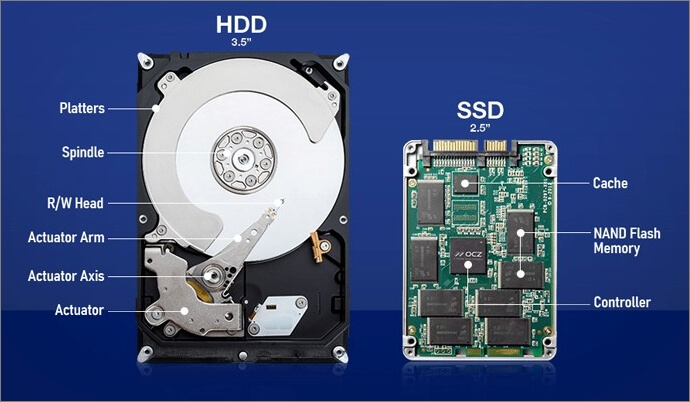
Benefits of SSDs over HDDs
- An SSD is faster than an HDD
- An SSD uses less power than an HDD
Benefits of HDDs over HDDs
- An HDD is cheaper than an SSD
- An HDD offers more storage space than an SSD
If you want a fast computer with a lot of storage space, consider a Hard Disk Drive (HDD). If you prioritize speed and power efficiency, a Solid-State Drive (SSD) might be the better choice.
You can consider using HDDs if you're on a budget, as they're still a viable option despite their slower speeds, but if you're looking for faster speeds, SSDs are the way to go.
Lifespan: SSD vs. HDD
SSDs last longer than HDDs due to their lack of moving parts, which can wear down over time, allowing them to last up to 10 years or more, compared to the 3-5 year lifespan of HDDs.
Solid-state drives (SSDs) offer a more durable and long-lasting alternative to traditional hard disk drives (HDDs). Unlike HDDs, SSDs don't require defragmentation, which helps extend their lifespan. This makes them a great option for computer storage solutions that need to last for a long time.
How to Recover Lost Data from HDD and SSD
While solid-state drives (SSDs) have many advantages, they are not immune to data loss. However, with the right approach, you can recover lost data from both HDDs and SSDs.
Many data recovery tools are available, but some are more effective than others. It's essential to choose a tool that's designed for the specific type of storage device you're using. Deep Data Recovery, for instance, is a versatile tool that can recover lost or corrupted data from nearly every storage device, including HDD and SSD, with a user-friendly interface that even novices can navigate with ease.
Step 1. Select file types and click "USB/SD Scan" to start
Launch Deep Data Recovery software, select the desired file types, and proceed by clicking "USB/SD Scan" to initiate the recovery process.

Note: You can choose different search modes based on where and why the data was lost.
Step 2. Scan the SSD
To recover lost data from an SSD, select the drive where the data was lost, and click the "Scan" button. This will initiate a scan of the drive for recoverable data.

Step 3. View the results
When the scanning is complete, you can find lost SSD data by using the "Filter" and "Search" options after checking the "Deleted Files" and "Other Lost Files" folders.

Step 4. Recover SSD files
To recover lost SSD files, select the desired data and click the "Recover" button to retrieve them.
- All in One Data Recovery Tool
Qiling data recovery software allows for the recovery of all types of data from various storage devices, with no limitations, making data recovery easy and effortless.
- Accidental Data Recovery
Get instant access to accidentally deleted files, including photos, videos, and documents, with a file recovery program that can recover them all.
- Formatted Data Recovery
Deep Data Recovery is a tool that can recover formatted data in a short time, typically within minutes, making it a reliable option for retrieving lost data.
- Flexible Scanning Modes
You can choose from the quick scan and advanced scan depending on your lost data, and with both scanning modes, you can recover your lost data without hassle.
This file recovery tool is definitely worth checking out, thanks to its user-friendly features and easy functionality. It's made retrieving lost data straightforward, making it a great option to consider. So, download and try it out for yourself!
More Guides on SSD vs. HDD
The debate between solid-The debate between solid state drives (SSDs) and hard disk drives (HDDs) is a long-standing one, with their pros and cons being the primary differentiators. However, factors such as lifespan and data retention also set them apart, making SSDs a more reliable option for storing data long-term.
SSD vs. HDD Lifespan
The lifespan of both hard drives (HDDs) and solid-state drives (SSDs) is difficult to estimate, but both can last a long time. However, HDDs generally tend to serve longer than SSDs.
SSDs have a limited lifespan due to the lack of mechanical parts, resulting in a finite number of reading and writing cycles.
SSD vs. HDD Data Retention
From a data retention perspective, both devices share a similar scenario. However, hard disk drives (HDDs) have a mechanical advantage, consisting of several components that give them the lead in this area.
Hard disk drives are more reliable than SSDs in terms of data integrity, but have slower read and write speeds. They are a good option for those prioritizing data reliability over speed. They are not as fast as SSDs but are more reliable. They are a good option for those prioritizing data reliability over speed.
Performance and Capacity: SSD vs. HDD
SSDs outperform HDDs due to their manufacturing process, using flash memory chips instead of spinning electro-magnetic platters and moving read/write head arms. As a result, SSDs offer significantly faster data transfer rates, with the latest standards reaching up to 550 MB/s, while HDDs are limited to around 100-200 MB/s. This performance gap is expected to widen further as SSD technology continues to advance.
SSDs have compact sizes, making them suitable for laptops and portable devices, but their storage capacity is limited. In contrast, HDDs come in standardized 2.5 and 3.5 inches sizes and offer up to 20TB of storage, giving them an edge over SSDs, which typically top out at 512GB.
While SSDs outperform HDDs in terms of data transfer rates, boot-up speeds, and overall performance, HDDs have a significant advantage in terms of storage capacity, allowing for larger storage options.
SSD vs. HDD Speed
SSDs (Solid-State Drives) are inherently faster than HDDs (Hard Disk Drives) due to their reliance on flash memory, whereas HDDs have moving parts prone to wear and tear, as well as thermal issues that can compromise their performance.
Ongoing research and innovations in SSD technologies will keep them ahead of HDDs in speed and data transfer rates.
SSD vs. HDD Reliability
SSDs and HDDs have different strengths and weaknesses. While SSDs can outlast HDDs in data retention and reliability, both types of drives require safekeeping and optimal operating conditions to perform well and ensure data availability.
The legacy design of a hard disk drive (HDD) makes it susceptible to mechanical failure due to its moving parts. Additionally, HDDs use magnetic storage, which can be vulnerable to data corruption or media damage if the drive is exposed to a strong external magnet.
SSD vs. HDD Price
The price of storage drives can be easily compared by calculating the cost per gigabyte. Historically, SSDs have been more expensive per gigabyte than hard drives, with prices consistently higher over the past six years. Although SSD prices have been decreasing, they remain less affordable than HDDs offering the same storage capacity.
1TB external hard drives can be purchased on Amazon for approximately $55, while 1TB SSDs cost around $475.
Concluding Words
The lifespan and data retention of SSDs (solid-state drives) and HDDs (hard disk drives) have surprising results. While SSDs offer faster speeds, HDDs are considered a safe and reliable storage medium.
Qiling data recovery software can help in case of data loss, which can occur with either storage option. With its easy yet practical features, you can recover lost data files in no time. Download this file recovery tool today to explore its entire feature.
Related Articles
- 4 Fixes to You Must Initialize a Disk Problem
- Recover Deleted Recordings/Shows on DirecTV
- Solutions: Cannot Open External Hard Drive and Files/Folders
- Free Download Bad Sector Repair Tool - Flobo Hard Disk Repair
- [Official & Latest] Deep Data Recovery Key 3.1 and Qiling License Code
Stop trying to use Qiling data recovery crack, keygen, or serial number. Deep Data Recovery 3.1 with the official license code and serial key is available here for you to download. With the Qiling data recovery key, you can activate Deep Data Recovery legally and recover your data in the safest way. - How to Recover Deleted Files in Windows 10 (7 FREE Ways)
How to recover deleted files in Windows 10? This tutorial covers several effective ways to help you undelete files or restore permanently deleted files on Windows 10.
Products
Articles & Tutorials
- Data Recovery
- Data Backup
- File Recovery
- File Backup
- System Backup and Restore
- Disk and Partition Clone
- Technical articles
- Mobile articles
- Disk Master Help
- Windows Data Recovery Tutorials
- Windows Secure Delete Tutorials
- Windows Partition Management Tutorials
- Windows File Backup and Restore Tutorials
- Windows System Backup and Restore Tutorials
- Windows Disk Backup and Restore Tutorials
- Windows Clone Tutorials